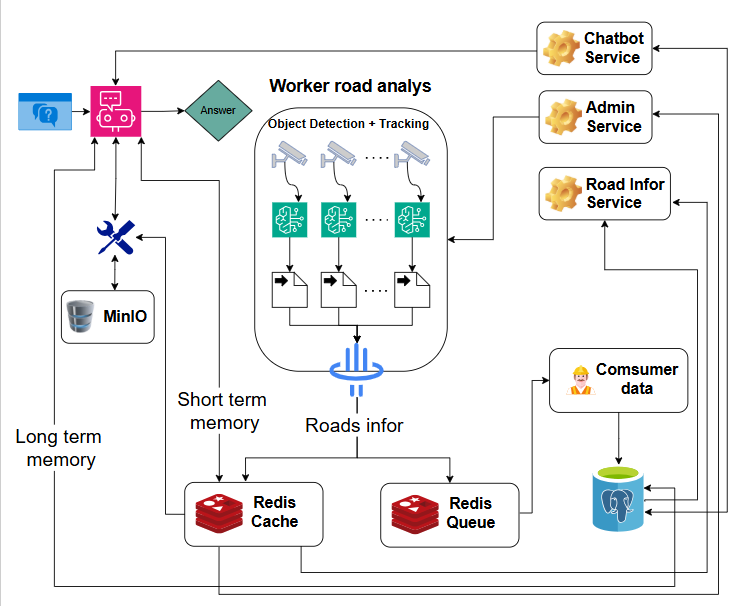
An intelligent traffic monitoring system that uses AI to detect and track vehicles in real time. It provides a live dashboard, REST/WebSocket APIs, and an AI chatbot for traffic queries.
Video.3.mp4
- Real-time vehicle detection and tracking (YOLO + ByteTrack)
- Multi-camera processing with multiprocessing
- Live dashboard with traffic analytics
- REST + WebSocket APIs for realtime data
- WebRTC low-latency video streaming
- AI chatbot (LangGraph ReAct) for natural language queries
- Model optimization with INT8 OpenVINO and TensorRT
- Model pruning with torch-pruning (see prune.py and readme_torch_prunning.md)
- CPU and GPU support
- Backend: FastAPI, Python
- Frontend: React, TypeScript, Vite
- Cache/Queue: Redis
- Object Storage: MinIO
- Database: PostgreSQL
- AI/ML: YOLO, ByteTrack, LangGraph
- Python 3.11+
- Node.js 18+
- PostgreSQL 16+
- Redis
- MinIO
- gdown (for downloading sample videos)
- NVIDIA GPU (optional)
- Copy environment files:
# macOS/Linux
cp backend/.env.example backend/.env
cp frontend/.env.example frontend/.env

# Windows PowerShell
Copy-Item backend/.env.example backend/.env
Copy-Item frontend/.env.example frontend/.env- Edit the
.envfiles to match your local services and secrets:
- If Redis or MinIO are already running, update
REDIS_URLandMINIO_*to match. - If not installed, install and start Redis and MinIO, then update the values in
backend/.env.
- Download sample videos into
backend/app/video_test:
cd backend/app
gdown --folder https://drive.google.com/drive/folders/1gkac5U5jEs174p7V7VC3rCmgvO_cVwxH- Install backend dependencies:
cd backend
pip install -r requirements_cpu.txt # or requirements_gpu.txt- Install frontend dependencies:
cd frontend
npm install pnpm
pnpm install- Run the backend:
cd backend
uvicorn app.main:app --reload --host 0.0.0.0 --port 8000- Run the frontend:
cd frontend
pnpm run dev
Backend: http://localhost:8000 Frontend: http://localhost:5173
- Copy environment files (same as manual).
- Ensure
backend/app/video_testcontains the sample videos (usegdownif needed). - Start services:
docker compose up --buildGPU build (optional):
DEVICE=gpu docker compose up --buildBackend: http://localhost:8000 Frontend: http://localhost:5173
Base prefix: /api/v1
Auth
POST /auth/register- Create a new accountPOST /auth/login- Login and receive JWTGET /auth/me- Get current user profile
User
PUT /user/password- Change passwordPUT /user/profile- Update profile info
Traffic
GET /road/roads_name- List monitored roadsGET /road/info/{road_name}- Current traffic stats (counts, speeds, status)GET /road/history/{road_name}- Traffic history (paginated)POST /road/webrtc/offer/{road_name}- WebRTC session setup (SDP offer -> answer)
Chat
POST /chatbot/chat- Send a message to the AI assistant
Chat History
GET /chat-history/messages- List chat messagesPOST /chat-history/messages- Save a messageDELETE /chat-history/messages- Clear all messagesDELETE /chat-history/messages/{message_id}- Delete a messageGET /chat-history/messages/count- Count messages
Admin
GET /admin/resources- System metrics (CPU, RAM, Disk, Network)GET /admin/traffic/status- Worker status per roadPOST /admin/traffic/roads/{road_name}/start- Start a road workerPOST /admin/traffic/roads/{road_name}/stop- Stop a road worker
WS /road/ws/frames/{road_name}- JPEG frame streamWS /road/ws/info/{road_name}- Realtime traffic metricsWS /road/ws/chart/{road_name}- Realtime chart dataWS /chatbot/ws/chat- Realtime chat streamPOST /road/webrtc/offer/{road_name}- WebRTC signaling for low-latency video
Most endpoints require JWT. Admin endpoints require admin role.
Header:
Authorization: Bearer <TOKEN>
WebSocket query:
?token=<TOKEN>
Swagger UI: http://localhost:8000/docs