

AssetChecker is a tiny run script that keeps your Assets.xcassets files clean and emits warnings when something is suspicious.
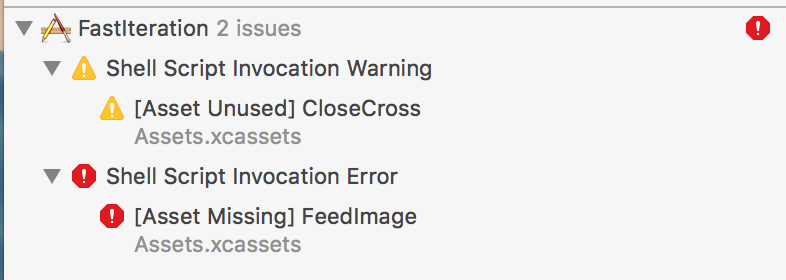
Because Image Assets files are not safe, if an asset is ever deleted, nothing will warn you that an image is broken in your code.
AssetChecker is part of freshOS iOS toolset. Try it in an example App ! Download Starter Project
By using a script running automatically, you have a safety net that makes using Asset Catalog a breeze.
The script will automatically find the asset catalogs ( .xcassets) in your project and serarch your source code to determine if there are errors with them. It searches for the following types of files:
- xibs
- storyboards
- swift files
- Obj-C (.m) files
For these types of references:
#imageLiteral(resourceName: )UIImage(named: )(swift)[UIImage imageNamed: ](ObjC)R.image.name()(supports R.Swift)
Then the script will automatically (On build)
- Raise Errors for Missing Assets
- Raise warnings for Unused Assets
Installation available via Cocoapods. Add the following to your Podfile:
pod 'AssetChecker'Or copy the script into your project.
Add the following Run Script in XCode, this will run the script at every build.
If you installed via Cocoapods, you can use the following script:
${PODS_ROOT}/AssetChecker/runAdd the package to your project by selecting File->Swift Package->Add Package Dependency
Then add the Run Script phase in Xcode as follows:
${BUILD_ROOT}/../../SourcePackages/checkouts/AssetChecker/runYou can also just copy the main.swift into your project. Use the path of where you copied AssetChecker script:
${SRCROOT}/{PATH_TO_THE_SCRIPT}/main.swift ${SRCROOT}/SourcesIn this example your source files are located in /Sources.
And configure top section of the script :
// Configure me \o/
let sourcePath = "/Sources"
let ignoredUnusedNames = [String]()
Run and Enjoy \o/
The following command line arguments are available to the script.
--catalog (optional) Path to your asset catalog.  By default, it will search all asset catalogs in your $SRCROOT
--source (optional) Absolute path to your source directory.  Defaults to $SRCROOT
--ignore (optional) A comma-separated list of assets which should be ignored by the script (no file extension needed)
--ignore_file (optional) Path to the ignore file.  If this option is used, --ignore option will be ignored.  By default, $SRCROOT/.assetchecker.
You can add names of assets to ignore to a .assetcheckerignore file at the root of your project. Put the name of each asset to ignore on a separate line, without any path or file extension. Regex values are also accepted.
Sometimes you're building the asset names dynamically so there is no way for AssetChecker to find out statically by looking at the codebase.
In this case the script will emit a false positive.
You can manually declare these false positives so that they get ignored by using the --ignore command line option mentioned above.
Sacha Durand Saint Omer, sachadso@gmail.com
Contributions to AssetChecker are very welcomed and encouraged!
AssetChecker is available under the MIT license. See LICENSE for more information.
Like the project? Offer coffee or support us with a monthly donation and help us continue our activities :)





Become a sponsor and get your logo on our README on Github with a link to your site :)