
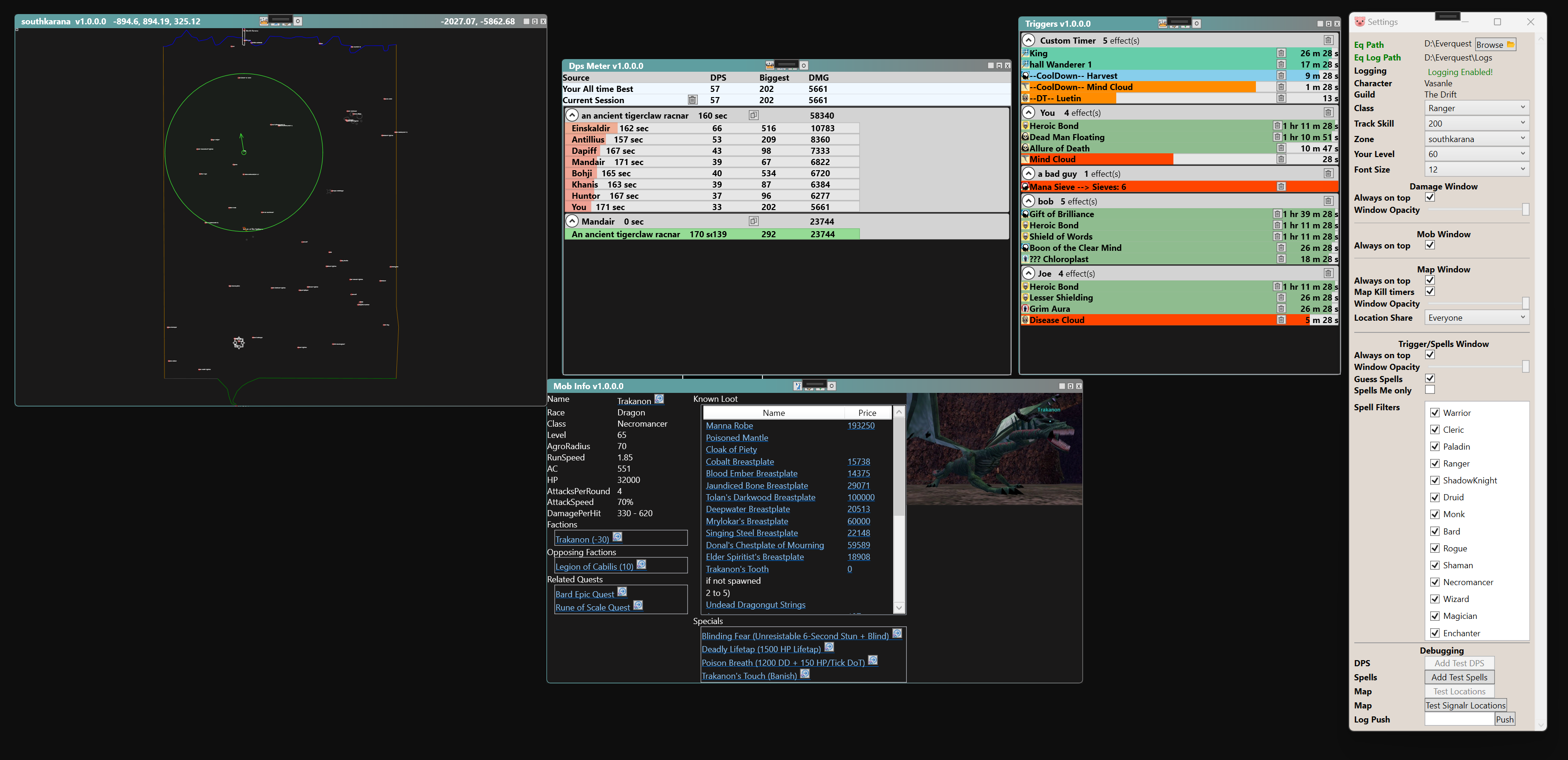
Instructions:
-
Project 1999: Download Windows P99, Unzip it and run EQTool.exe
-
Linux Project 1999 Download Linux P99, Unzip it and run EQTool.exe
- The program runs in the system tray. Look there to reopen spells window or settings! Program will check for updates on startup and self update if required, but if you want to check for a new Update, use the menu in the system tray!
- Added Bard Swarm Count trigger.
- Boat timers are build int!
- Full trigger system: create your own triggers with display text, text-to-speech, sounds, timers, and counters — plus a Built In library of ready-made triggers you can enable with one click.
- p99 middlemand ported from https://github.com/Zaela/p99-login-middlemand is now supported!
- Random rolls show up in the triggers window.
- See others on the map in real time. Also support for NParse map location sharing automatically if location sharing is set to everyone.
- Kael faction pull timer automatically added for everyone regardless of what zone you are in.
- Scout timer automatically added for everyone regardless of what zone you are in. THIS IS AN ESTIMATE! (Can be toggled off in settings.)
- Ring 8 timer automatically added for everyone regardless of what zone you are in. THIS IS AN ESTIMATE! (Can be toggled off in settings.)
- Ring War: when the Ring War starts, the full set of wave/round timers is automatically generated for you.
- Avatar of War lockout timer and Death Touch (Fright/Dread) timers are automatically tracked.
- Pet tracking: detects pet creation, death, reclaim, guard, follow, sit/stand, attack, and lifetap procs.
- Kill timer detection: When you kill a mob sometimes you miss the slain message. Now, when you miss the slain message, if you get either an exp message or a faction message a timer will appear correctly. Since it is unknown what the name of the mob is that died when you received a faction message only, the name of the timer is 'Faction Slain Guess' and 'Experience Slain Guess'.
- Detect EQ directory location instead of user required to enter it.
- Detect Spells cast on others (this is a best guess as I am reading the log file so chloroplast and Regrowth of the growth have the same message)
- Filter spells show by class
- Remove Spells from List if "Worn off message occurs"
- Mob Info Window gives details about mobs that you con in game.
- Automatically remove dead npc/player from the spell list.
- Auto detect level and class!
- DPS is trailing 12 second average.
- Show fight Session data for comparisons.
- The following spells have counters that are automatically tracked:
Mana Sieve
LowerElement (Flux Staff Effect)
Concussion
Flame Lick
Jolt
Cinder Jolt
Rage of Vallon
Waves of the Deep Sea
Anarchy
Breath of the Sea
Frostbite
Judgment of Ice
Storm Strike
Shrieking Howl
Static Strike
Rage of Zek
Blinding Luminance
Flash of Light. Bard AOE resists (Chords of Dissonance, Denon's Disruptive Discord, Selo's Chords of Cessation, Selo's Assonant Strane) are also counted. - Built-In Trigger Library: ready-made triggers organized into Combat, Encounters (per-zone folders), and Utility in the Triggers settings tab (marked with a gold lock). Includes: Enrage, Levitate/Invis fading, Charm Break, Failed Feign, Group Invite, NPC Gating, Tells You, Resists, Dragon Roar (with 36 second timer), VP Hoskar Resto (Diseased Cloud), Death Touch (Fright/Dread), Avatar of War lockout, Spell Worn Off, Zone Entry, Exp Timer, spell feedback alerts (fizzle, interrupt, out of mana, resist, and more), and 30+ raid AOE warnings with countdown timers for Temple of Veeshan, Veeshan's Peak, Skyshrine, Sebilis, Skyfire, Kael, Sol B, Permafrost, Dragon Necropolis, Plane of Growth, and more. Each can be enabled/disabled individually; their outputs and timers can be customized, and triggers you haven't edited receive fixes automatically with updates.
- The following Audio/Visual alerts are also available:
FTE (includes Guild)
Root Break
Bard swarm/hit counts
Death Loop
and CH Chain - Trigger editor quality of life: triggers can be restricted to a specific zone, colors are curated to stay readable on the overlay, and the Test box auto-generates a log line that fires the trigger so you can try it instantly.
- Timers on map for easy TOD tracking!
- All Melee disciplines show in the cooldown section of the timers window.
- Pricing information in Mob info window.
- Save spells cast on you when you log out so when you log back in they resume counter!
- Raid Mod Detection: When the program detects that you are in a raid, the triggers window gets slimmed down. It will switch to show information specific to your class. For example, if you are a cleric, it will only show buffs that clerics can cast on others and your buffs. This makes the window actually useful on raids now. When raid mode is detected, the color of the triggers window switches to red indicated it is on. There is a checkbox in the settings window to disable this functionality.
- Maps
- Automatic self update.
- DPS Meter window with current/last/all-time session comparisons.
- Real-time location sharing over the network (configurable: Everyone, Friends, Guild, or off).
- Per-server Friends list management that can be pushed to all of your character files.
- UI helpers: apply a master class UI file to all characters, and a Night Vision graphics fix (apply/revert).
- Automatic log archiving when your log file grows past a configurable size.
- Custom Map loading: If you have a folder called maps this will be checked for map files first. If no map files are found, the program will fallback to the built in map files. You can add your overrides for zone files. If you are making changes, you need to clear the cache files. There is a button in the settings -> map tab to clear these. Or you can delete the cachemaps folder.
- Custom Timers
- TAG is optional and can be used to filter out other chains that are going on. For example, if you TAG is CA, it will only show chains that have that TAG in it.
- POSITION must be 3 in length (Unless Ramp chain, in which case code looks for RAMP[NUMBER]), and follow a format of: 001-999; or AAA-ZZZ
- The characters " ch " must be present in the line, capitalization doesnt matter.
- All instances of TAG are stripped out of text. The characters " ch " are stripped out. The first group of 3 characters that are either all the same letter or a number are assigned as the position.
- All instances of Position are stripped out of the text. All non alphanumeric are stripped out of the text. What remains is the target.
Chain position MUST BE 3 in length and letters must all be the same, for example: 001; or 013; or aaa; or QQQ.
Ramp chain format is special and RAMP1 through RAMP999 are allowed. The following are included in tests that are supported, This is not all the possible ways, but to show examples of what i have support for!
- Curaja shouts, 'GG 014 CH -- Wreckognize'
- Hanbox shouts, 'GG 001 CH -- Beefwich'
- Hanbox shouts, 'GG 001 CH --Beefwich'
- Hanbox shouts, 'GG 001 CH --Beefwich 001'
- Wartburg says out of character, 'CA 004 CH -- Sam'
- Wartburg says out of character, '004 CH - Sam'
- Hanbox tells the guild, 'GG 001 CH --Beefwich'
- You say out of character, 'CA 002 CH -- Aaryk'
- Windarie auctions, '111 --- CH << Mandair >> --- 111'
- Mutao auctions, '777 CH <>> Mandair <<> 777'
- Mutao auctions, 'AAA CH <>> Mandair <<> AAA'
- Mutao auctions, 'GGG AAA CH <>> Mandair <<> AAA'
- Mutao auctions, 'BBB CH <>> Mandair <<> BB'
- Mutao auctions, 'AAA CH <>> Mandair <<>'
- Hanbox shouts, 'CA RAMP1 CH --Beefwich'
- Hanbox shouts, 'RAMP2 CH --Beefwich'
- Hanbox shouts, 'CH - name - 001'
-
All below commands work in tells (keep them private!) or regular say (share with your friends!)
  /t StartTimer-duration
  /t StartTimer-duration-label
or
  /say StartTimer-duration
  /say StartTimer-duration-label
where
  "StartTimer" is the identifying marker ("PigTimer" also works as an alias)
  "duration" can be in time formats:
       hh:mm:ss
       mm:ss
       seconds
  "label" can contain any character, number, or underscore, but cannot have blank spaces

  "StartTimer", "duration", and "label" should be separated by a - dash
This can be in a tell (that only you will see), or in any visible channel (which others see).
Examples:
  StartTimer-30                      30 second timer, with no label
  StartTimer-10-TenSeconds           10 second timer, with label
  StartTimer-10:00-TenMinutes        10 minute timer, with label
  StartTimer-10:00:00-TenHours       10 hour timer, with label
  StartTimer-120-description         120 second timer, with label 'description'
  StartTimer-6:40-Guard_George       6 minutes 40 second timer, with label 'Guard_George'
  StartTimer-1:02:00-LongTimer       1 hour, 2 minute timer, with label 'LongTimer'
When you create a User Defined Trigger, the Search Text (and the output/display/TTS fields) can use simplified placeholder tokens instead of raw regular expressions. The tokens are expanded for you before the pattern is compiled to a real regex.
-
{name} — a capture token. It matches a word or phrase (letters, numbers, spaces, and the
`backtick that appears in many mob names) and stores it under that name. Reuse the same{name}in the output to print what was captured. You can use any name you like (e.g.{target},{damage}) and as many as you want. - {c} — a current character macro. It is replaced with the name of the character you are currently logged in as, before the pattern is matched. It captures nothing — think of it as "put my own name here". It works in the Search Text and in every output field (display text, alert text, text-to-speech). The substituted name is matched literally and is case-insensitive, and it automatically follows you when you switch characters.
-
{COUNTER} — a match counter macro. It is replaced with the number of times this trigger has matched. It works in the Display Text, Text to Say, and Timer Name output fields (case-insensitive). The count starts at
1on the first match and grows with each match. It starts over whenever you switch characters, and if you enable the reset time on the trigger's Counter tab it also goes back to zero after that period of inactivity; otherwise it keeps counting for the session.
Examples (assume you are logged in as Gandalf):
-
Search Text:
{c} has been slain by {s}
Display / TTS:{c} died to {s}!
Matches the log lineGandalf has been slain by a Balrogand outputsGandalf died to a Balrog! -
Search Text:
^{c} has fallen to the ground
Display / TTS:Failed feign death
Matches the log lineGandalf has fallen to the groundand outputsFailed feign death. Would not fire onSomeoneElse has fallen to the ground. -
Search Text:
You begin casting {spell}
TTS:{c} is casting {spell}
Uses{c}in the output only, to speak your own name.
Note: {c} is a macro, not a capture group, so it always resolves to whoever is currently logged in. If no character is detected yet, it expands to nothing.


- Ignore it and download!

- Press More info and "Run anyway"

- In the above image, you are running the exe from INSIDE the zip. You must first EXTRACT the exe, then you can run it!

- EQTool was unable to automatically detect your P99 install folder. You must specify it yourself!
- EQTool detected that eq logging is turned off. You must click enable logging. This will turn on EQ's logging which is where EQTool gets information from.
- If you cast spells eqtool will automatically detect your class and level once you start casting spells.
- You should still enter your class and level. It helps ensure calculations on spell durations are accurate.
- Great, goto settings and make sure the box is checked; 'Only show spells that effect you'.
- Great, goto settings and make sure that cleric is the only class selected in the "Other Spells" section.
- You need to type /loc into chat so that your location is feed to the log file.
- Normally, players create a hotkey that is bound to their movement keys. Then add a /loc so that each time you move, the macro for /loc is called.
- I set up my movement keys 'a' and 'd' to activate my hotbar 1 macro which has a /loc in it.
- Goto the system tray, click the pig icon and goto check for updates.
- Updates are checked for every timee the application starts as well.
- If an update is available it will download and start the new version. The old version will be deleted.
- This program reads your log file. So, if you were too far away to see the 'slain' message, then there is no way for EQTool to know the npc is dead.
Why do the see spell effects for others even though I checked the box 'Only show spells that effect you?'
- EQTool will ALWAYS show detrimental spell effects on everyone. The reason is that EQTool CANNOT tell the difference between an NPC and a PC. This means that in order to show spell effects on NPC, like slow/tash, etc, i must show ALL detrimental spell effects on all NPS/PC alike.

- This can happen for many reasons. The most common being that they left the group and you want to remove them from the list.
- Click the Trashcan next to the next and that NPC/Player will be removed from the list. This is a one-time action and if you cast on them again, they will reappear.

- Every time a message for the enchanter Mana sieve spell is encountered, the counter is incremented.
- So, if you are in range of the sieve messages, you will have an accurate count in the Trigger list.

- The first row is the saved fight data which shows all-time-best DPS, Biggest hit and Total Damage.
- Current Session is best DPS, Biggest hit and Total Damage, except the timeframe starts since you have logged on.
- Last Session is the old session data. You can use this to compare weapon swapping and differnt setups.

- Turn on others hits in your eqsettings!
- Goto General -> Reset Triggers.
- WARNING: this deletes ALL triggers and folders (including any you created) and restores the built-in defaults.
- Right click in the map and a menu will appear, add the time, and press add.
- You can move the timer around by dragging it.
- You can delete the timer by right clicking over it and clicking the delete option.
- Timer color starts at Green and changes to Red the closer it gets to zero time remaining. Timers will last for 4 minutes after the time has expired then automatically remove themselves.