
Generate DTM (Digital Terrain Model) from DSM (Digital Surface Model)






dsm2dtm is a robust, python library for extracting bare earth Digital Terrain Models (DTM) from Digital Surface Models (DSM). It effectively removes non-ground features like buildings, vegetation, and cars, leaving only the underlying terrain.
Key features:
- Pure Python: No external binary dependencies (no SAGA, no GDAL CLI). Just
numpy,scipy, andrasterio. - Robust: Handles noise, cliffs, and varied resolutions automatically.
- Adaptive: Automatically tunes parameters based on input resolution and terrain slope.
- Easy to Use: Simple CLI and a clean Python API for developers.
pip install dsm2dtmconda install -c conda-forge dsm2dtmgit clone https://github.com/seedlit/dsm2dtm.git
cd dsm2dtm
pip install .You can integrate dsm2dtm into your own Python pipelines. We provide high-level and low-level APIs.
from dsm2dtm import generate_dtm, save_dtm

input_path = "dsm.tif"
output_path = "dtm.tif"

# 1. Generate DTM (returns numpy array and profile metadata)
dtm_array, profile = generate_dtm(input_path)

# 2. Save to disk
save_dtm(dtm_array, profile, output_path)Ideal for in-memory processing or integration with other libraries like xarray.
import rasterio
from dsm2dtm.algorithm import dsm_to_dtm
from dsm2dtm import save_dtm

# Load data yourself
with rasterio.open("dsm.tif") as src:
    dsm = src.read(1)
    res = src.res  # (x_res, y_res)
    nodata = src.nodata
    profile = src.profile

# Run algorithm on raw numpy array
dtm_array = dsm_to_dtm(dsm, resolution=res, nodata=nodata)

# Save to disk
save_dtm(dtm_array, profile, "dtm.tif")The simplest way to use dsm2dtm is via the command line.
dsm2dtm --dsm dsm.tif --out_dir output/Arguments:
--dsm: Path to the input DSM (GeoTIFF).--out_dir: Directory where the output DTM will be saved (default:generated_dtm).--radius: (Optional) Kernel radius in meters for object removal. Objects larger than 2x this radius will typically NOT be removed. Set this to slightly larger than half the width of the largest building in your scene. Default: 40.0.--slope: (Optional) Terrain slope (0-1). Calculated automatically if not provided.
The plugin is available in the official QGIS Plugin Repository.
- Open QGIS.
- Go to Plugins > Manage and Install Plugins...
- Search for
DSM to DTM. - Click Install Plugin.
Alternatively, view on the web: plugins.qgis.org/plugins/dsm2dtm/
This comparison highlights the removal of surface features, such as dense vegetation and buildings, to reveal the underlying bare earth topography and river details in the generated Digital Terrain Model.
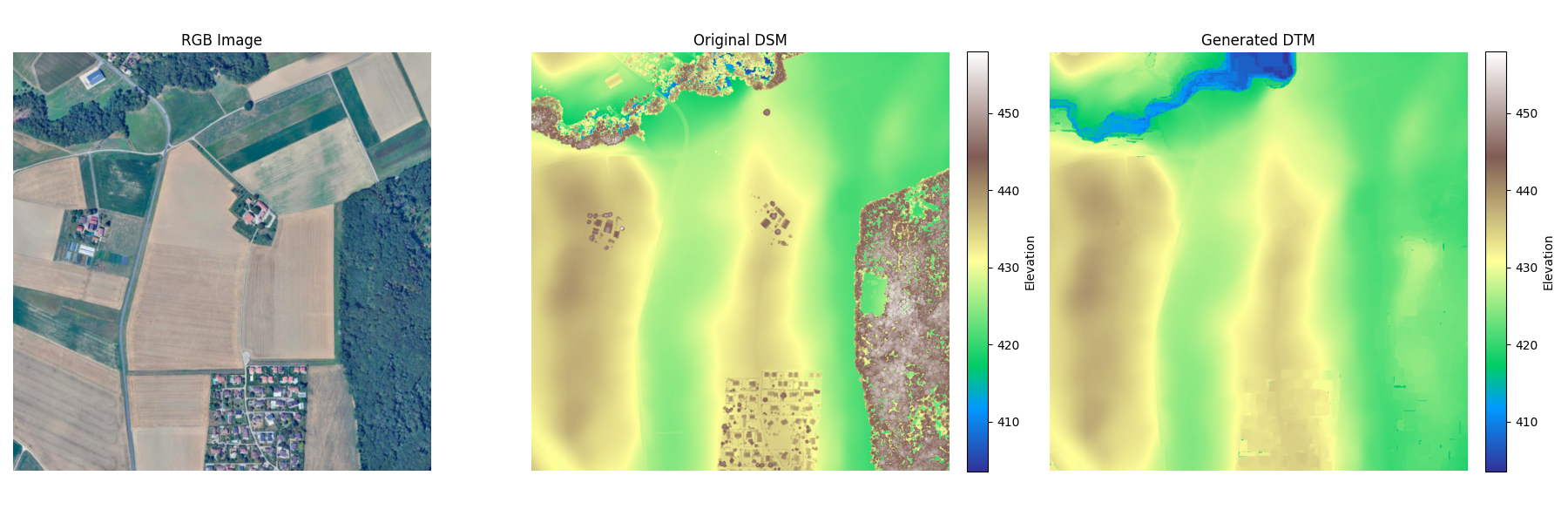
The library implements an optimized version of the Progressive Morphological Filter (PMF) combined with surface refinement.
graph LR
    subgraph Preprocessing [Preprocessing]
        A["Input DSM"] -->|Load & Reproject| B["Internal Grid (UTM)"];
        B -->|Resample if >0.5m| C["Working Resolution"];
        C --> D["Slope Estimation"];
    end

    subgraph Core [Core Filtering]
        D --> E{"Progressive Morphological Filter"};
        E -->|Iterative Opening| F["Rough Ground Estimate"];
        F --> G["Surface Refinement"];
        G -->|Remove Spikes| H["Refined Ground"];
    end

    subgraph Post [Post-Processing]
        H --> I["Gaussian Smoothing"];
        I --> J["Gap Filling"];
        J -->|Reproject| K["Final DTM"];
    end
- Resolution Adaptation: Parameters are scaled automatically based on the input pixel size. High-resolution inputs (>0.5m) are optionally downsampled for stability and speed, then upsampled back.
- Slope Estimation: Local terrain slopes are calculated to adapt the filtering thresholds.
- Progressive Morphological Filter (PMF): Iteratively applies morphological opening (erosion followed by dilation) with increasing window sizes. This effectively "shaves off" objects that stick out above the ground surface.
- Refinement: A smoothing step compares the rough ground estimate with the original surface to recover over-smoothed details while rejecting spikes.
- Gap Filling: Any remaining holes (nodata) are filled using inverse distance weighting or nearest neighbor interpolation.
We welcome contributions! Please feel free to submit a Pull Request.
We are actively looking for help with:
- Performance:
- GPU acceleration (e.g., using
cupy). - Parallel processing (Multi-core/Multi-threading or
dask).
- GPU acceleration (e.g., using
- Algorithm Improvements:
- Reducing holes/artifacts on building borders
- Better removal of square-shaped buildings (currently works best on rectangular footprints).
We use uv for dependency management and pre-commit for code quality.
# 1. Clone
git clone https://github.com/seedlit/dsm2dtm.git

# 2. Install dependencies
uv sync --all-extras

# 3. Install hooks
uv run pre-commit installWe use pytest for testing. The suite includes unit tests, stress tests, and integration tests with real-world data (downloaded automatically).
# Run all tests
uv run pytest

# Run only stress tests
uv run pytest tests/test_stress.pyMIT License. See LICENSE for details.