
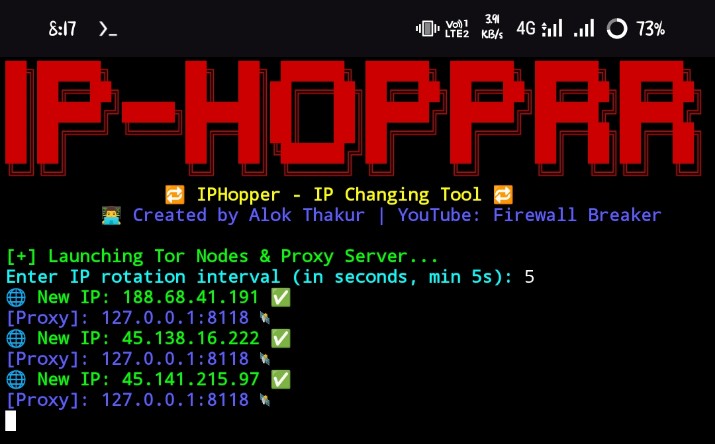
IPHopper is an advanced IP rotation tool designed for ethical hackers, privacy enthusiasts, and cybersecurity learners.
It works by launching multiple Tor nodes in parallel and routing traffic through a centralized Privoxy proxy server — enabling users to automatically change their public IP address at customizable intervals.
Whether you're conducting anonymous security research or learning how anonymization networks like Tor work, IPHopper provides a lightweight and powerful CLI-based solution — especially built for Termux and Linux-based systems.
When working in the cybersecurity field or doing web reconnaissance, constantly changing your IP address can help avoid detection, rate-limiting, and geo-restrictions.
Most users rely on VPNs, but VPNs are centralized services and not always transparent. Tor, on the other hand, offers a decentralized and free solution for anonymity.
IPHopper combines:
- Multiple Tor instances (multi-node parallelization)
- A central Privoxy proxy server
- IP rotation automation via control ports
All packaged in a simple tool with beginner-friendly configuration and advanced functionality under the hood.
- 🔁 Auto IP Rotation using the Tor Network
- 🧠 Multiple Tor Nodes: Five nodes running simultaneously
- 🔒 Privacy-focused: All traffic routed through a secure proxy
- 🧱 No Root Required: Fully works on non-rooted Termux devices
- 📟 Custom Rotation Timer: Set your own rotation interval in seconds
- 🧰 Self-contained Configuration: Cleans and reinitializes on every run
- 💻 Termux + Linux Compatible
- 👨💻 Developed by Ethical Hackers for Educational Use
This tool is developed and maintained by Santosh, the creator
On this channel, you'll find beginner-friendly tutorials, practical hacking labs, and deep explanations of tools like this one — all tailored for Indian learners and mobile users.
Make sure to Subscribe and Support the creator if this tool helps you! 🙌
- Five separate Tor nodes are launched with their own config files and data directories.
- A Privoxy proxy is set up and configured to forward all traffic across the 5 Tor nodes.
- A control loop sends SIGNAL NEWNYM to all control ports every X seconds (your interval).
- Your current public IP is fetched and displayed from
https://api64.ipify.org. - Your IP changes automatically, as if you're hopping across networks — hence the name IPHopper.
- 🔍 Safe and anonymous reconnaissance
- 🌐 Bypassing soft IP rate-limits during testing
- 🛡️ Practicing anonymity techniques
- 📚 Cybersecurity learning labs
- 🔬 Testing how websites respond to changing IPs
⚠️ This tool is created strictly for educational and ethical purposes.
- You must not use this tool for illegal activity, unauthorized scanning, or attacking any network you do not own or have permission to test.
- This tool does not guarantee full anonymity, as DNS leaks, misconfigurations, or user mistakes can expose identity.
- Always test in safe and legal environments (e.g., virtual labs, local servers).
- The developer, Alok Thakur, is not responsible for any misuse, damage, or legal consequences arising from the use of this tool.
You are solely responsible for your actions.
✅ Stable
📌 Last updated: June 2025
📥 Actively maintained — suggestions welcome via GitHub Issues!
apt update && apt upgrade && apt install tur-repo && apt install git tor privoxy netcat-openbsd curl && git clone https://github.com/thakur2309/IP-HOPPRR-.git && cd IP-HOPPRR- && bash setup.sh && bash iphopper.sh
apt update && apt upgrade -y
apt install tur-repo -y
apt install git tor privoxy netcat-openbsd curl -y
git clone
cd IP-HOPPRR-
bash setup.sh
bash iphopper.sh

