

A simple Node.js bot that tracks new issues in a GitHub repository (e.g., any public repo) based on labels and sends notifications to Telegram.
I recently got an opportunity to contribute to open source project. I enabled watch on the repository to get notified of new issues via email, but those notifications just got buried in a flood of other emails, and I missed some opportunities.
I wanted a solution that would:
- Notify me only for specific labels like
help wantedorgood first issue. - Deliver the alert directly to Telegram.
- Avoid duplicate notifications by keeping track of what I already saw.
So I created this bot using Node.js with help from ChatGPT to make it functional and easy to configure.
- Configurable repository & labels: Track only the issues you care about (e.g.,
Type: Maintainer Only,Status: Help Wanted). - Persistent state: Keeps track of the last processed issue to avoid duplicate notifications.
- Filters out pull requests automatically.
- Multiple new issue detection: If several new issues appear since the last check, all are notified.
- Telegram notifications: Sends messages for every new issue.
- Easy setup: Use
setup.jsto configure repository, select labels, and initialize files. - Runs continuously with PM2 for background automation.
- You run
setup.jsto select your GitHub repository and issue labels. - The bot fetches the latest issues from GitHub and filters them by your chosen labels.
- Any new issues are sent to your Telegram account.
- The bot saves the last processed issue to
last_issue.txtso it won’t repeat notifications. - Use PM2 to keep the bot running in the background.
- Clone this repo:
git clone git@github.com:sameeksha-dalvi/issue-notifier-bot.git
cd issue-notifier-bot- Install dependencies:
npm install- Create a .env file:
Before running the bot, you need to create a .env file with the following variables:
GITHUB_TOKEN=<your_github_personal_access_token>
TELEGRAM_BOT_TOKEN=<your_telegram_bot_token>
TELEGRAM_CHAT_ID=<your_chat_id>-
GitHub Personal Access Token – Required to access GitHub’s API.
Follow GitHub’s guide to create one: Creating a personal access token -
Telegram Bot Token – Required to send messages via your Telegram bot.
Follow this tutorial to create a bot and get the token: Telegram Bot FAQ -
Telegram Chat ID – The chat where notifications will be sent.
You can find your chat ID using this guide: Getting your chat ID
- Run the setup script:
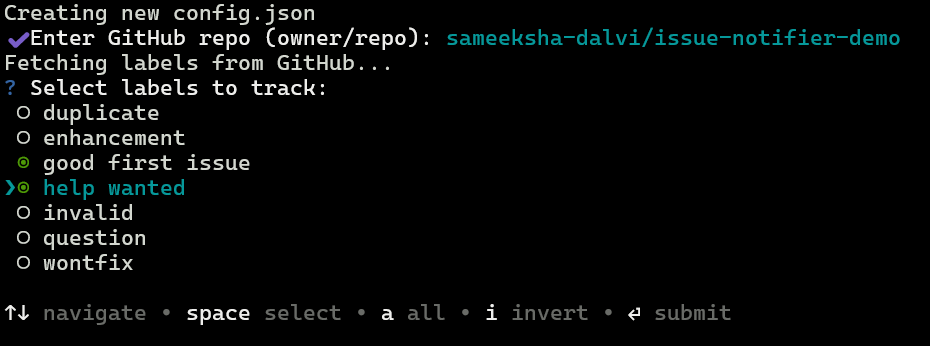
node setup.jsFollow the prompts to select your repository and issue labels.
This screenshot shows the CLI asking for GitHub repository:

After fetching labels from GitHub, you can select which ones to monitor:
Manual run (for testing):
node index.jsRun automatically every 5 minutes using PM2 (recommended):
pm2 start index.js --cron "*/5 * * * *" --name github-issue-botSave the PM2 process so it restarts after reboot:
pm2 save
pm2 startup
View logs:
pm2 logs github-issue-botRestart after code changes:
pm2 restart github-issue-botOpen-source contributors who want notifications only for certain labels (like good first issue, help wanted, maintainer only).
Maintainers who want to track specific types of issues quickly.
- Runs locally – your GitHub token stays on your machine; nothing is sent to third-party servers.
- Zero cost – Unlike some cloud automation services that have usage limits or subscription fees, this bot runs locally and is free.
- Customizable – select exactly which labels to track for notifications.
- Lightweight – simple Node.js script that works in the background without heavy infrastructure.
- Runs only when your system is on – The bot works only if the script is running; it cannot send notifications if your computer is off.
- Relies on GitHub API limits – GitHub may restrict the number of requests per hour for personal access tokens.
- Only tracks selected labels – Issues without the labels you chose in
config.jsonwill not trigger notifications. - No user interface – Configuration is done via CLI prompts and the
.envfile. - Telegram notifications only – Alerts are sent only through Telegram; other platforms like WhatsApp or email are not supported.
MIT License