A proof of concept of a full stack Rust project built on the same principles as archetype-rust-axon.
An archetypal Rust project that uses AxonServer for Event Sourcing and CQRS. This project uses the dendrite crate (rustic-dendrite git repo) to connect to AxonServer.
This is a fork of the original archetype-rust-axon project with the intention to replace the React frontend with a frontend based on the Rusty Leptos-framework that can be compiled to Web-assembly.
This project provides the following setup in Docker.
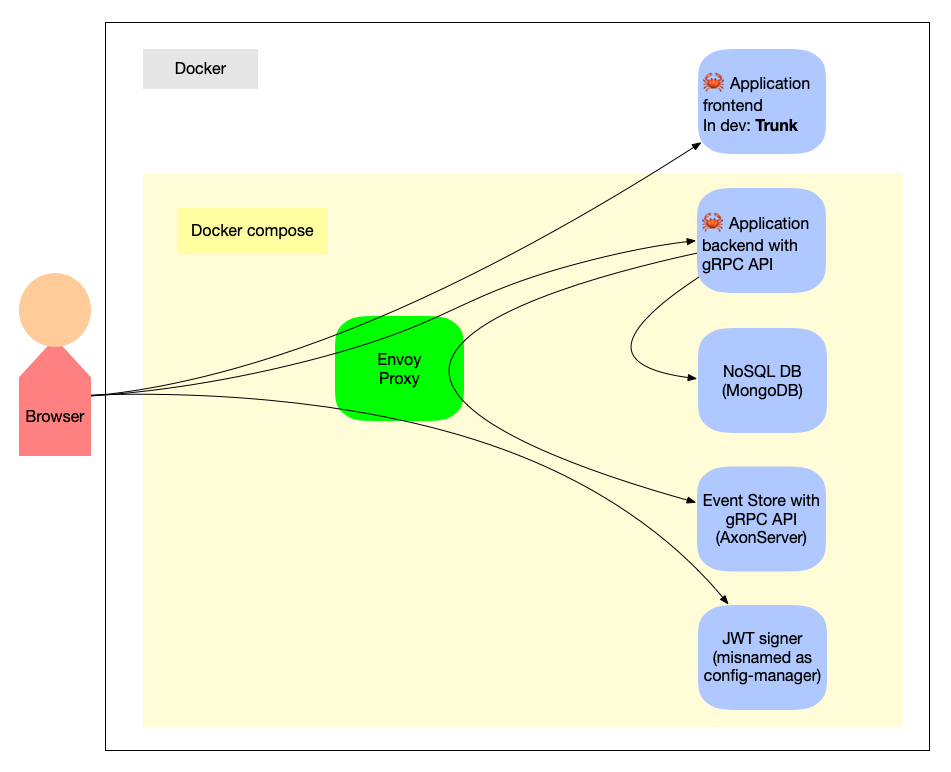
I got sidetracked and started to add building and packaging with Nix before I started on the Leptos frontend. I followed the series of blog posts Building a Rust service with Nix pretty closely. (The glue between Nix and Rust build tool Cargo is provided by Crane.)
Use this project as a template for new Event Sourced CQRS projects with AxonServer by clicking the "Use this template" button of GitHub.
The module src/monolith/example_event/trusted_generated.rs specifies my personal public key as the initial trusted key. So the application accepts only JWT tokens signed with my personal private key (which, hopefully, you don't have 🙂). Therefore, I recommend you to use the project as a template (or fork it) and run bin/generate-module-for-trusted-keys.sh to generate a version of trusted_generated.rs with a key that you trust.
The file etc/settings-sample.sh contains sample settings for the project. It is advised to change at least the variable ENSEMBLE_NAME before running clobber-build-and-run.sh when creating a new project from the template. The script clobber-build-and-run.sh automatically creates etc/settings-local.sh from etc/settings-sample.sh if it is not present. The file etc/settings-local.sh is ignored by git, so your local settings stay local.
First, (build and) start a container that runs the nix daemon as root:
$ bin/nix-container.sh -p 8080:8080Then, open a non-root bash prompt in the container that runs the daemon:
$ bin/nix-exec.shThe bash-shell inside the nix container is configured with direnv, so the first time that you log on (and each time you change .envrc) you have to accept the contents of .envrc with:
$ direnv allowNow, the wasm presentation can be built and served with:
$ cd present
$ nix develop
$ trunk serve --address 0.0.0.0
Now I have to figure out how to package the wasm output in a container, so that it can be deployed next to the monolithic backend in a docker-compose context.
The goal is to have a single script, clobber-build-and-run.sh, that builds and runs the complete application (front-end, back-end, event-store, mongodb, authorization-subsystem).
The script clobber-build-and-run.sh takes the following arguments (options only work in the given order; when switched around the behavior is undefined):
| option | description |
|---|---|
-v |
once or twice for debug or trace mode respectively |
--help |
show a brief usage reminder |
--tee <file> |
write the output also to the given file |
--skip-build |
skip the build phase, only clobber and run |
--build-uses-siblings |
expose the parent of the project to the Rust compiler, so that the build can reference sibling projects (e.g., for testing changes to the dendrite library) |
--back-end-only |
build only the back-end, not the front-end |
--no-clobber |
skip removal of the docker volumes where the data is kept |
The file etc/docker-compose.yml is recreated from etc/docker-compose-template.yml by script docker-compose-up.sh for each run of clobber-build-and-run.sh.
There is a separate script bin/docker-compose-up.sh that only regenerates the docker-compose.yml and invokes docker compose up. It only takes option -v (once or twice).
There is also a basic script grpcurl-call.sh that provides access to the gRPC API of the back-end from the command-line.
In alphabetic order:
- AxonServer: A zero-configuration message router and event store for Axon (docker image) — as the Event Store
- Bash: The shell, or command language interpreter, for the GNU operating system — for building and deploying
- Docker compose: A tool for defining and running multi-container Docker applications — for spinning up development and test environments
- Envoy proxy: An open source edge and service proxy, designed for cloud-native applications (docker image) — to decouple microservices
- Leptos: A full-stack, isomorphic Rust web framework leveraging fine-grained reactivity to build declarative user interfaces — for the front-end
- MongoDB: NoSQL Document store (docker image) — for query models (though any tokio-compatible persistence engine will do)
- Nix: Declarative builds and deployments (docker image) — for repeatable builds
- Rust: A language empowering everyone to build reliable and efficient software (docker image) — for both front-end and back-end
- Tokio: A runtime for writing reliable, asynchronous, and slim applications with the Rust programming language — as a runtime for the backend
- Tonic: A Rust implementation of gRPC with first class support of async/await — for the plumbing on the back-end