Releases: rladstaetter/LogoRRR
26.2.0


This release improves Search Term Group handling, memory consumption and packaging for Linux.
Have a look at the new features in this video: https://www.youtube.com/watch?v=4INweBlGWoQ
New Features
- Favourites were redesigned as an ongoing process started with 26.1.0. Now it should be much easier to understand this feature. For this, a new button was added and the Settings dialog was redesigned. (#368.)
- Search term groups are now editable - you can change ordering and colour of search terms (#378).
- Persisting application state was improved as well, leading to a more consistent behaviour when continuing user sessions. See #375, #369.
- CSS handling was updated to the latest
atlantafxrelease. - RPM Builds for Linux are now available - see #377.
Full Changelog: 26.1.1...26.2.0
26.1.1
This maintenance release improves the overall performance and handling of larger text files.
What's Changed
- 361 performance regression by @rladstaetter in #362
Full Changelog: 26.1.0...26.1.1
Contributors

Assets 13
26.1.0

This release improves the installation and user experience, adds new features to LogoRRR and fixes some subtle bugs.
New features
Favorites
Favorites are search terms which can be reused for different log files (see #359).

LogoRRR comes preinstalled with a number of common patterns, you can tailor them to your needs. Click on the heart symbol and open the new settings dialog (available via the File menu) to set your favourites. After selecting a favourite, this set of terms
are used when opening new files.
Improved UI

The userinterface got a new look - it is now more clear which search terms are active.
Global default timestamp settings

With Issue #327 implemented, you can now define default global timestamp settings. This reduces configuration effort when analysing log files from the same source. Moreover, the UI was improved such that it should be easier to use overall.

Visual Improvements
Blank Page redesign

The blank page got some love and a redesign - looks more modern now. Also, addressing #340, a click on LogoRRRs icon in the about view opens www.logorrr.app.
New Icon

|
LogoRRR's icon was revamped and got a svg version. How do you like it? |
Changes to search term / filter menu bar

The search term buttons are rendered in a more modern way - see #346, Settings Editor got improved as well.
Bugfixes
Distribution and Installation Enhancements
LogoRRR supports Snap
Starting with Release 26.1.0 you can download LogoRRR for various Linux Distributions from https://snapcraft.io/logorrr !
If you are more of a terminal guy just type:
snap install logorrr
in a terminal.
It should be noted that the snap artefacts use LogoRRR's GraalVM build. See Pull request #337 for details.
Zip file distribution
For windows and some use cases it is better to have the LogoRRR distribution as a zip file - this was implemented for #318 .
GraalVM compatibility mode
Early Snap releases were optimised for modern CPUs which led to an undesirable behavior on some systems (aka LogoRRR wouldn't even start). #341 addressed and fixed this.
Improvements to code and infrastructure
Upload for binaries
Binaries can now be uploaded automatically for Windows and Linux to https://www.logorrr.app/ which simplifies releases (#350, 354)
LogoRRR uses Scala3 (#338)
LogoRRR now uses Scala3 along with its brace-less syntax. A big step for LogoRRR!
Maven4 by default
LogoRRR now uses mvnw to always build with Maven4. New build scripts help to build the various artefacts (See #333).
25.2.0
Enhancements
Tailer reimplementation (#326, #329)
This release reimplements the tail functionality for LogoRRR. You can use this feature to observe log files.
LogoRRR uses JRE25 and JavaFX25 (#320)
LogoRRR now uses the latest Java runtime (JRE 25) and JavaFX library (also 25).
Build LogoRRR with Maven 4 (#316)
This was done mainly for geek reasons and in a purely minimalistic way. No Maven4 features are used yet, but builds seem to run slightly faster. It will definitely enable new optimisation possibilities in the future.
Show occurrences of each searchterm (#301)
This is actually a very nice enhancement which improves the visual style of LogoRRR a lot.

Now not only the searchterms are displayed in a nicer way, but also the number of hits are shown which yields some added value for the user. This also solves #244 - closing/removing search terms should be obvious with this new UI concept.
Customizable and Reusable Search Term Groups (#256, #323)

This release sports a new feature to improve control over log filtering and highlighting preferences.
-
you can Save and Reuse your filter queries: You can now save the current set of search terms (filters) with a name, allowing you to easily switch between custom configurations across different log files.
-
Global vs. Log-Specific: Groups can be marked with a ❤️ to be shared globally and available for every log file you open, or kept specific to the current file.
-
New Defaults: Two new default groups are included:
- The 'default' group, containing the standard log levels: FINEST, INFO, WARNING, and SEVERE.
- An 'empty' group, for quickly clearing all search terms.
-
Default Selection: When opening a new log file, the application will automatically select the last group you used. If you are opening a file for the first time, the pre-configured 'default' group is applied.
-
Group Management: You can manage and edit your global Search Term Groups through the new Settings menu item.
You want to know more? Have a look at the complete list of solved work items.
25.1.0
Release Highlights

This version fixes several bugs, improves usability and memory footprint.
New features
LogoRRR has got a little facelift - some graphical widgets were reordered which leads to a better and leaner user interface. (#307, #305). The textview to the right has now also its own slider (#293). The sliders are more recognisable as well. (#283).
Bugfixes
Several Bugfixes were addressed in this release. Notably, LogoRRR now remembers the position of the time sliders on restart (#261) and among other things some graphical glitches were resolved (#294). The color blending for search hits was fixed (#292).
Removed features
I've decided to remove the regex search functionality since I was never happy with the implementation and overall it doesn't fit into the spirit of the application which strives to be simple to use. (#300)
Deployment
- LogoRRR is now available on the flathub store as well, which eases installation for Linux users. This feature had been on the wishlist quite some time (#111).
- This release adds flatpak and GraalVM builds for Linux!
- There is also an experimental build for Mac for GraalVM which uses Liberica SDK (see #284) - this version is not merged into main development which still uses javapackager for distribution.
- This version includes updates to the Windows Installer. The Installer UI is simplified; LogoRRR is installed per user. See #273 and pull request #274. Thanks to the Advanced Installer Team for providing an opensource license for LogoRRR! 👏
- By implementing #264 LogoRRR now will be installed into an appropriate directory in your Temp/Roaming directory.
Internals
Much code was rewritten, some of it was externalized in a separate library (#285) - This is also an attempt to modularize LogoRRR further such that parts of it can be used in other projects as well - this is an ongoing effort however.
Summary
For an overview of all issues please visit the milestone page.
A detailed changelog is available here.
Downloads
- Windows: You can install LogoRRR from Windows App Store or use the provided installer below.
- MacOsX: LogoRRR is available in the Apple Appstore
- Linux: Check out Flathub Store or download .deb files from the list below.
24.5.1
Release Highlights

Timestamp support
This release includes a feature to detect timestamps in your log files, and provides a useful filter mechanism to show log entries in a certain time period which can be easily adjusted. See #43. The application tries to make it very easy to specify the location and format of the timestamp. With this feature in place it will be possible to add some new interesting features in the future.
Easy Text selection
By enabling multiline text selection, it is now more intuitive to copy & paste relevant logs to the clipboard for further use in other applications. See #242.
Set Scrollbar width to zero
If there is no need for a scrollbar, it will be hidden such that valuable screen space is not wasted. Have a look at #199.
Bugfixes and maintenance work
Several bugs (#231, #236 and #240) were fixed in this release. Moreover several upstream dependencies were bumped to their newest versions. Notably, LogoRRR now uses Scala 2.13.15 and a very recent version of JavaFX.
For an overview of all issues please visit the milestone page, and a detailled changelog is available here.
Downloads
- Windows: You can install LogoRRR from Windows App Store or use the provided installer below.
- MacOsX: LogoRRR is available in the Apple Appstore
- Linux users can download builds for ARM and x86 directly from this site, see the links below.
24.4.0
Release Highlights

This release is the first one which is code signed on Windows, furthermore it introduces improvements regarding visualisation and self localisation and, as always, fixes some bugs.
For an overview have a look at the milestone page, and a changelog is available here.
Enhancements
- #64: Codesigning on windows 🚀
- #229: slider control to change the size of the boxes more easily
- #226: the mouse pointer leaves a trail when navigating
- #155: adds a viewport visualisation
This release features the completion of #64, which had been one of the oldest issues in the issue tracker. Now, LogoRRR takes the next step and is code signed thanks to an open source code signing certificate from Certum.
Those enhancements improve the user experience since the UI is more responsive to the users actions. LogoRRR feels more dynamic. The biggest improvement is surely #229, which makes it even easier to customize the log view to your needs.
Bugfixes
Twor Bugfixes made it into this release.
- #224: a minor bug which made LogoRRR shrink if restarted repeatedly
- #222: on some occasions LogoRRR couldn't load files because of this bug
Both bugfixes represent another improvement in the quality of LogoRRR and help the user to enjoy working with this application.
Other news
I can announce a relaunch of LogoRRR.app and a Youtube Playlist dedicated to LogoRRRs development.
Follow logorrr@twitter to get informed about the latest development news, or dive into more detail on the development blog.
Downloads
For Windows installation, simply use the provided installer below.
- For MacOsX, LogoRRR is available in the Apple Appstore.
- Linux users can download builds tailored for ARM or Intel architectures. Find the suitable .deb package for your system in the links below.
Full changelog
24.3.0
Release Highlights

This update is a maintenance release with visual improvements and bugfixes. Internally, substiantial work was done to improve test coverage (End2End tests and performance tests).
For an overview have a look at the milestone page, and a changelog is available here.
Enhancements
There are four Enhancements in this release:
- #206: add shadows to boxes 🚀
- #204: show information more densely
- #218: open zip files from dropped directory
- #211: position window on first startup in the center
#206 is a really nice addition, which improves look & feel a lot. #204 helps to get an idea of the overall situation for large files.
Bugfixes
Four Bugfixes made it into this release.
- #213: fix LogoRRR freeze
- #212: fix open links in About dialogue on Mac
- #201: exception on startup
- #209: unsupported JavaFX configuration
#213 and #212 were perceivable for the end user, #201 and #209 were minor bug fixes.
Developer experience improvements
The most work for this release went into improving the Developer experience.
- #208: implement support for TestFX 🚀🚀
- #203: add JMH support 🚀
- #202: Jlink via command file on Linux
- #198: Fix IoManagerSpec
#208 introduced end2end tests for LogoRRR, you can have a look on youtube for a demonstration of several use cases which are now checked on every build of LogoRRR. This improved also the code quality in the process and will reduce regressions in the future.
#203 helps finding performance bottlenecks, this release renders in fact a little bit faster than previous editions and continues the work done in release 23.3.0.
#198 helps executing IoManagerSpec in the CI, #202 harmonises the approach for JLink with Mac.
Other news
I can announce a relaunch of LogoRRR.app and a Youtube Playlist dedicated to LogoRRRs development. On social media there is also an account you can follow logorrr@twitter to get informed about the latest development news.
Downloads
- For MacOsX, LogoRRR is available in the Apple Appstore.
- Linux users can download builds tailored for ARM or Intel architectures. Find the suitable .deb package for your system in the links below.
Note
For Windows installation, simply use the provided installer below. Please note that this installer is not signed (see issues #64 and #29), which means you will need to acknowledge and approve a warning dialog during the installation process.
Full changelog
24.2.0
Release Highlights
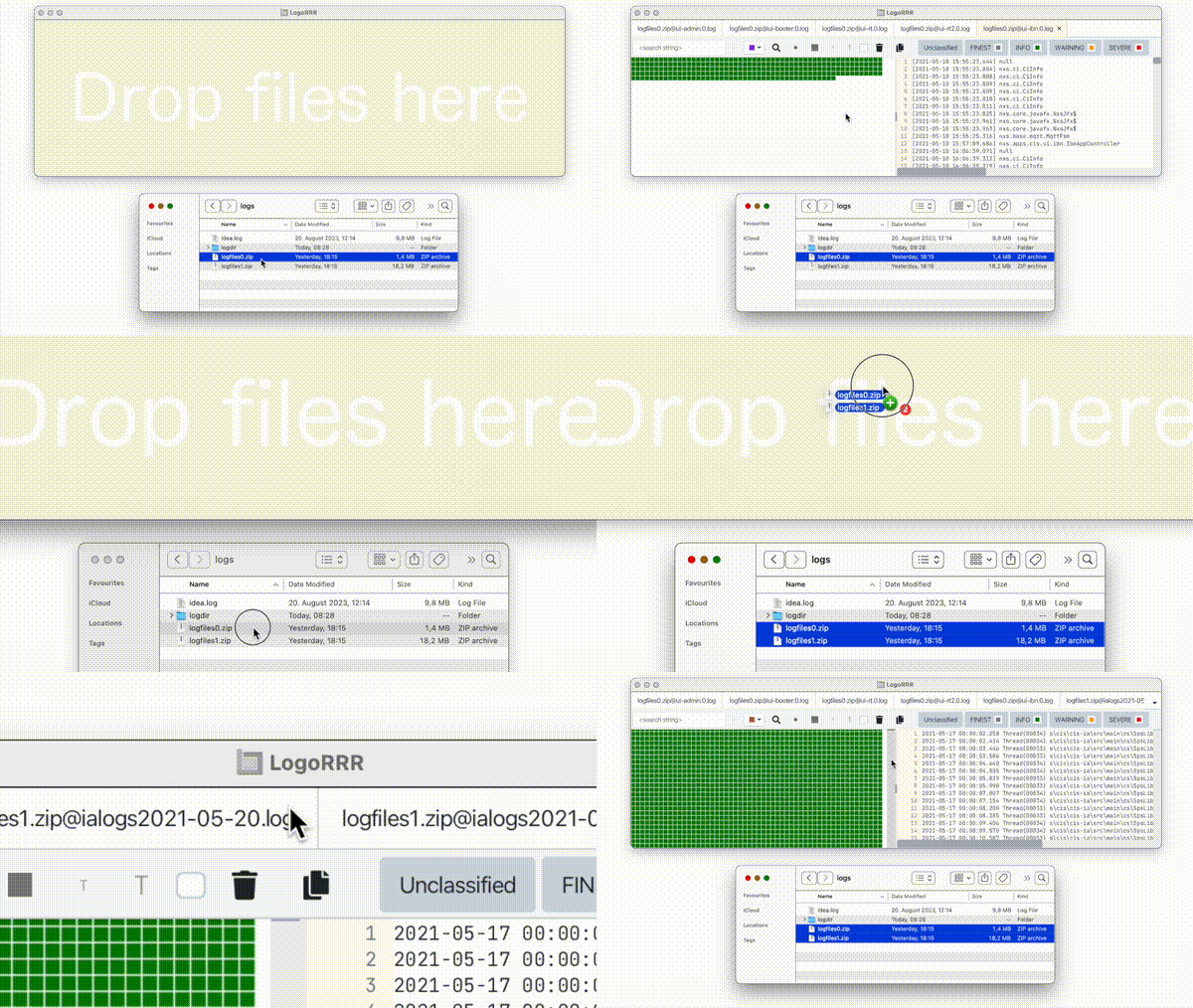
This update brings enhanced zip file support and animated clipboard actions, alongside various bug fixes.

Enhancements
Bugfixes
- #189: fixes context menu for LogFileTab
- #188: close all log files start screen is not shown
- #179: fixes visual glitch for mac
- #178: fixes selection when applying context actions in textview
- #184: fix mouseover text for windows desktop shortcut
Developer experience improvements
- #183 improve project bootstrapping fix run configurations for windows
- #176: improve java.util.logging configuration
- #185: Bump windows jre version to 21
For an overview have a look at the milestone page, and a changelog is available here.
Downloads
- For MacOsX, LogoRRR is available in the Apple Appstore.
- Linux users can download builds tailored for ARM or Intel architectures. Find the suitable .deb package for your system in the links below.
Note
For Windows installation, simply use the provided installer below. Please note that this installer is not signed (see issues #64 and #29), which means you will need to acknowledge and approve several warning dialogs during the installation process.
Full changelog
24.1.0
Release Highlights
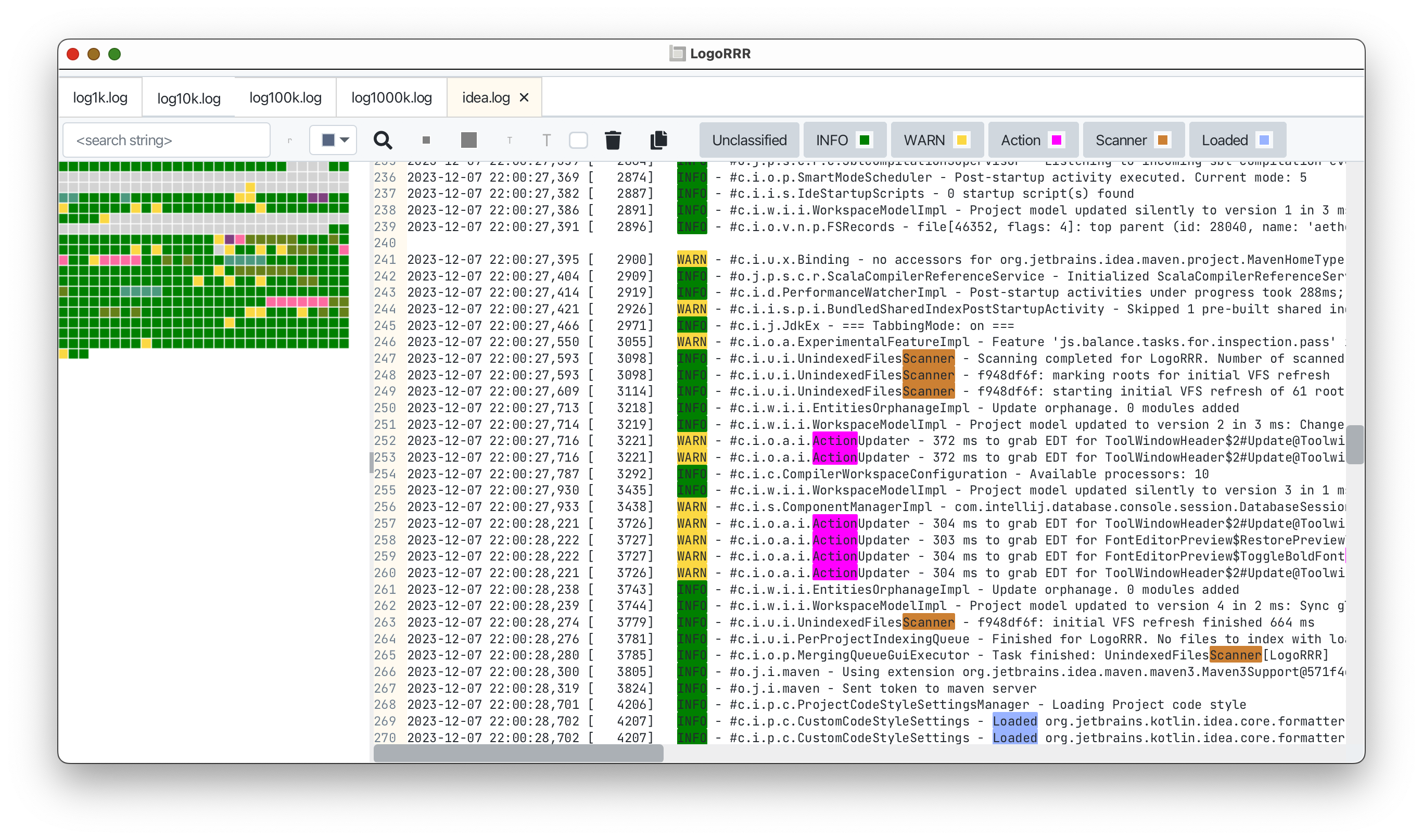
This update introduces multiple usability enhancements designed to assist users in efficiently handling larger files, exporting filtered data, and maintaining focus on their current tasks.
Enhancements and Bug Fixes
-
#172: widens scroll bars
-
#173: fixes visual bugs in TextView
-
#146: fixes open file dialog for mac
-
#154, #159: adds context menu items for more options to close a log file
Also, logorrr.app was improved by adding a dedicated download link for linux builds (#135) and the download statistics page was improved (#163).
For an overview have a look at the milestone page, and a changelog is available here.
Downloads
- For MacOsX, LogoRRR is available in the Apple Appstore.
- For Windows, just use the attached installer below. Keep in mind that this installer is not signed (#64, #29), thus you have to confirm several warning dialogs during install.
- Linux users can download builds tailored for ARM or Intel architectures. Find the suitable .deb package for your system in the links below.