Releases: neitsa/PrepareLanding
PrepareLanding-1.2.1

Version 1.2.1
Released July 26, 2021
RimWorld Version: 1.3
General
What's New?
-
Fix last possible conflict problem with other mods (bug #41 - reported by @skellitor301).
- There should not be any conflicts as of now.
-
RimWorld v1.3 (Ideology) compatibility.
-
Fix: inverted logical OR and AND filters.
PrepareLanding-1.2.0-71-develop
update deployment token.
PrepareLanding-1.0.1
Version 1.0.1
Released March 8, 2020
RimWorld Version: 1.1 (and 1.0)
General
What's New?
- Fix overall population generated with a minimum value [issue #37].
- overall population is now generated with its default value.
PrepareLanding-1.0.0
Version 1.0.0
Released March 7, 2020
RimWorld Version: 1.1 (and 1.0)
General
What's New?
- Updated for Rimworld 1.1 (no other additions).
- The mod has the required assemblies to be compatible with Rimworld 1.0.
- Many thanks to @JonathanTroyer for the PR #36 which basically fixed a lot of things!
PrepareLanding-0.9.4
Version 0.9.4
Released November 2, 2018
RimWorld Version: 1.0
General
What's New?
- Integrate
Precise World Generation Percentagein Prepare Landing. This allows users to fine tune (between 1 and 100%) the world generation percentage in the Create World page.- If you don't like this feature you can easily disable it. For this, go to:
Options>Mod Settings>Prepare Landingand then checkDisable Precise World Gen. %.
- Be wary that worlds generated with 3% or below coverage might not have settleable tiles.
- If you don't like this feature you can easily disable it. For this, go to:
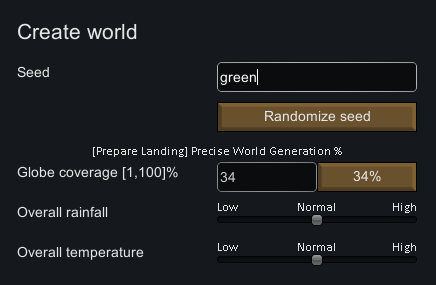
- Fixed RimWorld minor version in ModManager XML.
PrepareLanding-0.9.3
Version 0.9.3
Released November 1, 2018 🎃 👻
RimWorld Version: 1.0
General
What's New?
-
Added clickable list of tiles for world records (see the "
info" tab on the main Prepare Landing window). -
Added a shortcut (
CTRL+P) to force the display of the main windows on the world map.- shortcut is configurable in the
options>keyboard configuration>Prepare Landingmenu.
- shortcut is configurable in the
-
Fixed NRE when going to the world map if no previous instance of Prepare Landing Main window had been already instantiated (reported by BD183).
-
Fixed hard limit on rainfall for GodMode (follow-up of bug #33)
- Max value is now 7000 mm.
-
Fixed typo in ModManager XML.
PrepareLanding-0.9.2
Version 0.9.2
Released October 19, 2018
RimWorld Version: 1.0
General
What's New?
-
PrepareLanding is now compatible with Rimworld 1.0 (1.0.6864.30166)
-
Fixed hard limit on rainfall filter (bug #33 - reported by @serenewaffles)
- Max value is now 10000 mm.
-
Fixed bottom buttons not visible on low resolution <= 1280 * 720 (bug #32 - reported by Bernie Laplante)
-
Fixed god mode Window temperature mode
- It now follows user preference for temperature (Celsius / Fahrenheit / Kelvin)
-
Use of the updated Harmony and HugsLib libraries.
Internal Changes
- Added
Manifest.xmlfor ModManager support.
PrepareLanding-0.9
Version 0.9.0
Released September 1, 2018
RimWorld Version: Beta 19
General
What's New?
-
PrepareLanding is now compatible with Rimworld Beta 19 (0.19.6814)
-
New filters:
- Movement Difficulty.
- Forageability.
- Forageable Food.
- Minimum Temperature.
- Maximum Temperature.
-
The code now handles correctly the different temperature scales (Celsius, Fahrenheit, Kelvin).
- This works for the filters on the temperature tab and the various temperature forecasts.
-
The following filters were removed
- Note: they were still working but users would have had no feedback from the game to pick the proper values.
- Current, Summer and Winter Movement Time (all replaced with Movement Difficulty).
- Summer and Winter Temperature (replaced with Min and Max temperature).
-
Use of the updated Harmony and HugsLib libraries.
Internal Changes
- The code now correctly handles Unity Material loading and usage on the main thread.
PrepareLanding-0.8
Version 0.8.0
Released June 15, 2018
RimWorld Version: Beta 18
General
What's New?
-
The whole mod can now be translated to other languages.
- Added French translation! Cocorico :)
-
Added a game option to reduce CPU cycles and the memory footprint of the mod.
- While in game, see: Options > Mod Settings > PrepareLanding
- There's one option which is disabled by default
- If enabled, it skips some calculations and doesn't store some data about the world
- In return for less CPU cycles and less memory used, some world information are not available.
-
Drastically reduced the Mod memory footprint and CPU cycles.
- Some non critical code has been factored out.
- The code was doing some heavy calculation (and used some memory) for world map overlays which is still not public.
Minor Changes
-
Tweaked some parts of the GUI for languages that are more verbose than English.
-
Side note: the "God Mode" tab is not translated as it is doomed to disappear at some point.
PrepareLanding-0.7
Version 0.7.0
Released December 22, 2017 🎄 🎅
RimWorld Version: Beta 18
The PrepareLanding source code is licensed under the MIT Licence.
General
What's New?
This version has more changes than I thought I would implement...
TL;DR
- New filters:
- Caves
- Named locations
- Coastal rotations
- Reworked Road / Rivers filters to follow Boolean logic.
- Stones can be filtered in order or not.
- Add a new "coordinates" window.
Major Changes
- Add a filter for tiles with caves [issue #20]
- It's in the "Terrain 2 & Temp". tab.
- Add a filter for filtering tiles that are in a specific named location (aka World Features) [issue #21]
- It's in the "Terrain 2 & Temp". tab.
- Add a filter for coastal rotation [issue #25]
- It is now possible to filter coastal tiles that have their coast facing a certain direction
- e.g. Filter all tiles that have a northern coast, etc.
- It's in the Terrain Tab, below the already existing coastal filters.
- Completely reworked the filtering for 3 states items (ON / OFF / Partial)
- Roads and Rivers: complete Boolean filtering (AND & OR)
- new button on the GUI to choose between the two
- Stones:
- Finally, added a "no order" filtering, hooray!
- These new filters can now be saved and loaded in presets.
- Roads and Rivers: complete Boolean filtering (AND & OR)
- Add a new "Coordinates Window" (still rough implementation)
CTRL + Mwhile on the world map. (command + Mfor Mac)- Allows to go to a tile by its ID or coordinates.
- Add buttons with the main point of interests (North Pole, South Pole, etc.)
Minor Changes
- Each filter header is now colored (default to magenta)
- Remove all the code that was implemented to bypass a bug in Rimworld vanilla (bug was fixed in B18) [issue #22]
- Info Tab
- Add the "Average Disease Frequency" information for each biome in the Info Tab [issue #19]
- Rework the world information display on the Info Tab
- new "World records" with the lowest / highest characteristics (temperature, rainfall, elevation)
- Add a way to list and delete presets [issue #23]
- The delete button is in the "Load" tab, visible when you load a preset.
- Pick a preset in the left list and press delete twice to remove it.
- Fix a bug where "Animal Can Graze" filter could not be saved or loaded properly [issue #24]
- (Privacy) Redact the name of the current user from the log file [issue #26]
- The preset folder location is written in the log as a debug purpose.
- This folder is, most of the time, in a sub-dir of the user directory: thus user name would be written to the log...
- e.g.
C:\Users\neitsa\AppData\LocalLow\Ludeon Studios\RimWorld by Ludeon Studios\PrepareLanding - Is now logged as:
C:\Users\<redacted>\AppData\LocalLow\Ludeon Studios\RimWorld by Ludeon Studios\PrepareLanding
- Remove a warning from RimWorld: "mesh already finalized." [issue #27]
- RimWorld thinks that the highlighted tiles mesh (used to display highlighted tile on the world map) is already finalized.
- This makes RimWorld display a warning in the log.
- This warning was not present until B18: fixed by telling RimWorld that the mesh was not yet finalized when created.
- Rename "Temperature" Tab to "Terrain II & Temp."
- Clear the filter logger when a new world is generated
- Add a new message, "New World Generated"
- Updated filtered tile description (in "Filtered Tiles" tab) to be in synch. with B18.
Internal Changes
- Upgrade automatic builder to VS 2017 \o/
- Add a new internal container for three state items
- Easier to manage from a code POV.
- Reworked completely the Harmony Patch for displaying the main PrepareLanding button.
- 2 times less code!
- It now allows other mods to patch the same function.
- Major Code cleanup