Function secret sharing (FSS) primitives including:
- 2-party distributed point function (DPF)
- 2-party distributed comparison function (DCF)
Features:
- First-class support for GPU (based on CUDA)
- Well-commented and documented
- Header-only library, easy for integration
Multi-party computation (MPC) is a subfield of cryptography that aims to enable a group of parties (e.g., servers) to jointly compute a function over their inputs while keeping the inputs private.
Secret sharing is a method that distributes a secret among a group of parties, such that no individual party holds any information about the secret.
For example, a number
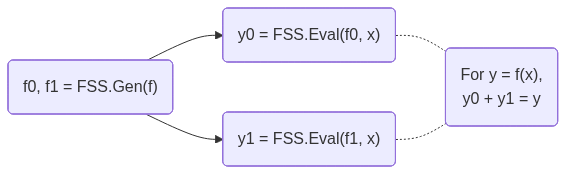
FSS is a scheme to secret-share a function into a group of function shares.
Each function share, called as a key, can be individually evaluated on a party.
The outputs of the keys are the shares of the original function output.
FSS consists of 2 methods: Gen for generating function shares as keys and Eval for evaluating a key to get an output share.
FSS's workflow is shown below:
DPF/DCF are FSS for point/comparison functions.
They are called out because 2-party DPF/DCF can have
- CMake >= 3.22
- CUDA toolkit >= 12.0 (for C++20 support). Tested on the latest CUDA toolkit.
- OpenSSL 3 (only required for CPU with AES-128 MMO PRG)
Clone the repository:
git clone https://github.com/myl7/fss.git
cd fss
Option A: Install via CMake and use find_package
cmake -B build -DBUILD_TESTING=OFF -DCMAKE_INSTALL_PREFIX=/path/to/install
cmake --build build
cmake --install build
Then in your project's CMakeLists.txt:
find_package(fss REQUIRED)
target_link_libraries(your_target fss::fss)
When configuring your project, point CMake to the install prefix:
cmake -B build -DCMAKE_PREFIX_PATH=/path/to/installOption B: Use as a subdirectory (header-only)
Without installing, you can define the target directly in your CMakeLists.txt, like the samples do:
add_library(fss INTERFACE)
target_include_directories(fss INTERFACE "/path/to/fss/include")
target_compile_features(fss INTERFACE cxx_std_20 cuda_std_20)
Then link it in your project:
target_link_libraries(your_target fss)This walks through using DPF and DCF on the CPU with AES-128 MMO PRG. This PRG requires OpenSSL.
-
Include the headers and set up type aliases:
#include <fss/dpf.cuh>
#include <fss/dcf.cuh>
#include <fss/group/bytes.cuh>
#include <fss/prg/aes128_mmo.cuh>

constexpr int kInBits = 8;  // Input domain: 2^8 = 256 values
using In = uint8_t;
using Group = fss::group::Bytes;

// DPF uses mul=2, DCF uses mul=4
using DpfPrg = fss::prg::Aes128Mmo<2>;
using DcfPrg = fss::prg::Aes128Mmo<4>;
using Dpf = fss::Dpf<kInBits, Group, DpfPrg, In>;
using Dcf = fss::Dcf<kInBits, Group, DcfPrg, In>;
-
Create the PRG with AES keys and instantiate DPF/DCF:
// DPF PRG needs 2 AES keys
unsigned char key0[16] = {1, 2, 3, 4, 5, 6, 7, 8, 9, 10, 11, 12, 13, 14, 15, 16};
unsigned char key1[16] = {16, 15, 14, 13, 12, 11, 10, 9, 8, 7, 6, 5, 4, 3, 2, 1};
const unsigned char *keys[2] = {key0, key1};
auto ctxs = DpfPrg::CreateCtxs(keys);

DpfPrg prg(ctxs);
Dpf dpf{prg};
-
Run
Gento generate correction words (keys) from secret inputs:In alpha = 42; // Secret point / threshold int4 beta = {7, 0, 0, 0}; // Secret payload (LSB of .w must be 0) // Random seeds for the two parties (LSB of .w must be 0) int4 seeds[2] = { {0x11111111, 0x22222222, 0x33333333, 0x44444440}, {0x55555555, 0x66666666, 0x77777777, static_cast<int>(0x88888880u)}, }; Dpf::Cw cws[kInBits + 1]; dpf.Gen(cws, seeds, alpha, beta);
-
Run
Evalon each party and reconstruct using the group:// Each party evaluates independently int4 y0 = dpf.Eval(false, seeds[0], cws, alpha); int4 y1 = dpf.Eval(true, seeds[1], cws, alpha); // Reconstruct via the group: convert to group elements, add, convert back // For Bytes group this is XOR; for Uint group this is arithmetic addition int4 sum = (Group::From(y0) + Group::From(y1)).Into(); // sum == beta at x == alpha, 0 otherwise
-
Free the AES contexts when done:
DpfPrg::FreeCtxs(ctxs);
DCF follows the same pattern — use DcfPrg (mul=4, needs 4 AES keys), Dcf, and Dcf::Cw. The reconstructed output equals beta when x < alpha and 0 otherwise.
Link with OpenSSL in your CMakeLists.txt:
find_package(OpenSSL REQUIRED)
target_link_libraries(your_target fss OpenSSL::Crypto)
See samples/dpf_dcf_cpu.cu for the complete working example.
This walks through using DPF and DCF on the GPU with ChaCha PRG.
-
Include the headers and set up type aliases:
#include <fss/dpf.cuh>
#include <fss/dcf.cuh>
#include <fss/group/bytes.cuh>
#include <fss/prg/chacha.cuh>

constexpr int kInBits = 8;
using In = uint8_t;
using Group = fss::group::Bytes;

// DPF uses mul=2, DCF uses mul=4
using DpfPrg = fss::prg::ChaCha<2>;
using DcfPrg = fss::prg::ChaCha<4>;
using Dpf = fss::Dpf<kInBits, Group, DpfPrg, In>;
using Dcf = fss::Dcf<kInBits, Group, DcfPrg, In>;
-
Set up a nonce in constant memory and create the PRG in a kernel:
__constant__ int kNonce[2] = {0x12345678, 0x9abcdef0};

__global__ void GenKernel(Dpf::Cw *cws, const int4 *seeds, const In *alphas, const int4 *betas) {
    int tid = blockIdx.x * blockDim.x + threadIdx.x;

    DpfPrg prg(kNonce);
    Dpf dpf{prg};

    int4 s[2] = {seeds[tid * 2], seeds[tid * 2 + 1]};
    dpf.Gen(cws + tid * (kInBits + 1), s, alphas[tid], betas[tid]);
}
-
Prepare host data, copy to device, and launch the
Genkernel:int4 *d_seeds = /* cudaMalloc + cudaMemcpy seeds to device */; In *d_alphas = /* cudaMalloc + cudaMemcpy alphas to device */; int4 *d_betas = /* cudaMalloc + cudaMemcpy betas to device */; Dpf::Cw *d_cws; cudaMalloc(&d_cws, sizeof(Dpf::Cw) * (kInBits + 1) * N); GenKernel<<<blocks, threads>>>(d_cws, d_seeds, d_alphas, d_betas);
-
Write and launch an
Evalkernel for each party, then copy results back:__global__ void EvalKernel(int4 *ys, bool party, const int4 *seeds, const Dpf::Cw *cws, const In *xs) { int tid = blockIdx.x * blockDim.x + threadIdx.x; DpfPrg prg(kNonce); Dpf dpf{prg}; ys[tid] = dpf.Eval(party, seeds[tid], cws + tid * (kInBits + 1), xs[tid]); } // Launch for party 0 and party 1, then copy d_ys back to host EvalKernel<<<blocks, threads>>>(d_ys, false, d_seeds0, d_cws, d_xs); EvalKernel<<<blocks, threads>>>(d_ys, true, d_seeds1, d_cws, d_xs);
-
Reconstruct on the host using the group, same as the CPU case:
int4 sum = (Group::From(h_y0s[i]) + Group::From(h_y1s[i])).Into();
DCF follows the same pattern — use DcfPrg (mul=4), Dcf, and Dcf::Cw.
See samples/dpf_dcf_gpu.cu for the complete working example.
Apache License, Version 2.0
Copyright (C) 2026 Yulong Ming i@myl.moe