autoit CLI tool to make thumbnails of video
requires ffmpeg and imagemagick installed
example usage calling executable:
thumbnail_maker.exe "input=Big_Buck_Bunny.mp4" "output=thumbnails.png" "columns=4" "rows=3" "size=135" "border=1" "font=arial" "fontsize=12" "header=name,size,resolution,duration,date" "time=southeast"
example usage calling script directly:
AutoIt3.exe thumbnail_maker.au3 "input=Big_Buck_Bunny.mp4" "output=thumbnails.png" "columns=4" "rows=3" "size=135" "border=1" "font=arial" "fontsize=12" "header=name,size,resolution,duration,date" "time=southeast"
example output:
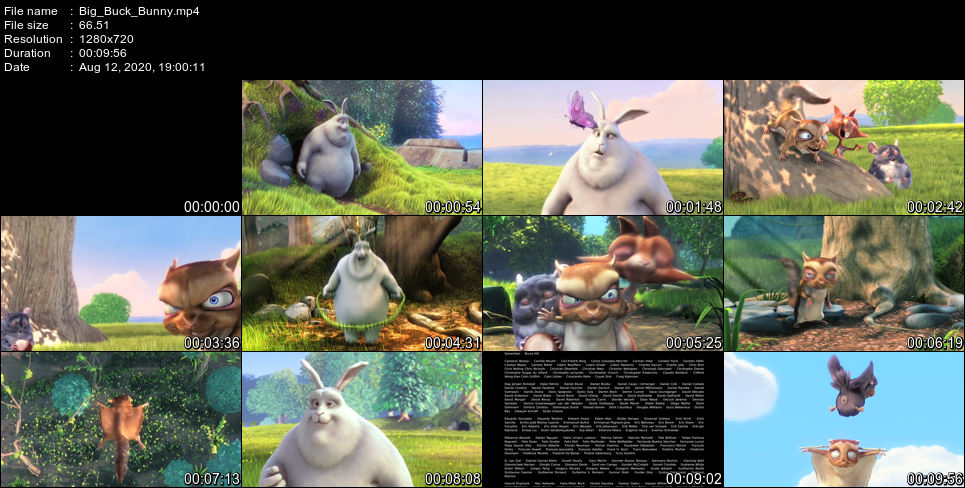
parameter options - can be in any order
input (input, in, i)
required
video file you wish to process.
all formats supported by ffmpeg work.
run ffmpeg -formats to see video formats.
output (output, out, o)
optional - defaults to output.png
filename and image format for the resulting output.
all image formats supported by imagemagick work.
run identify -list format to see image formats.
columns (columns, column, cols, col, c)
optional - defaults to 4
any number other than 0.
number of columns of thumbnails.
rows (rows, row, r)
optional - defaults to 3
any number other than 0.
number of columns of thumbnails.
size (size, s)
optional - defaults to 135
horizontal aspect: max height in pixels for thumbnails.
portrait aspect: max width in pixels for thumbnails.
border (border, b)
optional - defaults to 1
pixel space between thumbnails and around entire image.
font (font, f)
optional - defaults to arial
the font to use for any text or numbers.
run convert -list font to see installed fonts.
fontsize (fontsize, fs)
optional - defaults to 12
the font size to use for any text or numbers.
header (header, head, h)
optional - defaults to Name, Size, Resolution, Duration
additonal information about the video that will be displayed at the top of the image.
can be name, size, resolution, duration, fps, date. none means no header.
the ordering is maintained. can show the same information more than once.
timestamp (timestamp, time, ts, t)
optional - defaults to southeast
which side of the thumbnails to place a timestamp.
can be north, northeast, east, southeast, south, southwest, west, northwest. none means no timestamp.