




MCP server for Eureka Flow — manage visual workflows from any MCP-compatible AI client.
Build, execute, and monitor data processing pipelines through natural language.
In plain words: it gives Claude (and other AI assistants) the ability to build and run
automated workflows for you — just by chatting. No code, no setup beyond a one-time sign-in.
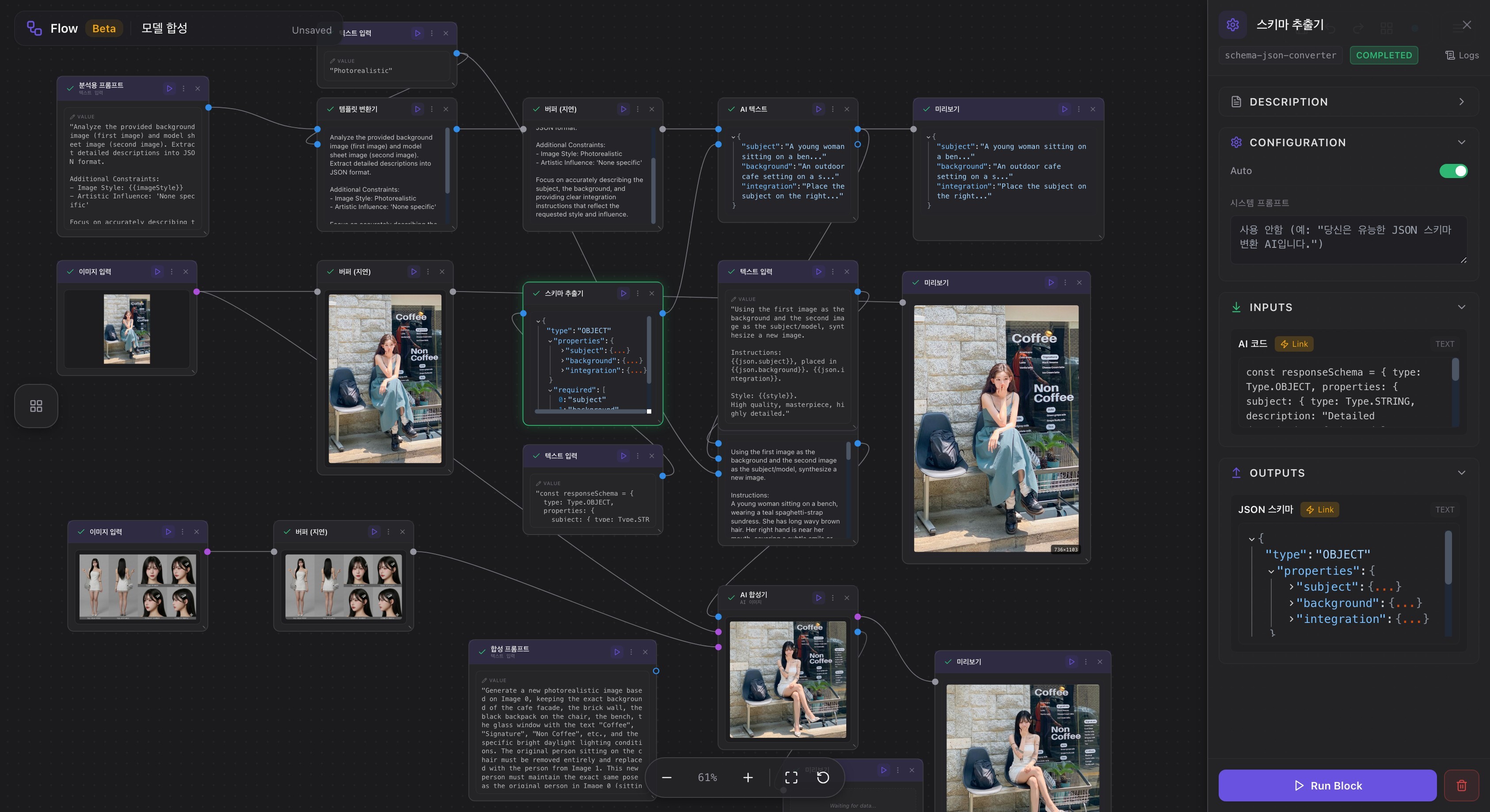
Eureka Flow is a visual tool for chaining steps into a flow: take some input, process it (summarize, transform, call an AI model, hit an API), and get a result — without writing code. Each step is a block, and you connect blocks to pass data along.
Normally you'd build those flows by hand in the editor. flow-mcp lets your AI assistant do it for you: you describe what you want in chat ("make a flow that summarizes the text I paste"), and it creates, runs, and inspects the flow on your behalf. Think of it as giving Claude hands to operate Eureka Flow.
Works with Claude Desktop, Cursor, Windsurf, VS Code (Continue/Cline), Claude Code, and any MCP-compatible client.
Just ask in natural language:
| What you want | Say this to Claude |
|---|---|
| Sign in (no key to copy) | "Log in to Flow" |
| List workflows | "Show my flows" |
| Create a workflow | "Create a flow: text input → buffer → preview" |
| Run a workflow | "Run flow 1004897" |
| Check results | "Show the preview node output" |
| Visualize | "Show graph for 1004897" |
| Rename a node | "Rename node 1009369 to EurekaFlow" |
| Add a node | "Add a text input block to this flow" |
| Connect nodes | "Connect the input node to the buffer" |
| Clean up | "Delete disconnected nodes" |
No code required. No tool names to remember. Just ask in natural language.
You'll need: the Claude Desktop app installed, and a free EurekaCodes account (just sign in with Google — no signup form). Claude Desktop bundles its own Node.js runtime, so there's nothing else to install.
- Download the extension. On the Releases page, open the Assets section and download
flow-mcp.mcpb. (Ignore the "Source code" files — you don't need those.) - Install it. Double-click
flow-mcp.mcpb. Claude Desktop opens an install window — leave the API Key field blank (you'll log in from chat in the next step) and click Install.- Mac says "unidentified developer"? Right-click the file → Open → Open. That's normal for downloads.
- No install window appeared? Open Claude Desktop → Settings → Extensions and drag the file in.
- Log in — no key to copy. In Claude, just say "Log in to Flow." A browser window opens for Google sign-in — finish there, and Claude provisions and stores your API key automatically. (Prefer to paste a key yourself? Get one at flow.eureka.codes → sign in → Create Key → Copy, and put it in the API Key field at step 2 instead.)
- Check it works. Ask Claude "Show my flows". If it answers at all — even "you have no flows yet" — you're connected! 🎉 Then try "Create a flow" or "Check my credit balance".
- See a red error or "server disconnected" instead? Open Settings → Extensions and confirm flow-mcp is enabled, then ask Claude to "log in" again.
One login unlocks everything — flows and billing credits. No key to copy, nothing technical to edit.
One-click: click a badge to auto-add the npx config, then say "Log in to Flow":


Or configure it manually:
Manual install (npm + config file)
1. Install
npm install -g @lemoncloud/flow-mcp2. Add to your client's MCP config — no API key needed. Claude Desktop file: ~/Library/Application Support/Claude/claude_desktop_config.json
{
  "mcpServers": {
    "flow-mcp": {
      "command": "npx",
      "args": ["-y", "@lemoncloud/flow-mcp"]
    }
  }
}- Cursor / Windsurf / VS Code (Continue/Cline): add the same
mcpServersblock to the IDE's MCP settings. - Claude Code:
claude mcp add flow-mcp -- npx -y @lemoncloud/flow-mcp
3. Restart your client and say "Log in to Flow" — a browser opens for Google sign-in and your key is provisioned automatically. Then try "Show my flows".
Prefer a fixed key? Get one at flow.eureka.codes (sign in → Create Key → Copy) and add
"env": { "FLOW_API_KEY": "ec-…" }to the config above instead of logging in.
Environment variables — all optional; FLOW_API_KEY is only needed if you skip the in-chat login:
| Variable | Required | Default | Description |
|---|---|---|---|
FLOW_API_KEY |
— | API key (optional — the auth tool mints one via browser login) |
|
FLOW_API_URL |
https://api.eureka.codes/flw-v1 |
API server URL | |
FLOW_API_TIMEOUT |
30000 |
Request timeout (ms) | |
FLOW_WS_URL |
wss://wss.eureka.codes/wss-v1 |
WebSocket URL for real-time execution monitoring | |
LOG_LEVEL |
info |
Log verbosity on stderr: debug | info | warn | error |
Not sure where to start? flow-mcp ships guided templates that walk Claude through a complete workflow. In clients that support MCP prompts (Claude Desktop, Cursor), type / and pick one — or just ask for it by name:
| Template | What it does |
|---|---|
| quick-flow | Builds and runs a text input → buffer → preview flow (great first run) |
| etl-pipeline | Builds a multi-step Extract → Transform → Load flow from your description |
| debug-execution | Runs a flow, then inspects each node and port to find where it failed |
| publish-flow | Creates (or takes an existing) flow and publishes it as a public template |
Each template just steers Claude through the right flow_read / flow_do actions — no new permissions to approve.
"Show available blocks"
→ Lists input / process / output block types

"Create a flow with text input, 3s buffer, and preview connected together"
→ Creates 3 nodes + 2 edges automatically

"Run the flow"
→ Shows real-time progress → returns results
"Load flow 1004897"
→ Shows nodes, edges, port data

"Change the input text to Hello Eureka"
→ Updates config.text

"Add another output block and connect it"
→ Creates node + edge

"Show graph"
→ Mermaid diagram
"Run the whole flow"
→ Per-node progress + completion status

"What's the preview node output?"
→ Port data (value, type, timestamp)
First top-up? Add a card at billing.eureka.codes first. Balance, packs, and history work without one — but a purchase needs a card on file.
"Check my credit balance"
→ Total / available / held credits

"Show credit packs"
→ Purchasable packs with USD prices

"Top up 1,000 credits"
→ Charges the card on file (enroll one at billing.eureka.codes if you haven't)

"Show my credit history"
→ Top-ups and usage, newest first
"Publish flow 1004897"        → opens it to the public
"Make flow 1004897 private"   → unpublishes it
flow-mcp exposes just five tools — so you approve permissions a handful of times, not 31. They split by domain (flow / credit) and by access (read vs do), plus an auth tool for sign-in. The read tools are marked read-only; the "do" tools are where the
{ action, params } · Actions:
profile_get · flow_list · flow_load · flow_graph · flow_export · node_get · node_get_port · block_get · block_list · run_list · run_get
node_getreturnsconfig/inputData/outputDataas objects keyed by config key or port id — the same shapeflow_loaduses. The server's array form (config$,inputData$$,outputData$$) is decoded and no longer passed through.
{ action, params } · Actions:
flow_create · flow_update · flow_publish · flow_save · flow_clone · flow_run · flow_run_from · node_create · node_run · node_update · node_delete · edge_create · edge_delete
{ action, params } · Actions:
credit_balance · credit_packs · credit_history
{ action, params } · Actions:
credit_purchase
{ action, params } · Actions:
login · status · logout
loginopens a browser for Google sign-in and provisions + stores your API key — no copy-paste. Click "Always allow" once for each tool you use and you're set. The two read tools are read-only and safe to allow; the*_dotools are the only ones that change anything or charge your card.
Developer Guide
git clone https://github.com/lemoncloud-io/flow-mcp.git
cd flow-mcp
npm install
npm run build| Command | Description |
|---|---|
npm run build |
TypeScript compilation |
npm run dev |
Watch mode |
npm run lint |
ESLint |
npm run lint:type |
Type check (tsc --noEmit) |
npm run format |
Prettier format |
npm start |
Run MCP server (stdio) |
npm test |
Run tests |
{
  "mcpServers": {
    "flow-mcp": {
      "command": "node",
      "args": ["/absolute/path/to/flow-mcp/dist/stdio.js"],
      "env": {
        "FLOW_API_KEY": "your-api-key",
        "FLOW_WS_URL": "wss://wss.eureka.codes/wss-v1"
      }
    }
  }
}stdio.ts (console suppression + JSON-RPC filter)
-> server.ts (McpServer + 5 dispatch tools -> 31 actions)
-> tools/*.ts (tool handlers)
-> api-client.ts (Axios -> flows-api REST)
-> ws-client.ts (WebSocket -> real-time execution events)
-> config.ts (Zod v4 env validation)
@lemoncloud/flow-engine (shared graph rules: socket frame parsing + ordering,
node-view decoding, edge dedup, id charset)
1. Connect WS (info= param -> connectionId)
2. Trigger run (POST /nodes/:id/run?connection=<connId>)
3. Monitor events (node status + port updates)
4. Settle on completion (all terminal) or quiet period (1.5s)
5. Return result with full event log
npm run build
npm publish --access public- Eureka Flow — Visual workflow editor (frontend)
Apache-2.0 -- LemonCloud