This repository contains tutorials and projects for remote collaboration using Github.
Github is a platform originally intended for making it easier for developers to collaborate on code. Github can be thought of as consisting of two parts. It builds upon Git, a command line program that allows programmers to safely and efficiently make changes to their code and the code of others, and it adds a friendly user interface that creates a venue for discourse around these changes. Git and Github have had a profound effect on how code has been developed over the last 15 years.
Do you ever find yourself clicking "Save As…" and entering something like "Paper_FINAL_3_for_real_this_time_updated_2.doc" into the text field? Or even "Paper_20200320_e.doc"? Have you found yourself collaborating with people on Google Docs and wishing you could go back in time to find a specific change and see why that change was made and how it was agreed to? Git and Github have established ways of working that tighten up the less-rigorous aspects of our workflows. Via Github, you can see each change to a file, who made it, and if there were any comments or discussion around the change. Complementarily, these tools allow us to be more experimental, riskier, adventurous, and creative with our projects, because of the reassurance that we can always step back to a working version.
While Git and Github were created with coders in mind, it turns out that the workflows created by these bits of software can be useful for non-code projects, too. For example, the District of Columbia now stores their laws on Github, which enables ordinary citizens to fix bugs in the law with a Github pull request. Closer to home, a colleague of ours in the Harvard music department developed his dissertation using these tools.
In our new epoch of mandated remote work, it is a good time to learn from the folks who have been working this way for decades.
In order to create or make changes to documents on Github, you need to make an account. This is free! And if you're a student, Github has a Student Developer Pack if you want to explore additional developer tools.
Start your journey with Github by helping out with our mission to document as many (adorable) animals as possible.
Then, check out some of the Github tutorials in this repository. All you need is the web browser you are currently using to dig into the features of Github.
If you find yourself wanting to work on a project that requires a little bit more flexibility than what is afforded by the Github user interface, check out the Git tutorials. You'll have to roll up your sleeves and download some software, but it'll be worth it.
- How to Install Git
- How to Clone a Remote Repository with Git
- How to Pull Changes from a Remote Repository with Git
- How to Push Changes to a Remote Repository with Git
- How to Ignore Files in Git
Check out the Glossary if there are any new terms for you.
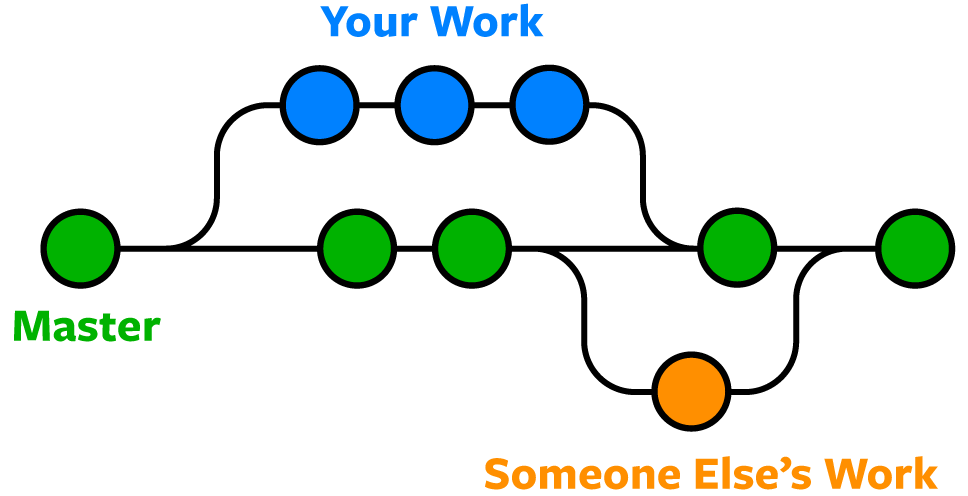
Git is a distributed version control system. It was originally created to make it easier for many developers to contribute to a very large open source code project. It allowed developers across the world to hack on this project in a way that prevented the original version from being broken by mistake. When a developer feels that they are ready for their changes to be incorporated into the original, they can send their changes to the owner of the original, and the owner can agree to incorporate the changes (or not). Git makes it easy to see the changes made, so even if the project is huge, the changes are very clear, and the owner can be confident that the changes won't break the original.
Github was developed a few years after Git. It adds features that make collaboration more efficient, like bug tracking, feature requests, task managment, and more. You can do things like tag users (à la Slack, Twitter, etc.) to get their attention, and you can integrate a bunch of other tools to make sure that your project is always working as intended.