

The developer friendly IDE for RDF knowledge graphs.
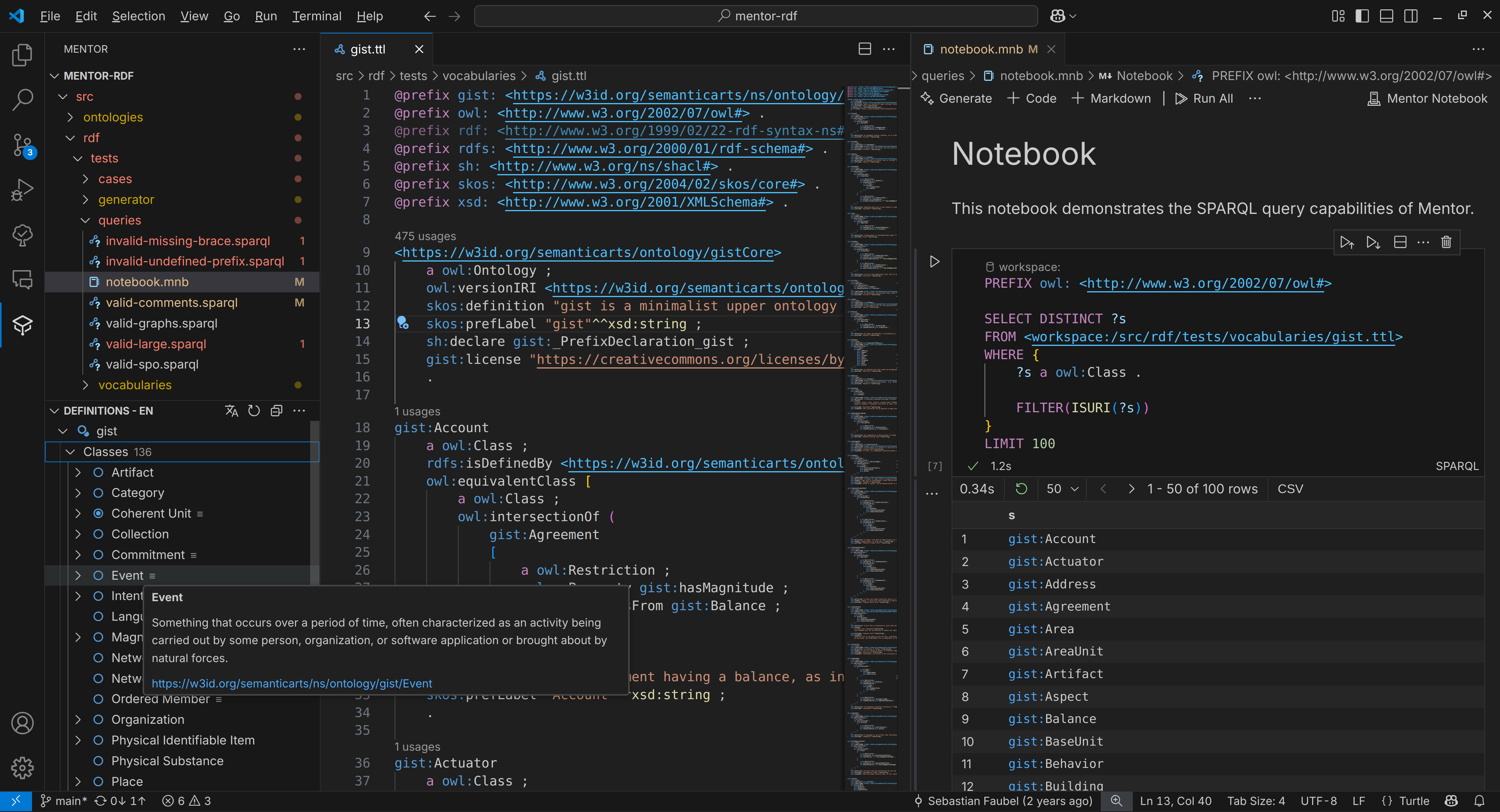
- Workspace Management
- Fast indexing, cross-file references, code lenses and quick navigation to definitions.
- Content Navigation
- Browsable definition trees for RDFS / OWL / SHACL / SKOS
- Structural reasoning and multilingual labels.
- Syntax Highlighting & Validation
- N3 / Turtle / TriG / RDF-XML and SPARQL.
- Editing
- Repository wide auto-complete
- Built in prefix.cc support for namespace lookups
- Refactoring
- Refactor prefixed names and IRIs
- Auto-implement / sort / remove prefixes
- Notebooks && SPARQL
- Built-in triple store for all files in the workspace.
- Run queries against remote endpoints or workspace files.
- Interactive notebooks with support for Markdown, RDF data and SPARQL queries.
- Collaboration
- Runs in the browser (e.g.
vscode.dev), supports editing GitHub repositories and live collaboration.
- Runs in the browser (e.g.
- Added support for highlighting unused variables in SPARQL queries
- Added support for indexing notebook cells upon indexing the workspace
- Fixed invalid syntax highlighting of prefixes that contain '-' characters
- Moved SPARQL connection management into dedicated view
- Removed old connection management tree view
- Added basic graph management:
- Can list SPARQL endpoint graphs in connection view
- Can drop graphs to binding result view
You can install the Mentor extension directly from the Visual Studio Code marketplace. Follow these steps:
- Open Visual Studio Code.
- Click on the Extensions view icon on the Sidebar (or press
Ctrl+Shift+X). - In the Extensions view, enter
Mentorin the search form and pressEnter. - Locate the Mentor extension in the search results and click on the install button.
We appreciate contributions in all forms! By contributing to Mentor, you'll help make it a better tool for the RDF and knowledge graph community. Contributions can take many shapes, including:
-
Bug reports: If you encounter an issue, please report it to us so we can investigate and fix it. Your feedback helps us understand what works well and what we can improve.
-
Reviews and feedback: Share your experience with Mentor by leaving a review on the Visual Studio Marketplace.
-
Code contributions: Help us improve the extension by submitting new features, bug fixes, or refactoring existing code.
To get started, fork this repository on GitHub and then clone the fork to your local computer. Once cloned, add an upstream remote pointing to the primary toolkit repo.
git clone https://github.com/faubulous/mentor-vscode.git
cd mentor-vscode
Install the project dependencies.
npm installCreate a development build of the extension.
npm run build:watchTo start debugging the 'Launch Extension' configuration, follow these steps:
- Open Visual Studio Code.
- Click on the Run view icon on the Sidebar (or press
Ctrl+Shift+D). - At the top of the Run view, in the dropdown list of debug configurations, select 'Launch Extension'.
- After the configuration is set, you can start debugging by clicking on the green 'Start Debugging' button (or press
F5).
This will start a new instance of Visual Studio Code with the Mentor extension loaded. You can set breakpoints in your code to stop execution and inspect variables, call stack, and so on.
npm install --global @vscode/vsceCreate a production build and install it into your local Visual Studio Code environment:
npm run package:installDistributed under the GPL Version 3 License. See LICENSE for more information.