ddduck defines a small, machine-readable product-spec format. The framework keeps schemas, validators, policies, and generators separate from each consumer product.
Start with the getting-started guide for a working first product. Then use the model guide, the model reference, the CLI reference, and the architecture guide as needed.
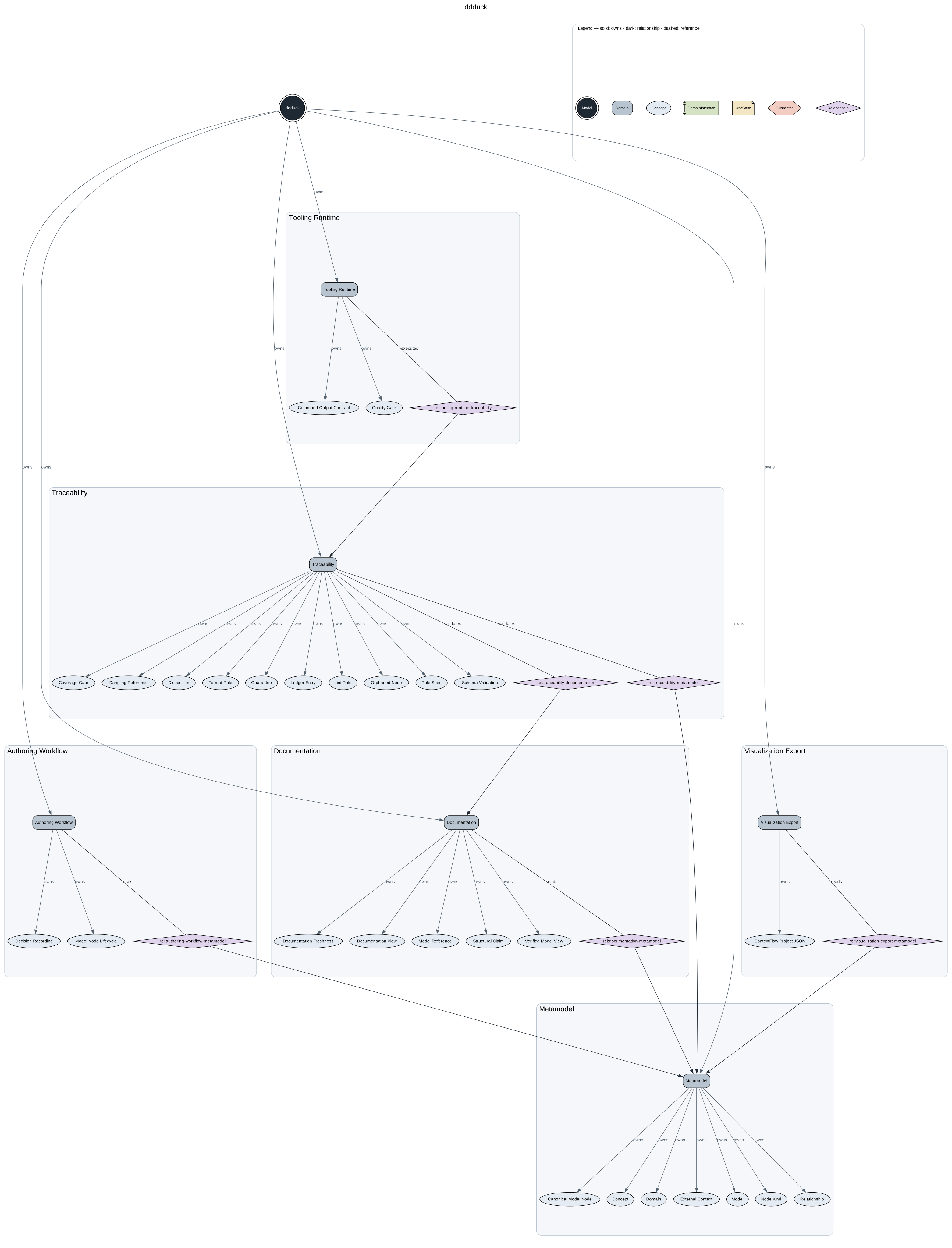
Every product renders to a verified graph of its model — the ownership spine
(Model → Domain → members), reference edges, and a legend decoding shapes and
line styles. ddduck generate produces it as a deterministic SVG. This
framework's own model:
A consumer product owns one product root. Documentation-centric repositories can use docs/ddd/;
small or dedicated product repositories can use ddd/:
docs/ddd/
  product.yaml
  model/
    domains/
    concepts/
    relationships/
    use-cases/
    interfaces/
    guarantees/
  decisions/
  generated/
    docs/
    graph/
product.yaml and files under model/ are canonical source. generated/ is derived
output: never edit it by hand.
Repository-local ddduck tool metadata lives outside the product root in .ddduck/ at the
enclosing repository root; without one, ddduck init writes it inside the new product root
instead (see the CLI reference). For example,
this framework repository stores its own model in docs/ddd/ and records that selection in:
{
  "schemaVersion": "1",
  "productRoot": "docs/ddd",
  "ignore": ["vendor", "target", "build", "dist", "__pycache__"]
}
ignore lists directory names the scanners skip on top of the always-ignored
dot-directories and node_modules; it is written pre-filled by ddduck init
and fully editable (see the CLI reference).
Install the CLI from npm (requires Node.js 22 or newer):
npm install -g ddduckOr run it from a local checkout for contributing (npm install, then npm link or
node <checkout>/scripts/ddduck.mjs — see
Install ddduck). Create a product root with:
ddduck init ddd --id model:<product-id>--root <path> is always the explicit override; without it, ddduck resolves the enclosing
product root, then .ddduck/config.json, then a unique repository candidate (see
the CLI reference for the full order, including the
example-candidate fallback), and fails with a diagnostic when the choice is ambiguous. The mutation surface is deliberately narrow — check,
generate, and the create/move/split/retire Guarantee lifecycle commands — and every
successful source mutation regenerates the derived views. The canonical resolution rules and
command contracts live in the CLI reference.
YAML remains the normal human-authored source format, with ddduck check as the deterministic
safety net.
Install the evidence-backed model maintenance skill in a consumer repository:
ddduck install skill update-ddduck-specs --repo <repository-root>--repo defaults to the current directory. See the CLI reference
for the installed layout, host invocation, and plan-only behavior.
The bounded read API — ddduck query node|neighbors|impact|anchors|spec|context — emits JSON
only (--json is optional and a no-op) and never writes source or generated output. Default
queries expose only active Guarantees; pass --history to read a retired or split Guarantee's
historical record instead of its lifecycle redirect. The full query table and response contract
live in the CLI reference.
ddduck query context is the agent-facing bounded read for an explicit selection: full
canonical records for the selected IDs, every direct edge that touches them, one-hop perimeter
summaries, and a SHA-256 sourceDigest identifying the source snapshot — authoritative only
for reads that did not race a mutation. Its boundaries and refusal rules are documented in
the CLI reference; responses conform to
schemas/context-pack.schema.json.
Maintainer surface: see Agent-readiness evals in the development guide.
Maintainer surface: see Revision-scoped FR-to-code audits in the development guide.
Global PolicySpec declarations live in policies/, outside any product graph: see
Framework contracts in the development guide.