
A Home Assistant custom integration that monitors fuel prices at UK petrol stations using official government data feeds.
Find the cheapest fuel near you!


- ✅ Official Fuel Finder API - Uses the UK Government Fuel Finder API (OAuth-protected)
- ✅ Real-time Price Monitoring - Track E10, E5, B7 (Diesel), and SDV (Super Diesel) prices
- ✅ Location-Based Search - Find stations within a specified radius of your home or any location
- ✅ Automatic Updates - Configurable update intervals from 5 minutes to 24 hours
- ✅ Easy Setup - Simple configuration flow with map-based location selection
- ✅ Cheapest Price Sensors - Automatically shows the cheapest price for each fuel type
- ✅ Ranked Cheapest Options - Optionally expose 2nd, 3rd (up to 5th) cheapest stations per fuel type
- E10 - Standard unleaded petrol (10% ethanol)
- E5 - Super unleaded petrol (5% ethanol)
- B7 - Standard diesel (7% biodiesel)
- SDV - Super diesel / Premium diesel
This integration now uses the UK Government Fuel Finder platform directly:
- Public data API:
GET /api/v1/pfsandGET /api/v1/pfs/fuel-prices - Authentication: OAuth client credentials via
POST /api/v1/oauth/generate_access_token - Documentation: Fuel Finder Developer Portal
You must create your own API application credentials before setup.
- Ensure HACS is installed
- Add this repository as a custom repository in HACS:
- Click on HACS in the sidebar
- Click on "Integrations"
- Click the three dots in the top right corner
- Select "Custom repositories"
- Enter the repository URL:
https://github.com/beecho01/Fuel-Prices-UK - Select category: "Integration"
- Click "Add"
- Find "Fuel Prices UK" in the HACS integration list
- Click "Download"
- Restart Home Assistant
- Download the latest release from GitHub Releases
- Extract the
custom_components/fuel_prices_ukdirectory to your Home Assistantcustom_componentsdirectory - Restart Home Assistant
Before adding the integration, create API credentials:
- Sign in at the Fuel Finder Developer Portal
- Create an Information Recipient application
- Copy your
client_idandclient_secret
Then in Home Assistant:
- Go to Settings → Devices & Services
- Click + Add Integration
- Search for "Fuel Prices UK"
- Follow the configuration wizard:
- Fuel Finder API Client ID
- Fuel Finder API Client Secret
- Location Method (map or address/postcode)
- Update Interval: How often to fetch prices (minimum 300 seconds)
- Location: Map pin or address/postcode lookup
- Search Radius: Distance in miles (0.5-31)
- Fuel Types: Fuel types to monitor
After setup, you can update these settings by clicking Configure on the integration:
- Fuel Finder API credentials
- Update interval
- Search radius
- Fuel types to monitor
- Number of cheapest options to expose per fuel type (1-5)
The integration creates ranked sensors for each fuel type you've selected.
The integration creates ranked sensors per selected fuel type based on your Number of Cheapest Options setting.
- Rank 1 keeps the existing entity naming style and represents the cheapest station.
- Higher ranks expose next-best alternatives (for example 2nd and 3rd cheapest).
Rank 1 Sensor Name: sensor.fuel_price_uk_[location]_[distance]_cheapest_[fuel_type]
Higher Rank Sensor Name: sensor.fuel_price_uk_[location]_[distance]_rank_[n]_cheapest_[fuel_type]
Example: sensor.fuel_price_uk_sw1a_2aa_3_mi_cheapest_e10
State: Current price for that rank in £/L to 3 decimal places (e.g. £1.379)
Attributes:
fuel_type: The type of fuel (E10, E5, B7, SDV)price_rank: Rank position (1 = cheapest, 2 = second cheapest, etc.)price_rank_label: Human-readable rank label (for example1st,2nd,3rd)address: Full address of the stationpostcode: Postcode of the stationbrand: Retailer brand (e.g., "Tesco", "Shell")latitude: Station latitudelongitude: Station longitudedistance: Distance from your location (km)last_updated: When the price was last updatedunit_of_measurement: GBPdevice_class: monetaryicon: mdi:gas-station
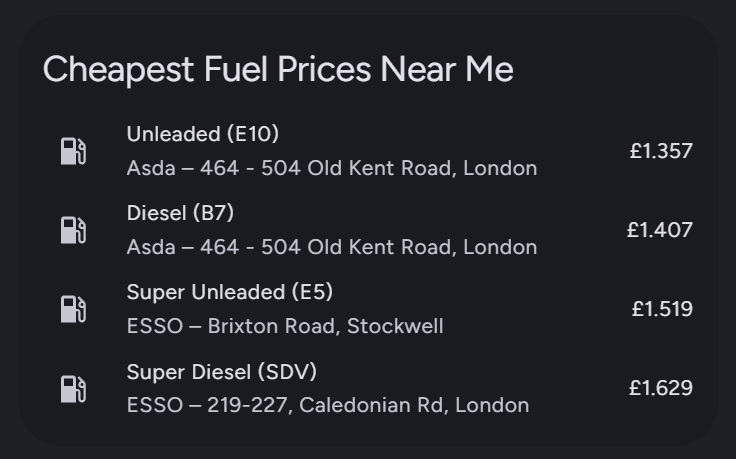
type: entities
title: Cheapest Fuel Prices Near Me
entities:
  - entity: sensor.fuel_price_uk_sw1a_2aa_3_mi_cheapest_e10
    name: Unleaded (E10)
    secondary_info: last-updated
  - entity: sensor.fuel_price_uk_sw1a_2aa_3_mi_cheapest_b7
    name: Diesel (B7)
    secondary_info: last-updated
  - entity: sensor.fuel_price_uk_sw1a_2aa_3_mi_cheapest_e5
    name: Super Unleaded (E5)
    secondary_info: last-updated
  - entity: sensor.fuel_price_uk_sw1a_2aa_3_mi_cheapest_sdv
    name: Super Diesel (SDV)
    secondary_info: last-updated
The standard Home Assistant entities card does not evaluate Jinja templates in secondary_info.
If you want brand + address rendered inline, use a custom row card such as custom:template-entity-row from HACS.
Use this if you enabled Number of Cheapest Options as 3 or higher.
type: entities
title: E10 Cheapest Alternatives
entities:
  - entity: sensor.fuel_price_uk_sw1a_2aa_3_mi_cheapest_e10
    name: E10 1st Cheapest
    secondary_info: last-updated
  - entity: sensor.fuel_price_uk_sw1a_2aa_3_mi_rank_2_cheapest_e10
    name: E10 2nd Cheapest
    secondary_info: last-updated
  - entity: sensor.fuel_price_uk_sw1a_2aa_3_mi_rank_3_cheapest_e10
    name: E10 3rd Cheapest
    secondary_info: last-updated
You can repeat the same pattern for other fuel types (b7, e5, sdv) by changing the entity suffix.
Show fuel stations on a map:
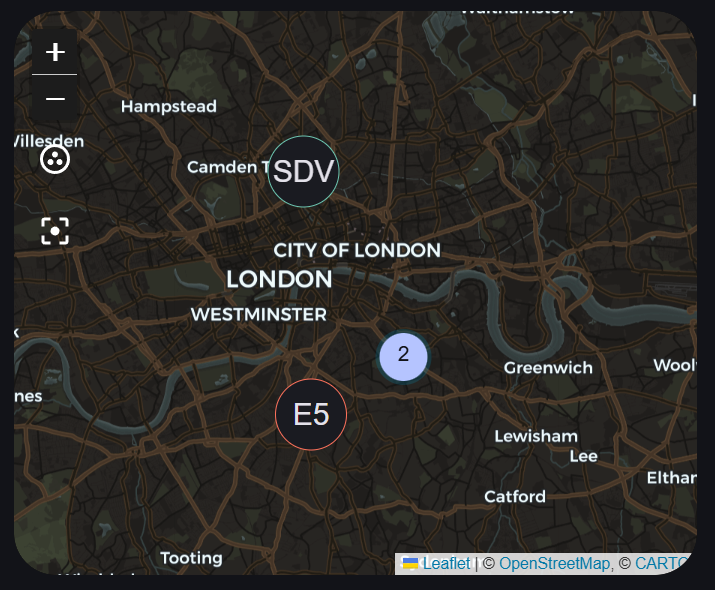
type: map
entities:
  - entity: sensor.fuel_price_uk_sw1a_2aa_3_mi_cheapest_e10
    label_mode: attribute
    attribute: fuel_type
  - entity: sensor.fuel_price_uk_sw1a_2aa_3_mi_cheapest_b7
    label_mode: attribute
    attribute: fuel_type
  - entity: sensor.fuel_price_uk_sw1a_2aa_3_mi_cheapest_e5
    label_mode: attribute
    attribute: fuel_type
  - entity: sensor.fuel_price_uk_sw1a_2aa_3_mi_cheapest_sdv
    label_mode: attribute
    attribute: fuel_type
auto_fit: true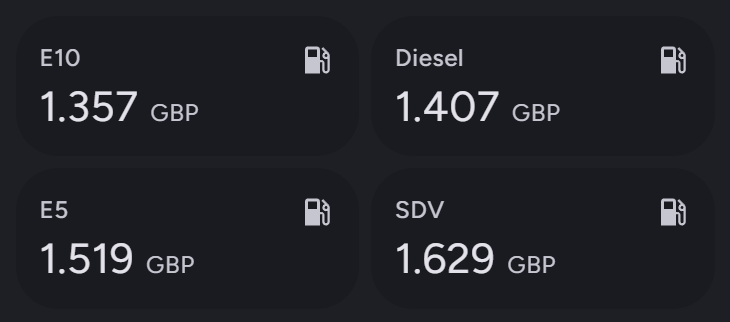
type: grid
square: false
columns: 2
cards:
  - type: sensor
    entity: sensor.fuel_price_uk_sw1a_2aa_3_mi_cheapest_e10
    name: E10
    icon: mdi:gas-station
  - type: sensor
    entity: sensor.fuel_price_uk_sw1a_2aa_3_mi_cheapest_b7
    name: Diesel
    icon: mdi:gas-station
  - type: sensor
    entity: sensor.fuel_price_uk_sw1a_2aa_3_mi_cheapest_e5
    name: E5
    icon: mdi:gas-station
  - type: sensor
    entity: sensor.fuel_price_uk_sw1a_2aa_3_mi_cheapest_sdv
    name: SDV
icon: mdi:gas-stationThis integration ships with a lightweight async client in custom_components/fuel_prices_uk/api_client.py that:
- Exchanges your
client_idandclient_secretfor a short-lived OAuth token - Fetches station metadata (
/api/v1/pfs) and fuel prices (/api/v1/pfs/fuel-prices) in API batches - Normalises fuel types from the new API (for example
B7_STANDARD→B7) - Filters stations within your configured radius and exposes the cheapest values per fuel type
- Minimum update interval: 5 minutes (300 seconds)
- Maximum update interval: 24 hours (86400 seconds)
- Recommended: 1 hour (3600 seconds) - this balances fresh data with API usage
Note: Most retailers update their prices once per day, typically overnight.
- Check that you have an internet connection
- Verify your location and radius settings
- Some areas may have limited station coverage
- Try increasing the search radius
- Check the
last_updatedattribute on the sensor - Retailers update at different times - some may be slower than others
- Try reducing the update interval for more frequent checks
- Check your Home Assistant logs for errors
- Verify your Fuel Finder API credentials are valid
- Ensure you have Python 3.9 or higher
- Try reinstalling the integration
- Restart Home Assistant
During setup, the integration now creates entities first and performs the initial API sync in the background. If the Fuel Finder API is slow, sensors can remain unavailable for a short period before prices appear.
- Wait a few minutes and then refresh entity states
- Check logs for
[coordinator][startup_refresh]messages - If the first sync fails, the scheduled refresh cycle will retry automatically
- Run
python scripts/check_api_client.py --client-id YOUR_ID --client-secret YOUR_SECRETto perform a quick end-to-end check against the Fuel Finder API. - You can also set
FUEL_FINDER_CLIENT_IDandFUEL_FINDER_CLIENT_SECRETenvironment variables and run the same script without flags.
- Data quality depends on retailer participation in the government scheme
- Not all fuel stations are included (only those participating in the transparency scheme)
- Prices may be up to 24 hours old depending on when retailers update their data
- Some retailers may not provide all fuel types
For issues, feature requests, or questions:
- Open an issue on GitHub
- Check existing issues to see if your question has been answered
This integration uses official data provided by the UK Government Fuel Finder service:
This project is licensed under the Apache 2.0 License - see the LICENSE file for details.
This integration is not affiliated with or endorsed by the UK Government. Price data is provided as-is from official government feeds, but accuracy cannot be guaranteed. Always verify prices at the pump before filling up.
Made with ❤️ for the Home Assistant community