


📣 Stay updated! Subscribe to our newsletter for the latest releases, tutorials, and tips.







AlbumentationsX is a Python library for image augmentation. It provides high-performance, robust implementations and cutting-edge features for computer vision tasks. Image augmentation is used in deep learning and computer vision to increase the quality of trained models. The purpose of image augmentation is to create new training samples from the existing data.
If AlbumentationsX supports your research, please cite AlbumentationsX: One Augmentation Pipeline for Images and Related Annotations. Your citation makes the project's research impact visible to funders and helps sustain maintenance.
@article{iglovikov2026albumentationsx,
    title = {AlbumentationsX: One Augmentation Pipeline for Images and Related Annotations},
    author = {Iglovikov, Vladimir},
    journal = {arXiv preprint arXiv:2608.11123},
    year = {2026},
    doi = {10.48550/arXiv.2608.11123},
    url = {https://arxiv.org/abs/2608.11123}
}AlbumentationsX offers two license options:
- Commercial license: choose alternative permissions for proprietary software under an agreement covering your team, products, and deployments. Request a quote or email vladimir@albumentations.ai.
- AGPL-3.0-only: available at no charge. The AGPL permits commercial use subject to its terms. Read the license guide.
Commercial, proprietary, internal, or production status alone does not require a commercial license. See the AGPL text and licensing details and history for the applicable terms.
For supplier questionnaires and purchasing documents, see institutional procurement.
# Install the PyTorch build for your platform first. For Linux CPU-only:
pip install "torch>=2.13.0" --index-url https://download.pytorch.org/whl/cpu

# Then install AlbumentationsX with OpenCV.
pip install "albumentationsx[headless]"
import albumentations as A
transform = A.Compose(
[
A.RandomCrop(width=256, height=256),
A.HorizontalFlip(p=0.5),
A.RandomBrightnessContrast(p=0.2),
]
)Here is an example of how you can apply some pixel-level augmentations to create new images from the original one:

- Complete Computer Vision Support: Works with all major CV tasks
- Simple, Unified API: One consistent interface for all data types - RGB/grayscale/multispectral images, masks, bounding boxes, and keypoints.
- Rich Augmentation Library: 70+ high-quality augmentations to enhance your training data.
- Fast: Consistently benchmarked as the fastest augmentation library also shown below section, with optimizations for production use.
- Deep Learning Integration: Works with PyTorch, TensorFlow, and other frameworks. Part of the PyTorch ecosystem.
- Created by Experts: Built by developers with deep experience in computer vision and machine learning competitions.
- Citing
- Licensing
- Quick Start
- Why AlbumentationsX
- Authors
- Installation
- Documentation
- A simple example
- List of augmentations
- Augmentation examples
- Benchmark results
- Performance comparison
- Contribute
- License
- Contact
- Newsletter
Vladimir I. Iglovikov | Kaggle Grandmaster
Mikhail Druzhinin | Kaggle Expert
Alexander Buslaev | Kaggle Master
Eugene Khvedchenya | Kaggle Grandmaster
AlbumentationsX requires Python 3.10 or higher. To install the latest version from PyPI:
Install the PyTorch build for your CPU, CUDA, or MPS environment before installing AlbumentationsX. For a Linux CPU-only environment:
pip install "torch>=2.13.0" --index-url https://download.pytorch.org/whl/cpuFor CUDA or macOS (MPS), use the matching command from the PyTorch installation selector. AlbumentationsX does not choose or install a PyTorch accelerator build.
If you already have OpenCV installed (any variant), install AlbumentationsX:
pip install -U albumentationsxIf you don't have OpenCV installed yet, choose the appropriate variant:
# For servers/Docker (no GUI support, lighter package)
pip install -U "albumentationsx[headless]"

# For local development with GUI support (cv2.imshow, etc.)
pip install opencv-python && pip install -U albumentationsx

# For OpenCV with extra algorithms (contrib modules)
pip install opencv-contrib-python && pip install -U albumentationsx

# For contrib + headless
pip install -U "albumentationsx[contrib-headless]"
Note: AlbumentationsX works with any OpenCV variant:
opencv-python(full version with GUI)opencv-python-headless(no GUI, smaller size)opencv-contrib-python(with extra modules)opencv-contrib-python-headless(contrib + headless)
Choose the one that fits your needs. The library will detect whichever is installed.
pip install albumentationsx installs the base dependency set without PyTorch. It is useful for dependency-only
consumers such as documentation builds. Importing albumentations requires the PyTorch build you selected above.
Other installation options are described in the documentation.
The full documentation is available at https://albumentations.ai/docs/. For security, release verification, and contributor guides, see the repository documentation.
For AI-assisted augmentation review, AlbumentationsX can also be used through MCP-capable hosts such as Claude Desktop, Cursor, Claude Code, and Codex. The community AlbumentationsX MCP integration lets assistants inspect transforms, validate pipelines, render bounded local preview batches, compare preview runs, collect concrete feedback, and export reproducible AlbumentationsX pipelines.
import albumentations as A
import cv2

transform = A.Compose(
    [
        A.RandomCrop(width=256, height=256),
        A.HorizontalFlip(p=0.5),
        A.RandomBrightnessContrast(p=0.2),
    ]
)

image = cv2.imread("image.jpg", cv2.IMREAD_COLOR_RGB)

transformed = transform(image=image)
transformed_image = transformed["image"]
AlbumentationsX collects usage statistics by default to guide product development. See data collection and opt-out.
Pixel-level transforms will change just an input image and will leave any additional targets such as masks, bounding boxes, and keypoints unchanged. For volumetric data (a volume and 3D masks), these transforms are applied independently to each slice along the Z-axis (depth dimension), maintaining consistency across the volume. The list of pixel-level transforms:
- AdditiveNoise
- AdvancedBlur
- AnnotationArtifacts
- AtmosphericFog
- AutoContrast
- Blur
- CLAHE
- ChannelDropout
- ChannelShuffle
- ChannelSwap
- ChromaticAberration
- ColorJitter
- Colorize
- Defocus
- Dithering
- Downscale
- Emboss
- Enhance
- Equalize
- ExposureMatching
- FDA
- FancyPCA
- FilmGrain
- FromFloat
- GaussNoise
- GaussianBlur
- GlassBlur
- HEStain
- Halftone
- HistogramMatching
- HueSaturationValue
- ISONoise
- KSpaceSpikeNoise
- Illumination
- ImageCompression
- InvertImg
- LensFlare
- MedianBlur
- ModeFilter
- MotionBlur
- MultiplicativeNoise
- Normalize
- PhotoMetricDistort
- PixelDistributionAdaptation
- PlanckianJitter
- PlasmaBrightnessContrast
- PlasmaShadow
- Posterize
- RGBShift
- RandomBrightnessContrast
- RandomFog
- RandomGamma
- RandomGravel
- RandomRain
- RandomShadow
- RandomSnow
- RandomSunFlare
- RandomToneCurve
- RicianNoise
- RingingOvershoot
- SaltAndPepper
- Sharpen
- ShotNoise
- StochasticConvolution
- Solarize
- Spatter
- Superpixels
- TextImage
- ToFloat
- ToGray
- ToRGB
- ToSepia
- UnsharpMask
- Vignetting
- ZoomBlur
Spatial-level transforms will simultaneously change both an input image as well as additional targets such as masks, bounding boxes, and keypoints. For volumetric data (a volume and 3D masks), these transforms are applied independently to each slice along the Z-axis (depth dimension), maintaining consistency across the volume. The following table shows which additional targets are supported by each transform:
- Volume: 3D array of shape (D, H, W) or (D, H, W, C) where D is depth, H is height, W is width, and C is number of channels (optional)
- Mask3D: Binary or multi-class 3D mask of shape (D, H, W) where each slice represents segmentation for the corresponding volume slice
| Transform | Image | Mask | BBoxes (HBB) | BBoxes (OBB) | Keypoints | Volume | Mask3D |
|---|---|---|---|---|---|---|---|
| Affine | ✓ | ✓ | ✓ | ✓ | ✓ | ✓ | ✓ |
| AtLeastOneBBoxRandomCrop | ✓ | ✓ | ✓ | ✓ | ✓ | ✓ | ✓ |
| BBoxSafeRandomCrop | ✓ | ✓ | ✓ | ✓ | ✓ | ✓ | ✓ |
| BBoxSubsetSafeRandomCrop | ✓ | ✓ | ✓ | ✓ | ✓ | ✓ | ✓ |
| CenterCrop | ✓ | ✓ | ✓ | ✓ | ✓ | ✓ | ✓ |
| CoarseDropout | ✓ | ✓ | ✓ | ✓ | ✓ | ✓ | |
| ConstrainedCoarseDropout | ✓ | ✓ | ✓ | ✓ | ✓ | ✓ | |
| CopyAndPaste | ✓ | ✓ | ✓ | ✓ | |||
| Crop | ✓ | ✓ | ✓ | ✓ | ✓ | ✓ | ✓ |
| CropAndPad | ✓ | ✓ | ✓ | ✓ | ✓ | ✓ | ✓ |
| CropNonEmptyMaskIfExists | ✓ | ✓ | ✓ | ✓ | ✓ | ✓ | ✓ |
| D4 | ✓ | ✓ | ✓ | ✓ | ✓ | ✓ | ✓ |
| ElasticTransform | ✓ | ✓ | ✓ | ✓ | ✓ | ✓ | ✓ |
| Erasing | ✓ | ✓ | ✓ | ✓ | ✓ | ✓ | |
| FrequencyMasking | ✓ | ✓ | ✓ | ✓ | ✓ | ✓ | |
| GridDistortion | ✓ | ✓ | ✓ | ✓ | ✓ | ✓ | ✓ |
| GridDropout | ✓ | ✓ | ✓ | ✓ | ✓ | ✓ | |
| GridElasticDeform | ✓ | ✓ | ✓ | ✓ | ✓ | ✓ | |
| GridMask | ✓ | ✓ | ✓ | ✓ | ✓ | ✓ | |
| GuidedCoarseDropout | ✓ | ✓ | ✓ | ✓ | |||
| HorizontalFlip | ✓ | ✓ | ✓ | ✓ | ✓ | ✓ | ✓ |
| Lambda | ✓ | ✓ | ✓ | ✓ | ✓ | ✓ | ✓ |
| LetterBox | ✓ | ✓ | ✓ | ✓ | ✓ | ✓ | ✓ |
| LongestMaxSize | ✓ | ✓ | ✓ | ✓ | ✓ | ✓ | ✓ |
| MaskDropout | ✓ | ✓ | ✓ | ✓ | ✓ | ✓ | |
| Morphological | ✓ | ✓ | ✓ | ✓ | ✓ | ✓ | |
| Mosaic | ✓ | ✓ | ✓ | ✓ | ✓ | ||
| NoOp | ✓ | ✓ | ✓ | ✓ | ✓ | ✓ | ✓ |
| OpticalDistortion | ✓ | ✓ | ✓ | ✓ | ✓ | ✓ | ✓ |
| OverlayElements | ✓ | ✓ | |||||
| Pad | ✓ | ✓ | ✓ | ✓ | ✓ | ✓ | ✓ |
| PadIfNeeded | ✓ | ✓ | ✓ | ✓ | ✓ | ✓ | ✓ |
| Perspective | ✓ | ✓ | ✓ | ✓ | ✓ | ✓ | ✓ |
| PiecewiseAffine | ✓ | ✓ | ✓ | ✓ | ✓ | ✓ | ✓ |
| PixelDropout | ✓ | ✓ | ✓ | ✓ | ✓ | ✓ | ✓ |
| PixelSpread | ✓ | ✓ | ✓ | ✓ | ✓ | ✓ | ✓ |
| RandomCrop | ✓ | ✓ | ✓ | ✓ | ✓ | ✓ | ✓ |
| RandomCropFromBorders | ✓ | ✓ | ✓ | ✓ | ✓ | ✓ | ✓ |
| RandomCropNearBBox | ✓ | ✓ | ✓ | ✓ | ✓ | ✓ | ✓ |
| RandomGridShuffle | ✓ | ✓ | ✓ | ✓ | ✓ | ✓ | |
| RandomResizedCrop | ✓ | ✓ | ✓ | ✓ | ✓ | ✓ | ✓ |
| RandomRotate90 | ✓ | ✓ | ✓ | ✓ | ✓ | ✓ | ✓ |
| RandomScale | ✓ | ✓ | ✓ | ✓ | ✓ | ✓ | ✓ |
| RandomSizedBBoxSafeCrop | ✓ | ✓ | ✓ | ✓ | ✓ | ✓ | ✓ |
| RandomSizedCrop | ✓ | ✓ | ✓ | ✓ | ✓ | ✓ | ✓ |
| Resize | ✓ | ✓ | ✓ | ✓ | ✓ | ✓ | ✓ |
| Rotate | ✓ | ✓ | ✓ | ✓ | ✓ | ✓ | ✓ |
| SafeRotate | ✓ | ✓ | ✓ | ✓ | ✓ | ✓ | ✓ |
| ShiftScaleRotate | ✓ | ✓ | ✓ | ✓ | ✓ | ✓ | ✓ |
| SmallestMaxSize | ✓ | ✓ | ✓ | ✓ | ✓ | ✓ | ✓ |
| SquareSymmetry | ✓ | ✓ | ✓ | ✓ | ✓ | ✓ | ✓ |
| ThinPlateSpline | ✓ | ✓ | ✓ | ✓ | ✓ | ✓ | ✓ |
| TimeMasking | ✓ | ✓ | ✓ | ✓ | ✓ | ✓ | |
| TimeReverse | ✓ | ✓ | ✓ | ✓ | ✓ | ✓ | ✓ |
| Transpose | ✓ | ✓ | ✓ | ✓ | ✓ | ✓ | ✓ |
| VerticalFlip | ✓ | ✓ | ✓ | ✓ | ✓ | ✓ | ✓ |
| WaterRefraction | ✓ | ✓ | ✓ | ✓ | ✓ | ✓ | ✓ |
| XYMasking | ✓ | ✓ | ✓ | ✓ | ✓ | ✓ |
3D transforms operate on volumetric data. Spatial transforms can also modify associated 3D masks and keypoints, while volume-intensity transforms leave those targets unchanged.
Where:
- Volume: 3D array of shape (D, H, W) or (D, H, W, C) where D is depth, H is height, W is width, and C is number of channels (optional)
- Mask3D: Binary or multi-class 3D mask of shape (D, H, W) where each slice represents segmentation for the corresponding volume slice
| Transform | Volume | Mask3D | Keypoints |
|---|---|---|---|
| Affine3D | ✓ | ✓ | ✓ |
| Anisotropy3D | ✓ | ||
| CenterCrop3D | ✓ | ✓ | ✓ |
| CoarseDropout3D | ✓ | ✓ | ✓ |
| CubicSymmetry | ✓ | ✓ | ✓ |
| ElasticTransform3D | ✓ | ✓ | ✓ |
| Flip3D | ✓ | ✓ | ✓ |
| GridShuffle3D | ✓ | ✓ | ✓ |
| Pad3D | ✓ | ✓ | ✓ |
| PadIfNeeded3D | ✓ | ✓ | ✓ |
| RandomCrop3D | ✓ | ✓ | ✓ |
| RandomRotate90_3D | ✓ | ✓ | ✓ |
| Resize3D | ✓ | ✓ | ✓ |
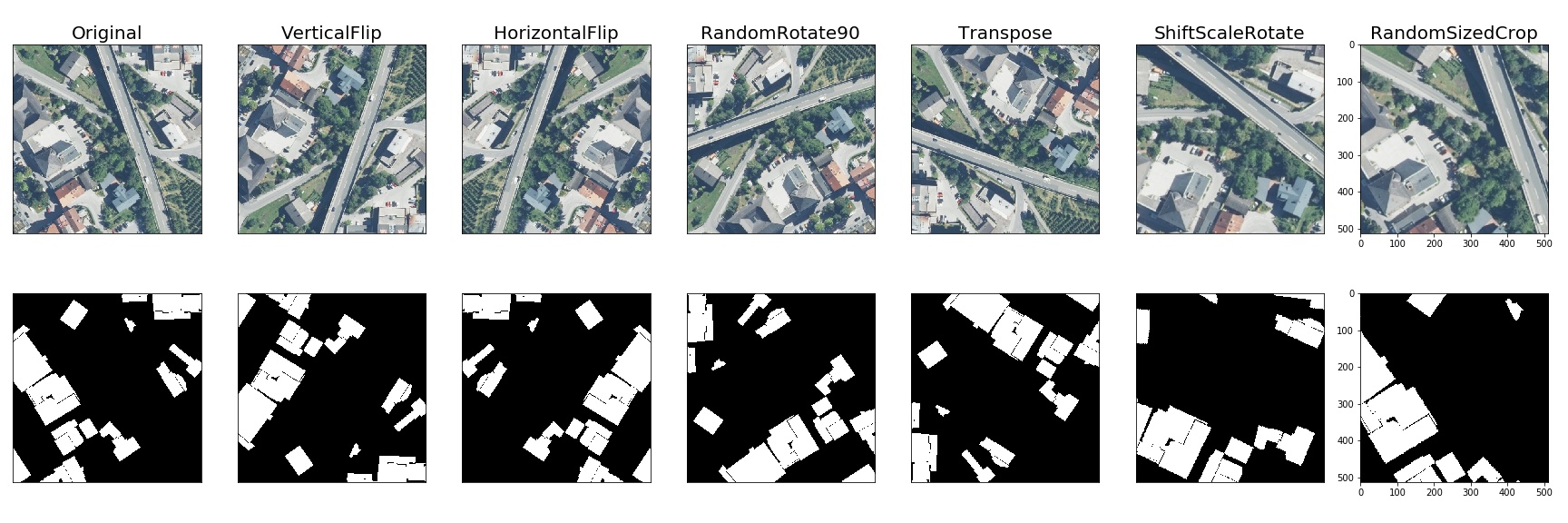
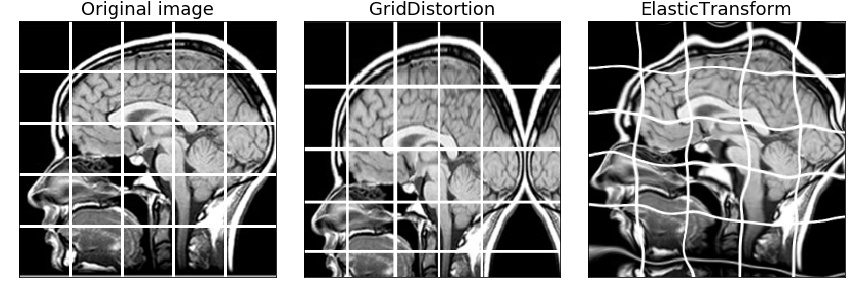
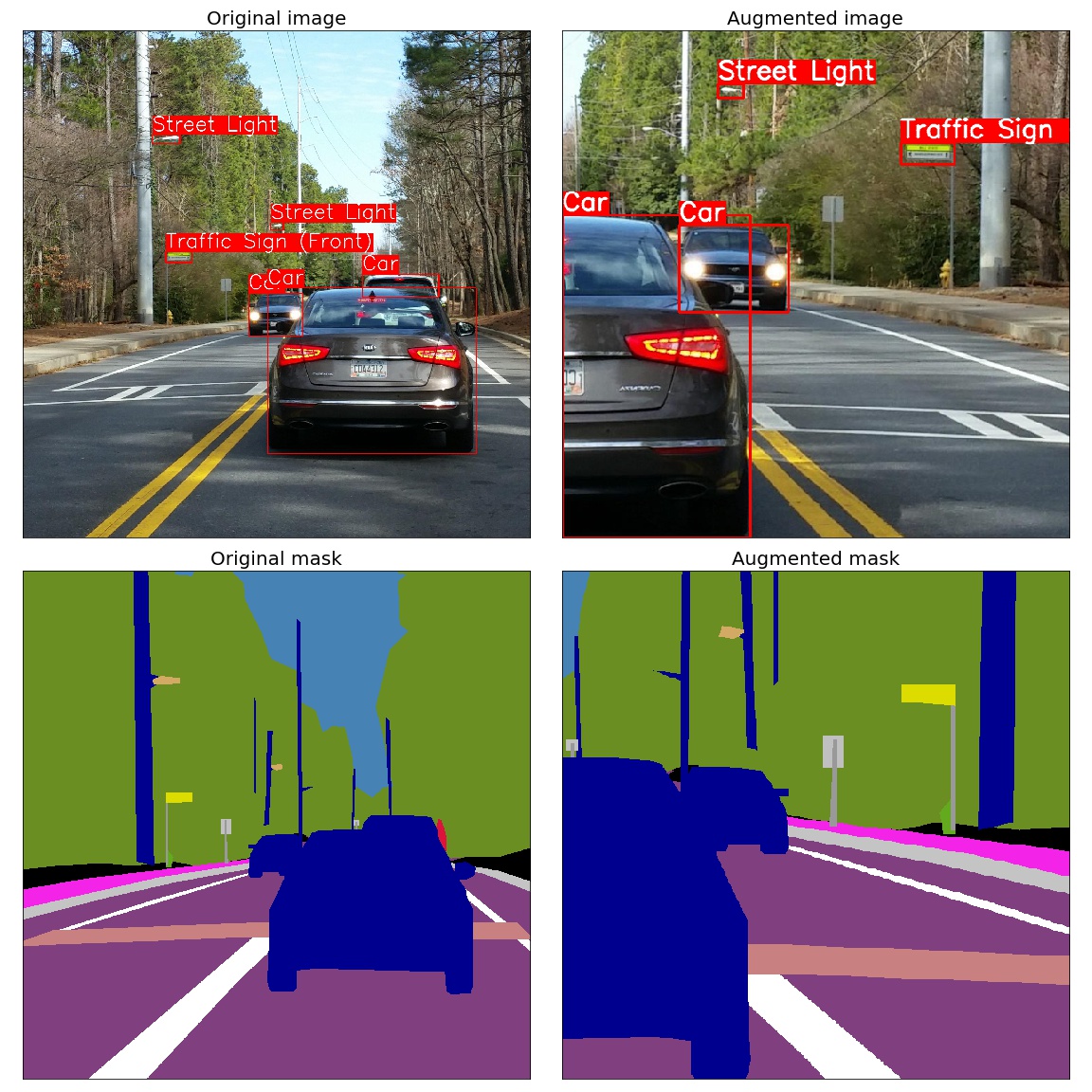
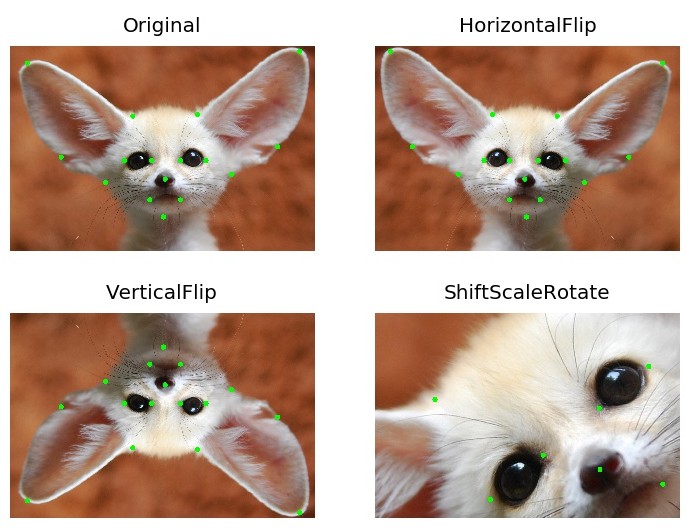
These results cover the library versions listed below.
- Platform: macOS-15.1-arm64-arm-64bit
- Processor: arm
- CPU Count: 16
- Python Version: 3.12.8
- Number of images: 2000
- Runs per transform: 5
- Max warmup iterations: 1000
- albumentationsx: 2.0.8
- augly: 1.0.0
- imgaug: 0.4.0
- kornia: 0.8.0
- torchvision: 0.20.1
Number shows how many uint8 images per second can be processed on one CPU thread. Larger is better. The Speedup column shows how many times faster AlbumentationsX is compared to the fastest other library for each transform.
| Transform | albumentationsx 2.0.8 |
augly 1.0.0 |
imgaug 0.4.0 |
kornia 0.8.0 |
torchvision 0.20.1 |
Speedup (AlbX/fastest other) |
|---|---|---|---|---|---|---|
| Affine | 1445 ± 9 | - | 1328 ± 16 | 248 ± 6 | 188 ± 2 | 1.09x |
| AutoContrast | 1657 ± 13 | - | - | 541 ± 8 | 344 ± 1 | 3.06x |
| Blur | 7657 ± 114 | 386 ± 4 | 5381 ± 125 | 265 ± 11 | - | 1.42x |
| Brightness | 11985 ± 455 | 2108 ± 32 | 1076 ± 32 | 1127 ± 27 | 854 ± 13 | 5.68x |
| CLAHE | 647 ± 4 | - | 555 ± 14 | 165 ± 3 | - | 1.17x |
| CenterCrop128 | 119293 ± 2164 | - | - | - | - | N/A |
| ChannelDropout | 11534 ± 306 | - | - | 2283 ± 24 | - | 5.05x |
| ChannelShuffle | 6772 ± 109 | - | 1252 ± 26 | 1328 ± 44 | 4417 ± 234 | 1.53x |
| CoarseDropout | 18962 ± 1346 | - | 1190 ± 22 | - | - | 15.93x |
| ColorJitter | 1020 ± 91 | 418 ± 5 | - | 104 ± 4 | 87 ± 1 | 2.44x |
| Contrast | 12394 ± 363 | 1379 ± 25 | 717 ± 5 | 1109 ± 41 | 602 ± 13 | 8.99x |
| CornerIllumination | 484 ± 7 | - | - | 452 ± 3 | - | 1.07x |
| Elastic | 374 ± 2 | - | 395 ± 14 | 1 ± 0 | 3 ± 0 | 0.95x |
| Equalize | 1236 ± 21 | - | 814 ± 11 | 306 ± 1 | 795 ± 3 | 1.52x |
| Erasing | 27451 ± 2794 | - | - | 1210 ± 27 | 3577 ± 49 | 7.67x |
| GaussianBlur | 2350 ± 118 | 387 ± 4 | 1460 ± 23 | 254 ± 5 | 127 ± 4 | 1.61x |
| GaussianIllumination | 720 ± 7 | - | - | 436 ± 13 | - | 1.65x |
| GaussianNoise | 315 ± 4 | - | 263 ± 9 | 125 ± 1 | - | 1.20x |
| Grayscale | 32284 ± 1130 | 6088 ± 107 | 3100 ± 24 | 1201 ± 52 | 2600 ± 23 | 5.30x |
| HSV | 1197 ± 23 | - | - | - | - | N/A |
| HorizontalFlip | 14460 ± 368 | 8808 ± 1012 | 9599 ± 495 | 1297 ± 13 | 2486 ± 107 | 1.51x |
| Hue | 1944 ± 64 | - | - | 150 ± 1 | - | 12.98x |
| Invert | 27665 ± 3803 | - | 3682 ± 79 | 2881 ± 43 | 4244 ± 30 | 6.52x |
| JpegCompression | 1321 ± 33 | 1202 ± 19 | 687 ± 26 | 120 ± 1 | 889 ± 7 | 1.10x |
| LinearIllumination | 479 ± 5 | - | - | 708 ± 6 | - | 0.68x |
| MedianBlur | 1229 ± 9 | - | 1152 ± 14 | 6 ± 0 | - | 1.07x |
| MotionBlur | 3521 ± 25 | - | 928 ± 37 | 159 ± 1 | - | 3.79x |
| Normalize | 1819 ± 49 | - | - | 1251 ± 14 | 1018 ± 7 | 1.45x |
| OpticalDistortion | 661 ± 7 | - | - | 174 ± 0 | - | 3.80x |
| Pad | 48589 ± 2059 | - | - | - | 4889 ± 183 | 9.94x |
| Perspective | 1206 ± 3 | - | 908 ± 8 | 154 ± 3 | 147 ± 5 | 1.33x |
| PlankianJitter | 3221 ± 63 | - | - | 2150 ± 52 | - | 1.50x |
| PlasmaBrightness | 168 ± 2 | - | - | 85 ± 1 | - | 1.98x |
| PlasmaContrast | 145 ± 3 | - | - | 84 ± 0 | - | 1.71x |
| PlasmaShadow | 183 ± 5 | - | - | 216 ± 5 | - | 0.85x |
| Posterize | 12979 ± 1121 | - | 3111 ± 95 | 836 ± 30 | 4247 ± 26 | 3.06x |
| RGBShift | 3391 ± 104 | - | - | 896 ± 9 | - | 3.79x |
| Rain | 2043 ± 115 | - | - | 1493 ± 9 | - | 1.37x |
| RandomCrop128 | 111859 ± 1374 | 45395 ± 934 | 21408 ± 622 | 2946 ± 42 | 31450 ± 249 | 2.46x |
| RandomGamma | 12444 ± 753 | - | 3504 ± 72 | 230 ± 3 | - | 3.55x |
| RandomResizedCrop | 4347 ± 37 | - | - | 661 ± 16 | 837 ± 37 | 5.19x |
| Resize | 3532 ± 67 | 1083 ± 21 | 2995 ± 70 | 645 ± 13 | 260 ± 9 | 1.18x |
| Rotate | 2912 ± 68 | 1739 ± 105 | 2574 ± 10 | 256 ± 2 | 258 ± 4 | 1.13x |
| SaltAndPepper | 629 ± 6 | - | - | 480 ± 12 | - | 1.31x |
| Saturation | 1596 ± 24 | - | 495 ± 3 | 155 ± 2 | - | 3.22x |
| Sharpen | 2346 ± 10 | - | 1101 ± 30 | 201 ± 2 | 220 ± 3 | 2.13x |
| Shear | 1299 ± 11 | - | 1244 ± 14 | 261 ± 1 | - | 1.04x |
| Snow | 611 ± 9 | - | - | 143 ± 1 | - | 4.28x |
| Solarize | 11756 ± 481 | - | 3843 ± 80 | 263 ± 6 | 1032 ± 14 | 3.06x |
| ThinPlateSpline | 82 ± 1 | - | - | 58 ± 0 | - | 1.41x |
| VerticalFlip | 32386 ± 936 | 16830 ± 1653 | 19935 ± 1708 | 2872 ± 37 | 4696 ± 161 | 1.62x |
We thrive on community collaboration! AlbumentationsX wouldn't be the powerful augmentation library it is without contributions from developers like you. Please see our Contributing Guide to get started. A huge Thank You 🙏 to everyone who contributes!
We look forward to your contributions to help make the AlbumentationsX ecosystem even better!
See Licensing for the two options. The AGPL text, licensing history, and third-party notices record the applicable terms. Earlier releases retain the permissions that accompanied them.
For bug reports and feature requests related to AlbumentationsX, please visit GitHub Issues. For questions, discussions, and community support, join our active communities on Discord, Twitter, LinkedIn, and Reddit. We're here to help with all things AlbumentationsX!
Never miss updates, tutorials, and tips from the AlbumentationsX team! Subscribe to our newsletter.