IoT Final Project | School of Digital Technologies Team 10: HOEUN Visai · CHHOEUN Sovorthanak · KEAN Youhorng · EK Panhawath
- Project Overview
- System Architecture
- Hardware Components
- Wiring Diagram
- Decision Logic
- Object Detection Model: YOLO11
- Software Stack
- Setup & Installation
- How to Run
- Web Dashboard
- Demo Video
- Project Structure
TRAFFICOS is an IoT-based smart traffic light system that combines computer vision, embedded systems, and real-time communication to intelligently control traffic signals at a simulated 2-road intersection.
Unlike traditional fixed-timer traffic lights, TRAFFICOS:
- Detects vehicles in real time using YOLO11 AI object detection
- Confirms vehicle presence physically using an ultrasonic distance sensor
- Prioritizes the road with more waiting vehicles
- Adapts green time based on traffic density
- Provides a live web dashboard for remote monitoring and manual override
The system uses toy cars on a model intersection to simulate real-world traffic conditions.
| Feature | Description |
|---|---|
| Live YOLO detection | YOLO11n running on PC, fed by 2 ESP32-CAM streams |
| Ultrasonic confirmation | Road A verifies car is within 10cm before opening green |
| Priority algorithm | Higher car count wins; tie broken by waiting time |
| Environment sensing | DHT11 reads temperature and humidity |
| Buzzer alerts | Warns drivers during yellow transition |
| TM1637 display | Shows current time (HH:MM) on the physical model |
| Web dashboard | Real-time monitoring, manual override, ultrasonic toggle |
┌─────────────────────────────────────────────────────────────────┐
│                        SENSING LAYER                            │
│                                                                 │
│   ESP32-CAM A           ESP32-CAM B                             │
│   (Road A feed)         (Road B feed)                           │
│        │                     │                                  │
│        └──── Wi-Fi ──────────┘                                  │
└─────────────────────┬───────────────────────────────────────────┘
                      │ MJPEG stream (:81/stream)
┌─────────────────────▼───────────────────────────────────────────┐
│                      PROCESSING LAYER                           │
│                                                                 │
│              Computer (Python — server.py)                      │
│        ┌──────────────────────────────────────┐                 │
│        │  YOLO11n   →   Count vehicles/road   │                 │
│        │  Flask     →   Serve web dashboard   │                 │
│        │  Serial    →   Send JSON to ESP32    │                 │
│        └──────────────────────────────────────┘                 │
└─────────────────────┬───────────────────────────────────────────┘
                      │ USB Serial: {"countA":2,"countB":1}
┌─────────────────────▼───────────────────────────────────────────┐
│                      CONTROL LAYER                              │
│                                                                 │
│        ESP32-WROOM-32 (traffic_controller_v10.ino)              │
│   ┌──────────────────────────────────────────────────────┐      │
│   │  Priority Algorithm  →  State Machine  →  GPIO pins  │      │
│   └──────────────────────────────────────────────────────┘      │
│        │           │           │           │                    │
│      LEDs A      LEDs B     Buzzer      TM1637                  │
│      R/Y/G       R/Y/G      (warn)    (clock)                   │
└─────────────────────────────────────────────────────────────────┘
                      │
┌─────────────────────▼───────────────────────────────────────────┐
│                    MONITORING LAYER                             │
│         Web Dashboard → http://localhost:5000                   │
│    Live streams · Vehicle counts · Signal status · Sensors      │
└─────────────────────────────────────────────────────────────────┘
ESP32-CAM A/B  ──[Wi-Fi MJPEG]──▶  PC (YOLO11)  ──[USB Serial JSON]──▶  ESP32 Controller
                                        │
                                        ▼
                                   Web Dashboard
                                  (http://localhost:5000)
| Component | Purpose | Quantity |
|---|---|---|
| ESP32-WROOM-32 | Main controller | 1 |
| Red LED + 220Ω resistor | Traffic light — Road A | 1 |
| Yellow LED + 220Ω resistor | Traffic light — Road A | 1 |
| Green LED + 220Ω resistor | Traffic light — Road A | 1 |
| Red LED + 220Ω resistor | Traffic light — Road B | 1 |
| Yellow LED + 220Ω resistor | Traffic light — Road B | 1 |
| Green LED + 220Ω resistor | Traffic light — Road B | 1 |
| HC-SR04 Ultrasonic sensor | Vehicle distance — Road A | 1 |
| DHT11 Temperature sensor | Environment monitoring | 1 |
| Active buzzer module | Yellow phase warning | 1 |
| TM1637 4-digit display | Current time (HH:MM) | 1 |
| Component | Purpose | Quantity |
|---|---|---|
| ESP32-WROOM-32 | Camera host | 2 |
| OV3660 / compatible camera | Video capture per road | 2 |
- Any laptop/PC with Python 3.10+
- USB cable to ESP32 controller
| Component | Pin | ESP32 GPIO |
|---|---|---|
| Road A — Red LED | Anode → 220Ω | GPIO 2 |
| Road A — Yellow LED | Anode → 220Ω | GPIO 4 |
| Road A — Green LED | Anode → 220Ω | GPIO 5 |
| Road B — Red LED | Anode → 220Ω | GPIO 22 |
| Road B — Yellow LED | Anode → 220Ω | GPIO 23 |
| Road B — Green LED | Anode → 220Ω | GPIO 25 |
| Buzzer (active module) | S pin | GPIO 26 |
| Buzzer | + | 5V (VIN) |
| Buzzer | − | GND |
| HC-SR04 | VCC | 5V (VIN) |
| HC-SR04 | TRIG | GPIO 32 |
| HC-SR04 | ECHO | GPIO 33 |
| HC-SR04 | GND | GND |
| DHT11 | VCC | 3.3V |
| DHT11 | DATA + 10kΩ to 3.3V | GPIO 15 |
| DHT11 | GND | GND |
| TM1637 | CLK | GPIO 18 |
| TM1637 | DIO | GPIO 19 |
| TM1637 | VCC | 3.3V |
| TM1637 | GND | GND |
| All LEDs (cathode) | Short leg | GND (shared rail) |
Note: All LEDs use 220Ω current-limiting resistors. DHT11 requires a 10kΩ pull-up resistor on DATA to 3.3V.
This is the core logic that satisfies the "combined camera + sensor" requirement.
Step 1 — Pick priority road:
  IF only Road A has cars  → A wins
  IF only Road B has cars  → B wins
  IF both have cars        → road with MORE cars wins
  IF equal count           → road that waited LONGER wins
  IF nobody has cars       → ALL RED (keep checking)

Step 2 — Confirm with ultrasonic (Road A only):
  IF winner is A AND distance < 10cm  → open GREEN
  IF winner is A AND distance >= 10cm → car not at line yet, wait
  IF winner is B                      → open GREEN (camera only)
ALL RED ──[car detected + confirmed]──▶ GREEN (direct, no yellow)
  GREEN ──[car still present]─────────▶ GREEN (stays indefinitely)
  GREEN ──[car gone × 5 frames]───────▶ YELLOW (2s warning + buzzer)
 YELLOW ──[2s elapsed]───────────────▶ ALL RED (0.8s safety gap)
ALL RED ──[evaluate priority again]──▶ next road GREEN
green_time = 5s + (vehicle_count × 2s)
min: 5 seconds | max: 30 seconds
To prevent a single missed YOLO detection frame from triggering yellow, the system requires 5 consecutive missed detections before acting. This makes the system robust against momentary occlusion or camera angle issues.
YOLO detects car on Road A?
        │
    YES ├──▶ Ultrasonic < 10cm?
        │         │
        │     YES ├──▶ Road A GREEN
        │         │
        │      NO └──▶ Wait (car approaching)
        │
     NO └──▶ YOLO detects car on Road B?
                 │
             YES └──▶ Road B GREEN (no distance check)
                 │
              NO └──▶ ALL RED (no cars anywhere)
TRAFFICOS uses YOLO11 (You Only Look Once, version 11) developed by Ultralytics, the latest generation of the YOLO family. The model is loaded via the ultralytics Python library and runs entirely on the host PC — no GPU required for real-time inference at reduced resolution.
Two model weight files are included in the project to allow easy switching:
| Model File | Variant | Parameters | Size | mAP50-95 | Best For |
|---|---|---|---|---|---|
yolo11n.pt |
Nano (default) | ~2.6M | ~5.4 MB | 39.5 | Low-latency, CPU inference |
yolo11s.pt |
Small | ~9.4M | ~18.4 MB | 47.0 | Better accuracy on front-facing/partial vehicles |
The default model used is yolo11n.pt (Nano), selected for its sub-2ms inference speed which allows real-time detection at 15 FPS across two simultaneous camera streams on a standard laptop CPU.
YOLO11 introduces several architectural improvements over its predecessors:
| Component | Description |
|---|---|
| C3k2 Blocks | Lightweight cross-stage partial bottleneck with two smaller kernels for efficient feature extraction |
| SPPF | Spatial Pyramid Pooling – Fast, aggregates multi-scale spatial features in the backbone |
| C2PSA | Convolutional block with Parallel Spatial Attention, improves localization of small/distant objects |
This architecture achieves higher accuracy per parameter than YOLOv8 and earlier models, making it ideal for embedded and near-edge deployment.
The pre-trained yolo11n.pt model was trained on the MS COCO (Microsoft Common Objects in Context) dataset:
- 80 object classes covering everyday scenes (people, animals, vehicles, furniture, etc.)
- 118,000+ training images with 1.5M labeled object instances
- Standard benchmark for object detection research and deployment
TRAFFICOS uses a class-ID filter to count only vehicle-type objects from YOLO's 80-class output:
| COCO Class ID | Label | Included | Reason |
|---|---|---|---|
| 2 | car |
Yes | Primary vehicle type |
| 3 | motorcycle |
Yes | Two-wheelers counted as vehicles |
| 5 | bus |
Yes | Large public transit vehicles |
| 7 | truck |
Yes | Commercial/heavy vehicles |
| 0 | person |
No | Pedestrians excluded |
| 9 | traffic light |
No | Infrastructure, not traffic |
In code (server.py):
VEHICLE_CLASSES = {2, 3, 5, 7} # car, motorcycle, bus, truck| Parameter | Value | Rationale |
|---|---|---|
| Confidence threshold | 0.25 |
Lower than default (0.5) to catch partial, front-facing, and toy vehicle detections |
| Detection resolution | 320×240 px |
Frame downscaled before inference to reduce latency without significant accuracy loss |
| Inference frequency | Every 3rd frame | YOLO_EVERY_N_FRAMES = 3 — balances CPU load vs. detection responsiveness |
| Stream FPS cap | 15 FPS | STREAM_INTERVAL = 1/15 — limits bandwidth and processing overhead |
| JPEG quality | 60% | Compressed dashboard stream to reduce network bandwidth |
To improve detection accuracy (at a slight speed cost), change the model path in server.py:
# In server.py — line 30
MODEL_PATH = "yolo11s.pt"   # Switch from nano → small for better accuracy
The yolo11s.pt file is already included in the repository. The small model is especially recommended if the camera angle captures vehicles head-on (front-facing), which the nano model can sometimes miss.
| Layer | Technology | File |
|---|---|---|
| Object Detection | YOLO11n (Ultralytics) | server.py |
| Web Server | Flask (Python) | server.py |
| Camera Streaming | OpenCV + MJPEG | server.py |
| ESP32 Firmware | Arduino C++ | traffic_controller_v10/traffic_controller_v10.ino |
| Web Dashboard | HTML + CSS + Chart.js | dashboard/index.html |
| Serial Protocol | JSON over USB (9600 baud) | both sides |
Python (pip install):
pip install flask ultralytics opencv-python pyserialArduino IDE (Manage Libraries):
ArduinoJsonby Benoit BlanchonDHT sensor libraryby AdafruitAdafruit Unified Sensorby AdafruitTM1637by Avishay Orpaz
git clone https://github.com/YOUR_USERNAME/trafficos.git
cd trafficospip install flask ultralytics opencv-python pyserial- Open Arduino IDE
- Board:
ESP32 Dev ModuleorAI Thinker ESP32-CAM - Flash the
CameraWebServerexample (built into Arduino IDE) - Set your Wi-Fi SSID and password in the sketch
- Note the IP address printed on Serial Monitor after boot
- Open
traffic_controller_v10/traffic_controller_v10.inoin Arduino IDE - Board:
ESP32 Dev Module - Port: your ESP32 controller COM port (e.g.
COM6) - Upload
Edit server.py:
CAMERA_A    = "http://YOUR_CAM_A_IP:81/stream"
CAMERA_B    = "http://YOUR_CAM_B_IP:81/stream"
SERIAL_PORT = "COM6" # your controller ESP32 port- Plug ESP32 controller into PC via USB
- Power on both ESP32-CAMs (USB or power bank)
- Confirm camera IPs by opening
http://CAMERA_IP/in browser
python server.pyExpected output:
[INFO] Loading YOLO model...
[INFO] Model ready! conf=0.25
[INFO] Serial on COM6
[INFO] Time synced: 14:30
[Cam A] Connected!
[Cam B] Connected!

[INFO] Dashboard → http://localhost:5000
Navigate to http://localhost:5000 in any browser on the same network.
The TRAFFICOS dashboard (http://localhost:5000) provides:
| Panel | Description |
|---|---|
| Live Detection Feed | Side-by-side YOLO detection streams for Road A and Road B |
| Signal Status | Animated traffic light showing current state (RED/YELLOW/GREEN) |
| AUTO / MANUAL toggle | Switch between automatic AI control and manual override |
| Road A / Road B controls | Independent RED / YELLOW / GREEN buttons per road |
| Ultrasonic toggle | Enable/disable distance verification for Road A |
| Live Stats | Vehicle count per road, active road, current mode |
| Sensor Data | Temperature (°C), humidity (%), distance (cm) |
| Vehicle Count Chart | 60-second history graph for both roads |
| Event Log | Timestamped log of all state changes |
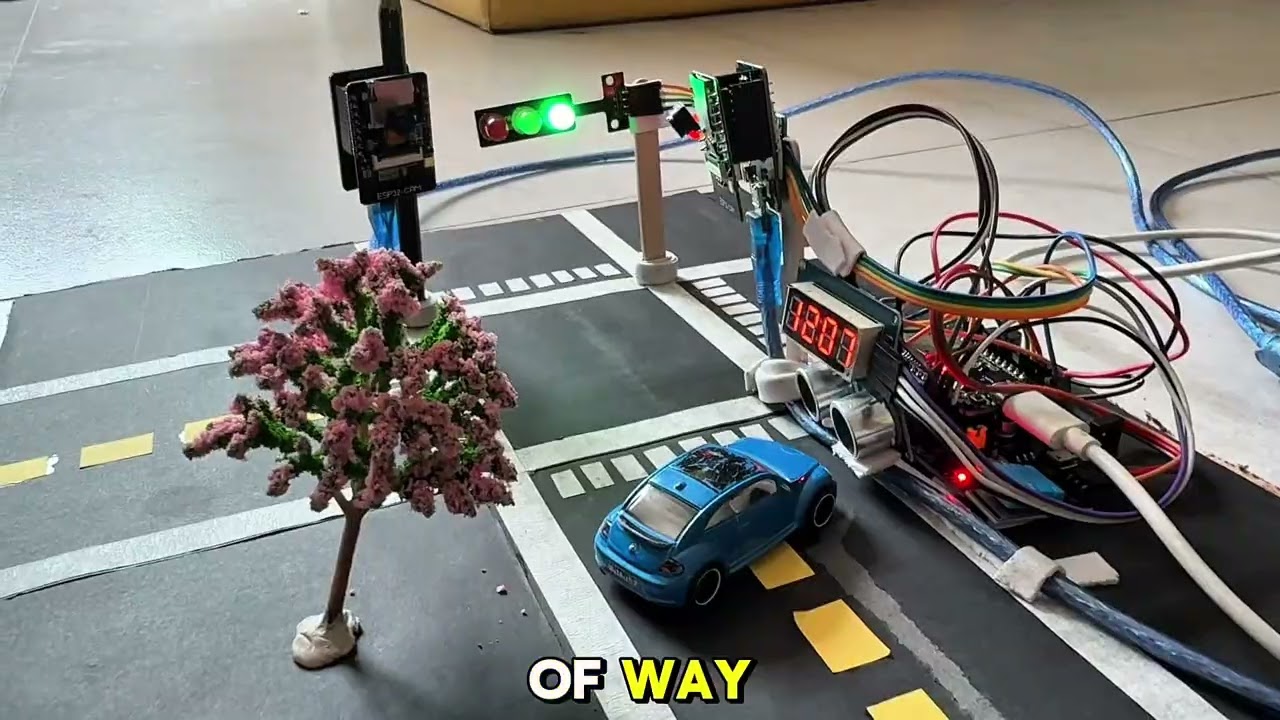
Video covers:
- Team introduction and system name
- System architecture walkthrough
- Decision logic explanation
- Live demonstration with toy cars
- Behind the scenes (wiring, code, dashboard)
trafficos/
│
├── server.py                            # Flask server: YOLO detection + serial + API
│
├── dashboard/
│   └── index.html                       # Web dashboard (single file)
│
├── traffic_controller_v10/
│   └── traffic_controller_v10.ino       # ESP32 Arduino firmware (final version)
│
├── yolo11n.pt                           # YOLO11 nano model weights (default, ~5.4 MB)
├── yolo11s.pt                           # YOLO11 small model weights (higher accuracy, ~18.4 MB)
│
└── README.md                            # This file
| Criterion | Weight | Status |
|---|---|---|
| Camera / Vision System | 20% | YOLO11n + 2× ESP32-CAM |
| Sensor & Actuator Integration | 20% | DHT11 + HC-SR04 + LEDs + Buzzer + TM1637 |
| Decision Logic | 10% | Camera AND ultrasonic combined |
| Code Quality | 10% | Clean, commented, modular |
| Video Explanation | 15% | See demo video above |
| In-Class Presentation | 20% | Live demo ready |
| Creativity | 5% | Web dashboard + AI + real-time |
| Total | 100% | All criteria addressed |
This project was developed for academic purposes at the American University of Phnom Penh. All rights reserved by the authors.
ICT-360 - Introduction to Internet of Things | American University of Phnom Penh | May 30, 2026