Functionalities tour

NEW For its first official release, Panache now introduces genome sorting options. Check it out!
- 1 - File Loaders
- 2 - Choice of Chromosome
- 3 - Core Genome Threshold
- 4 - Zoom Level
- 5 - Hollow Area Finder
- 6 - Navigation Miniature
- 7 - Annotation Cards
- 8 - Presence Absence Variation Matrix
- 9 - Information Tracks
- 10 - Similarities Repartition Tracks
Here you can load your data. Panache currently support three types of file : Presence Absence matrices, annotation files in gff3 format, and Newick trees. For more information on how to format these input files, make sure to check our Files & formats section.
Panache displays one (pan)chromosome at a time. Here you can choose which chromosome to display. For better performances it is advised to group contigs into one chromosome.

Core and variable (or 'dispensable') genomes categorizations varies between studies. Here you can choose which threshold to apply. Pangenomic blocks with a presence count higher than or equal to this threshold will be coloured on the fly in orange, and the others in blue in the dedicated information track.
Panache auto scales the visualization according to the mean size of the pangenomic blocks. At time this default zoom level may not be appropriate, here you can modify it on the fly. As of now it will only change the sizes on screen, and will not allow you to zoom in to the nucleotide level.

The Hollow Area Finder (HAF for short) is a utility looking for zones with consecutive absence of blocks. It takes two parameters as input:
- Absence rate: the proportion of genomes that should display consecutive absence in a given area
- Number of consecutive blocks: the minimum number of consecutive blocks that should be absent
Coordinates of areas matching these criterias are stored and, explorable using the navigation buttons at the bottom. If a consecutive absence is detected for a higher number of blocks, the area will automatically be expended. Matching areas are highlighted in bright yellow on the display, with brackets delimiting them.

Note: for performance reasons, the calculations are now running only when the HAF is open, and will not be run if it is collapsed in the option panel.

A miniature of the information for the whole (pan)chromosome is displayed on top of the screen. The Presence Absence Matrix is rendered as a histogram for readability. Navigation can be achieved by clicking on any region, and the display will update to show the selected area.
By hovering the annotation marks (black squares) above the presence matrix you can find Annotation Cards, with more detail about the hovered annotation. Please note that the annotation marks have the same size, no matter the actual length of the annotation.
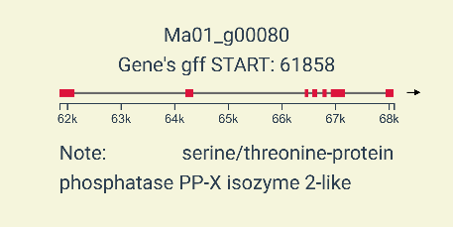
Gff files of annotation can be loaded in addition to a presence absence data file. Gene annotations will be extracted and displayed as marks on a beeswarm plot (https://observablehq.com/@d3/beeswarm) on top of the PAV matrix. These marks are centered on the coordinates of the corresponding genes, and display Annotation Cards when hovered. These cards show the gene name, strand, exons, functions (if any) and overlaps with other genes (if any).

Genomes are displayed on rows, and pangenomic blocks on columns. When a block is present in a genome, a colored rectangle is drawn on screen, else it is kept empty. Colors are applied following a rainbow-like pattern to differentiate columns, unless functions are provided in the pav file (colors would then be applied depending on the category/value of the corresponding field).
Note: When the matrix contain too may genomes, a slider can be found by hovering on the rightmost part, allowing to scroll through all the rows.

Below the PAV matrix are three additional tracks of summary information, that provide details when hovered.
Core / variable status track: Blocks identified as belonging to the core genome will be colored in orange, others in blue, according to the choosen threshold. When hovered, it displays how many genomes have the selected block.
Position track: Blocks are colored according to their position on the linear coordinate system, following a linear luminosity gradient. When hovered, it displays the exact start position of the selected block.
Repetition track: Pangenomic blocks may be repeated in different places in the pangenome (and it may be accessible information in your input file). Blocks are colored with darker shades of green according to the number of repetitions. When hovered, it shows the exact number of repetitions. Details can be found below.

Pangenomic blocks can be repeated and appearing in different chromosomes. These section inform of where these repetitions occur for every block. For every (pan)chromosome represented as a line ('1', '2', '3' and '4' in the picture above), a rectangle will be drawn if a repetition is found on it: proportion of repetitions is encoded with both width and darkness. Here are a few examples:
Case 'A':
- There are repetitions on all four chromosomes
- Most of the repetitions are found in the chromosomes '1' and '3' in similar proportions; chromosomes '2' and '4' have about half this amount
Case 'B':
- There are repetitions on chromosomes '1', '2' and '3', but none on chromosome '4'
- There are really few repetitions on chromosomes '2' and '3' compared to chromosome '1' which has about 3 times more repetitions
Note: these repetitions must be present in the data provided as input, see the File & formats section for more details.