Real-time audio metering for listening closely. Free & open source.


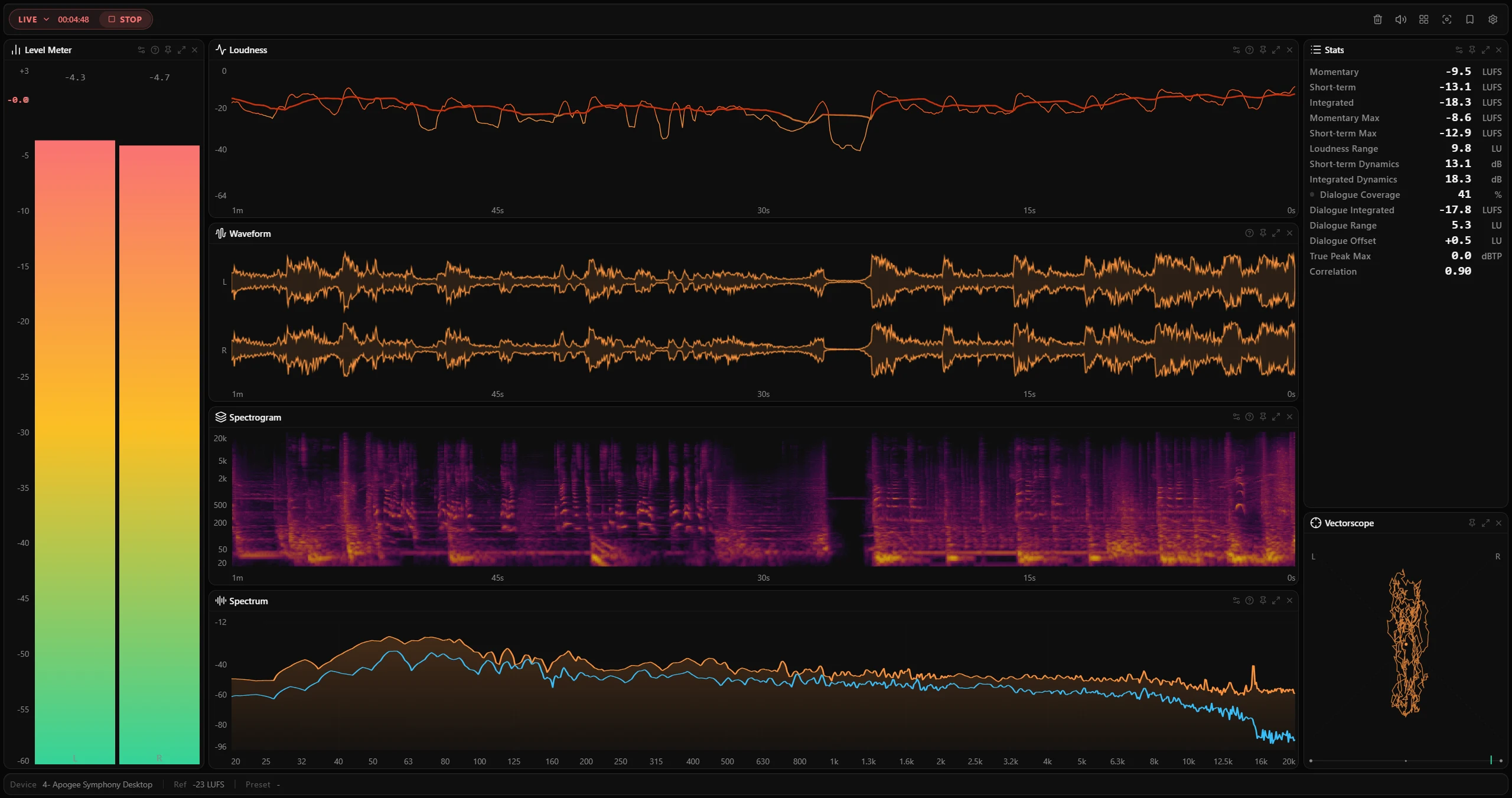
PLVS (reads as "plus") is a read-only desktop companion built for sound designers and mix engineers. It keeps your audio's level, shape, and movement in view while you work — no DAW routing, no virtual cables, no plugin slots required.
It can also work offline in file mode: drop in a local audio file and scrub through its full metering history across every meter.
Installed builds also include plvs-cli for agents, support workflows, and terminal automation. It can verify the installed runtime, probe media tracks, analyze files against user-defined QC thresholds, capture live delivery metrics, batch multiple analyses, and render saved JSON as Markdown without launching the desktop UI. See CLI for the full reference.
It combines seven metering panels in a single desktop app:
| Panel | What it shows |
|---|---|
| Level Meter | Per-channel level bars, switchable between sample Peak (dBFS) and Momentary / Short-term loudness (LUFS) |
| Loudness | Momentary & Short-term LUFS history curves (ITU-R BS.1770, EBU R128) with a configurable reference overlay |
| Stats | Configurable numeric readouts — Integrated, LRA, max values, dynamics, plus optional dialogue-gated metrics; reorderable |
| Spectrum | FFT-based real-time analyzer with per-band dBFS |
| Spectrogram | Scrolling time-frequency waterfall |
| Vectorscope | Stereo phase / correlation with configurable channel pairs |
| Waveform | Per-channel DAW-style amplitude envelope over the session history |
PLVS does not process, route, or modify audio. It's a monitor — it watches your signal and gets out of the way.
- No routing required — monitors any audio playing on your machine. Windows uses WASAPI loopback; macOS uses the native audio tap.
- File analysis mode — drop in a local audio file to meter it offline: probe metadata, decode through a bundled FFmpeg sidecar (wide format support), and scrub through the full session history across every meter.
- Multichannel — auto-detects mono, stereo, 5.1, and 7.1 with proper per-channel metering and BS.1770 weighting.
- Detailed spectrum analysis — multi-resolution FFT analyzer with M/S and L/R overlays, peak-hold, log-frequency grid, and musical note names on hover.
- Interactive charts — zoom, pan, and scrub every chart with adaptive tick labels and a live hover probe.
- Session history & snapshots — scroll back through the loudness timeline. Click any moment to freeze all meters at that snapshot, then return to live with one click.
- Configurable loudness reference — set a target LUFS value overlaid on the loudness chart.
- Dialogue-gated loudness (optional) — speech-aware readouts that measure loudness only over detected dialogue: Coverage (how much of the program is speech), Integrated, Range (LRA), and Offset (how far dialogue sits above or below the overall mix), with a live "speaking now" indicator. Powered by a selectable on-device voice-activity-detection engine (see Acknowledgements); enable it by adding any dialogue readout to the loudness stats. A real-time monitoring estimate, not a certified dialogue measurement.
- Flexible layout & theming — drag dividers, resize panels, open multiple instances of the same meter, and switch between presets from the toolbar. Includes a theme editor and several built-in themes, plus transparent-window and per-panel opacity controls.
- System integration — system tray, always-on-top window pinning, open-at-login, and customizable global keyboard shortcuts.
- Privacy-first — audio stays on device. No telemetry, no accounts, no network calls except update checks.
- ASIO is not supported on Windows. ASIO drivers bypass the Windows audio mixer entirely, so WASAPI loopback capture cannot intercept the signal. If you are using a DAW (e.g. REAPER, Ableton Live), set the DAW's audio system to WASAPI to allow PLVS to capture its output. For setups that require ASIO, routing through a virtual audio cable (e.g. VB-Cable) to a WASAPI-visible device is a workable alternative.
- Dialogue-gated readouts are an estimate, not a certified measurement. Dialogue detection uses an on-device open-source VAD engine (Silero VAD by default) rather than the proprietary Dolby Dialogue Intelligence used by certified broadcast tools, so the dialogue values can differ from those tools by a small margin. It also detects voice activity in general — singing is counted as speech — so the readings run high on music with prominent vocals. Use it for monitoring, not for compliance sign-off.
Tip
Visit GitHub Releases for the latest version.
| Platform | Package | Notes |
|---|---|---|
| Windows 10/11 (x64) | PLVS_x64-setup.exe |
NSIS installer |
| Windows 10/11 (x64) | PLVS_portable_x64.exe |
Portable — no install required |
| macOS (Apple Silicon) | PLVS_aarch64.dmg |
Requires macOS 14.2+ for system audio capture |
macOS — first launch warning
PLVS is not notarized by Apple. If macOS blocks the app on first launch, run:
xattr -cr /Applications/PLVS.appAlternatively, move PLVS.app to the Trash and immediately move it back — this also clears the quarantine flag.
Windows — SmartScreen warning
The installer is not code-signed. If SmartScreen blocks it, click More info → Run anyway.
- Download the installer for your platform from Releases.
- Launch PLVS and select your audio source from the toolbar dropdown:
- System Output (default) — monitors whatever is playing on your machine.
- Input device — monitors a physical microphone or line input.
- Press Start to begin monitoring.
- Arrange panels by dragging dividers and choosing a layout preset from the toolbar.
- Click any point on the loudness history chart to freeze a snapshot across all meters.
- Analyze a file (optional) — open a local audio file from the toolbar to meter it offline and scrub through its history.
Installed Windows builds include plvs-cli on the current user's PATH; portable builds may require calling the executable by full path.
plvs-cli --help
plvs-cli doctor --json
plvs-cli probe "C:\path\movie.mkv" --json
plvs-cli analyze "C:\path\file.wav" --json
plvs-cli analyze "C:\path\mix.wav" --target-lufs -14 --lufs-tolerance 1 --max-true-peak -1 --json
plvs-cli analyze "C:\path\episode.wav" --dialogue --reference-lufs -16 --json
plvs-cli analyze-batch "C:\path\a.wav" "C:\path\b.wav" --json
plvs-cli devices --json
plvs-cli profile export --out studio.plvsconfig.json
plvs-cli profile import studio.plvsconfig.json
plvs-cli report analysis.json --format markdown
plvs-cli capture --device "CABLE Output" --seconds 10 --json
probe discovers audio tracks without decoding the complete file. devices lists stable capture ids for automation. profile exports and imports desktop configuration. analyze measures a file, can enable dialogue-gated loudness, and can optionally apply user-defined QC thresholds; capture measures live audio from a device, using the same capture path as the desktop app but without a window. It blocks for --seconds of wall clock and holds the device open for that span. Omit --device for the system default; pass a stable id from devices or a unique label substring.
Use JSON commands for automation, then use report --format markdown when a user-readable summary is needed. See docs/cli.md for --out, batch manifests, streaming capture --every, and exit codes.
Requires Node.js ≥ 20.19.0 and Tauri v2 prerequisites (Rust, platform build tools).
git clone https://github.com/SounDoer/PLVS.git
cd PLVS
npm install
npm run desktop # start dev build with hot reloadnpm test # unit tests (Vitest)
npm run lint # ESLint
npm run build # build frontend to dist/
npm run desktop:build # local Tauri release build, without updater artifacts
npm run desktop:release-nsis # Windows NSIS installer
npm run desktop:release-dmg # macOS DMG
npm run check # full pre-merge check (format + lint + test + build)
npm run rust:check # Rust: fmt + clippy + test| Layer | Technology |
|---|---|
| Desktop shell | Tauri v2 (Rust) |
| Frontend | React 19 + Vite |
| Styling | Tailwind CSS v4 |
| UI primitives | Radix UI + shadcn/ui patterns |
| Charts & canvas | Custom Canvas 2D rendering pipeline |
| Audio capture | WASAPI loopback (Windows) / native audio tap (macOS) |
| DSP | Custom Rust pipeline — FFT, LUFS, peak, correlation |
| Testing | Vitest (frontend), cargo test (Rust) |
- Product Requirements (PRD) — what PLVS is, who it's for, product boundaries.
- Architecture — tech stack, directory map, audio pipeline, IPC, theme system.
- CLI — installed command-line companion for agents, support, and automation.
- Design Tokens — CSS variable system and theme structure.
- Loudness References — platform delivery targets for loudness overlays.
- ADR — architecture decision records.
Contributions are welcome. Before submitting a PR, please read CONTRIBUTING.md for environment setup, code conventions, and CI expectations.
- All code comments and docstrings should be in English.
- The full pre-merge check is
npm run check. - See
docs/README.mdfor a documentation map.
PLVS stands on the shoulders of excellent open-source work. In particular:
- Voice activity detection — dialogue-gated loudness can run on any of three selectable on-device VAD engines:
- Silero VAD (default) — bundled via the
voice_activity_detectorcrate (MIT). - FireRedVAD
- TEN VAD
- Silero VAD (default) — bundled via the
- CPAL — cross-platform audio capture (Apache-2.0).
- RustFFT & RealFFT — the FFT engine behind the spectrum and spectrogram (MIT / Apache-2.0).
- Rubato — sample-rate conversion (MIT).
- Tauri — the desktop application framework (MIT / Apache-2.0).
Thanks to all the maintainers and contributors of these projects.