


A C# Blazor library to effortlessly implement Lazy Loading and Dependency Injection
NuGet: https://www.nuget.org/packages/RonSijm.Blazyload/
This library fixes all lazy-loading related things. Mainly dependency injection when dependencies are lazy-loaded.
- Have Standalone packages with Dependency injection working
- Cascade loads dependencies so you don't have to worry about dll orchestration
- Have An Optional Wrapper because Blazor won't let DI return null
- Dynamically loading dlls without blazor telling you "You haven't registered that one as dll as lazyloaded"
- Lazyload assemblies from alternative paths, other than /_framework/
- Lazyload assemblies in an authenticated way
- Lazyload assemblies from class, not just from the router
- Fluxor integration for state management with lazy-loaded assemblies
- Support for .NET 10+ fingerprinted assembly names
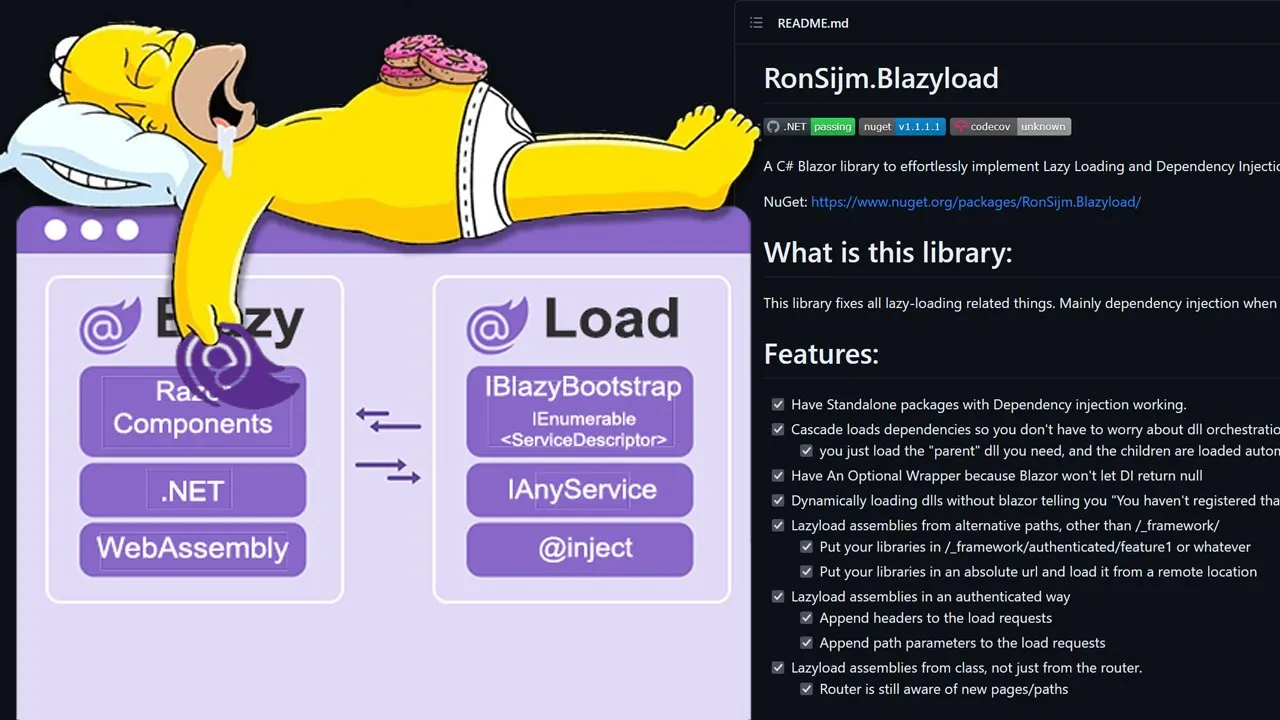
Here is a picture to better explain the purpose:

https://ronsijm.github.io/RonSijm.Blazyload/
In your Program.cs, configure Blazyload:
builder.UseBlazyload(BlazyConfig);Where BlazyConfig is your configuration action. See the Navigation-Based Loading section for a complete example.
This is the new and preferred way of configuring Blazyload. Configure your router to use the assembly loader directly - no code-behind file needed:
@using RonSijm.Blazyload
@inject IBlazyAssemblyLoader AssemblyLoader;

<Router AppAssembly="@typeof(App).Assembly"
        OnNavigateAsync="@AssemblyLoader.OnNavigateAsync"
        AdditionalAssemblies="@AssemblyLoader.AdditionalAssemblies">
    <Found Context="routeData">
        <RouteView RouteData="@routeData" DefaultLayout="@typeof(MainLayout)" />
    </Found>
    <NotFound>
        <LayoutView Layout="@typeof(MainLayout)">
            <p>Sorry, there's nothing at this address.</p>
        </LayoutView>
    </NotFound>
</Router>-
@inject IBlazyAssemblyLoader AssemblyLoader;- Injects the Blazyload assembly loader service. This service manages lazy loading of assemblies and tracks which assemblies have been loaded. -
OnNavigateAsync="@AssemblyLoader.OnNavigateAsync"- Connects the Router's navigation event to Blazyload. When the user navigates to a route, Blazyload checks if any assemblies are configured for that route (viaLoadOnNavigation) and loads them automatically before the page renders. -
AdditionalAssemblies="@AssemblyLoader.AdditionalAssemblies"- Provides the Router with a list of all loaded assemblies. This allows the Router to discover pages and components from lazy-loaded assemblies. As assemblies are loaded, they're automatically added to this collection.
That's it! No App.razor.cs code-behind file needed. The LoadOnNavigation calls in Program.cs handle all the routing logic:
// Automatically load assemblies when navigating to specific routes
options.LoadOnNavigation("fetchdata1", "RonSijm.FluxorDemo.Blazyload.WeatherLib1.wasm");
options.LoadOnNavigation("Lib1ReduceInto", "RonSijm.FluxorDemo.Blazyload.WeatherLib1.wasm");
options.LoadOnNavigation("Lib1ReduceIntoMethod", "RonSijm.FluxorDemo.Blazyload.WeatherLib1.wasm");
options.LoadOnNavigation("Lib1ReduceIntoReducer", "RonSijm.FluxorDemo.Blazyload.WeatherLib1.wasm");

options.LoadOnNavigation("fetchdata4", "RonSijm.FluxorDemo.Blazyload.WeatherLib4.Page.wasm");For historical reference, the old V1 style required a code-behind file with manual route handling:
/// <summary>
/// DEPRECATED: This is the old V1 style of manually handling navigation.
/// In V2, use LoadOnNavigation in Program.cs instead.
/// </summary>
public partial class App
{
    private async Task OnNavigateAsync(NavigationContext args)
    {
        try
        {
            // Old V1 style: manually check paths and load assemblies
            if (args.Path == "fetchdata1")
            {
                await AssemblyLoader.LoadAssemblyAsync("RonSijm.Demo.Blazyload.WeatherLib1.wasm");
            }
            else if (args.Path == "fetchdata2")
            {
                await AssemblyLoader.LoadAssemblyAsync("RonSijm.Demo.Blazyload.WeatherLib2.wasm");
            }
            else if (args.Path == "fetchdata3")
            {
                await AssemblyLoader.LoadAssemblyAsync("RonSijm.Demo.Blazyload.WeatherLib3.wasm");
            }
        }
        catch (Exception)
        {
            // Do Nothing
        }
    }
}Create a BlazyBootstrap.cs class in your library's Properties folder:
// ReSharper disable once UnusedType.Global
public class BlazyBootstrap : IBootstrapper
{
    public Task<IEnumerable<ServiceDescriptor>> Bootstrap()
    {
        var serviceCollection = new ServiceCollection();
        serviceCollection.AddSingleton<IWeatherResolver, WeatherResolver>();

        return Task.FromResult<IEnumerable<ServiceDescriptor>>(serviceCollection);
    }
}If you don't want a reference to Blazyload in your library:
/// <summary>
/// In this example you can see how to bootstrap something without using a reference to the library.
/// Note that you must exactly implement "public Task<IEnumerable<ServiceDescriptor>> Bootstrap()"
/// </summary>
public class BlazyBootstrap
{
// ReSharper disable once UnusedMember.Global
public Task<IEnumerable<ServiceDescriptor>> Bootstrap()
{
var serviceCollection = new ServiceCollection();
serviceCollection.AddSingleton<IWeatherResolver, WeatherResolver>();
return Task.FromResult<IEnumerable<ServiceDescriptor>>(serviceCollection);
}
}Use a custom class name instead of the default BlazyBootstrap:
// ReSharper disable once UnusedType.Global
public class CustomRegistrationClass
{
    public Task<IEnumerable<ServiceDescriptor>> Bootstrap()
    {
        var serviceCollection = new ServiceCollection();
        serviceCollection.AddSingleton<IWeatherResolver, WeatherResolver>();

        return Task.FromResult<IEnumerable<ServiceDescriptor>>(serviceCollection);
    }
}Configure it in Program.cs:
// Use a custom bootstrap class instead of the default BlazyBootstrap
options.UseSettingsForDll("RonSijm.Demo.Blazyload.WeatherLib3")
    .UseCustomClass("RonSijm.Demo.Blazyload.WeatherLib3.CustomRegistrationClass")
.DisableCascadeLoading();When you lazy load a library that has dependencies, those dependencies are automatically loaded. This is enabled by default.
To disable cascade loading for a specific assembly:
options.UseSettingsForDll("YourAssembly")
.DisableCascadeLoading();Load assemblies from custom paths instead of the default /_framework/:
// Load assemblies from custom relative paths
options.UseSettingsForDll("RonSijm.Demo.Blazyload.WeatherLib1").UseCustomRelativePath("_framework/WeatherLib1/");
options.UseSettingsForDll("RonSijm.Demo.Blazyload.WeatherLib2").UseCustomRelativePath("_framework/WeatherLib2/").UseHttpHandler(dummyAuthHandler.HandleAuth);Use lambda expressions to match multiple assemblies:
// Use lambda expressions to match multiple assemblies by criteria
options.UseSettingsWhen(assembly => assembly.StartsWith("RonSijm.Demo.Blazyload.WeatherLib4", StringComparison.InvariantCultureIgnoreCase)).UseCustomRelativePath("_framework/WeatherLib4/");Add authentication headers to assembly load requests:
// Load assemblies with authentication/custom HTTP handling
options.UseSettingsForDll("RonSijm.Demo.Blazyload.WeatherLib3").UseOptions(x =>
{
    // Note: absolute paths don't include the dll name, because these settings can be used for multiple dlls at once.
    // Note2: I'm not setting any custom url here, because the s3AuthHandler overrules it.
    //x.AbsolutePath = awsBucket;
    x.DisableCascadeLoading = true;
    x.ClassPath = "RonSijm.Demo.Blazyload.WeatherLib3.CustomRegistrationClass";
    x.HttpHandler = s3AuthHandler.HandleAuth;
});Automatically load assemblies when navigating to specific routes:
// Automatically load assemblies when navigating to specific routes
options.LoadOnNavigation("fetchdata1", "RonSijm.FluxorDemo.Blazyload.WeatherLib1.wasm");
options.LoadOnNavigation("Lib1ReduceInto", "RonSijm.FluxorDemo.Blazyload.WeatherLib1.wasm");
options.LoadOnNavigation("Lib1ReduceIntoMethod", "RonSijm.FluxorDemo.Blazyload.WeatherLib1.wasm");
options.LoadOnNavigation("Lib1ReduceIntoReducer", "RonSijm.FluxorDemo.Blazyload.WeatherLib1.wasm");

options.LoadOnNavigation("fetchdata4", "RonSijm.FluxorDemo.Blazyload.WeatherLib4.Page.wasm");Use Optional<T> for dependencies that may not be loaded yet:
@inject Optional<IWeatherResolver> WeatherResolver

@code {
    protected override async Task OnInitializedAsync()
    {
        // Check if the optional dependency has a value before using it
        if (WeatherResolver.HasValue)
        {
            _forecasts = await WeatherResolver.Value.GetWeather();
        }
    }
}Blazyload supports optional logging for debugging assembly loading issues:
builder.UseBlazyload(options =>
{
    // Enable general logging for assembly loading
    options.AssemblyLoaderOptions.EnableLogging = true;

    // Enable logging specifically for cascade loading errors
    options.AssemblyLoaderOptions.EnableLoggingForCascadeErrors = true;
});Blazyload has optional Fluxor integration available as a completely standalone package: RonSijm.Blazyload.Fluxor
Note: Blazyload works perfectly fine on its own without the Fluxor package. The Fluxor integration package is only needed if you want to lazy-load additional Fluxor states, reducers, and effects after the initial application load.
public static class DependencyInjectionService
{
    // Note: You don't *need* to declare your options like this, you can do it inside main.
    // I'm doing it like this so that my config accessible to bUnit
    public static Action<BlazyloadProviderOptions> CreateOptions(bool wireJavascriptServices = true)
    {
        var currAssembly = typeof(DependencyInjectionService).Assembly;

        var optionsFactory = new Action<BlazyloadProviderOptions>(options =>
        {
            // Automatically load assemblies when navigating to specific routes
            options.LoadOnNavigation("fetchdata1", "RonSijm.FluxorDemo.Blazyload.WeatherLib1.wasm");
            options.LoadOnNavigation("Lib1ReduceInto", "RonSijm.FluxorDemo.Blazyload.WeatherLib1.wasm");
            options.LoadOnNavigation("Lib1ReduceIntoMethod", "RonSijm.FluxorDemo.Blazyload.WeatherLib1.wasm");
            options.LoadOnNavigation("Lib1ReduceIntoReducer", "RonSijm.FluxorDemo.Blazyload.WeatherLib1.wasm");

            options.LoadOnNavigation("fetchdata4", "RonSijm.FluxorDemo.Blazyload.WeatherLib4.Page.wasm");

            // Configure Fluxor for state management with lazy-loaded assemblies
            options.UseFluxor(fluxorOptions =>
            {
                fluxorOptions.ScanAssemblies(currAssembly);

#if DEBUG
                if (wireJavascriptServices)
                {
                    fluxorOptions.AddNativeExtension(x => x.UseReduxDevTools());
                }
#endif
            });
        });

        return optionsFactory;
    }
}Historically, all dependency injection functionality was contained within the Blazyload library. For improved testability and separation of concerns, all non-Blazor-specific code has been moved to a standalone dependency injection framework: RonSijm.Syringe
- Testability: By separating the core DI logic from Blazor-specific code, both libraries can be tested independently
- Reusability: Syringe can be used in any .NET project, not just Blazor WebAssembly applications
- Fully Compatible: Syringe is fully compatible with Microsoft's built-in dependency injection (
Microsoft.Extensions.DependencyInjection)
- Implicit Wiring - Automatically register all classes in an assembly with
WireImplicit<T>() - Dynamic Service Registration - Add services at runtime after the container is built with
LoadServiceDescriptors() - Optional Dependencies -
Optional<T>wrapper for dependencies that may not be available (especially useful in Blazor) - Lazy Resolution -
Lazy<T>support for deferred service instantiation - Keyed Services - Full support for .NET 8+ keyed services
- Scoped Services - Proper scope management with
CreateScope()
- Attribute-Based Registration - Control registration with
[Registration.DontRegister]and[Lifetime.Singleton]attributes - Configuration-Based Registration - Configure service registration via
appsettings.json - Assembly Bootstrapping -
IBootstrapperinterface for libraries to define their own service registrations
- ILoadAfterExtension - Hook into assembly loading events
- ISyringeAfterBuildExtension - Execute code after the service provider is built
- ISyringeServiceProviderAfterServiceExtension - Decorate or modify services after resolution
- SyringeGlobalSettings - Configure default service lifetime and registration behavior
For full documentation, see the RonSijm.Syringe repository.
Starting with .NET 10, Blazor WebAssembly uses fingerprinted assembly names (e.g., MyAssembly.abc123.wasm) for cache busting. Blazyload automatically handles this by reading the fingerprint mapping from the Blazor runtime configuration.
Blazyload uses JavaScript interop to read the assembly mapping directly from the Blazor runtime's in-memory configuration. This is more efficient than fetching and parsing configuration files via HTTP.
If you need to disable fingerprinting for your project, you can do so in your .csproj file:
<PropertyGroup>
    <WasmFingerprintAssets>false</WasmFingerprintAssets>
</PropertyGroup>The blazor.boot.json file has been removed and its configuration is now inlined into dotnet.js. Blazyload handles this automatically by reading the configuration from the Blazor runtime's memory via JavaScript interop.
See: What's new in ASP.NET Core 10.0 - blazor.boot.json inlined
Instead of referencing your libraries as .dll, they now have a .wasm extension.
See: dotnet/runtime#92965 (comment)
- Blazyload 2.0: Dependency injection abstracted and moved to RonSijm.Syringe, support for .NET10
- Blazyload 1.3: Loading PDB Symbols while debugger is attached
- Blazyload 1.2: Added Support for .NET 8
- Bugfixes: Submit a PR with a bugfix + a unit-test
- Features: Start a discussion first
Discord: https://discord.gg/cDC6VkUn2X
