🧰 Unified WPF launcher for Windows utility scripts 🚀 One-click install via PowerShell 🎨 Dynamic Light/Dark Theme
✅ Fast • Trusted • No setup
irm "https://raw.githubusercontent.com/ReAlNoMo/WindowsAcolyte/main/install.ps1" | iex| Requirement | Details |
|---|---|
| 🟦 PowerShell | 7.0+ (auto-download if missing) |
| 🪟 Windows | 10 / 11 (WPF required) |
| 🔐 Admin | Required for some modules |
Current version: v1.6
Global theme toggle for the entire UI
| Light Mode | Dark Mode |
|---|---|
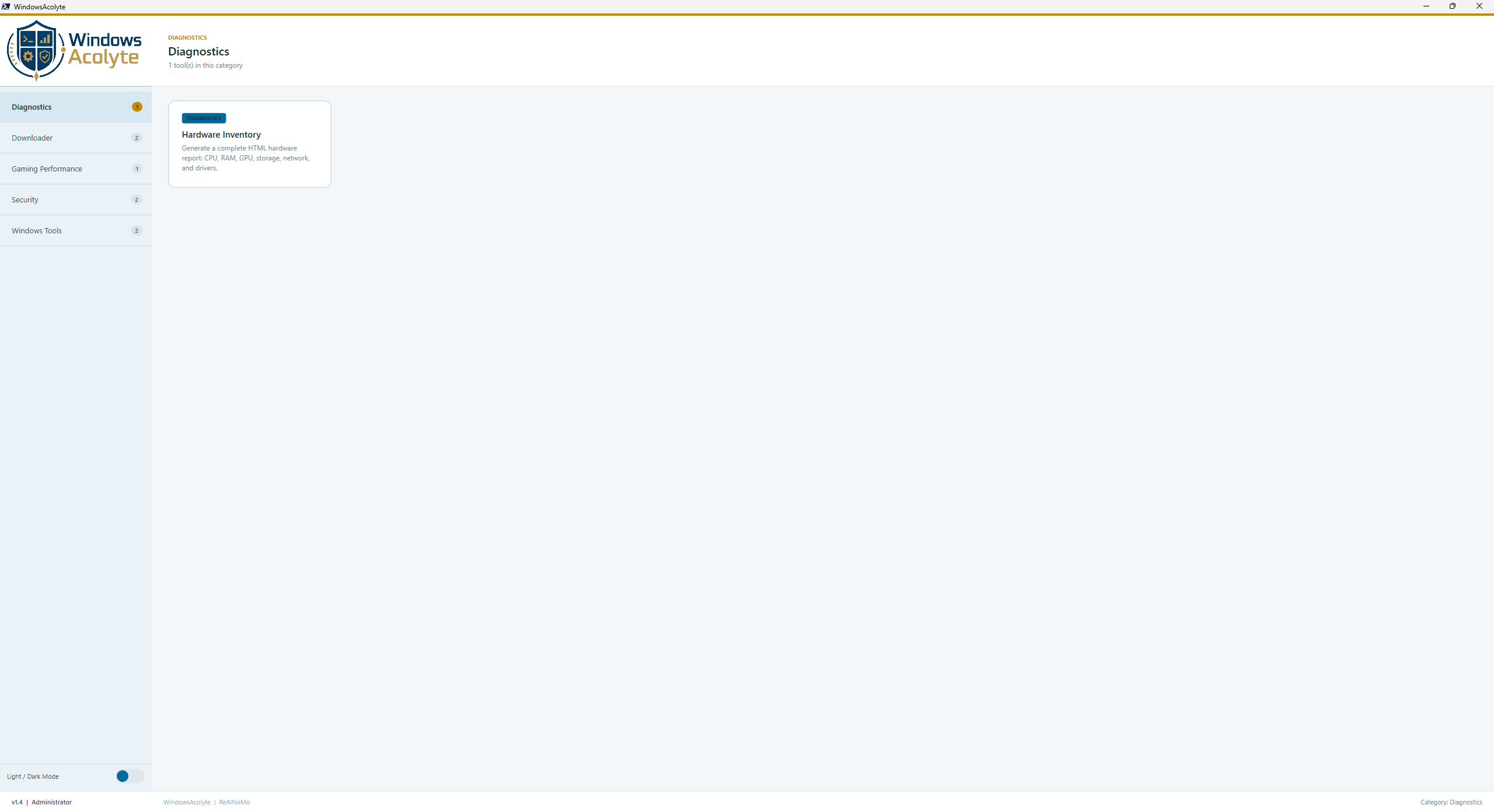 |
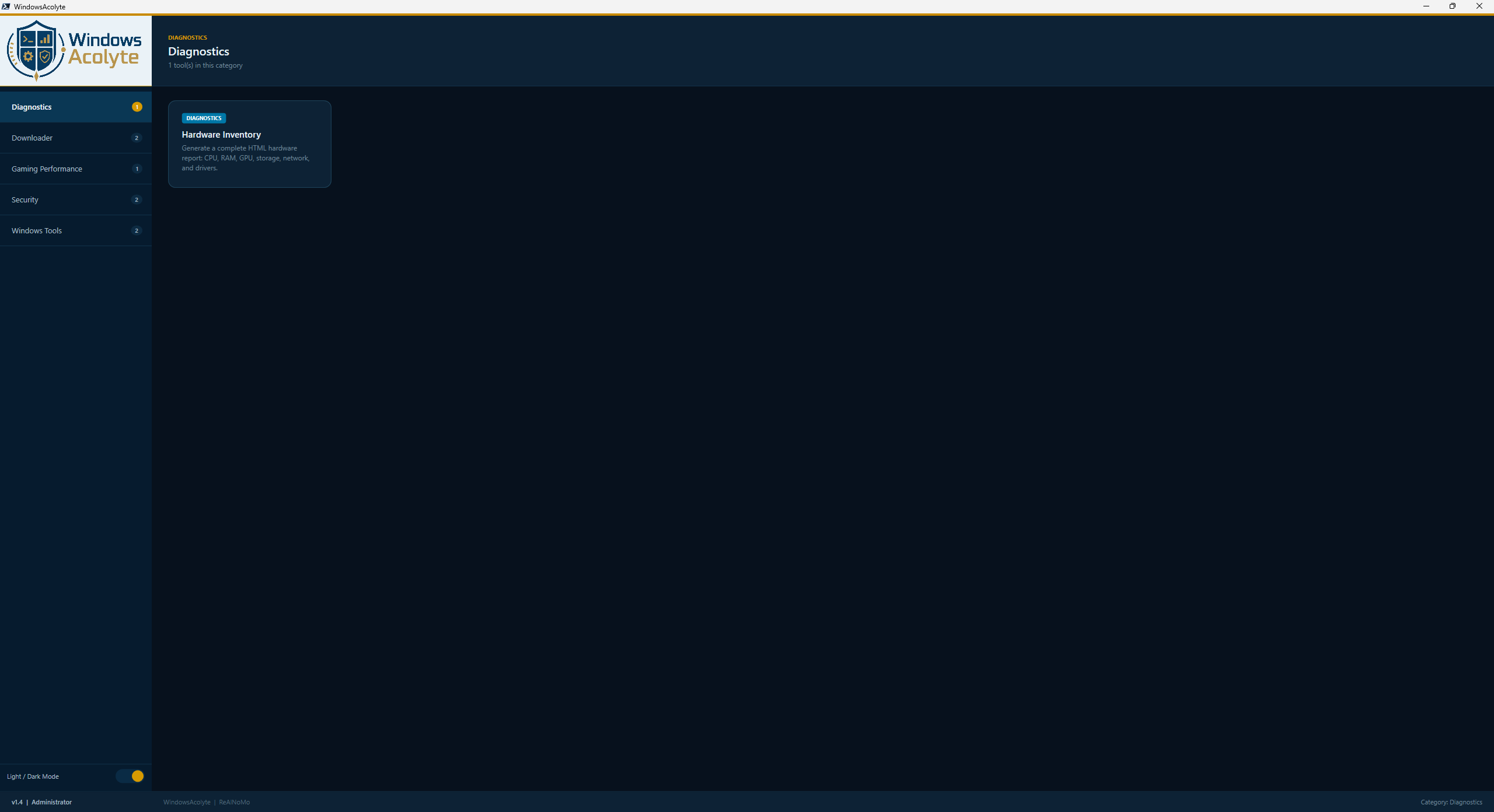 |
- Toggle button (bottom-left sidebar)
- Light + Dark themes (all 50+ colors)
- Dynamic brush updates in real-time
- Persistent across all modules
- Logo border auto-adjusts
- All native controls + custom elements
Category: Security Admin: ❌ No
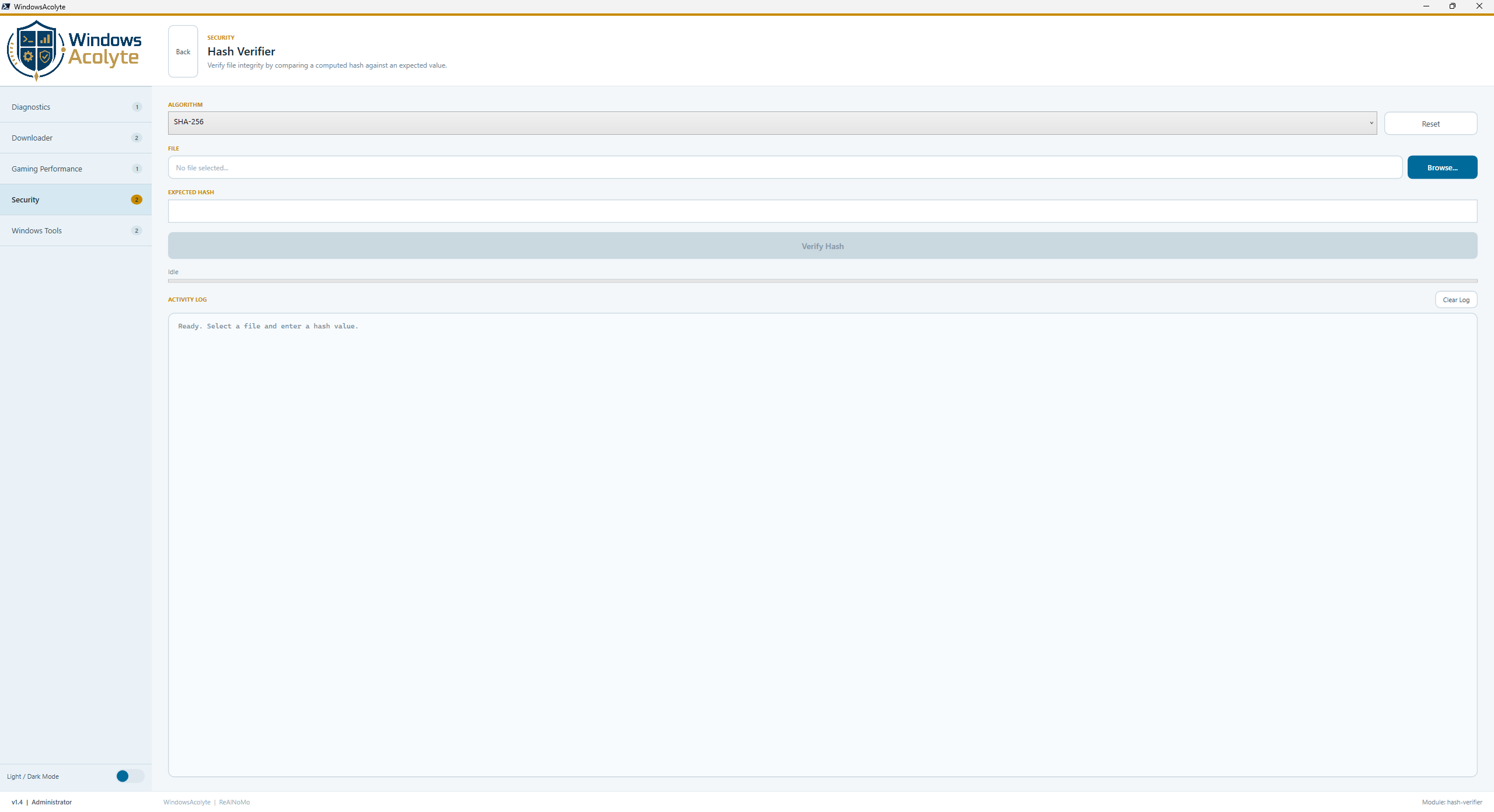
- Generate file hashes (SHA-256, SHA-512, SHA-384, SHA-1, MD5)
- Compare computed hash against an expected value
- Detect tampering or file corruption
- Live progress bar with percentage display
- Activity log with timestamps and status codes
- Background processing via Runspace + DispatcherTimer (non-blocking UI)
💡 Use case: Verify downloads before execution 🪶 Windows changes: None
Category: Windows Tools Admin:
⚠️ Yes
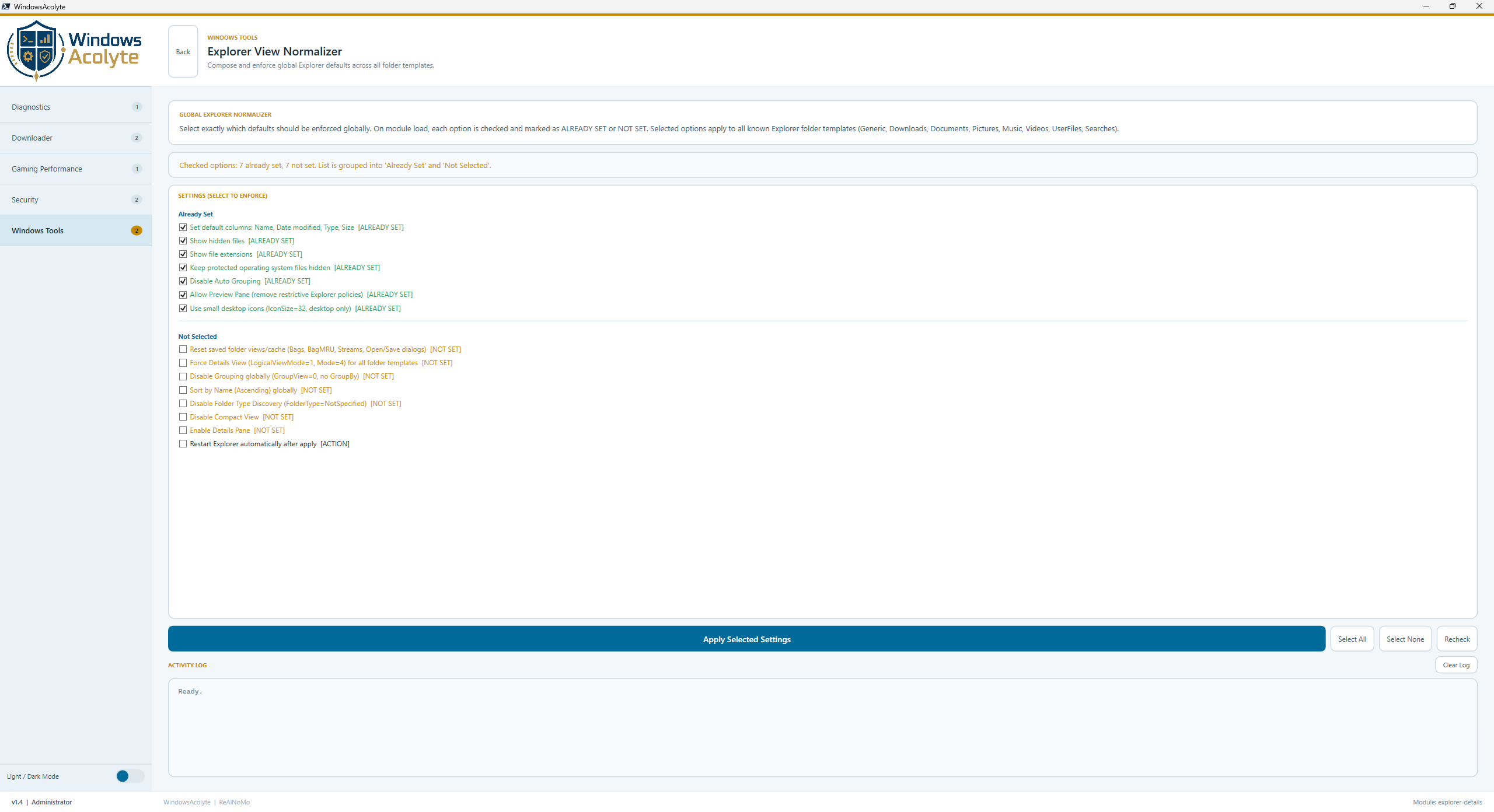
- Lets you compose global Explorer defaults using checkbox fields
- Splits settings list into Already Set and Not Selected
- Checks all settings on module load and shows current state immediately
- Reset saved Explorer folder views
- Force Details view across all normal folder types
- Disable grouping completely (
Last week,Last month, etc.) - Sort by Name (ASC)
- Apply columns: Name, Date modified, Type, Size
- Show hidden files
- Show file extensions
- Keep protected operating system files hidden
- Disable Compact View
- Enable Details Pane and keep Preview Pane available
- Optional: use small desktop icons (
IconSize=32) - Disable Folder Type Discovery with
FolderType = NotSpecified - Apply to all folder types (Generic, Downloads, Documents, Pictures, Music, Videos, UserFiles, Searches)
- Clear Shell Bags, BagMRU, Desktop/Defaults Streams, and common Open/Save dialog view caches
- Restart Explorer automatically
- Apply now supports apply + revert: unchecked options are reverted when possible
- Automatic recheck runs immediately after apply so new states are shown without manual refresh
This resets saved Explorer folder views. Existing custom folder layouts are removed and replaced with the WindowsAcolyte defaults.
HKCU:\...\Shell\Bags\AllFolders\Shell\*
  LogicalViewMode  = 1
  Mode             = 4
  GroupView        = 0
  GroupBy          = ""
  GroupByKey:PID   = 0
  GroupByDirection = 1
  Sort             = Name ascending (REG_BINARY)
  ColInfo          = Name, Date modified, Type, Size (REG_BINARY)
  FolderType       = NotSpecified

HKCU:\Software\Microsoft\Windows\CurrentVersion\Explorer\Advanced
  Hidden           = 1
  HideFileExt      = 0
  ShowSuperHidden  = 0
  UseCompactMode   = 0
UseAutoGrouping = 0Category: Diagnostics Admin:
⚠️ Yes
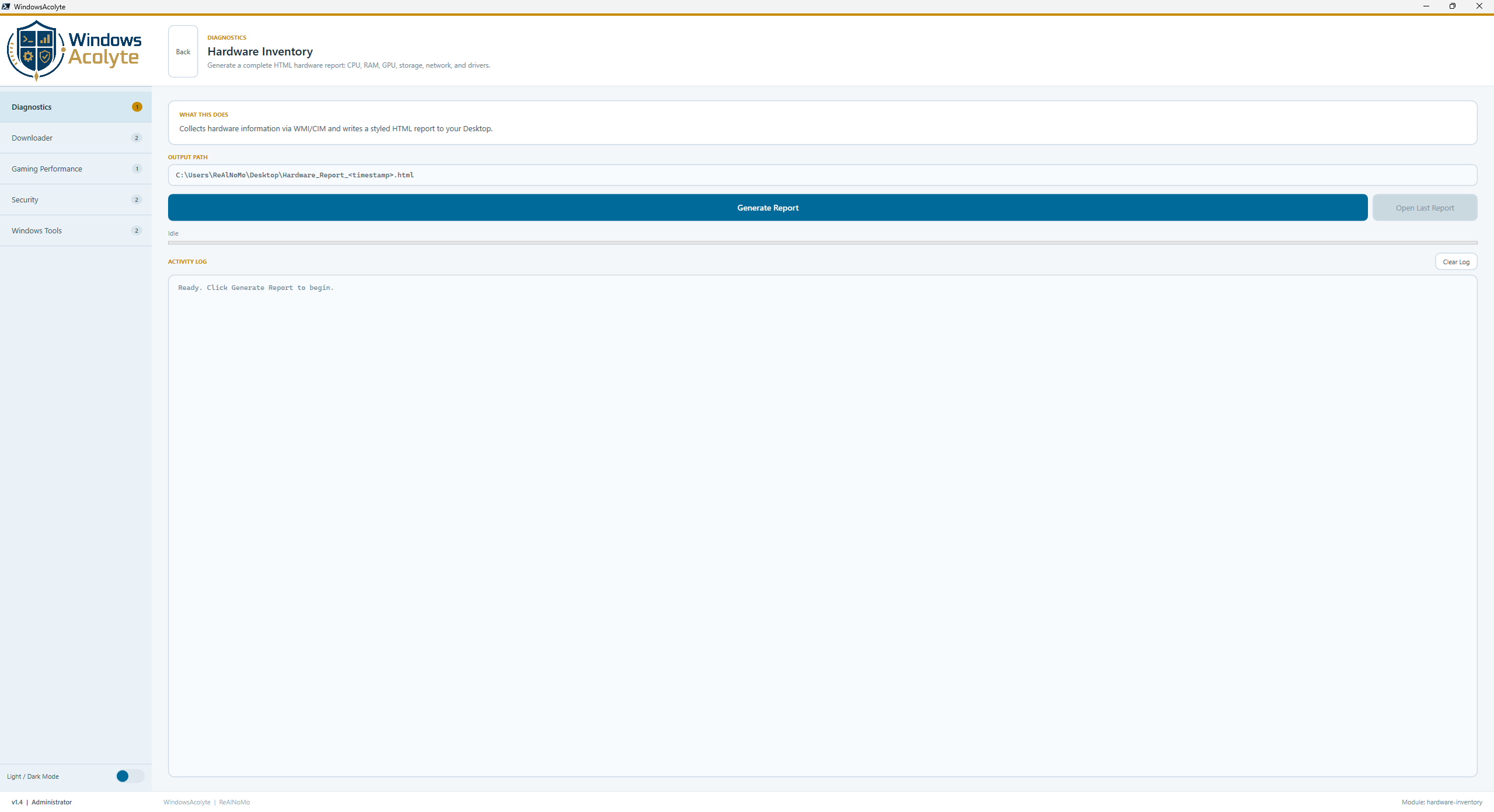
- System / Mainboard info (manufacturer, model, BIOS version and date)
- CPU details (cores, clock speed, socket, cache sizes, driver version)
- RAM slots (capacity, speed, manufacturer, part number, serial number)
- GPU (VRAM, resolution, driver version and date)
- Storage drives and logical partitions (size, free space, file system)
- Network adapters (MAC, driver, IP address)
- Audio devices with driver info
- Full PnP driver list (sortable by class and device name)
- Styled HTML report saved to the Desktop
- Background processing with progress bar
📄 Output
Desktop\Hardware_Report_YYYY-MM-DD_HH-MM.html
- Dark-themed HTML report
- Sortable tables
- Activity log with timestamps
- Re-open last report button
- Concurrent background processing
🪶 Windows changes: None (read-only)
Category: Security Admin: ❌ No
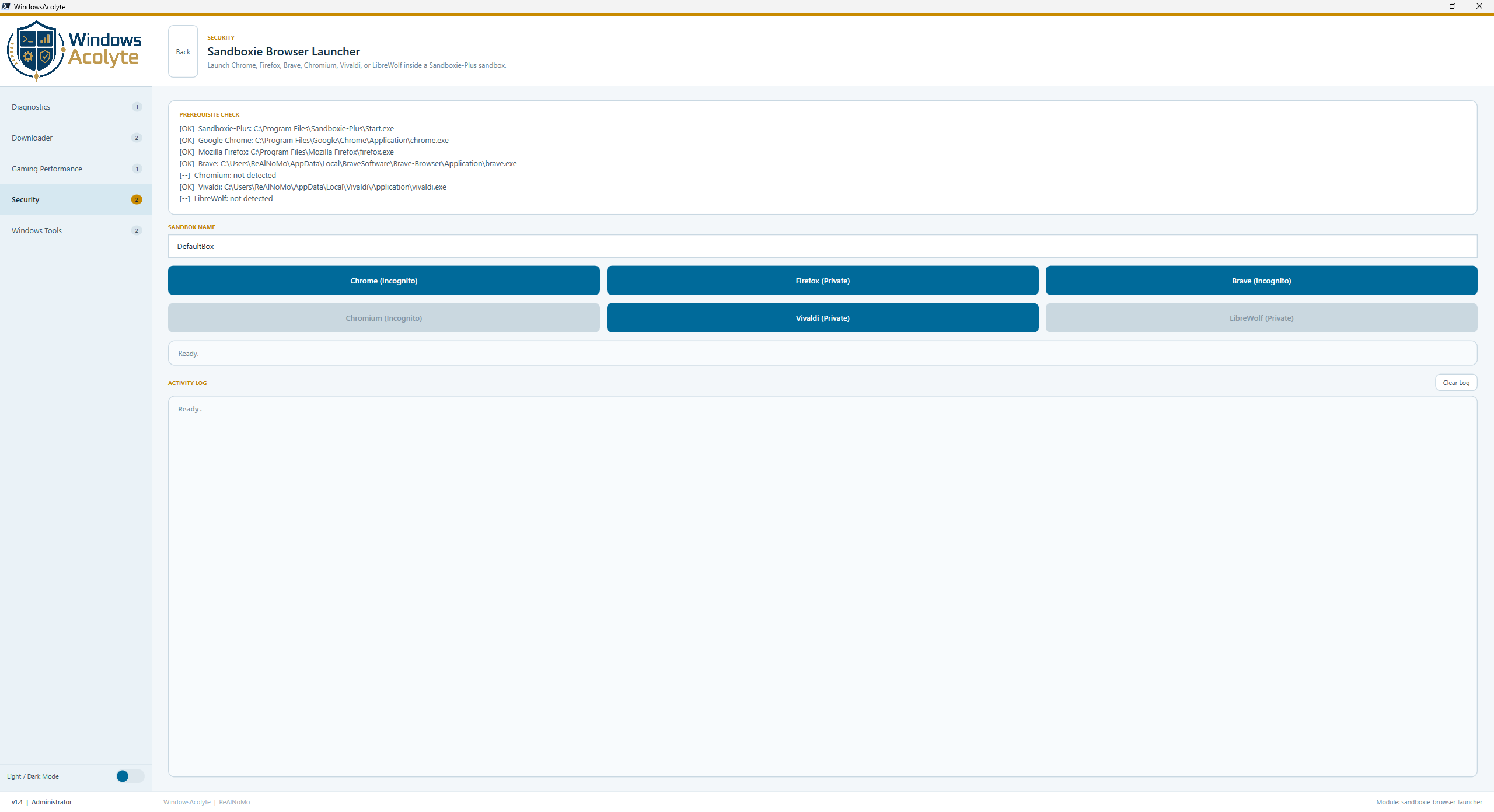
- Launch browsers sandboxed via Sandboxie-Plus
- Private / Incognito mode per browser
- Auto-detect installed browsers on launch
- 6 supported browsers
- Configurable sandbox name
- Prerequisite check (Sandboxie-Plus + each browser)
- Status display and activity log
| Browser | Incognito | Private Mode | Auto-Detect |
|---|---|---|---|
| Chrome | ✅ | N/A | ✅ |
| Chromium | ✅ | N/A | ✅ |
| Firefox | N/A | ✅ | ✅ |
| Brave | ✅ | N/A | ✅ |
| Vivaldi | N/A | ✅ | ✅ |
| LibreWolf | N/A | ✅ | ✅ |
- Sandboxie-Plus installed
- At least one supported browser installed
- ✅ One button per browser (auto-disabled if not installed)
- ✅ Configurable sandbox name field
- 🔍 Prerequisite check on load (Sandboxie-Plus + all browsers)
- 🪵 Activity log
💡 Use case
Safely browse untrusted websites, test malware links, isolate browsing activity
Category: Gaming Performance Admin:
⚠️ Yes
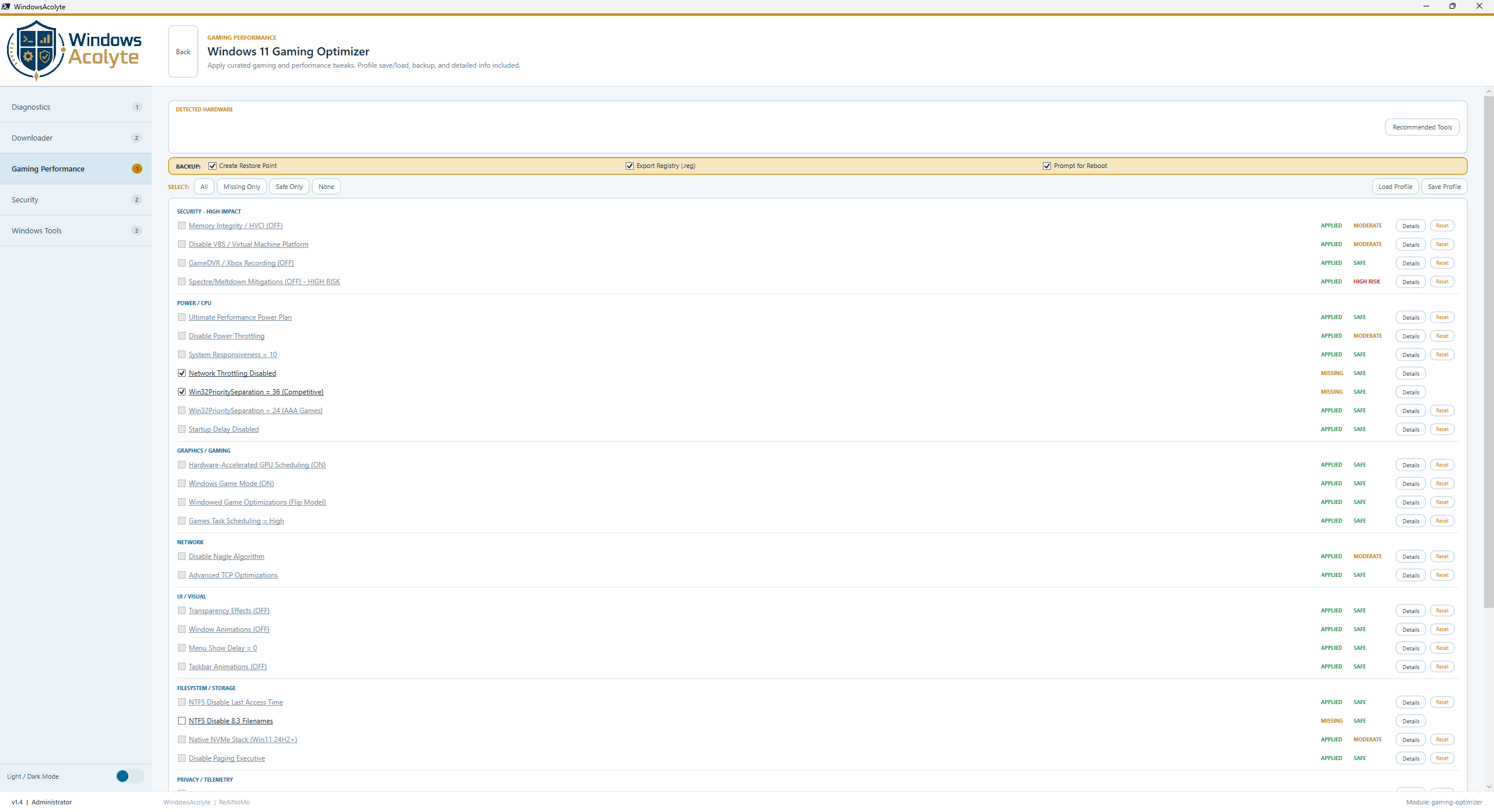
🚀 Applies 29 performance tweaks with risk levels (fully idempotent)
| Tweak | Effect | Reboot | Risk |
|---|---|---|---|
| HVCI Disable | 🚀 Up to +25% FPS | ✅ Yes | 🔴 High |
| VBS Disable | 🚀 +2-8% FPS | ✅ Yes | 🔴 High |
| GPU Scheduling | ⏱️ -2ms latency | ✅ Yes | 🟢 Low |
| GameDVR Disable | 🚀 +2-5% FPS | ✅ Yes | 🟢 Low |
| Spectre/Meltdown Disable | ⚡ +5-15% CPU | ✅ Yes | 🔴 High |
| NVMe Stack Optimization | 💾 Up to 45% less CPU per I/O | ✅ Yes | 🟡 Medium |
| Win32Priority | 🎯 Frame consistency | ❌ No | 🟢 Low |
| Network Throttling Off | 🌐 +10-30ms ping reduction | ❌ No | 🟢 Low |
- Memory Integrity / HVCI (OFF)
- VBS / Virtual Machine Platform (OFF)
- Ultimate Performance Power Plan
- Power Throttling (OFF)
- System Responsiveness = 10
- Network Throttling (OFF)
- Win32PrioritySeparation (Competitive/AAA modes)
- GameDVR / Xbox Recording (OFF)
- Hardware-Accelerated GPU Scheduling (ON)
- Windows Game Mode (ON) – CRITICAL for AMD X3D
- Windowed Game Optimizations (Flip Model)
- Games Task Scheduling = High
- Transparency Effects (OFF)
- Window Animations (OFF)
- Menu Show Delay = 0
- Disable Nagle Algorithm
- Advanced TCP Optimizations
- Taskbar Animations (OFF)
- NTFS Disable Last Access Time
- NTFS Disable 8.3 Filenames
- Disable Paging Executive
- Spectre/Meltdown Mitigations (OFF) – HIGH RISK
- Native NVMe Stack (Win11 24H2+) – EXPERIMENTAL
- Disable Telemetry
- Search History (OFF)
- Share Across Devices (OFF)
- Dynamic Lighting (OFF)
- Additional Registry Tuning
- Advanced Gaming Settings
- ✅ Checkbox selection with risk indicators (🟢 SAFE / 🟡 MODERATE / 🔴 HIGH)
- 🔍 Hardware detection (Intel 12+ / AMD Ryzen 5000+ / AMD X3D / NVIDIA)
⚠️ X3D CPU auto-detection (Game Mode forced ON)- 🔍 Status detection (APPLIED ✅ / MISSING
⚠️ ) - 🔄 Re-scan button
- 🪵 Activity log with timestamps & status codes
- 💾 Profile Save/Load (JSON format)
- 🔧 Restore Points auto-creation
- 📋 Registry backup before changes
- 🎨 Dark Mode support
- ✨ Recommended pre-selection based on hardware
- Save current tweak configuration
- Load saved profiles
- Hardware context stored (CPU, GPU, RAM, Build)
- JSON format (human-readable)
- Multiple profiles supported
- Validation on load
🔴 Reboot required for many tweaks 🧠 AMD X3D CPUs → Game Mode MUST stay enabled (auto-detected, forced ON) 🔒 High-Risk tweaks → User confirmation popup required 💾 Registry backup → Automatic before changes ⚡ Competitive vs AAA → Win32Priority can be set to either mode 📊 Estimates → FPS gains are approximate; actual results vary per system
Integrated recommendations for:
- ISLC – Intelligent Standby List Cleaner (very high impact)
- Process Lasso – CPU prioritization (Intel 12+/AMD X3D)
- NVCleanstall – NVIDIA driver bloatware removal
- TimerResolution – Windows timer boost (competitive games)
- DDU – Complete driver uninstall
- MSI Afterburner + RTSS – FPS limiting to refresh rate -3
- O&O ShutUp10++ – Privacy & telemetry GUI
- InSpectre – CPU mitigation status
Category: Gaming Performance Admin:
⚠️ Yes
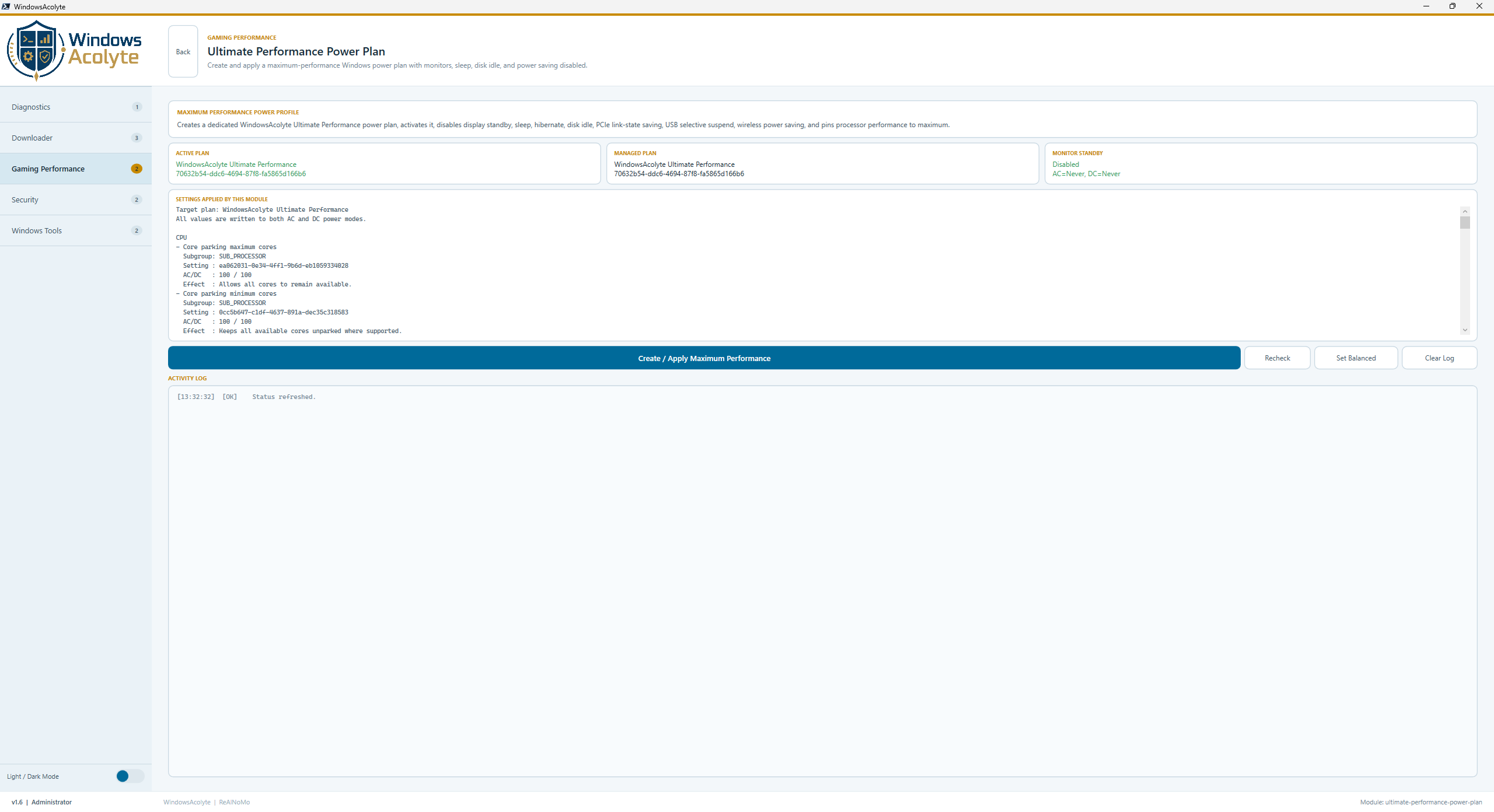
- Creates a dedicated WindowsAcolyte Ultimate Performance power plan from the Windows Ultimate Performance template
- Activates the plan and applies maximum-performance AC/DC settings
- Keeps monitors awake forever (
Turn off display after = Never) - Disables sleep, hibernate, hybrid sleep, and hard-disk idle timers
- Sets CPU minimum and maximum processor state to 100%
- Applies aggressive CPU boost, maximum boost policy, performance-first EPP, and core parking disablement where Windows exposes those settings
- Disables PCIe Link State Power Management, USB selective suspend, and wireless adapter power saving
- Sets video playback to quality/performance mode
- Shows the exact
powercfgsubgroup, setting, AC/DC value, and effect before applying - Includes Recheck, Apply, Set Balanced, and Activity Log actions
- Skips unsupported hardware-specific settings safely and logs them as warnings
This profile is built for maximum responsiveness, not battery life. Expect higher idle power use, heat, and fan activity.
Category: Downloader Admin: ❌ No
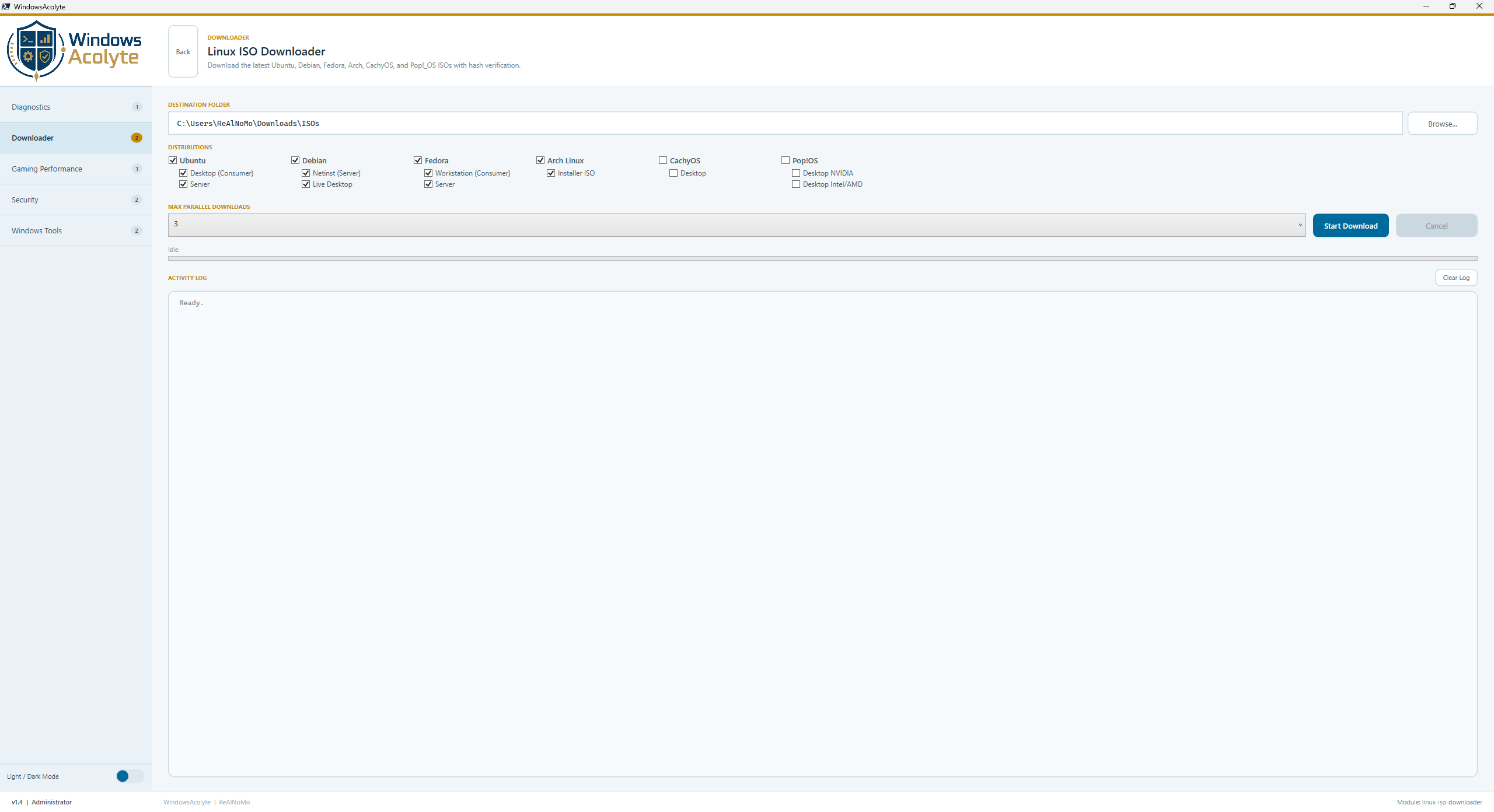
- Download latest ISOs from official sources
- Parallel downloads (1–5 concurrent)
- Parent/child distro selection (main distro = all variants, sub-option = single variant)
- Separate live progress row for every selected ISO
- SHA256 verification (where available)
- Auto mirror fallback
- Resume / skip existing files
- Background processing via ConcurrentQueue + DispatcherTimer
| Distro | Variants | Default | Source |
|---|---|---|---|
| Ubuntu | Desktop (Consumer), Server | ✅ Both | ubuntu.com |
| Debian | Netinst (Server), Live Desktop | ✅ Both | debian.org |
| Fedora | Workstation (Consumer), Server | ✅ Both | fedoraproject.org |
| Arch Linux | Installer ISO | ✅ | archlinux.org |
| CachyOS | Desktop | ❌ Opt-in | cachyos.org |
| Pop!_OS | Desktop NVIDIA, Desktop Intel/AMD | ❌ Opt-in | pop-os.org |
Clicking a main distro selects or clears all of its variants. Selecting only a sub-option downloads only that specific ISO.
- Overall progress bar plus one persistent progress row per selected ISO
- Speed indicator (MB/s) and ETA
- Queued/running/done/failed/cancelled state per ISO
- Activity log dynamically resizes under the progress area
- Resume / skip existing files
- Activity log
- Mirror failover
- Parallel download control
📁 Default Output (Auto-Detected)
C:\Users\[CurrentUser]\Downloads\ISOs
ℹ️ Automatically detects the current Windows user — no hardcoded paths
Category: Downloader Admin: ❌ No
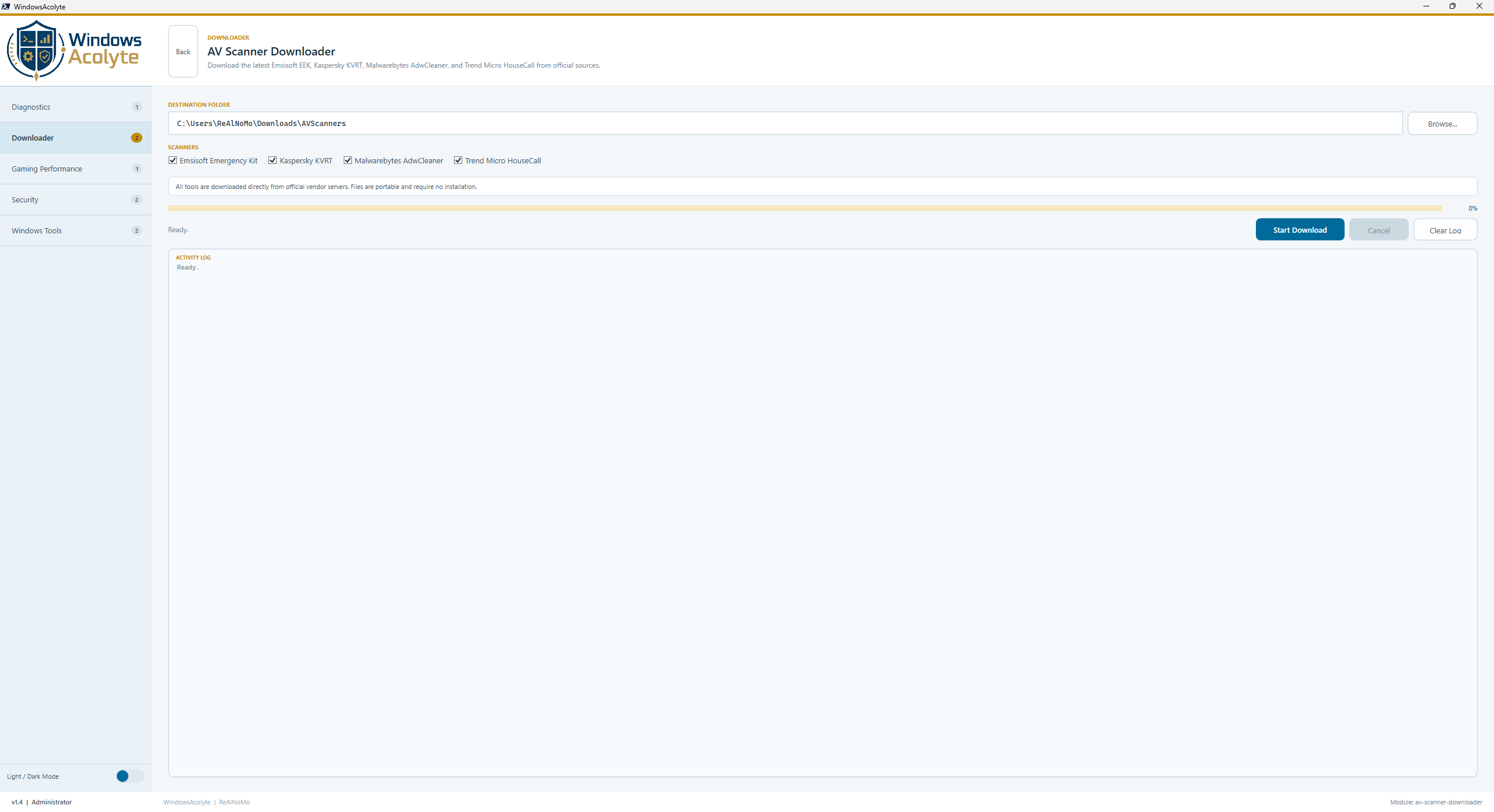
- Download portable AV scanner tools from official vendor servers
- Parallel downloads (1–4 concurrent)
- Background processing via RunspacePool
- Per-file progress tracking with speed and ETA
- MD5/SHA256 verification (where available)
- Live queue-based UI updates
| Scanner | Vendor | Portable | Verification |
|---|---|---|---|
| EEK | Emsisoft | ✅ | ✅ MD5 |
| KVRT | Kaspersky | ✅ | ✅ SHA256 |
| AdwCleaner | Malwarebytes | ✅ | ❌ |
| HouseCall | Trend Micro | ✅ | ✅ SHA256 |
- Per-file speed indicator (MB/s)
- ETA calculation
- Overall progress + file count
- Activity log
- Download coordination
- ConcurrentQueue architecture
📁 Default Output (Auto-Detected)
C:\Users\[CurrentUser]\Downloads\AVScanners
ℹ️ Automatically detects the current Windows user — portable & flexible
- Orchestrator Pattern: Isolated RunspacePool per download batch
- Thread Safety: ConcurrentQueue for cross-runspace communication
- UI Updates: DispatcherTimer-based polling (no blocking)
- Cancellation: System.Threading.CancellationToken support
💡 Use case
Bulk download of portable security tools for offline scanning
Category: Windows Tools Admin: ❌ No
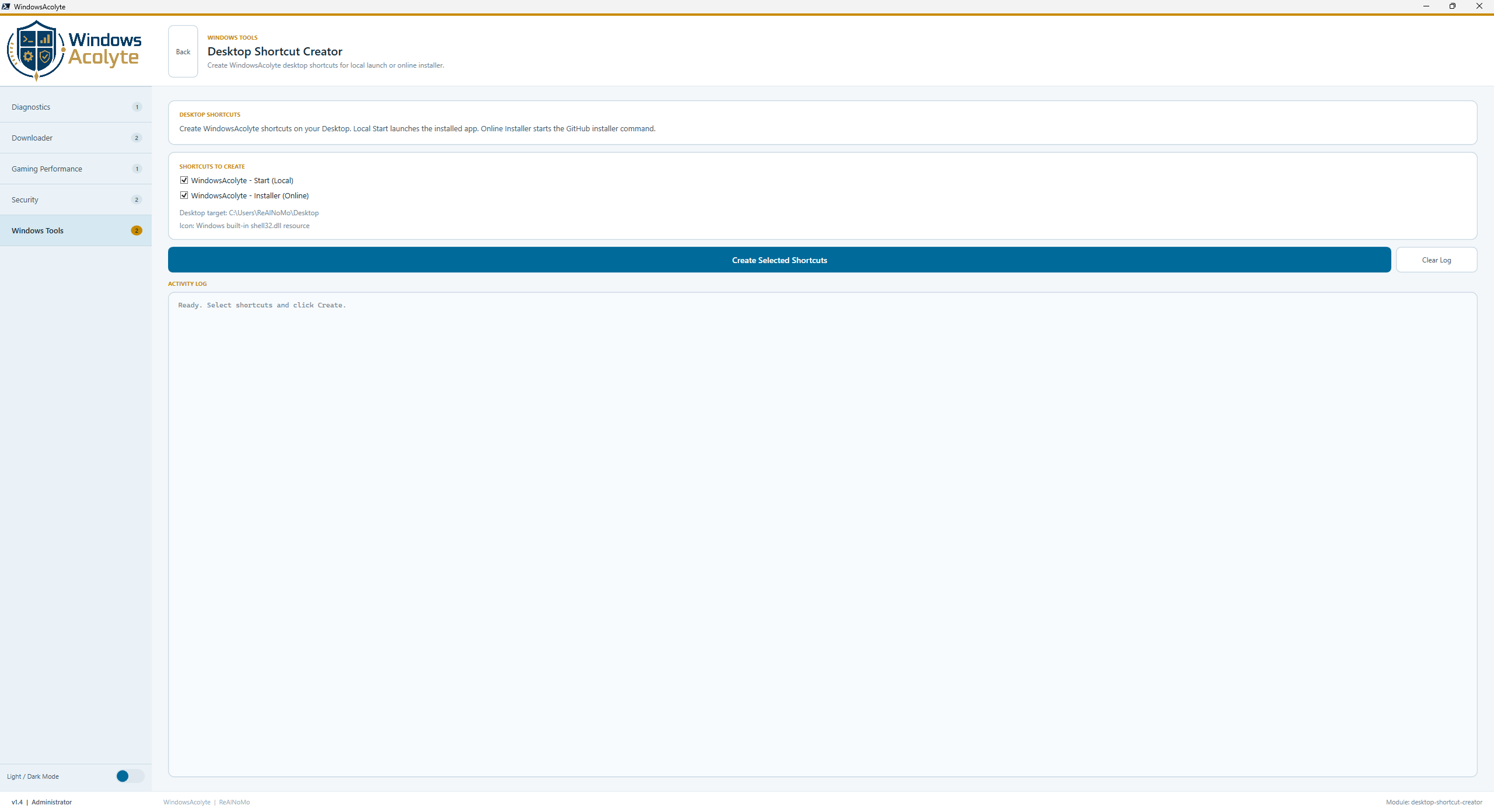
- Creates WindowsAcolyte shortcuts on the current user's Desktop
- Supports Local Start and Online Installer shortcut variants
- Uses English shortcut names:
WindowsAcolyte - Start (Local).lnkWindowsAcolyte - Installer (Online).lnk
- Uses PowerShell 7 (
pwsh.exe) with-NoProfileand-ExecutionPolicy Bypass - Uses the dedicated white-background shortcut icon from
logo/Windows_Acolyte_Shortcut_Icon.ico - Logs created shortcut paths and missing local install warnings
💡 Use case
Recreate WindowsAcolyte Desktop launch shortcuts directly from the app.
Category: Downloader Admin: ❌ No
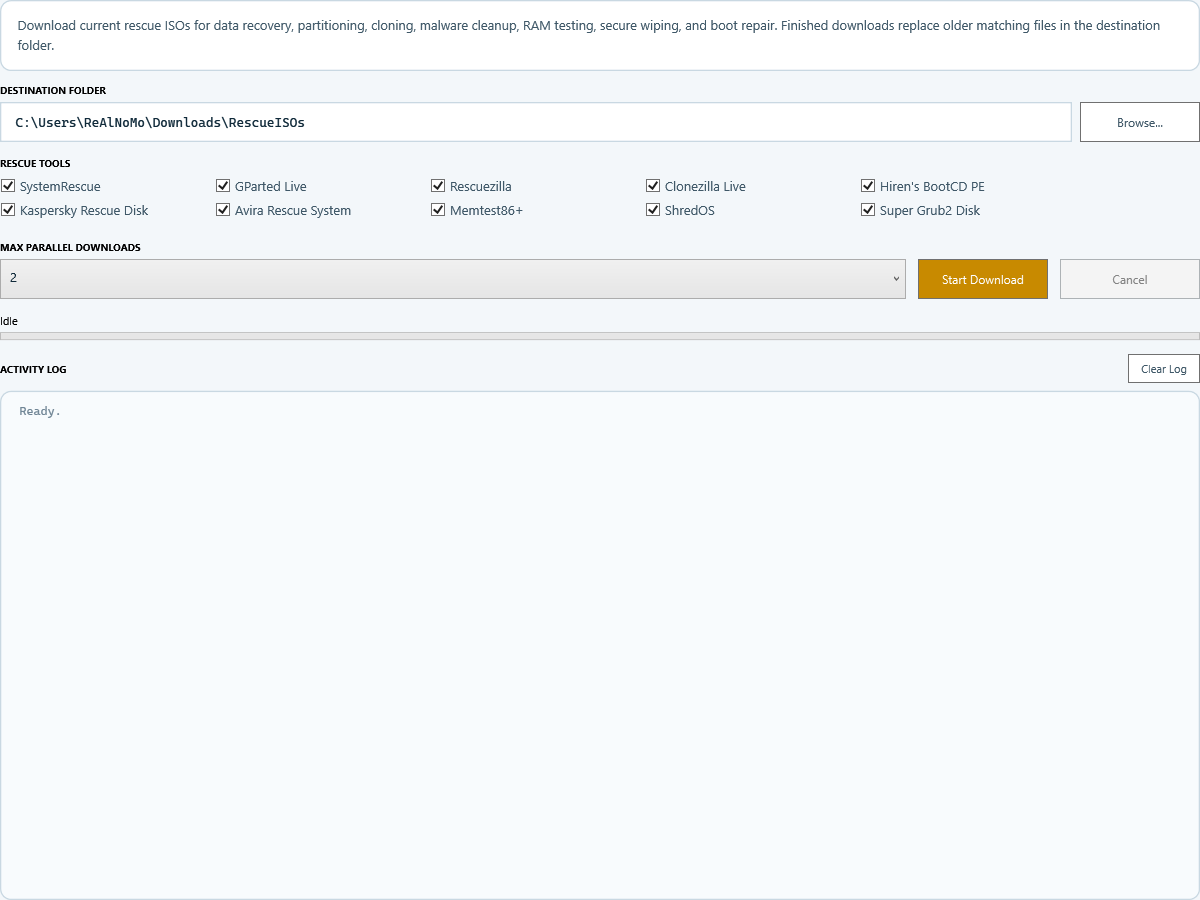
- Downloads current rescue, partitioning, cloning, malware cleanup, RAM test, wipe, and boot repair images
- Keeps stable local filenames like
systemrescue-latest-amd64.iso - Replaces older matching files in the destination folder after a successful download
- Supports parallel downloads with one progress row per selected tool
- Extracts ISO files from upstream ZIP packages where required (
Memtest86+,Super Grub2 Disk) - Uses official project pages, GitHub Releases, SourceForge project pages, and vendor latest URLs
| Tool | Purpose | Source |
|---|---|---|
| SystemRescue | Data rescue and system recovery | system-rescue.org / SourceForge |
| GParted Live | Partitioning | SourceForge |
| Rescuezilla | Backup, restore, clone | GitHub Releases |
| Clonezilla Live | Disk and partition cloning | SourceForge |
| Hiren's BootCD PE | Windows PE repair toolkit | hirensbootcd.org |
| Kaspersky Rescue Disk | Offline malware cleanup | Kaspersky latest URL |
| Avira Rescue System | Offline malware cleanup | Avira latest URL |
| Memtest86+ | RAM testing | memtest.org |
| ShredOS | Secure disk wiping | GitHub Releases |
| Super Grub2 Disk | Boot repair | SourceForge |
📁 Default Output (Auto-Detected)
C:\Users\[CurrentUser]\Downloads\RescueISOs
ℹ️ Existing older matching ISO files are removed only after the new download has completed successfully.
Set-ExecutionPolicy RemoteSigned -Scope CurrentUser
.\install.ps1
📁 Install location:
%LOCALAPPDATA%\WindowsAcolyte
Remove-Item "$env:LOCALAPPDATA\WindowsAcolyte" -Recurse -ForceRemove from PowerShell profile:
$PROFILE
📄 File naming:
modules/NN-Name.ps1
Register-PowerToolsModule `
    -Id "custom-id" `
    -Name "Custom Module" `
    -Description "What it does" `
    -Category "Category" `
    -RequiresAdmin $false `
-Show { }- Inline XAML only
- Logging with timestamps + status codes
- Try/Catch everywhere
- Use dynamic theme brushes (
$Global:PTS_Brush) - Background processing for long tasks
- ConcurrentQueue for thread-safe communication
| Problem | Solution |
|---|---|
| PowerShell 7 missing | Install from aka.ms/powershell |
| Command not found | Restart terminal |
| ExecutionPolicy error | Set RemoteSigned |
| Modules missing | Check /modules folder |
| Gaming tweaks missing | Run as Admin |
| Logo color wrong | Toggle dark mode |
| ISO path invalid | Uses auto-detected Downloads\ISOs folder |
| Browser buttons greyed out | Browser or Sandboxie-Plus not installed |
| Component | Requirement |
|---|---|
| PowerShell | 7.0+ |
| Windows | 10 / 11 |
| WPF | Required |
| Display | 1024×600+ |
| Download modules | .NET HttpClient (built-in) |
- ✅ All 10 modules fully functional
- ✅ Ultimate Performance Power Plan: creates a dedicated WindowsAcolyte power plan, activates it, disables monitor standby/sleep/disk idle, and enforces maximum CPU/PCIe/USB/WLAN performance settings
- ✅ Rescue ISO Downloader: latest rescue/partition/cloning/malware/memory/wipe/boot images with replacement cleanup
- ✅ Dynamic Light/Dark theme (all 50+ colors)
- ✅ Logo updated to
logo/Windows_Acolyte_Logo.png - ✅ Windows icon generated from the logo as
logo/Windows_Acolyte_Icon.ico - ✅ Desktop shortcut icon uses white background via
logo/Windows_Acolyte_Shortcut_Icon.ico - ✅ Theme colors aligned with the logo palette
- ✅ Explorer View Normalizer: checkbox UI, grouped state view, apply/revert, auto-recheck, small desktop icons
- ✅ Linux ISO Downloader: distro variant selection and one progress row per ISO
- ✅ Desktop Shortcut Creator: local start and online installer links from Windows Tools
- ✅ Shortcut launch paths cleaned up without
-NoExit - ✅ Gaming Optimizer: 29 tweaks + profiles
- ✅ AV Scanner: RunspacePool orchestration
- ✅ All modules use PTS_Brush theming
- ✅ Background processing via DispatcherTimer
- ✅ ConcurrentQueue for thread-safe communication
- ✅ Window starts maximized
🚨 Use at your own risk
This software is provided "as is", without any warranties of any kind, express or implied, including but not limited to functionality, reliability, security, or compatibility.
By using this software, you agree that:
- All actions are performed at your own risk
- System-level modifications (registry, performance tweaks, etc.) may cause issues
- You are responsible for backups and system protection
To the fullest extent permitted by law, the author shall not be liable for any damages, including but not limited to data loss, system instability, hardware damage, security vulnerabilities, or indirect/consequential damages.
💡 Recommendation: Test in a VM or secondary system before applying changes.
MIT
ReAlNoMo Version 1.5 • May 2026