Unlike the iPod Classics, the iPod Mini did not received the same love by themes developers and most themes that I could find were pretty far from my expectations and my needs. I found only 2 themes (Sprocket and Minim) that were very interesting and good looking, and started to use them regularly. I learnt how to modify Rockbox themes (using this excellent tutorial : https://www.rockbox.org/wiki/CustomWPS and also by looking how these 2 themes were made by reading their code).
The idea started essentially about just fixing some bugs and adding very small improvements but the project grew up over time and now both themes are greatly improved esthetically and ergonomically so I also renamed them. I did not made those themes from scratch and my work could not exist without the Rockbox project and without the work of those themes developers who made a solid base to work with.
I think this work may benefit to the community, so I share it in the hope that this will be useful to someone in the vast Internet.
You need to install extra "Fonts file" from the latest daily build : https://www.rockbox.org/daily.shtml
Based on Minim b4 by yuuiko. It's still Minimal... but less minimal than it used to be.
Improvements made by me :
- Use the font "Sazanami Mincho 11px" by default in menus (to show more content on screen without having to scroll)
- The realtime volume viewer is now disabled automatically for OPUS files in order to save some precious CPU cycles. The iPod Mini is struggling hard with this format, but this format is very useful to encode audiobooks at very low bitrate (32 to 40kbps) but with high quality.
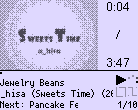
- Important layout improvements on WPS :
- Added the playlist state (current/total)
- Reduced slightly the surface of album cover to show one more line of text
- Use Sazanami Mincho 11px to show a 3rd line of text content
- Add another line that show info about the Next song in the playlist
- Text is now scrolling even if the song is not playing
- When changing the volume, the audio format is now shown on a different line
- After changing the volume, the WPS return instantly to normal state. There's no need anymore to show different info during a few seconds (which was in my opinion not a very practical user experience design choice because those info should be accessible just by an eye-sight without any user interaction)
- Show track year ID3 at the end of the second line if the info is available
- Show current clock and battery percentage in 3rd line (bottom-right), as alternating text
- Show sleep timer if available in 3rd text line (bottom-right) and show a short description of each info before showing it (during 1.5 seconds)
- Reduced the surface of the album art/real time volume viewer to show the current played time of the current song and the total time of the current song. This info is very important for long tracks and also for audiobooks so you will be able to know when your current chapter will end (as long as you properly splitted your book to 1 file per chapter).
Bug fixes made by me :
- Fixed a missing space between the Month name and the day of month in the lockscreen when music is playing (there is 2 different lockscreen, one that show if music is playing and another that show when there's no music to play. On the second one, there was nothing to fix, it was correct.)
- Fix to the glitchy lockscreen each time a new song is played in the background while staying on the lockscreen (I inspired myself from the code of this theme https://github.com/D0-0K/adwaitapod to figure out how to fix it).
- Fix multiple issues that could cause the lockscreen to glitch out
- The lock icon was not showing up on WPS if no album cover is present or if album cover is disabled, it's now fixed
- Reduce CPU usage (makes the battery charging and the disk accesses icons refreshing much slower)
- Reduce CPU usage while switching tracks, by showing the volume realtime viewer only 1s after the start of the song (For some reason, each time you switch a song (even if the next one has a cover art), the realtime volume viewer is always shown during a few seconds while the next song is loading...)
This theme already supports japanese characters just fine out of the box. With all of my work, you lose 5 pixels that were previously showing the cover art in WPS but you get a precious 3rd line using a smaller font. It's less minimal than the work and the vision of yuuiko, but in my opinion it is much more usable because you now get access to every important data directly on your WPS just by looking into your screen a few seconds without having to touch to anything. Minim is now competiting in terms of usability against a very complete and simple looking theme like Sprocket in my opinion, while still looking and feeling much more "Minimal" and esthetic than any other available Rockbox themes available for the iPod Mini.
I also decided purposely to not touch the lockscreen (when you HOLD from the home screen) because it is supposed to look nice but not supposed to replace the real WPS, so don't ask me to add more data on this space. I like how the cover art is taking all space here with only current hour + date with a big font.
Please support the designer/theme creator here by donating on his patreon : https://www.patreon.com/yuuiko
Based on Sprocket by gogi-goji
Improvements made by me :
- Add important fonts in the package
- Use the font "Rockbox-Mix" on the WPS to support japanese characters
- Use the font "11-Sazanami-Mincho" in menus to print more lines and support japanese characters everywhere
- Only in menus (not in WPS), the title of the list is now shown in the status bar rather than the current volume icon + text. This means that all content lists will show one more line of content. The size of an iPod Mini screen is so small, so each line shown on screen is precious and helps at navigation within a large music library. Having the list title in the status bar creates also a clear visual separation between the title and the content which increases readability and comfort.
- Enable scrollbar on the right of the screen
- If no sleep timer is configured, the current clock (hour + minutes) will be shown on the bottom-center of the WPS so you can know what time is it just by looking your screen at any time without having to fiddle in menus
- This theme can now show album arts ! It's fully conditional, so you still get full screen texts if you disabled album arts globally or if your current track does not have any available one.
- The play status (Play/Stop icon) is now showed on the status bar outside the WPS (so in menus) only when the lock icon is shown, to let more space to show more characters of the current title label during navigation in the menus and in the file/database browser.
- The battery percentage text "100%" is now replaced by "F" to indicate you that your iPod is now fully charged. This saves some space and allowed to reduce the size of the text area, which will be used by the title of the current view (list) in the status bar if it is long enough.
- The battery percentage is replaced by the disk access icon each time there is any disk access (only in menus and only when not locked and never in WPS)
Bug fixes made by me :
- Clear any previous wallpaper when applying the theme
Link to the original theme : https://github.com/gogi-goji/sprocket-rockbox-theme and https://themes.rockbox.org/index.php?themeid=1820&target=ipodmini2g
Licence : https://creativecommons.org/licenses/by-sa/3.0/deed.fr
The choice is up to you, I currently just like to use both. I often prefer slightly Minimless because the design is much more advanced and ambitious, and because cover arts looks much better in it. With my improvements, Minimless is now just as usable as SprocketModern; you have access to all important info in the WPS just by looking at any time your screen during a few seconds.
Some things that I noticed about cover arts :
- This tool https://www.mp3tag.de/en/download.html can in the menu "Actions" mass convert embedded images to plain jpeg and extract them. I recommend using it to convert to 200x200 jpeg all of your library. Don't push the quality slider to the maximum, it's un-necessary and overkill, keep it at the default level (which is 2 bars below the maximum).
- Use externally loaded cover arts and sanitize embedded ones using Foobar2000 to save some precious disk space
- If you really like to see your cover arts, Minimless will show them much better in WPS than any other Rockbox theme (but not fully, only around 80% of your cover). Minimless in WPS show them at 98x98 then cut a little part of it to show the data from your music at the bottom of your screen and it also cut some pixels from top. SprocketModern and the default theme (cabbiev2) shows cover arts fully at 55x55 which make them often very unreadable (so it's useless and frustrating to look at if those are just looking like garbage). It's looking much better to not show all of it but with a greater resolution. With Minimless, you can often recognize the artists and sometimes read some big text written in the picture which is a pretty fun experience on the tiny screen of an iPod Mini.
When configured exactly like this, your covers should load instantly.
The font "Sazanami Mincho 11px" supports almost all special characters in all languages but not all. You can use the software "mp3tag" to mass replace problematic characters (For example, "œ" can become "oe" which means the same but will show correctly). The only font that supports natively all characters is "14-RockBox-Mix" but it is much taller and larger than Sazanami. You can find more details about international coverage about fonts here : https://translate.rockbox.org/whichfont.php
Feel free to check this post : https://www.reddit.com/r/ipod/comments/1ebxjur/ipod_mini_sharing_thoughts_and_tricks_on_daily/ You will find many tricks and advices.
Those themes should work just fine with the iPod Mini 1G but I can't test it.
You can find the same-but-adapted themes in this repo : https://github.com/Olsro/rockbox-classicbw-themes
You can tip me on Patreon : https://www.patreon.com/Olsro