

SolaX Cloud / SolaXCloud integration to monitor your SolaX system in Home Assistant using the official SolaX Cloud API.
- Automatically creates per-inverter sensors and provides a system-wide overview with total sensors.
- Requires no YAML configuration or template sensors.
Ideal if you want a simple, feature-rich, plug-and-play cloud integration for SolaXCloud in Home Assistant and your Energy Dashboard.
- 🔌 Works with single or multiple inverters
- 📊 Automatic per-inverter and system-wide total sensors
- ⚡ AC/DC efficiency per inverter and total system
- 🔋 Optional battery energy estimation (calculated from battery power)
- 🧠 Dynamic sensors (only creates sensors your system supports)
⚠️ Built-in API error and rate-limit reporting- 🛠️ No YAML or templates required (fully UI-based setup)
- 🌍 Multiple language support
- 🇬🇧 🇩🇪 🇳🇱 🇨🇿 🇵🇱 🇵🇹 🇪🇸 🇮🇹 🇫🇷 🇸🇪 🇩🇰 🇳🇴 🇫🇮 🇱🇹
This integration is developed and tested in real Home Assistant setups.
Contributions, issues, and pull requests are welcome.
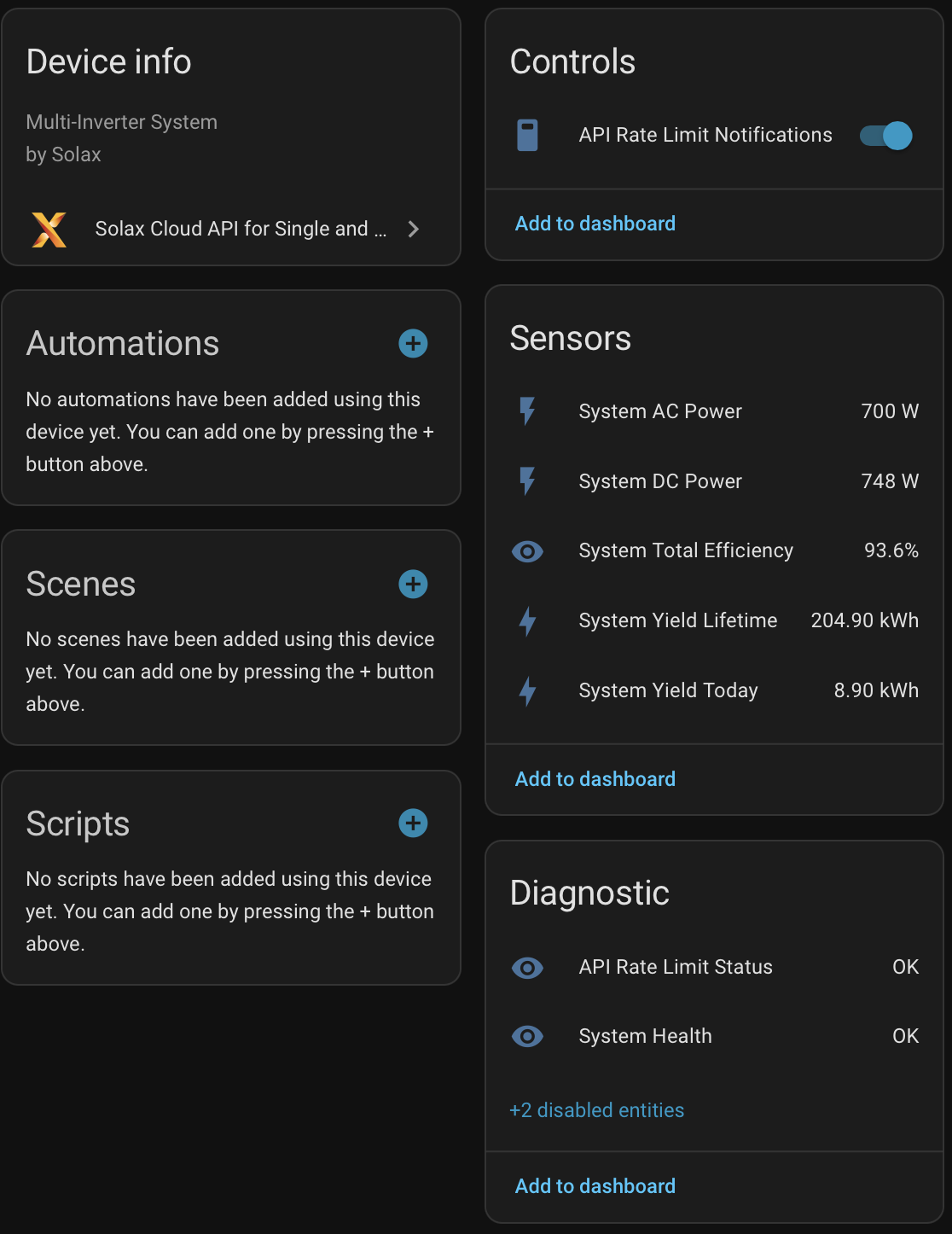
Total System information
This system contains 3 micro-inverters:
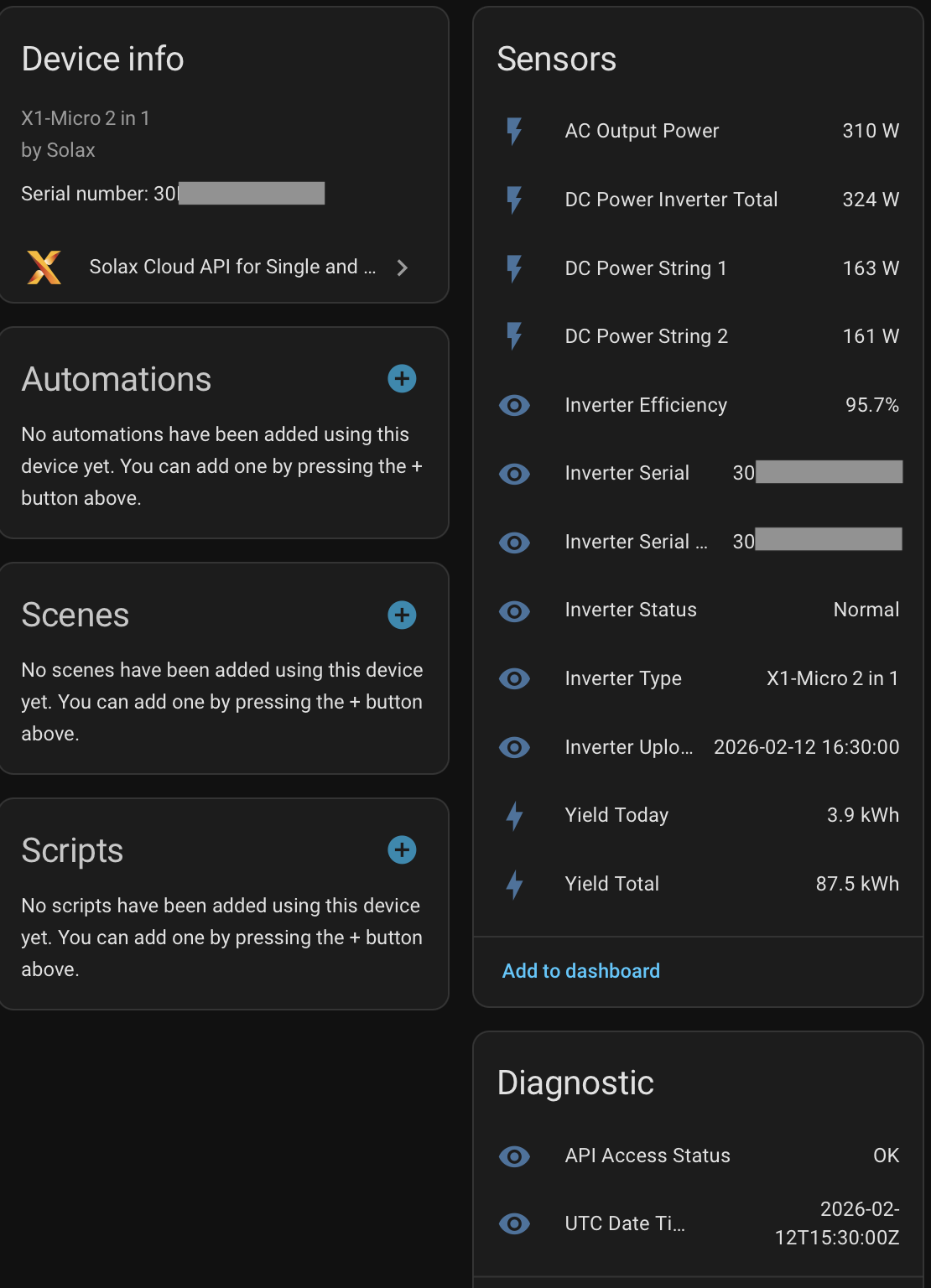
Single-inverter info:
This is a micro inverter.
Solar panel array overview:
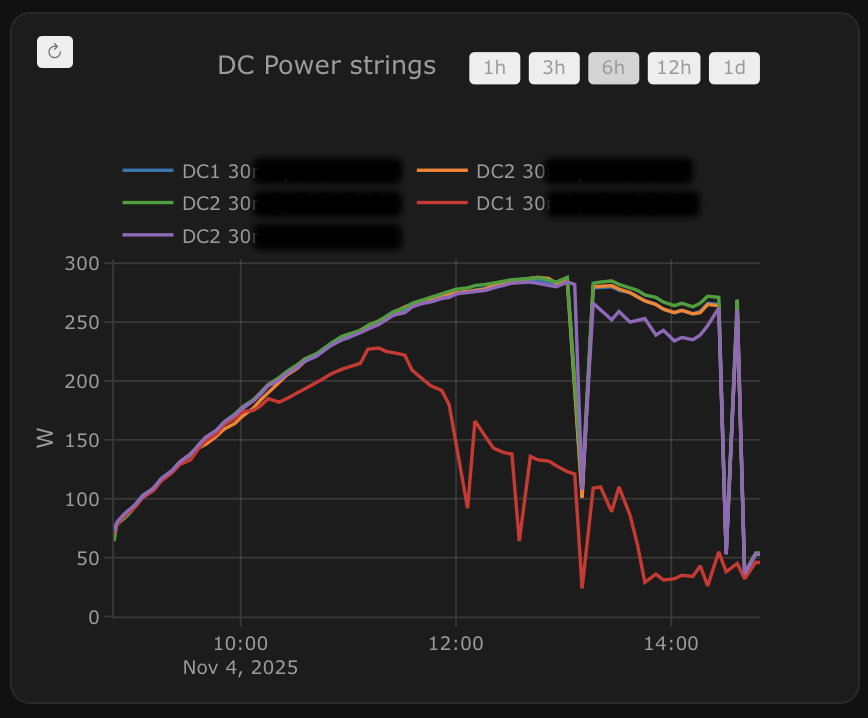
As this system has micro inverters, we can see individual panel performance.
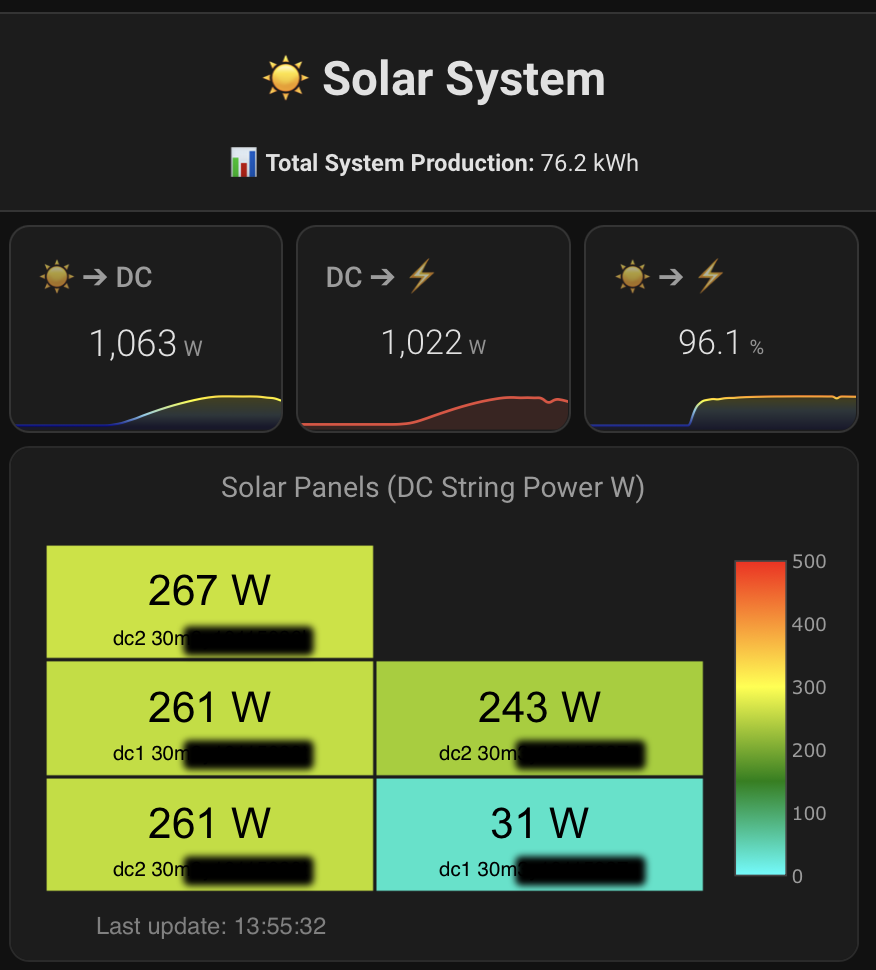
Individual DC string performance over the day.
One of the panels is shaded during the winter months.
Built in diagnostics:
Redacted diagnostics with masked serials and token data for troubleshooting.
Complete feature summary
- Single Integration Instance - One config entry for a full site (single- or multi-inverter)
- Single API Token - One token for all configured inverter serials
- Dynamic Sensor Creation - Creates only sensors with real API data
- Per-Inverter Metrics - Power, yield, battery, EPS, status/type, and upload timestamps
- Computed Per-Inverter Sensors - DC total and inverter efficiency
- Estimated Battery Energy Sensors (Opt-in) - Estimated daily and total charge/discharge energy from
batPowersample integration - System Totals Device - AC/DC totals, yield today/lifetime, system efficiency, system health, and API rate-limit status
- Per-Inverter API Access Status -
OK,Rate Limited,Serial Unauthorized,API Error - Resilient API Handling - Rate-limit cooldown and clear status reporting
- Smart Reload on Config Changes - New inverter(s) are queried first; unchanged inverters keep cached values
- Invalid Serial Handling - Unauthorized serials are marked unavailable and clearly surfaced
- Options Flow Safety Popups - Acknowledgment dialogs for rate limits and invalid serial/access
- Persistent Notifications + Toggle - Rate-limit notifications can be enabled/disabled from System Totals
- Entity/Device Cleanup - Removed serials clean up stale entities/devices from the registry
- Stable Entity Prefix - Entity IDs remain stable when system name changes
- Built-in Diagnostics Export - Download diagnostics with API responses with partial masked token and partial serial masking for privacy.
- UI Language Support - 🇬🇧 English (
en), 🇩🇪 German (de), 🇳🇱 Dutch (nl), 🇨🇿 Czech (cs), 🇵🇱 Polish (pl), 🇵🇹 Portuguese (pt), 🇪🇸 Spanish (es), 🇮🇹 Italian (it), 🇫🇷 French (fr), 🇸🇪 Swedish (sv), 🇩🇰 Danish (da), 🇳🇴 Norwegian Bokmal (nb), 🇫🇮 Finnish (fi), 🇱🇹 Lithuanian (lt)
Before installation, you need:
-
SolaX Cloud Account - Register at solaxcloud.com
-
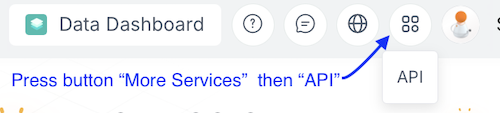
API Token - In SolaX Cloud, in the top-right menu and click More Services, select API from the dropdown:
On Third-party Ecosystem copy the Token ID under API Realtime Data.
Use thisToken IDduring integration setup: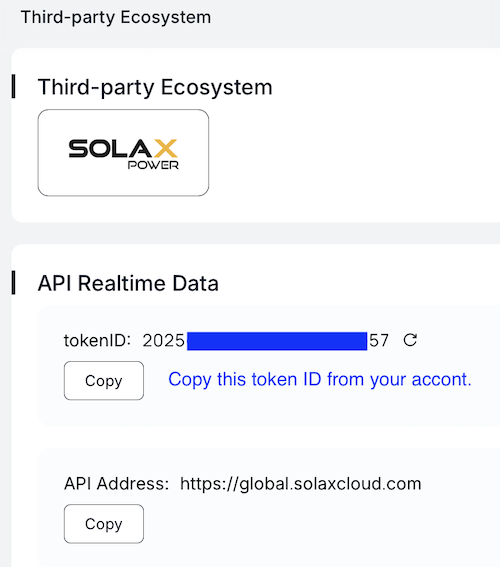
-
Inverter Serial Numbers - Use the serial shown under Devices in Solax Cloud.
- If your system uses a Solax LAN/WiFi dongle, use the dongle serial.
- If your inverter has built-in WiFi, use the WiFi inverter serial.
- For microinverter systems, use the microinverter(s) serial(s).
- Add/install SolaX Cloud API for Single- and Multi-Inverter Systems from HACS (Integration category).
- Restart Home Assistant.
Manual install (We recommend HACS):
- Download the latest release
- Copy the
custom_components/solax_cloud_apifolder to your Home Assistantcustom_componentsdirectory - Restart Home Assistant
- Go to Settings → Devices & Services
- Click + Add Integration
- Search for "SolaX Cloud API"
- Enter your configuration:
- API Token: The
Token IDfrom SolaX Cloud Third-party Ecosystem → API Realtime Data - System Name: Name for your solar system (used for system total sensors and entity ID prefix)
- Scan Interval: Polling frequency in seconds (default: 120, minimum suggested: 120)
- API Token: The
- After initial setup, you'll be guided to add inverter serials one by one.
- Inverter Serial Numbers - Use the serial shown under Devices in SolaX Cloud.
- If your system uses a SolaX LAN/WiFi dongle, use the dongle serial.
- If your inverter has built-in WiFi, use the WiFi inverter serial.
- For microinverter systems, use the microinverter(s) serial(s).
- Check "Finish Setup" when all inverters are added
To add or remove inverters later:
- Go to your SolaX Cloud API integration
- Click Configure
- Add new serial numbers or remove existing ones
- Click Save Changes
After saving, the integration reloads automatically and validates the result.
If rate limits or invalid serial/access errors are detected, you get a GUI popup (options flow) and a persistent notification.
- 📊 Data Refresh Rate: SolaX Cloud data updates every 5 minutes, even if we query every 2 minutes.
- 💾 Transient Error Retention: The last good values are retained during temporary rate limits/API issues.
- 🔧 Dynamic Sensors: Entities are created based on real fields returned for your inverter model.
This integration currently includes the following inverter type names:
Inverter List:
- X1-LX
- X-Hybrid
- X1-Hybiyd/Fit
- X1-Boost/Air/Mini
- X3-Hybrid-G1/G2
- X3-20K/30K
- X3-MIC/PRO
- X1-Smart
- X1-AC
- A1-Hybrid
- A1-FIT
- A1
- J1-ESS
- X3-Hybrid-G4
- X1-Hybrid-G4
- X3-MIC/PRO-G2
- X1-SPT
- X1-Boost-G4
- A1-HYB-G2
- A1-AC-G2
- A1-SMT-G2
- X1-Mini-G4
- X1-IES
- X3-IES
- X3-ULT
- X1-SMART-G2
- A1-Micro 1 in 1
- X1-Micro 2 in 1
- X1-Micro 4 in 1
- X3-AELIO
- X3-HYB-G4 PRO
- X3-NEO-LV
- X1-VAST
- X3-IES-P
- J3-ULT-LV-16.5K
- J3-ULT-30K
- J1-ESS-HB-2
- C3-IES
- X3-IES-A
- X1-IES-A
- X3-ULT-GLV
- X1-MINI-G4 PLUS
- X1-Reno-LV
- A1-HYB-G3
- X3-FTH
- X3-MGA-G2
- X1-Hybrid-LV
- X1-Lite-LV
- X3-GRAND-HV
- X3-FORTH-PLUS
If any inverter type name is missing or incorrect, please open a pull request.
Per inverter, the integration can create the following sensors (dynamic: only fields with API data are created):
Per inverter sensor list:
AC Output PowerDC Power String 1DC Power String 2DC Power String 3DC Power String 4Grid Feed-in PowerGrid Feed-in Power Meter 2Battery PowerBattery State of ChargeYield TodayYield TotalGrid Feed-in EnergyGrid Consumption EnergyEPS Phase 1 PowerEPS Phase 2 PowerEPS Phase 3 PowerInverter StatusBattery StatusInverter TypeInverter SerialInverter Serial Wi-Fi ModuleInverter Upload TimeUTC Date Time(diagnostic, disabled by default)DC Power Inverter Total(computed)Inverter Efficiency(computed)API Access Status(diagnostic)Estimated Battery Charge Energy Today(estimated, disabled by default, battery systems only)Estimated Battery Charge Energy Total(estimated, disabled by default, battery systems only)Estimated Battery Discharge Energy Today(estimated, disabled by default, battery systems only)Estimated Battery Discharge Energy Total(estimated, disabled by default, battery systems only)
System-wide sensor list:
System-wide sensors:
System AC PowerSystem DC PowerSystem Yield TodaySystem Yield LifetimeSystem Total EfficiencySystem Health(diagnostic)API Rate Limit Status(diagnostic)Last Poll Attempt(diagnostic, disabled by default)Next Scheduled Poll(diagnostic, disabled by default)Estimated System Battery Charge Energy Today(estimated, disabled by default, battery systems only)Estimated System Battery Charge Energy Total(estimated, disabled by default, battery systems only)Estimated System Battery Discharge Energy Today(estimated, disabled by default, battery systems only)Estimated System Battery Discharge Energy Total(estimated, disabled by default, battery systems only)
Diagnostic entities list:
API Access Status [Serial](diagnostic): API access health for each inverterSystem Health(diagnostic): overall health status across configured invertersAPI Rate Limit Status(diagnostic): current API rate-limit stateLast Poll Attempt(diagnostic, disabled by default): timestamp of the latest coordinator poll attemptNext Scheduled Poll(diagnostic, disabled by default): timestamp of the next planned pollAPI Rate Limit Notifications(switch under System Totals): toggle persistent rate-limit notifications
- Status sensors include both human-readable text and raw numeric values
- All sensors include timestamp information
- System total sensors show active/total inverter count
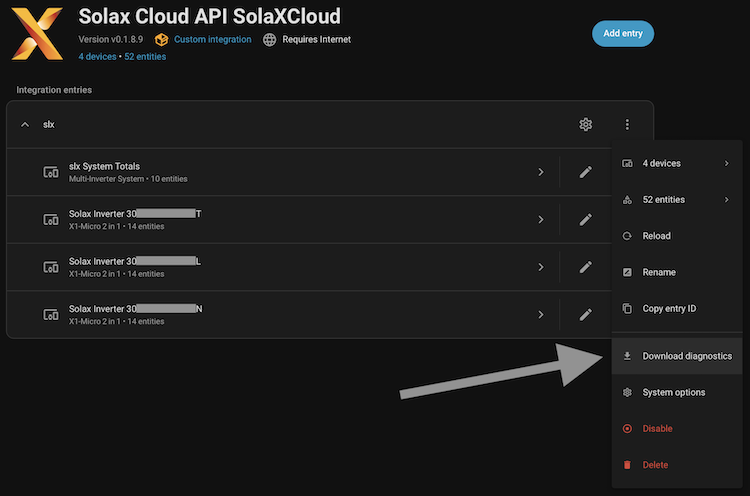
How to download diagnostics
- Go to Settings -> Devices & Services
- Open your Solax Cloud API integration
- Click the top-right menu (
⋮) - Click Download diagnostics
- Share diagnostics when opening an issue (redact anything else you consider sensitive)
Diagnostics privacy notes
- Token values are exported as a masked preview plus token length (not full token).
- Serial numbers are partially masked in diagnostics output.
- Home Assistant diagnostics packages may include additional platform/environment metadata outside this integration's own payload.
No data appearing?
- Verify your API token is correct (it is validated during setup)
- Check inverter serial numbers are accurate: use LAN/WiFi dongle serial when present, inverter serial for built-in WiFi systems, or microinverter serial for microinverter systems
- Ensure inverters are connected to Solax Cloud and reporting data
- Check Home Assistant logs for specific error messages
Rate limiting warnings?
- Increase your scan interval (recommended: 120+ seconds for multi-inverter systems)
- The integration automatically handles rate limits with backoff logic
- Check
API Rate Limit Statusand per-inverterAPI Access Status
Wrong serial / no auth
- You will get an invalid serial/access persistent notification
- During options changes, you also get an acknowledgment popup
- Affected inverter remains unavailable until serial/access is corrected
Missing sensors?
- Some sensors only appear if your inverter supports that feature
- Battery sensors only appear if you have battery storage
- Estimated battery energy sensors are created only when
batPowerdata exists and are disabled by default - PV channel sensors depend on your inverter's configuration
- EPS sensors only appear if you have backup power capability
Configuration issues?
- Use the integration's configure option to add/remove inverters
- The system automatically reloads when changes are saved
- Removed inverters are cleaned from registry, and new ones are fetched first
Need an immediate refresh test?
- Call the Home Assistant action/service
solax_cloud_api.manual_refresh - This triggers an instant fetch outside the normal scan interval
Found a bug or have a feature request? Please open an issue on GitHub.
Want to add support for more inverter types or features? Pull requests are welcome!
This project is licensed under the MIT License - see the LICENSE file for details.
This integration is not officially affiliated with Solax Power.
Note: Note: This integration is designed to be robust and user-friendly, with error handling and rate-limit protection for reliable operation with the Official SolaX Cloud API.
