Simple local app to connect your WhatsApp by scanning a QR code, display recent messages in a grid, select a chat card (or click "Send to selected") to send a preset reply.
very benificial if you want to manage a lot of chats quickly, there arent many solutions to do this and most ways require you to have a meta bussiness account and whatsapp bussiness api, this uses a workaround to get us workinig on personal whatsapp accounts (see Risks And Important Features)
To DO: Create a branch with support for official whatsapp bussiness API (PRs welcome) Requirements
- Node.js 16+ (LTS recommended)
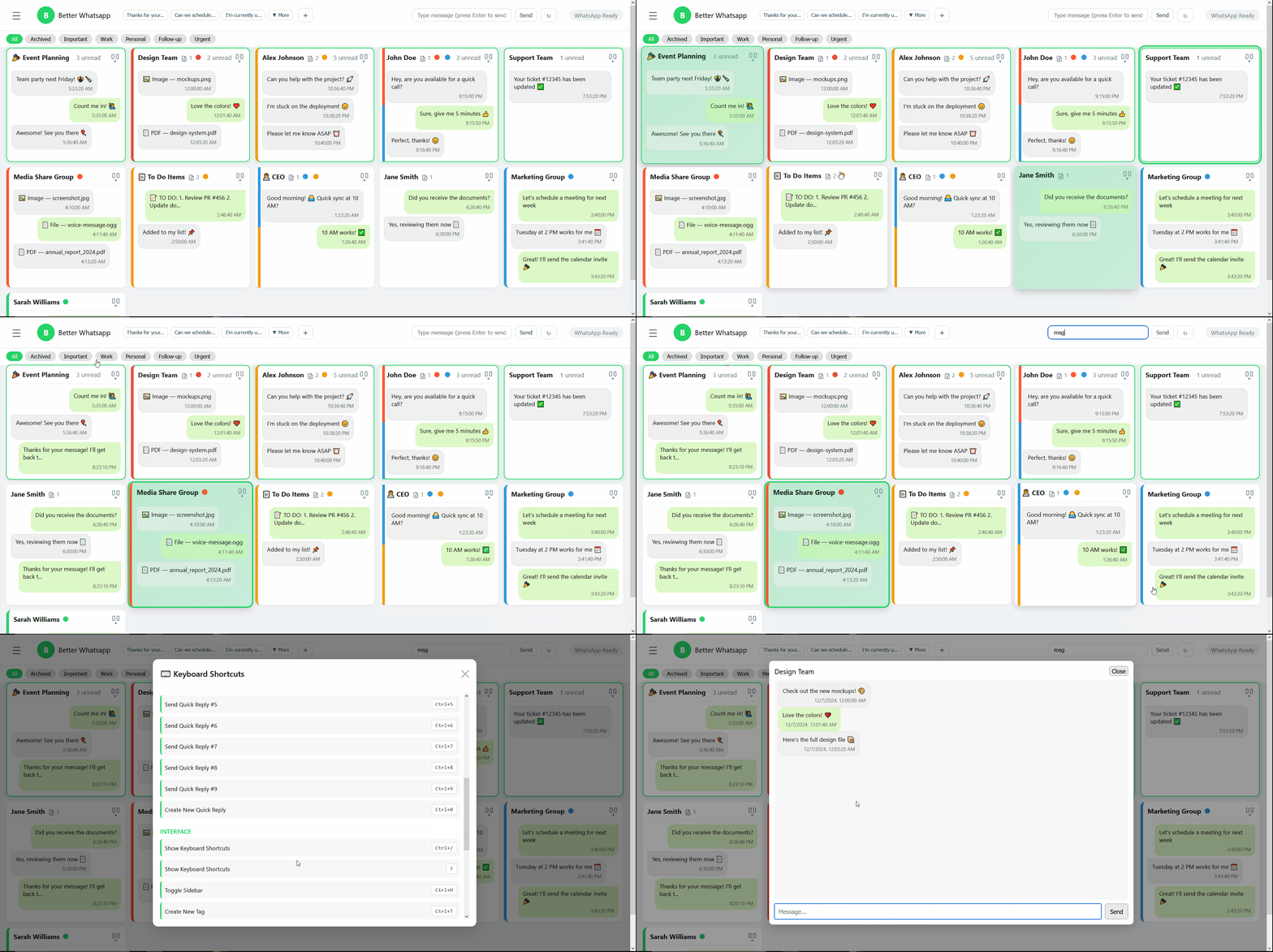
- Comprehensive Keyboard Shortcuts: 26 keyboard shortcuts for power users to navigate, select, send messages, and manage chats entirely without a mouse.
Navigation
↑ ↓ ← →- Navigate between chats in grid layoutSpace- Add/remove focused chat from selectionEnter- Open full chat modalEscape- Deselect all chatsCtrl+A- Select all visible chats
Quick Replies
Ctrl+1throughCtrl+9- Send quick reply #1-9 to selected chatsCtrl+0- Create new quick reply
Interface
Ctrl+/or?- Show keyboard shortcuts guideCtrl+H- Toggle settings sidebarCtrl+T- Create new tagCtrl+R- Refresh chatsCtrl+M- Focus message input fieldCtrl+F- Focus search inputCtrl+Alt+M- Mark selected chats as read (used to be ctrl+shift+r:now deprecated)
Modals
Ctrl+Enter- Save/confirm in tag/quick reply/note editorsEscape- Cancel/close any modalEnter- Send message (in full chat modal)Escape- Close full chat modal
- Quick Replies (for multiple chats) CRUD: create, edit, delete, import from JSON, export to JSON.

- Multi-select send: select multiple chat cards and send a quick reply to all of them at once.
- Compact cards: each chat card shows last messages (up to 3) with WhatsApp-like bubbles for quick scanning.
- Sticker & media preview: stickers are shown inline in compact cards (small thumbnail) and full media (images/PDFs) render inside the full-chat modal.
- Tags (backup and restorable ): create colored tags, assign/unassign tags to chats via right-click context menu, filter the chat grid by tag, and import/export tags + assignments.
- Notes: add freeform notes bound to chats. Notes support create/read/update/delete, import/export, deduplication on import, and phone-number fallback mapping during import.
- Note badges & preview: chat cards show a compact notes badge (📝) when notes exist. Hovering a card for ~1.5s shows a floating preview bubble with up to 3 notes (scrollable if more).


- Context menu: right-click a chat card to manage tags and notes quickly (
+ Add Note,Edit Notes).

- Central Notes settings: a
Notes ⚙button in the header exposes a central Import/Export panel to backup or restore all notes.


- Server-backed persistence: presets, tags, tag assignments, and notes are stored in
data.sqliteviasql.js(WASM).
- Storage: notes are stored with both
chat_id(e.g.,1234567890@c.us) and a normalizedphone_numberwhen available. This helps reconnect notes if chats are deleted and later reappear. - Import behavior: the import endpoint attempts to match incoming notes to existing chats by
chatIdfirst, then byphoneNumber(matchingtag_assignments.phone_numberor existingnotes.phone_number), and finally by constructingphone@c.usas a fallback. Import has optionalreplacebehavior (delete existing then insert). - Deduplication: when importing, the server skips notes that already exist with identical
chat_idandtext(counts reported in the import response asimported,skipped,failed,total).
Install
cd c:/Users/Waths/Desktop/better-whatsapp
npm install
Run
npm start
# open http://localhost:3000 in your browser
tests (for developers)
npm run test-quick-replies # tests the quick reply functionality CRUD + DB export imports as jsonHow it works
- On first run the server will print and emit a QR code. Scan with WhatsApp "Linked devices" → "Link a device".
- After authentication the UI hides the QR and shows messages.
- Click a message square to select it. Type a preset reply in the input and press
ror click "Send to selected" to send.
Notes & next steps
- This is a minimal demo. Improve by adding:
- message pagination and search
- mapping message to exact chat contact/name
- confirmations and delivery status
- authentication & access control for the web UI
- Focused inbox: grid of chat cards so you can scan recent conversations quickly.
- Quick replies: create, edit, import/export, and send preset messages to single or multiple selected chats.
- Persistent server-side storage: quick replies are stored in a local SQLite file (
data.sqlite) (implemented withsql.js) so presets survive restarts. - Full-chat modal: open a chat to see a scrollable history (with inline images and PDF previews) and send messages from the modal.
- Pinning & unread prioritization: pin important chats and surface unread conversations.
- This app uses the WhatsApp Web client (via
whatsapp-web.js) and requires scanning your WhatsApp QR to link. The application acts like a browser session for your account. - Security & privacy risks:
- Anyone with access to your machine and the LocalAuth session files can access your WhatsApp session.
- Media and messages may be downloaded and temporarily encoded as data URLs for preview; large files may increase disk and memory usage.
- Keep
data.sqliteand the./.wwebjs_authsession folder secure and backed up if needed.
- WhatsApp Terms of Service:
- Using third-party tools to access WhatsApp Web may violate WhatsApp's Terms of Service in some circumstances. Use this project only for personal, legitimate use and at your own risk.
-
Pros:
- Faster triage: grid + recency/unread sorting helps process messages quickly.
- Reusable quick replies: saves typing and supports multiline replies.
- Local-first: data and session stay on your machine (no central server required).
- Lightweight persistence without native installs (
sql.jsavoids native builds).
-
Cons / Limitations:
- Not an official WhatsApp client — behavior depends on WhatsApp Web and
whatsapp-web.jsinternals. - Media handling is basic: large files are encoded as data URLs; consider adding streaming or direct file links for heavy usage.
- No user authentication for the web UI in this prototype — anyone who can reach the server can control the linked WhatsApp session.
- Possible breakage: changes to WhatsApp Web can break the underlying library and require updates.
- Not an official WhatsApp client — behavior depends on WhatsApp Web and
Requirements
- Node.js (LTS recommended, >= 18 works well)
Install
Simple local app to connect your WhatsApp by scanning a QR code, display recent messages in a grid, select a chat card (or click "Send to selected") to send a preset reply.
This project is a personal productivity prototype — it helps triage many chats quickly without needing the official Business API.
To DO: Create a branch with support for official WhatsApp Business API (PRs welcome)
Requirements
- Node.js 16+ (LTS recommended; Node 18+ recommended for built-in fetch support in tests)
Install
cd c:/Users/Waths/Desktop/better-whatsapp
npm install
Run
npm start
# open http://localhost:3000 in your browser
Tests (for developers)
npm run test-quick-replies  # quick-replies API end-to-end
npm run test-tags          # tags API end-to-end
npm run test-notes         # notes API end-to-end (CRUD, import/export, dedupe)
How it works
- On first run the server will print and emit a QR code. Scan with WhatsApp "Linked devices" → "Link a device".
- After authentication the UI hides the QR and shows messages in a compact grid.
- Click a chat card to select it. Type a preset reply in the input and click "Send to selected".
- GET
/api/notes?chatId=...— list notes for a chat. - GET
/api/notes/export— export all notes (or add?chatId=...to export just one chat). - POST
/api/notes— create a note:{ chatId, text }. - PUT
/api/notes/:id— update a note:{ text }. - DELETE
/api/notes/:id— delete a note. - POST
/api/notes/import— import notes:{ notes: [...], replace: boolean }(import will append by default ifreplace: false). - GET
/api/notes/counts— returns counts per chat for efficient badge rendering.
Tags API endpoints are also available (see server routes) and include /api/tags, /api/tags/assign, /api/tags/import, /api/tags/export.
- Start the server and then run the provided test scripts which exercise the APIs end-to-end:
npm run test-quick-replies
npm run test-tags
npm run test-notes
The notes test (test/test_notes.js) will:
- create, read, update, and delete notes via the API,
- test export and import (append) flows,
- verify deduplication on import,
- verify phone-number fallback import,
- and clean up after itself.
- If the QR does not appear, check server logs for
qror initialization errors. - If
sql.jsfails to load the WASM, ensurenode_modules/sql.js/dist/sql-wasm.wasmexists. - Tests use the global
fetchAPI (available in Node 18+). If you run tests with older Node, install a fetch polyfill.
- Run this app only on trusted machines.
- Protect the
./.wwebjs_authfolder anddata.sqlitefile (don’t share them). - If exposing this server beyond localhost, add authentication (not included in the prototype).
- authentication for the web UI
- paginated message loading and search
- streaming media previews and thumbnails
- per-chat pin persistence
use the dev-frontend server if you are only doing frontend stuff (no need for linking whatsapp almost all functionality should retain except for minor glithces)
npm run dev-frontendthis will load a sample frontend with mock-server.js as backend

- This is an independent project (MIT-style usage). It is not affiliated with WhatsApp/Facebook/Meta.
- Use responsibly and respect WhatsApp's Terms of Service.