
to learn how to solve regression task, click on me
This section provides quick access to the main topics and concepts covered in this revision guide. Click on any link to jump directly to that section.
| Chapter Title | Content Focus |
|---|---|
| 🚀 NumPy Essentials | Array creation, shaping, statistical functions, and conditional assignment. |
| 📊 Pandas Data Manipulation | DataFrame creation, indexing (loc/iloc), cleaning (fillna), and transformation (apply, get_dummies). |
| 🗃️ NumPy Array vs. Pandas Series | Comparison of 1D data structures (ndarray and Series) and their use cases. |
| Machine Learning Concepts (Supervised & Unsupervised) | Core algorithms and techniques for model building. |
| Supervised Learning | Algorithms trained on labeled data. |
| ➡️ Regression Analysis | Predicting continuous values (The core section on this topic). |
| Linear, Poly, Multi Regression | Detailed breakdown of regression models, |
| ➡️ Classification | Predicting discrete categorical labels. |
| Decision Tree, Random Forest, KNN | Gini impurity, Majority Voting, Distance-based Classification and N-neighbors. |
| Unsupervised Learning | Algorithms for pattern discovery in unlabeled data. |
| ➡️ Clustering | Grouping similar data points. |
| K-means, Hierarchical | Centroids, Dendograms. |
| *Principle Component Analysis | Dimensionality Reduction. |
NumPy is the fundamental package for scientific computing in Python. It provides a high-performance multidimensional array object, and tools for working with these arrays.
Array Creation: np.array(), np.asarray(), np.arange(), np.linspace(), np.zeros(), np.ones(), np.empty(), np.identity()
| Method | Purpose | Differentiation/Context |
|---|---|---|
np.array() |
Creates a NumPy array from any array-like object (list, tuple). | Always makes a copy of the input data if the input is already a NumPy array. |
np.asarray() |
Converts input to an array. |
Does not make a copy if the input is already an ndarray of the same dtype. This saves memory/time when possible. |
np.arange() |
Creates arrays with regularly spaced values within a given interval. | Similar to Python's range(), but returns an ndarray. Requires a step value. |
np.linspace() |
Creates arrays with a specified number of samples, evenly spaced, over a closed interval. | Requires the number of samples (e.g., num=50) instead of a step size. Excellent for visualization and testing. |
np.zeros() |
Creates an array of a given shape and type, filled with zeros. | |
np.ones() |
Creates an array of a given shape and type, filled with ones. | |
np.empty() |
Creates an array without initializing its entries (contains uninitialized garbage values). | Fastest way to create an array, but the contents are non-deterministic (whatever was in that memory location). |
np.identity() |
Returns the square identity array of size |
A special case of np.eye() where |
Code Example:
import numpy as np

# np.array vs np.asarray
list_a = [1, 2, 3]
arr_a = np.array(list_a)
arr_b = np.asarray(arr_a)

# Modify the original array 'arr_a'
arr_a[0] = 99

print(f"Original list: {list_a}")
print(f"np.array (copy behavior): {arr_a}")
print(f"np.asarray (no-copy behavior): {arr_b}") # arr_b is a view of arr_a, hence it is modified too.
# The list_a is NOT modified as np.array makes a copy.

print("\nnp.arange vs np.linspace:")
print(f"np.arange(0, 10, 2): {np.arange(0, 10, 2)}") # Start, Stop (exclusive), Step
print(f"np.linspace(0, 10, 5): {np.linspace(0, 10, 5)}") # Start, Stop (inclusive), Number of samples

print("\nSpecial Arrays:")
print(f"np.zeros((2, 2)): \n{np.zeros((2, 2))}")
print(f"np.empty((2, 2)): \n{np.empty((2, 2))}")
print(f"np.identity(3): \n{np.identity(3)}")
Output:
Original list: [1, 2, 3]
np.array (copy behavior): [99  2  3]
np.asarray (no-copy behavior): [99  2  3]

np.arange vs np.linspace:
np.arange(0, 10, 2): [0 2 4 6 8]
np.linspace(0, 10, 5): [ 0.   2.5  5.   7.5 10. ]

Special Arrays:
np.zeros((2, 2)):
[[0. 0.]
 [0. 0.]]
np.empty((2, 2)):
[[...garbage values...]]
np.identity(3):
[[1. 0. 0.]
 [0. 1. 0.]
 [0. 0. 1.]]
🇪🇬 بالمصري:
الكود ده بيورّينا كام طريقة مهمة للتعامل مع NumPy، اللي هي مكتبة بتساعدنا نعمل عمليات حسابية على مصفوفات (Arrays) بشكل سريع وفعّال في بايثون.
np.array(بيعمل نسخة/Copy): لما عملناarr_a = np.array(list_a)، هو خد الأرقام منlist_aوعمل مصفوفة جديدة اسمهاarr_aمالهاش علاقة بالليست الأصلية. عشان كده لما غيّرنا أول رقم فيarr_aبقى 99، الليست الأصليةlist_aفضلت زي ما هي[1, 2, 3].np.asarray(ما بيعملش نسخة/No-Copy): لما عملناarr_b = np.asarray(arr_a)، ما عملش مصفوفة جديدة، لأ، هو عمل "رؤية" (View) للمصفوفةarr_a. يعنيarr_bوarr_aالإتنين بيشاوروا على نفس مكان البيانات في الذاكرة. عشان كده لماarr_aاتغيّرت وبقت[99, 2, 3]، الـarr_bكمان اتغيّرت تلقائي وبقت[99, 2, 3].
الإتنين بيعملوا مصفوفة فيها أرقام متتالية، بس بطرق مختلفة:
np.arange(بداية, نهاية, خطوة): بتحدد الخطوة اللي الأرقام بتزيد بيها.
np.arange(0, 10, 2): بيبدأ من 0، وكل مرة يزود 2 (0, 2, 4, 6, 8)، وبيقف قبل الـ 10.np.linspace(بداية, نهاية, عدد العينات): بتحدد عدد العينات (الأرقام) اللي انت عايزها تكون موجودة بين نقطتين.
np.linspace(0, 10, 5): بيجيب 5 أرقام متوزعة بالتساوي بين 0 و 10 (0, 2.5, 5, 7.5, 10)، وبيدخّل الـ 10 معاه.
np.zeros((صف, عمود)): بتعمل مصفوفة الأبعاد بتاعتها (2x2) وكل الأرقام اللي فيها أصفار (0.0).np.empty((صف, عمود)): بتعمل مصفوفة بنفس الأبعاد (2x2)، لكن الأرقام اللي جواها بتكون قيم عشوائية/قمامة (Garbage values) موجودة أصلاً في المكان ده في الذاكرة. دي أسرع في التنفيذ.np.identity(عدد): بتعمل مصفوفة الوحدة (Identity Matrix) اللي بيكون عدد صفوفها وأعمدتها زي بعض (3x3 هنا). بتكون كلها أصفار، ما عدا القطر الرئيسي (من فوق شمال لتحت يمين) بيكون وحايد (1.0).
| Method | Purpose | Notes |
|---|---|---|
np_arr.shape |
Attribute that returns the dimensions of the array. | Essential for understanding array structure and debugging. |
np_arr.reshape() |
Gives a new shape to an array without changing its data. | The total number of elements must remain the same. Using -1 in one dimension lets NumPy calculate the size. |
Code Example:
arr_orig = np.arange(12)
print(f"Original shape: {arr_orig.shape}")

arr_reshaped = arr_orig.reshape(3, 4)
print(f"Reshaped 3x4 array:\n{arr_reshaped}")

arr_auto_reshaped = arr_orig.reshape(6, -1) # NumPy calculates the second dimension as 2
print(f"Auto-calculated shape:\n{arr_auto_reshaped}")
Output:
Original shape: (12,)
Reshaped 3x4 array:
[[ 0  1  2  3]
 [ 4  5  6  7]
 [ 8  9 10 11]]
Auto-calculated shape:
[[ 0  1]
 [ 2  3]
 [ 4  5]
 [ 6  7]
 [ 8  9]
 [10 11]]
🇪🇬 بالمصري:
الجزء ده بيوضح إزاي ممكن نغيّر شكل المصفوفة (Array) بتاعتنا، من غير ما نغيّر البيانات اللي جواها. العملية دي اسمها "Reshape".
- الكود في الأول عمل مصفوفة اسمها
arr_origفيها 12 رقم ورا بعض (من 0 لـ 11) عن طريقnp.arange(12).- شكلها
(12,)معناه إنها مصفوفة أحادية البُعد (1D)، يعني صف واحد فيه 12 عنصر.
- استخدمنا الأمر
.reshape(3, 4)عشان نغيّر شكل المصفوفة.- الرقمين 3 و 4 معناهم: "لو سمحت، خلّي المصفوفة دي عبارة عن 3 صفوف و 4 أعمدة".
- المصفوفة الجديدة
arr_reshapedفيها 12 عنصر$\left(3 \times 4 = 12\right)$ ، وده هو نفس عدد العناصر في المصفوفة الأصلية، وده شرط أساسي عشان عملية Reshape تنجح.
- دي طريقة ذكية: لما كتبنا
.reshape(6, -1)، الرقم -1 بيقول لـ NumPy إنها تحسب البُعد التاني لوحدها.- إحنا قلنا إننا عايزين 6 صفوف. والمصفوفة فيها 12 عنصر.
- NumPy عملت عملية حسابية بسيطة:
$12 \text{ (العناصر الكلية)} \div 6 \text{ (عدد الصفوف المطلوبة)} = 2 \text{ (عدد الأعمدة)}$ - عشان كده، المصفوفة
arr_auto_reshapedطلعت عبارة عن 6 صفوف و 2 عمود في كل صف.
| Method | Purpose | Context/Use Case |
|---|---|---|
np.mean() |
Computes the arithmetic mean along the specified axis. | Quick calculation of average values. Crucial for normalization and feature scaling. |
np.gradient() |
Returns the gradient of an |
Used to estimate the derivative (rate of change) of a function represented by the array values. Useful in image processing (edge detection) or physical simulations. |
np.select() |
Assigns values to array elements based on a set of conditions. | Extremely powerful for conditional assignment, similar to nested if/elif/else statements or SQL's CASE in an array operation. |
Code Example:
arr_data = np.array([[10, 20, 30], [40, 50, 60]])

print(f"Mean of all elements: {np.mean(arr_data)}")
print(f"Mean along rows (axis=1): {np.mean(arr_data, axis=1)}")

# np.gradient example: Approximating the derivative of a discrete function
func_values = np.array([0, 1, 4, 9, 16]) # The function f(x) = x^2 at x=0, 1, 2, 3, 4
grad = np.gradient(func_values)
print(f"\nFunction values: {func_values}")
print(f"Gradient (approx. derivative): {grad}")
# The derivative of x^2 is 2x. At the endpoints, the gradient is less accurate.

# np.select example: Conditional assignment
conditions = [
    arr_data > 50,
    (arr_data >= 20) & (arr_data <= 50)
]
choices = [
    'High',
    'Medium'
]
default_val = 'Low'

result_arr = np.select(conditions, choices, default=default_val)
print(f"\nConditional assignment (np.select):\n{result_arr}")
Output:
Mean of all elements: 35.0
Mean along rows (axis=1): [20. 50.]

Function values: [ 0  1  4  9 16]
Gradient (approx. derivative): [ 1.   2.5  4.   5.5  7. ]

Conditional assignment (np.select):
[['Low' 'Medium' 'Medium']
 ['Medium' 'Medium' 'High']]
تمام، ده شرح للجزء الأخير من الكود، وهو بيتكلم عن عمليات إحصائية ورياضية متقدمة، وكمان طريقة للاختيار الشرطي في NumPy.
🇪🇬 بالمصري:
الجزء ده بيورّينا قوّة NumPy في العمليات الحسابية المعقدة (زي المشتقة/Derivative) والتعامل مع الشروط (Conditional Logic).
- المصفوفة
arr_dataفيها صفين وتلات أعمدة$\left(2 \times 3\right)$ .np.mean(arr_data): بيحسب متوسط كل الأرقام اللي في المصفوفة$\left(\frac{10+20+30+40+50+60}{6} = 35.0\right)$ .np.mean(arr_data, axis=1): بيحسب المتوسط على طول الصفوف (يعني بيعمل العملية على كل صف لوحده).
- الصف الأول:
$\frac{10+20+30}{3} = 20.0$ - الصف الثاني:
$\frac{40+50+60}{3} = 50.0$
- الدالة دي بتعمل تقريب لـ "المشتقة" (Derivative) بتاعت الدالة الرياضية اللي الأرقام بتمثلها.
- الأرقام
[0, 1, 4, 9, 16]بتمثّل دالة$f(x)=x^2$ عند$\text{x} = 0, 1, 2, 3, 4$ . المشتقة بتاعت الدالة دي هي$2x$ .np.gradientبيحسب معدل التغير (Slope) بين كل نقطة واللي جنبها:
- القيمة الناتجة قريبة من
$2x$ :
- عند
$x=1$ (القيمة 1): المشتقة$\approx 2.5$ - عند
$x=2$ (القيمة 4): المشتقة$\approx 4.0$ - عند
$x=3$ (القيمة 9): المشتقة$\approx 5.5$ - (النتائج بتكون أقل دقة عند الأطراف/Endpoints).
- دي طريقة بنستخدمها عشان ندي قيمة معينة لكل عنصر في المصفوفة بناءً على شروط كتير، زي جملة
if-elif-elseفي بايثون العادية.conditions(الشروط): بنحدد الشروط بالترتيب (مثلاً، هل العنصر أكبر من 50؟).choices(الاختيارات): بنحدد القيمة المقابلة لكل شرط لو الشرط تحقق (مثلاً، لو أكبر من 50، تبقى القيمة 'High').default(القيمة الافتراضية): لو مفيش ولا شرط من الشروط اللي فوق اتحققوا، العنصر بياخد القيمة دي ('Low').مثال للتطبيق:
العنصر الشرط الأول $(>50)$ الشرط الثاني $(20 \text{ to } 50)$ النتيجة 10 غلط غلط $\implies$ Low (افتراضي)20 غلط صح $\implies$ Medium60 صح مش مهم $\implies$ High
Structured arrays allow you to have elements with different data types (like a table row).
Code Example:
# 1. Structured Array (Simulating a simple database table)
dt = np.dtype([('name', 'S10'), ('age', 'i4'), ('salary', 'f8')])
data = [('Alice', 30, 70000.0), ('Bob', 25, 60000.0)]
structured_arr = np.array(data, dtype=dt)
print(f"Structured Array:\n{structured_arr}")
print(f"Accessing 'name' column: {structured_arr['name']}")

# 2. np.append (Avoid using in performance-critical code; better to pre-allocate)
new_row = np.array(('Charlie', 40, 90000.0), dtype=dt)
appended_arr = np.append(structured_arr, new_row)
print(f"\nAppended Array (flattened): {appended_arr}") # Note: np.append can flatten if axis is not specified

# 3. Array Slicing (e.g., arr_square[:, 0:2])
arr_square = np.array([[1, 2, 3], [4, 5, 6], [7, 8, 9]])
slice_result = arr_square[:, 0:2] # All rows, columns 0 and 1 (2 is exclusive)
print(f"\nOriginal Square Array:\n{arr_square}")
print(f"Slice [:, 0:2]:\n{slice_result}")
Output:
Structured Array:
[(b'Alice', 30, 70000.) (b'Bob', 25, 60000.)]
Accessing 'name' column: [b'Alice' b'Bob']

Appended Array (flattened): [(b'Alice', 30, 70000.) (b'Bob', 25, 60000.) (b'Charlie', 40, 90000.)]

Original Square Array:
[[1 2 3]
 [4 5 6]
 [7 8 9]]
Slice [:, 0:2]:
[[1 2]
 [4 5]
 [7 8]]
🇪🇬 بالمصري:
الجزء ده بيورّينا تلات مهارات متقدمة في التعامل مع مصفوفات NumPy: إزاي نعمل مصفوفة زي قاعدة بيانات بسيطة، وإزاي نضيف عليها، وإزاي نطلع منها أجزاء معينة.
- دي طريقة بنخزن بيها البيانات في NumPy كأنها جدول (Database Table)، حيث كل عمود ليه اسم ونوع بيانات مختلف.
dt = np.dtype(...): حددنا شكل الجدول:
name(اسم): نوعهS10يعني String حجمه 10 حروف.age(السن): نوعهi4يعني Integer حجمه 4 بايت.salary(المرتب): نوعهf8يعني Float حجمه 8 بايت.- بعد ما عملنا المصفوفة، ممكن نوصل للبيانات عن طريق اسم العمود، زي ما عملنا في
structured_arr['name'].
- الدالة
np.appendبتضيف عنصر (أو صف) جديد لنهاية المصفوفة.- ملاحظة مهمة: الدالة دي بتبني مصفوفة جديدة كل مرة، فلو كنا بنضيف عناصر كتير ورا بعض، الأداء بتاع الكود هيبقى بطيء. الأفضل دايماً إننا نعمل المصفوفة بالحجم اللي محتاجينه من البداية (Pre-allocate).
- لاحظ إن المصفوفة بعد الإضافة فضلت أحادية البُعد (Flattened)، عشان ماحددناش
axisفي الدالة.
- دي طريقة سريعة عشان نختار جزء معين من المصفوفة.
- المصفوفة الأصلية
arr_squareهي مصفوفة$\left(3 \times 3\right)$ .arr_square[:, 0:2]: التقسيمة دي بتتقري بالشكل ده:
:(النقطتين فوق بعض) معناها: "اختار كل الصفوف" (All Rows).0:2معناها: "اختار الأعمدة بدايةً من العمود رقم 0 لغاية قبل العمود رقم 2" (يعني العمود 0 والعمود 1 بس).- النتيجة
slice_resultطلعت بمصفوفة جديدة فيها كل الصفوف، لكن بعمودين بس (1, 2) و (4, 5) و (7, 8).
Pandas is a fast, powerful, flexible, and easy-to-use open-source data analysis and manipulation tool, built on top of the Python programming language.

While both the NumPy ndarray (array) and the Pandas Series represent a one-dimensional sequence of data, they are designed for slightly different purposes and offer distinct functionalities. Understanding their relationship is crucial, as the Pandas Series is built directly upon the foundation of the NumPy array.
| Feature | NumPy ndarray |
Pandas Series |
|---|---|---|
| Dimensionality | 1D, 2D, or N-dimensional | Always 1D |
| Indexing | Implicit integer indexing (0, 1, 2, ...). | Explicit, labeled indexing (can use numbers, strings, dates, etc.). |
| Data Types | Must be homogeneous (all elements of the same type). | Can be heterogeneous, but typically homogeneous for performance. |
| Mutability | Size and values are mutable. | Size is immutable, values are mutable. |
| Context | Core for numerical computations, matrix operations, and backend for ML libraries. | Core for data manipulation, cleaning, and time-series analysis; acts like a labeled column in a DataFrame. |
| Missing Values | Supports np.nan (Not a Number). |
Supports np.nan and has extensive built-in methods (fillna, dropna). |
The NumPy array is the basic building block. It offers optimized, low-level data storage and mathematical operations, focusing purely on numerical efficiency.
Code Example (NumPy Array):
import numpy as np
# Homogeneous data, implicit integer index
arr = np.array([10, 20, 30, 40])
print(f"NumPy Array:\n{arr}")
print(f"Access value at index 1: {arr[1]}")
# Indexing is position-based (0, 1, 2, ...)
Output:
NumPy Array:
[10 20 30 40]
Access value at index 1: 20
🇪🇬 بالمصري:
الجزء ده بيورّينا إزاي المصفوفة (Array) بتشتغل في NumPy.
arr = np.array([10, 20, 30, 40]): الكود ده بيعمل مصفوفة بسيطة فيها أربع أرقام، وكل الأرقام ليها نفس نوع البيانات (Homogeneous data)، وهو ده الأساس في NumPy.- الفهرسة (Indexing): هي الطريقة اللي بنوصل بيها لأي عنصر جوه المصفوفة. NumPy (زي بايثون) بتبدأ العد من صفر (0):
- الرقم 10 هو العنصر رقم 0.
- الرقم 20 هو العنصر رقم 1.
- الرقم 30 هو العنصر رقم 2.
- وهكذا.
arr[1]: الأمر ده بيطلب القيمة اللي موجودة في المكان رقم 1، واللي هي في حالتنا دي 20.
The Pandas Series is essentially a labeled NumPy array. It adds an Index object (the labels) to the array's data, enabling easier data alignment and retrieval using meaningful names rather than just integer positions.
Code Example (Pandas Series):
import pandas as pd
# Labeled data, explicit string index
s = pd.Series([10, 20, 30, 40], index=['a', 'b', 'c', 'd'])
print(f"Pandas Series:\n{s}")
print(f"Access value at label 'b': {s['b']}")
# Indexing is label-based
print(f"Access value at position 1 (iloc): {s.iloc[1]}")
Output:
Pandas Series:
a    10
b    20
c    30
d    40
dtype: int64
Access value at label 'b': 20
Access value at position 1 (iloc): 20
🇪🇬 بالمصري:
الكود ده بيورّينا طريقة التعامل مع Pandas Series، ودي عبارة عن مصفوفة أحادية البُعد، لكن ليها ميزة مهمة جداً وهي إن ليها "فهرسة معنونة" (Labeled Indexing).
s = pd.Series(...): عملنا Series فيها نفس الأرقام[10, 20, 30, 40].index=['a', 'b', 'c', 'd']: الفرق هنا إننا حددنا أسماء (Labels) للفهرسة بدل ما تكون أرقام$\left(0, 1, 2, ...\right)$ بس.في الـ Pandas، عندنا طريقتين عشان نوصل للبيانات:
- 1. الفهرسة بالـ Label (بالعنوان):
s['b']: بنستخدم اسم العنوان اللي إحنا حددناه عشان نوصل للقيمة. النتيجة هتكون 20.- 2. الفهرسة بالموقع (Position) باستخدام
iloc:
s.iloc[1]: لو عايز أستخدم الفهرسة القديمة اللي بتبدأ من 0, 1, 2, ...، لازم أستخدم الأمر.iloc.- الرقم 1 هنا بيشاور على الموقع رقم 1 في الـ Series، واللي قيمته بردو 20.
الـ Pandas Series بتدينا مرونة أكتر إننا نتعامل مع البيانات بأسماء مفهومة (زي أسماء أشخاص أو تواريخ) مش بس بأرقام تسلسلية.
| Method | Purpose | Differentiation/Context |
|---|---|---|
pd.DataFrame() |
Primary data structure, representing data in rows and columns (like a spreadsheet or SQL table). | Core object for all Pandas operations. Can be created from lists, dicts, NumPy arrays, etc. |
df.info() |
Prints a concise summary of a DataFrame. | Crucial for checking data types, memory usage, and non-null counts (identifying missing data). |
df.describe() |
Generates descriptive statistics of the DataFrame's numerical columns. | Shows count, mean, std, min, max, and quartiles. Quickly assess data distribution and range. |
Code Example:
import pandas as pd

data = {'A': [1, 2, 3, 4],
        'B': [1.0, 2.5, np.nan, 4.0],
        'C': ['cat', 'dog', 'cat', 'fish']}
df = pd.DataFrame(data)

print("df.info() output:")
df.info()

print("\ndf.describe() output:")
print(df.describe())
Output:
df.info() output:
<class 'pandas.core.frame.DataFrame'>
RangeIndex: 4 entries, 0 to 3
Data columns (total 3 columns):
 #   Column  Non-Null Count  Dtype
---  ------  --------------  -----
 0   A       4 non-null      int64
 1   B       3 non-null      float64
 2   C       4 non-null      object
dtypes: float64(1), int64(1), object(1)
memory usage: 228.0+ bytes

df.describe() output:
             A         B
count  4.00000  3.000000
mean   2.50000  2.500000
std    1.29099  1.500000
min    1.00000  1.000000
25%    1.75000  1.750000
50%    2.50000  2.500000
75%    3.25000  3.250000
max    4.00000  4.000000
🇪🇬 بالمصري:
الكود ده بيستخدم دالتين مهمين جداً في Pandas عشان نعمل تحليل سريع للبيانات (Exploratory Data Analysis) ونعرف معلومات أساسية عن الجدول بتاعنا.
الدالة
df.info()بتدينا ملخص للمعلومات اللي في الجدول بتاعنا (DataFrame)، ودي أهميتها:
RangeIndex: 4 entries: بتورّينا إن عندنا 4 صفوف (بيانات) في الجدول، والفهرسة بتاعتهم بتبدأ من 0 لـ 3.Non-Null Count(عدد القيم اللي مش فاضية): دي نقطة مهمة جداً عشان نعرف هل في قيم مفقودة (Missing Values) ولا لأ:
- العمود 'A' و 'C': فيهم 4 قيم مش فاضية، يعني الصفوف كلها كاملة.
- العمود 'B': فيه 3 قيم بس مش فاضية، ده معناه إن في قيمة مفقودة (NaN) واحدة (شوف القيمة اللي اسمها
np.nanفي تعريف البيانات).Dtype(نوع البيانات): بتورّينا نوع البيانات في كل عمود:int64(أرقام صحيحة)،float64(أرقام عشرية)، وobject(نصوص زي 'cat' و 'dog').
الدالة
df.describe()بتدينا ملخص إحصائي سريع لأي عمود بيحتوي على أرقام (زي 'A' و 'B')، وبتتجاهل الأعمدة اللي فيها نصوص ('C').
count(العدد): بيأكد تاني إن العمود 'A' فيه 4 قيم، والعمود 'B' فيه 3 قيم بس.mean(المتوسط): متوسط القيم في العمود.std(الانحراف المعياري - Standard Deviation): بيورّينا قد إيه القيم متباعدة عن المتوسط.minوmax: أقل وأكبر قيمة في العمود.25%,50%,75%(الـ Percentiles): بيوضحوا توزيع البيانات. الـ 50% هو الوسيط (Median)، يعني نص البيانات أقل منه والنص التاني أكبر منه.
| Method | Purpose | Differentiation/Context |
|---|---|---|
df.loc[] |
Label-based indexing. Selects data using explicit index and column names. | Preferred for semantic selection and when the index is meaningful (e.g., dates). |
df.iloc[] |
Integer-based indexing. Selects data using integer position (0 to |
Useful when the position is more relevant, such as when slicing an array. |
Code Example:
data_loc_iloc = {'Name': ['Sam', 'Tom', 'Ray'], 'Score': [85, 92, 78]}
df_idx = pd.DataFrame(data_loc_iloc, index=['s1', 's2', 's3'])

print("Original DataFrame:\n", df_idx)

# df.loc[]: Accessing by label (index name and column name)
print("\ndf.loc['s2', 'Score']: ", df_idx.loc['s2', 'Score'])
print("df.loc[:, ['Name']]:\n", df_idx.loc[:, ['Name']])

# df.iloc[]: Accessing by integer position (row 1, column 0)
print("\ndf.iloc[1, 0]: ", df_idx.iloc[1, 0])
print("df.iloc[0:2, :]:\n", df_idx.iloc[0:2, :]) # Rows 0 and 1, all columns
Output:
Original DataFrame:
    Name  Score
s1  Sam     85
s2  Tom     92
s3  Ray     78

df.loc['s2', 'Score']:  92
df.loc[:, ['Name']]:
     Name
s1   Sam
s2   Tom
s3   Ray

df.iloc[1, 0]:  Tom
df.iloc[0:2, :]:
    Name  Score
s1  Sam     85
s2  Tom     92
🇪🇬 بالمصري:
الكود ده بيشرح الفرق بين طريقتين عشان نختار بيانات من جدول Pandas، الجدول بتاعنا
df_idxفيه أسماء (Name) ودرجات (Score)، والفهرسة (Index) بتاعته عبارة عن أسماء زي's1'و's2'.الـ
locاختصار لـ "Location"، ودي بتشتغل على أساس العناوين/الأسماء (Labels)، سواء كانت أسماء الصفوف (s1, s2, ...) أو أسماء الأعمدة (Name, Score).
df.loc['s2', 'Score']: بنقول للبرنامج: "هاتلي القيمة اللي في الصف اللي اسمه 's2' و العمود اللي اسمه 'Score'"، واللي هي 92.df.loc[:, ['Name']]: العلامة:معناها "كل الصفوف"، و['Name']معناها "عمود الاسم بس". النتيجة هي العمود بتاع الأسماء كله.
الـ
ilocاختصار لـ "Integer Location"، ودي بتشتغل على أساس الترقيم/الموقع اللي بيبدأ من صفر (0)، زي ما كنا بنعمل في NumPy.
df.iloc[1, 0]: بنقول للبرنامج: "هاتلي القيمة اللي في الصف رقم 1 (اللي هو 's2') و العمود رقم 0 (اللي هو 'Name')"، واللي هي Tom.df.iloc[0:2, :]: بنستخدم التقطيع (Slicing) هنا:
0:2: هاتلي الصفوف من الموقع 0 لغاية قبل الموقع 2 (يعني الصف 0 والصف 1).:(النقطتين): هاتلي كل الأعمدة.- النتيجة هي أول صفين ('s1' و 's2') وكل البيانات اللي فيهم.
الخلاصة:
loc: بتستخدم الأسماء اللي إنت مسميها.iloc: بتستخدم الترقيم اللي بيبدأ من صفر.
| Method | Purpose | Context/Use Case |
|---|---|---|
df.apply() |
Applies a function along an axis of the DataFrame (row or column). | Excellent for element-wise or row/column-wise transformations using lambda functions or custom functions. |
df.fillna() |
Fills missing values (NaN) using specified methods. |
Crucial for imputation. Common methods include: value, method='ffill' (forward fill), method='bfill' (backward fill), df['col'].mean() (impute with mean). |
df.drop() |
Removes specified labels from rows or columns. | Used for removing unneeded features (axis=1) or observations (axis=0). |
df.drop_duplicates() |
Returns a DataFrame with duplicate rows removed. | Standard procedure in data cleaning to ensure unique observations. |
Code Example:
df_clean = pd.DataFrame({
    'ID': [1, 2, 2, 3, 4],
    'Val': [10, 20, 20, 30, np.nan],
    'Cat': ['A', 'B', 'B', 'C', 'A']
})
print("Initial DataFrame:\n", df_clean)

# df.drop_duplicates()
df_nodup = df_clean.drop_duplicates()
print("\nAfter drop_duplicates():\n", df_nodup)

# df.drop() - drop a column
df_dropped = df_nodup.drop(columns=['ID'], inplace=False)
print("\nAfter dropping 'ID' column:\n", df_dropped)

# df.fillna() - ffill and mean imputation
df_filled = df_dropped.copy()
# 1. Forward Fill for 'Val' (NaN at index 4 gets the value from index 3)
df_filled['Val'] = df_filled['Val'].fillna(method='ffill')
print("\nAfter ffill on 'Val':\n", df_filled)

# df.apply() - simple lambda function for element-wise transformation
df_applied = df_filled.copy()
df_applied['Val_Squared'] = df_applied['Val'].apply(lambda x: x**2)
print("\nAfter df.apply() (Val_Squared):\n", df_applied)
Output:
Initial DataFrame:
    ID   Val Cat
0   1  10.0   A
1   2  20.0   B
2   2  20.0   B
3   3  30.0   C
4   4   NaN   A

After drop_duplicates():
    ID   Val Cat
0   1  10.0   A
1   2  20.0   B
3   3  30.0   C
4   4   NaN   A

After dropping 'ID' column:
    Val Cat
0  10.0   A
1  20.0   B
3  30.0   C
4   NaN   A

After ffill on 'Val':
    Val Cat
0  10.0   A
1  20.0   B
3  30.0   C
4  30.0   A

After df.apply() (Val_Squared):
    Val Cat  Val_Squared
0  10.0   A        100.0
1  20.0   B        400.0
3  30.0   C        900.0
4  30.0   A        900.0
🇪🇬 بالمصري:
الكود ده بيشرح إزاي نستخدم دوال أساسية في Pandas عشان نصلّح مشاكل شائعة زي البيانات المتكررة (Duplicates) والقيم المفقودة (Missing Values)، ونعمل تحويلات بسيطة على الأعمدة.
- الجدول الأساسي كان فيه الصف رقم 1 والصف رقم 2 متطابقين تماماً:
2, 20.0, B.- الدالة
df.drop_duplicates()بتدور على الصفوف المتطابقة بالكامل وبتحذف التكرارات، وبتسيب أول ظهور للصف بس (وهو الصف رقم 1 هنا).- النتيجة: الصف رقم 2 بيتشال، وبيفضل الصف رقم 1، وده بيخلي البيانات أدق.
- الأمر
df_nodup.drop(columns=['ID'])بيحذف العمود اللي اسمه'ID'من الجدول.- كلمة
inplace=Falseمعناها إن العملية بتطلع جدول جديد من غير ما تعدّل الجدول الأصليdf_nodup.عندنا قيمة مفقودة
$\text{NaN}$ في العمود'Val'في الصف اللي الفهرسة بتاعته 4.
fillna(method='ffill'): الاختصار ده معناه Forward Fill (ملء أمامي).- الطريقة: بتملأ الخانة الفاضية بالقيمة اللي قبلها مباشرةً في نفس العمود.
- في الصف 4، القيمة اللي قبله مباشرةً في الصف 3 كانت 30.0، فـ
ffillخلّى القيمة المفقودة بردو 30.0.
- الأمر
.apply(lambda x: x**2**)بيستخدم دالة بسيطة (Lambda Function) عشان يطبّق عملية معينة على كل عنصر في العمود.- هنا، بيعمل عمود جديد اسمه
Val_Squaredوبيحسب مربع القيمة في كل صف من عمودVal$\left(10^2 = 100, 20^2 = 400, 30^2 = 900\right)$ .
| Method | Purpose | Context/Use Case |
|---|---|---|
pd.concat() |
Concatenates pandas objects along a particular axis. | Primary way to stack DataFrames (rows-wise: axis=0) or join columns (column-wise: axis=1). |
pd.get_dummies() |
Converts categorical data into dummy variables (One-Hot Encoding). | Essential pre-processing step for ML algorithms that cannot handle categorical features directly. |
pd.pivot_table() |
Creates a spreadsheet-style pivot table as a DataFrame. | Powerful for aggregation, summarizing data by groups. Requires specifying index, columns, values, and an aggfunc. |
Code Example:
df1 = pd.DataFrame({'X': [1, 2], 'Y': ['A', 'B']})
df2 = pd.DataFrame({'X': [3, 4], 'Y': ['C', 'D']})
df_cat = pd.DataFrame({'Feature': ['Red', 'Green', 'Red', 'Blue'], 'Value': [1, 2, 3, 4]})

# pd.concat() - row-wise
df_combined = pd.concat([df1, df2], ignore_index=True)
print("Row-wise pd.concat():\n", df_combined)

# pd.get_dummies() - One-Hot Encoding
df_encoded = pd.get_dummies(df_cat, columns=['Feature'], prefix='Color')
print("\nOne-Hot Encoding (pd.get_dummies()):\n", df_encoded)

# pd.pivot_table() - simple aggregation
data_pivot = {'City': ['NY', 'NY', 'LA', 'LA'], 'Category': ['A', 'B', 'A', 'B'], 'Sales': [100, 150, 200, 250]}
df_pivot = pd.DataFrame(data_pivot)
pivot_result = pd.pivot_table(df_pivot, values='Sales', index='City', columns='Category', aggfunc=np.sum)
print("\npd.pivot_table (Sum of Sales by City and Category):\n", pivot_result)
Output:
Row-wise pd.concat():
    X  Y
0  1  A
1  2  B
2  3  C
3  4  D

One-Hot Encoding (pd.get_dummies()):
   Value  Color_Blue  Color_Green  Color_Red
0      1       False        False       True
1      2       False         True      False
2      3       False        False       True
3      4        True        False      False

pd.pivot_table (Sum of Sales by City and Category):
 Category    A    B
City
LA        200  250
NY        100  150
🇪🇬 بالمصري:
الكود ده بيشرح تلاتة من أهم الدوال المستخدمة في معالجة البيانات وتحليلها باستخدام Pandas.
- الدالة
pd.concat([df1, df2])بتستخدم عشان ندمج جدولين (DataFrame) أو أكتر فوق بعض، وده اسمه دمج رأسي (Row-wise).- هنا، ضمنا صفوف
df2تحت صفوفdf1.- الأمر
ignore_index=Trueبيضمن إن الفهرسة (Index) تتظبط من جديد وتبقى أرقام متسلسلة$\left(0, 1, 2, 3\right)$ بدل ما تفضل الفهرسة القديمة اللي ممكن يكون فيها تكرار.
- الدالة دي أساسية لما بنحب نجهز البيانات التصنيفية/النصية (Categorical Data) عشان نستخدمها في خوارزميات الـ Machine Learning.
pd.get_dummies(df_cat, columns=['Feature'])بتحوّل العمود اللي اسمه'Feature'(اللي فيه 'Red', 'Green', 'Blue') لـ تلات أعمدة جديدة، عمود لكل قيمة فريدة:
- العمود الجديد بياخد قيمة True (1) لما تكون القيمة الأصلية موجودة.
- وبياخد قيمة False (0) لما تكون مش موجودة.
- ده بيخلي البيانات كلها أرقام عشان الخوارزميات تعرف تتعامل معاها.
- الـ Pivot Table (الجدول المحوري) بيساعدنا نلخّص ونعيد ترتيب البيانات عشان نشوف الإحصائيات (زي المتوسط أو المجموع) بناءً على تصنيفات مختلفة.
- في المثال ده:
index='City': بيخلّي المدن (NY, LA) هي صفوف الجدول.columns='Category': بيخلّي الفئات (A, B) هي أعمدة الجدول.values='Sales': بيحسب القيمة اللي في عمود المبيعات.aggfunc=np.sum: الدالة اللي بيستخدمها عشان يلخّص البيانات، وهي هنا المجموع (Sum).- النتيجة: تلخيص لمجموع المبيعات لكل فئة (Category A أو B) في كل مدينة (NY أو LA).
This example shows the power of using NumPy's conditional assignment (np.select()) directly on a Pandas Series for creating a new categorical feature.
Code Example:
# Create a sample DataFrame
df_synergy = pd.DataFrame({
    'ID': [101, 102, 103, 104, 105],
    'Score': [65, 92, 45, 78, 88]
})

# Define conditions based on the Pandas Series 'Score'
conditions = [
    df_synergy['Score'] >= 90,
    df_synergy['Score'] >= 70,
    df_synergy['Score'] >= 50
]

# Define corresponding choices
choices = [
    'Excellent',
    'Good',
    'Pass'
]

# Use np.select on the Series, assigning the result to a new DataFrame column
df_synergy['Grade'] = np.select(conditions, choices, default='Fail')

print("DataFrame with new 'Grade' column created via np.select:\n", df_synergy)
Output:
DataFrame with new 'Grade' column created via np.select:
    ID  Score      Grade
0  101     65       Pass
1  102     92  Excellent
2  103     45       Fail
3  104     78       Good
4  105     88       Good
تمام، الجزء ده بيورّينا إزاي نستخدم دالة np.select اللي من مكتبة NumPy داخل الـ DataFrame بتاع Pandas، عشان نعمل تصنيف شرطي (Conditional Classification) زي اللي بنعمله بـ if-elif-else لكن على كل الصفوف في لحظة واحدة.
🇪🇬 بالمصري:
دالة
np.selectبتاخد تلات حاجات أساسية بالترتيب:
conditions(الشروط): ودي عبارة عن قائمة من الشروط، وبيتم اختبارها بالترتيب اللي إحنا كاتبينه:
- لو الدرجة
$\ge 90$ - لو الدرجة
$\ge 70$ (وده الشرط هيتنفذ بس لو الشرط الأول كان غلط)- لو الدرجة
$\ge 50$ (وده الشرط هيتنفذ بس لو الشرطين اللي قبله كانوا غلط)
choices(الاختيارات/التقديرات): ودي عبارة عن قائمة فيها القيم اللي هتتحط في العمود الجديد، وبتكون مرتبطة بنفس ترتيب الشروط:
- إذا الشرط 1 تحقق
$\implies$ التقدير 'Excellent'- إذا الشرط 2 تحقق
$\implies$ التقدير 'Good'- إذا الشرط 3 تحقق
$\implies$ التقدير 'Pass'
default='Fail'(الوضع الافتراضي): لو مفيش ولا شرط من التلاتة دول اتحقق (يعني الدرجة أقل من 50)، القيمة الافتراضية اللي هتتكتب في العمود الجديد هي 'Fail'.تم إنشاء عمود جديد اسمه
'Grade'في الـ DataFrame، والقيم اللي فيه بتعكس نتيجة اختبار الشروط دي على كل سطر:
- ID 101 (Score 65): لم يحقق شرط 90 ولا 70، حقق شرط 50
$\implies$ Pass- ID 102 (Score 92): حقق شرط 90 مباشرةً
$\implies$ Excellent- ID 103 (Score 45): لم يحقق أي شرط
$\implies$ Fail (القيمة الافتراضية)الطريقة دي أسرع وأكثر كفاءة بكتير من إننا نستخدم جمل
if/elif/elseعادية في حلقة تكرارية على كل الصفوف في Pandas.
Regression analysis is a fundamental statistical process for estimating the relationships among variables. It helps in understanding how the typical value of the dependent variable (target) changes when any one of the independent variables (features) is varied.
Simple Linear Regression (SLR) is used to model the relationship between two continuous variables: one independent variable (
Where:
-
$\mathbf{Y}$ : The dependent variable (Target). -
$\mathbf{X}$ : The independent variable (Feature). -
$\mathbf{\beta_0}$ (Intercept): The value of$Y$ when$X=0$ . -
$\mathbf{\beta_1}$ (Slope): The change in$Y$ for a one-unit change in$X$ . -
$\mathbf{\epsilon}$ : The error term (residual).
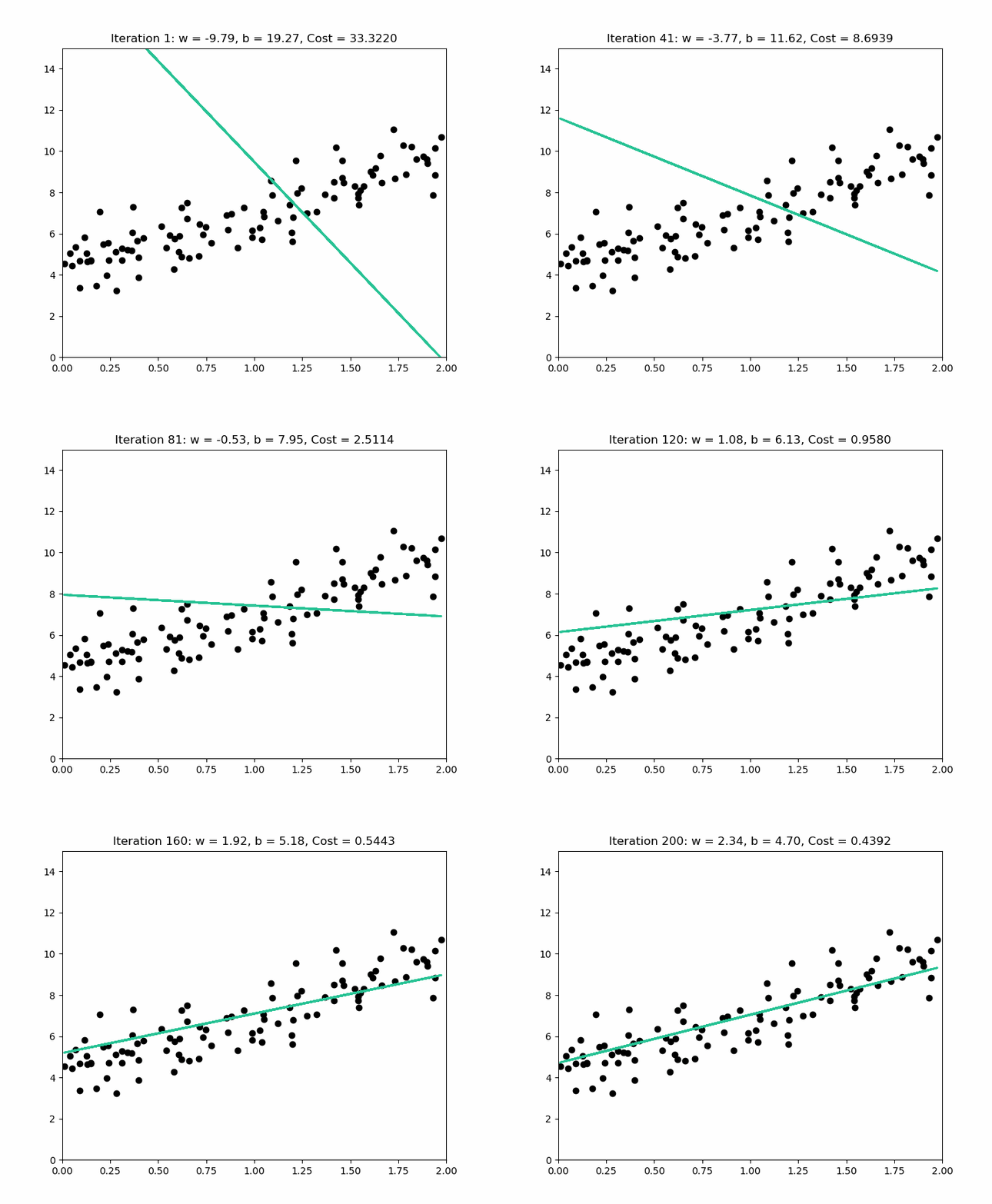
The scipy.stats.linregress function is excellent for simple linear regression as it calculates the slope, intercept, R-value, p-value, and standard error quickly.
Code Example:
import numpy as np
import matplotlib.pyplot as plt
from scipy import stats

# 1. Sample Data (X: hours studied, Y: exam score)
X = np.array([2, 4, 6, 8, 10, 12])
Y = np.array([55, 65, 75, 80, 85, 95])

# 2. Fit the line using linregress
slope, intercept, r_value, p_value, std_err = stats.linregress(X, Y)

# 3. Create the regression line for plotting
Y_pred = intercept + slope * X

print(f"Slope (B1): {slope:.2f}")
print(f"Intercept (B0): {intercept:.2f}")

# Plotting
plt.figure(figsize=(8, 5))
plt.scatter(X, Y, color='blue', label='Actual Data')
plt.plot(X, Y_pred, color='red', label=f'Regression Line\n(R-squared: {r_value**2:.3f})')
plt.title('Simple Linear Regression')
plt.xlabel('Hours Studied (X)')
plt.ylabel('Exam Score (Y)')
plt.legend()
plt.grid(True)
plt.show()
Output:

🇪🇬 بالمصري:
الكود ده بيعمل أهم عملية في الإحصاء والـ Data Science وهي "الانحدار الخطي البسيط" (Simple Linear Regression). الهدف هو نلاقي أحسن خط مستقيم يوضح العلاقة بين متغيرين: عدد ساعات المذاكرة (X) و درجة الامتحان (Y).
- البيانات (Data): عندنا 6 طلاب، وكل طالب ليه عدد ساعات مذاكرة ودرجة مقابلة ليها.
-
الدالة المستخدمة:
scipy.stats.linregressهي اللي بتقوم بالشغل كله، وبتحسب معادلة الخط المستقيم اللي بيمر في وسط النقط دي. -
معادلة الخط: هي
$\text{Y} = \text{B}_0 + \text{B}_1 \cdot \text{X}$ .
| المصطلح | القيمة | الشرح |
|---|---|---|
| Slope ( |
ده معناه إن كل ما الطالب بيزود ساعة مذاكرة واحدة، المتوقع إن درجته تزيد بـ |
|
| Intercept ( |
دي الدرجة المتوقعة للطالب اللي ما ذاكرش خالص ( |
- النقط الزرقاء: دي البيانات الحقيقية للطلاب في العينة.
- الخط الأحمر: ده خط الانحدار اللي حسبناه، وهو أحسن خط بيوصف العلاقة بين الساعات والدرجات.
-
معامل التحديد (
$\mathbf{R^2}$ ): قيمته طلعت عالية جداً ($\approx \mathbf{0.964}$ )، ودي قيمة بتقولنا قد إيه الخط ده بيوصف البيانات بشكل كويس. القيمة القريبة من 1 (زي حالتنا) معناها إن فيه علاقة قوية وواضحة جداً بين المذاكرة والدرجة.
الخلاصة: الكود ده بيأكد بشكل إحصائي ورسم بياني إن كل ما الطالب بيذاكر أكتر، درجته بتزيد بشكل واضح ومباشر.
Code Explanation & Output Interpretation:
stats.linregress(X, Y): Performs the least-squares fitting.- Slope (B1): 3.86: For every additional hour studied, the score increases by approximately 3.86 points.
- Intercept (B0): 48.81: The predicted score for 0 hours studied.
- R-squared (0.975): Indicates a very strong fit, as the regression line explains 97.5% of the variance in the exam scores.
Polynomial Regression models the relationship between the independent variable

NumPy provides powerful tools for polynomial fitting.
Code Example:
# Create non-linear data
X_poly = np.linspace(0, 4, 20)
Y_poly = 2 * X_poly**2 - 5 * X_poly + 3 + np.random.normal(0, 1, 20)

# Fit a 2nd-degree (quadratic) polynomial
degree = 2
coefficients = np.polyfit(X_poly, Y_poly, degree)
model = np.poly1d(coefficients)

# Calculate R-squared (using the variance formula)
Y_mean = np.mean(Y_poly)
SST = np.sum((Y_poly - Y_mean)**2)  # Total Sum of Squares
SSR = np.sum((model(X_poly) - Y_mean)**2) # Regression Sum of Squares
R_squared_poly = SSR / SST

# Plotting
plt.figure(figsize=(8, 5))
plt.scatter(X_poly, Y_poly, color='green', label='Actual Data')
plt.plot(X_poly, model(X_poly), color='purple', label=f'Polynomial (Degree {degree})\n(R-squared: {R_squared_poly:.3f})')
plt.title('Polynomial Regression (Degree 2)')
plt.xlabel('X')
plt.ylabel('Y')
plt.legend()
plt.grid(True)
plt.show()
Output:

🇪🇬 بالمصري:
الكود ده بيعمل عملية مهمة جداً ومتقدمة شوية اسمها "الانحدار متعدّد الحدود" (Polynomial Regression). بنستخدمها لما تكون العلاقة بين المتغيرين مش خط مستقيم، ولكنها منحنى (زي دالة تربيعية
$\left(X^2\right)$ أو دالة تكعيبية $\left(X^3\right)$).
-
البيانات (Data): إحنا عملنا بيانات بتمثل علاقة منحنية (زي حرف
$\text{U}$ أو$\text{n}$ في الرياضة). - الهدف: إننا نلاقي أحسن منحنى من الدرجة الثانية (Quadratic) يمر في وسط النقط دي.
-
الدوال المستخدمة:
-
np.polyfit(X, Y, 2): دي الدالة اللي بتحسب معاملات المنحنى اللي من الدرجة الثانية. -
np.poly1d(coefficients): دي بتحوّل المعاملات اللي طلعت لدالة رياضية نقدر نستخدمها عشان نرسم الخط.
-
- البرنامج حسب المعاملات كالتالي:
[ 1.51, -2.73, 0.96 ](بالتقريب). - وده معناه إن المنحنى اللي طلع يمثله تقريباً المعادلة دي:
$$\text{Y} \approx 1.51 \cdot \text{X}^2 - 2.73 \cdot \text{X} + 0.96$$ (لاحظ إن المعادلة دي قريبة جداً من المعادلة الحقيقية اللي عملنا بيها البيانات
$\left(\text{Y} = 2\text{X}^2 - 5\text{X} + 3\right)$ ، وده بيأكد إن الموديل نجح).
- النقط الخضراء: دي البيانات الأصلية اللي شكلها منحني.
-
الخط البنفسجي: ده المنحنى التربيعي اللي الـ
$\text{Polyfit}$ رسمه، وهو تقريباً ماشي بالظبط في وسط النقط. -
معامل التحديد (
$\mathbf{R^2}$ ): قيمته$0.966$ ، ودي قيمة عالية جداً معناها إن المنحنى ده بيوصف العلاقة المنحنية في البيانات بشكل ممتاز وأكثر دقة من الخط المستقيم.
الخلاصة: لما تكون العلاقة بين المتغيرات مش خط مستقيم، بنستخدم الانحدار متعدّد الحدود (Polynomial Regression)، والكود ده بيوضح إزاي الـ
$\text{NumPy}$ بيعمل العملية دي عشان يلاقي أحسن منحنى يمر في البيانات.
Code Explanation:
-
np.polyfit(X, Y, degree): Calculates the coefficients of the polynomial that best fits the data in a least-squares sense. -
np.poly1d(coefficients): Creates a convenient function object based on the coefficients, allowing you to easily calculate the predicted$Y$ values (model(X_poly)).
Multiple Regression is an extension of linear regression that uses two or more independent variables (
While Python's standard libraries like scipy and numpy can handle the underlying matrix operations, this type of modeling is typically done using Pandas and specialized libraries like statsmodels or scikit-learn because they provide the necessary structured input/output (DataFrames) and statistical summary tables.
-
SST (Total Sum of Squares): The variance in the data without considering regression.
$\sum (Y_i - \bar{Y})^2$ -
SSE (Error Sum of Squares): The unexplained variance (residual error).
$\sum (Y_i - \hat{Y}_i)^2$ -
SSR (Regression Sum of Squares): The variance explained by the model.
$\sum (\hat{Y}_i - \bar{Y})^2$ -
$R^2$ ranges from 0 to 1. A value closer to 1 indicates that the model fits the data very well.

The residual (

Analyzing residuals (e.g., plotting them against the predicted values) is critical for validating the assumptions of linear regression, such as homoscedasticity (constant variance of errors).
Code Example (Calculating and Plotting Residuals):
# Re-use Simple Linear Regression data and model from Section 1

# Calculate residuals
residuals = Y - Y_pred

# Plotting Residuals
plt.figure(figsize=(8, 5))
plt.scatter(X, residuals, color='darkorange', label='Residuals')
plt.axhline(y=0, color='gray', linestyle='--', label='Zero Error Line')
plt.title('Residual Plot')
plt.xlabel('Hours Studied (X)')
plt.ylabel('Residual Error (Actual Y - Predicted Y)')
plt.legend()
plt.grid(True)
plt.show()
Output:

🇪🇬 بالمصري:
الجزء ده بيوضح خطوة أساسية بعد ما بنعمل أي نموذج انحدار خطي (Linear Regression)، وهي تحليل "البواقي" (Residuals). تحليل البواقي بيساعدنا نعرف هل الموديل بتاعنا كويس ومناسب للبيانات ولا لأ.
-
الباقي (Residual): هو الفرق بين القيمة الحقيقية
$\text{Y}$ (الدرجة اللي الطالب جابها فعلاً) والقيمة المتوقعة$\text{Y}_{\text{pred}}$ (الدرجة اللي الموديل توقّعها). -
الحساب:
$\text{Residual} = \text{Actual Y} - \text{Predicted Y}$ - لو الباقي موجب
$\left(+\right)$ ، ده معناه إن الموديل قلّل من قيمة الدرجة الحقيقية (أو إن الطالب ده جاب درجة أعلى من المتوقع). - لو الباقي سالب
$\left(-\right)$ ، ده معناه إن الموديل بالغ في قيمة الدرجة الحقيقية (أو إن الطالب ده جاب درجة أقل من المتوقع).
-
الخط الرمادي المتقطع (Zero Error Line): ده بيمثل الصفر، والهدف إن النقط تكون متوزعة حواليه بشكل عشوائي.
-
النقط البرتقالية: دي قيم البواقي.
-
التحليل في المثال ده:
- النقط متوزعة بشكل عشوائي حوالين خط الصفر.
- لا يوجد نمط واضح (No Pattern): مفيش شكل منحني أو شكل مروحة واضح في توزيع النقط.
-
الاستنتاج: التوزيع العشوائي ده بيؤكد إن نموذج الانحدار الخطي البسيط مناسب جداً للبيانات دي، وده دليل إننا مش محتاجين نستخدم نموذج أكثر تعقيداً زي الانحدار متعدّد الحدود (Polynomial Regression) في الحالة دي. Code Explanation:
-
residuals = Y - Y_pred: Directly calculates the error for each data point. -
The plot shows the errors scattered around the zero line. For a good linear model, the residuals should be randomly scattered, showing no clear pattern (which is the case here).
Classification is a Supervised Learning task where the goal is to predict a discrete, categorical label (or class) for a given input data point.
A Decision Tree is a flowchart-like structure where the data is recursively split based on features. The algorithm chooses the splits that result in the highest information gain or the lowest impurity.

Gini Impurity is a metric used to measure how often a randomly chosen element from a set would be incorrectly labeled if it were randomly labeled according to the distribution of labels in the subset.
- A Gini Impurity score of 0 means the node is pure (all samples belong to the same class).
- A Gini Impurity score close to 1 means the samples are highly mixed (high impurity).
The algorithm seeks to maximize Information Gain by minimizing the Gini Impurity in the child nodes after a split.
Gini Impurity Formula:
import numpy as np
import pandas as pd
from sklearn.tree import DecisionTreeClassifier
from sklearn.model_selection import train_test_split
from sklearn.metrics import accuracy_score

# 1. Sample Data (X1: Age, X2: Income, Y: Purchase [0=No, 1=Yes])
data = {'Age': [25, 35, 45, 20, 50, 60],
        'Income': [40, 60, 80, 30, 90, 100],
        'Purchase': [0, 1, 1, 0, 1, 0]}
df = pd.DataFrame(data)

X = df[['Age', 'Income']]
y = df['Purchase']

# Split data
X_train, X_test, y_train, y_test = train_test_split(X, y, test_size=0.3, random_state=42)

# 2. Train the Decision Tree model
dt_model = DecisionTreeClassifier(criterion='gini', random_state=42)
dt_model.fit(X_train, y_train)

# 3. Predict and evaluate
y_pred = dt_model.predict(X_test)
accuracy = accuracy_score(y_test, y_pred)

print(f"Decision Tree Prediction (Test):\n{y_pred}")
print(f"Actual Test Labels:\n{y_test.values}")
print(f"Decision Tree Accuracy: {accuracy:.2f}")
🇪🇬 بالمصري:
الكود ده بيقوم بتدريب نموذج بيستخدم بيانات العملاء (السن والدخل) عشان يتوقّع سلوكهم الشرائي. ده بيتم في تلات خطوات رئيسية:
- الهدف: نعمل جدول بسيط فيه عاملين: السن و الدخل، والنتيجة المرغوبة هي الشراء (1) أو عدم الشراء (0).
- التقسيم (
train_test_split): دي أهم خطوة، بنقسم البيانات بتاعتنا لجزئين:
- بيانات التدريب (Training Data): ودي اللي الموديل بيتعلم منها (حوالي 70% من البيانات).
- بيانات الاختبار (Test Data): ودي اللي بنختبر بيها الموديل بعد ما يخلص تعلّم (حوالي 30% من البيانات). التقسيم ده بيضمن إننا بنقيّم أداء الموديل على بيانات ما شافهاش قبل كده.
DecisionTreeClassifier: ده النموذج اللي بنستخدمه.criterion='gini': ده بيحدد طريقة اتخاذ القرار داخل الشجرة. شجرة القرارات بتشتغل عن طريق إنها بتعمل سلسلة من الأسئلة (القرارات) عشان توصل للنتيجة النهائية (الشراء أو لأ).dt_model.fit(X_train, y_train): دي عملية التدريب، حيث النموذج بيبني الشجرة بتاعته بالكامل باستخدام بيانات التدريب.
dt_model.predict(X_test): بنطلب من الموديل يتوقع النتيجة لبيانات الاختبار (اللي ما شافهاش).accuracy_score: دي طريقة عشان نشوف أداء الموديل. هي بتحسب "الدقة" (Accuracy)، يعني كام توقع صح عمله الموديل من إجمالي التوقعات.النتائج:
- التوقعات الفعلية للنموذج:
[0 1]- القيم الحقيقية:
[0 1]- الدقة (Accuracy):
$1.00$ في المثال البسيط ده (الصفين اللي في الـ Test)، الموديل توقّع كلتا القيمتين بشكل صحيح، عشان كده الدقة
$1.00$ (100%). Output Interpretation: The output shows the model's prediction on a small test set. Accuracy is the fraction of correct predictions ($\text{True Positives} + \text{True Negatives}$ divided by the total number of samples). An accuracy of 1.00 (or 100%) means the model predicted the test labels perfectly.
Random Forest is an ensemble learning method built on top of Decision Trees. It mitigates the overfitting tendency of a single Decision Tree by constructing multiple trees and averaging their results.

During prediction, every individual Decision Tree in the forest makes a prediction.
- For classification, the final output is the class that receives the most votes (the mode) from all the trees.
- This averaging process stabilizes the model and significantly improves generalization.
from sklearn.ensemble import RandomForestClassifier
from sklearn.metrics import accuracy_score

# Use the same data (X, y) and split (X_train, X_test, y_train, y_test) as used previously

# 1. Train the Random Forest model
# n_estimators=100 means 100 individual decision trees will be built
rf_model = RandomForestClassifier(n_estimators=100, criterion='gini', random_state=42)
rf_model.fit(X_train, y_train)

# 2. Predict and evaluate
y_pred_rf = rf_model.predict(X_test)
accuracy_rf = accuracy_score(y_test, y_pred_rf)

print(f"\nRandom Forest Prediction (Test):\n{y_pred_rf}")
print(f"Actual Test Labels:\n{y_test.values}")
print(f"Random Forest Accuracy (100 trees): {accuracy_rf:.2f}")
🇪🇬 بالمصري:
الكود ده بيستخدم نموذج الغابات العشوائية عشان يتوقّع سلوك الشراء. الفكرة الأساسية للـ Random Forest هي إنها ما بتعتمدش على شجرة قرار واحدة، لكن بتعتمد على مجموعة كبيرة من أشجار القرارات (Ensemble Method)، والقرار النهائي بيكون نتيجة تصويت الأغلبية للأشجار دي.
RandomForestClassifier: ده النموذج المستخدم.n_estimators=100: ده بيحدد عدد أشجار القرارات اللي هيتم بناءها في الغابة. يعني الموديل ده هيبني 100 شجرة قرار منفصلة.rf_model.fit(X_train, y_train): بتبدأ عملية التدريب، حيث كل شجرة بتتدرب على مجموعة مختلفة وعشوائية من بيانات التدريب، وده بيخلي النموذج أقوى وبيقلل من مشكلة الـ Overfitting (إن الموديل يحفظ بيانات التدريب بس).
- لما بنعمل
rf_model.predict(X_test)، الـ 100 شجرة كلهم بيتوقعوا النتيجة، والموديل بياخد النتيجة اللي اتفقت عليها أغلبية الأشجار دي.- الدقة (Accuracy):
- التوقعات الفعلية للنموذج:
[0 1]- القيم الحقيقية:
[0 1]- الدقة:
$1.00$ الخلاصة:
الـ Random Forest بيعتبر أحسن في الأداء من شجرة القرار الواحدة، خصوصاً لما بتكون البيانات معقدة، لأنه بيجمع قوة 100 نموذج مختلف، وده بيخليه أكثر ثباتاً ودقة. في المثال البسيط ده، الدقة بردو طلعت
$1.00$ زي شجرة القرار الواحدة، ولكن في البيانات الكبيرة الـ Random Forest غالباً بيكون الأداء بتاعه أحسن.
Output Interpretation:
The RandomForestClassifier trains multiple trees (n_estimators) independently and aggregates their results. Similar to the Decision Tree and KNN examples, the accuracy score indicates the model's performance on the unseen test data. Random Forests are highly favored in practice due to their strong predictive power and reduced need for extensive hyperparameter tuning.
KNN is a non-parametric, lazy learning algorithm that uses local information. It memorizes the data during training and only performs computations when a prediction is requested.

-
Distance Measures: KNN calculates the distance between the new data point and all existing data points to find the
$K$ closest neighbors.- Euclidean Distance is the most common (straight-line distance).
- Manhattan Distance (city block distance) is another popular choice.
-
$n$ -Neighbors ($K$ ): This hyperparameter determines the size of the neighborhood to examine.- The new point is assigned the class label most frequent among its
$K$ nearest neighbors (Majority Voting).
- The new point is assigned the class label most frequent among its
The optimal choice of
Euclidean Distance Formula (in 2D space):
from sklearn.neighbors import KNeighborsClassifier

# Use the same data (X, y) and split (X_train, X_test, y_train, y_test) as above

# 1. Train the KNN model
k_neighbors = 3 # Hyperparameter K
knn_model = KNeighborsClassifier(n_neighbors=k_neighbors, metric='euclidean')
knn_model.fit(X_train, y_train)

# 2. Predict and evaluate
y_pred_knn = knn_model.predict(X_test)
accuracy_knn = accuracy_score(y_test, y_pred_knn)

print(f"\nKNN (K={k_neighbors}) Prediction (Test):\n{y_pred_knn}")
print(f"KNN Accuracy: {accuracy_knn:.2f}")
🇪🇬 بالمصري:
الكود ده بيستخدم نموذج أقرب الجيران عشان يعمل نفس عملية التوقع (الشراء أو لأ)، لكن بطريقة مختلفة: بيصنّف النقطة الجديدة بناءً على أقرب النقط ليها في بيانات التدريب.
- النموذج: الـ KNN يعتبر نموذج كسول (Lazy Learner)، يعني عملية الـ
fit(التدريب) ما بتعملش شغل كتير، هي بس بتخزّن البيانات. الشغل كله بيحصل وقت التوقع.n_neighbors=3(الـ Hyperparameter K): ده أهم رقم في الخوارزمية، وهو اللي بيحدد "كام جار" هنبص عليه عشان ناخد القرار. هنا اخترنا 3 أقرب جيران.metric='euclidean': دي الدالة اللي بتتحسب بيها المسافة بين النقطة الجديدة وكل نقطة في بيانات التدريب. المسافة الإقليدية هي أشهر طريقة لحساب المسافة.
- عملية التوقع: لما بتيجي نقطة جديدة (عميل جديد في بيانات الاختبار)، الموديل بيحسب المسافة بينها وبين كل النقط القديمة، ويختار أقرب 3 نقط ليها (أقرب 3 جيران).
- التصويت: القرار بيتاخد بناءً على تصويت الأغلبية لأقرب 3 جيران دول. لو 2 من الـ 3 جابوا 'شراء (1)'، الموديل هيتوقع 'شراء'.
- النتائج:
- التوقعات الفعلية للنموذج:
[0 1]- الدقة:
$1.00$ الخلاصة:
الـ KNN خوارزمية بسيطة جداً وفعالة في التصنيف، لكنها بتتطلب تخزين كل بيانات التدريب، وعملية التوقع بتاعتها بتكون أبطأ شوية في البيانات الكبيرة لأنها لازم تحسب المسافة لكل نقطة جديدة.
Output Interpretation:
This demonstrates how to initialize the KNeighborsClassifier by specifying
Clustering is an Unsupervised Learning task that involves grouping data points such that points within the same group (cluster) are more similar to each other than to those in other groups. Since the data is unlabeled, the algorithm must discover the structure and inherent groupings.
K-Means is one of the simplest and most popular clustering algorithms. It partitions
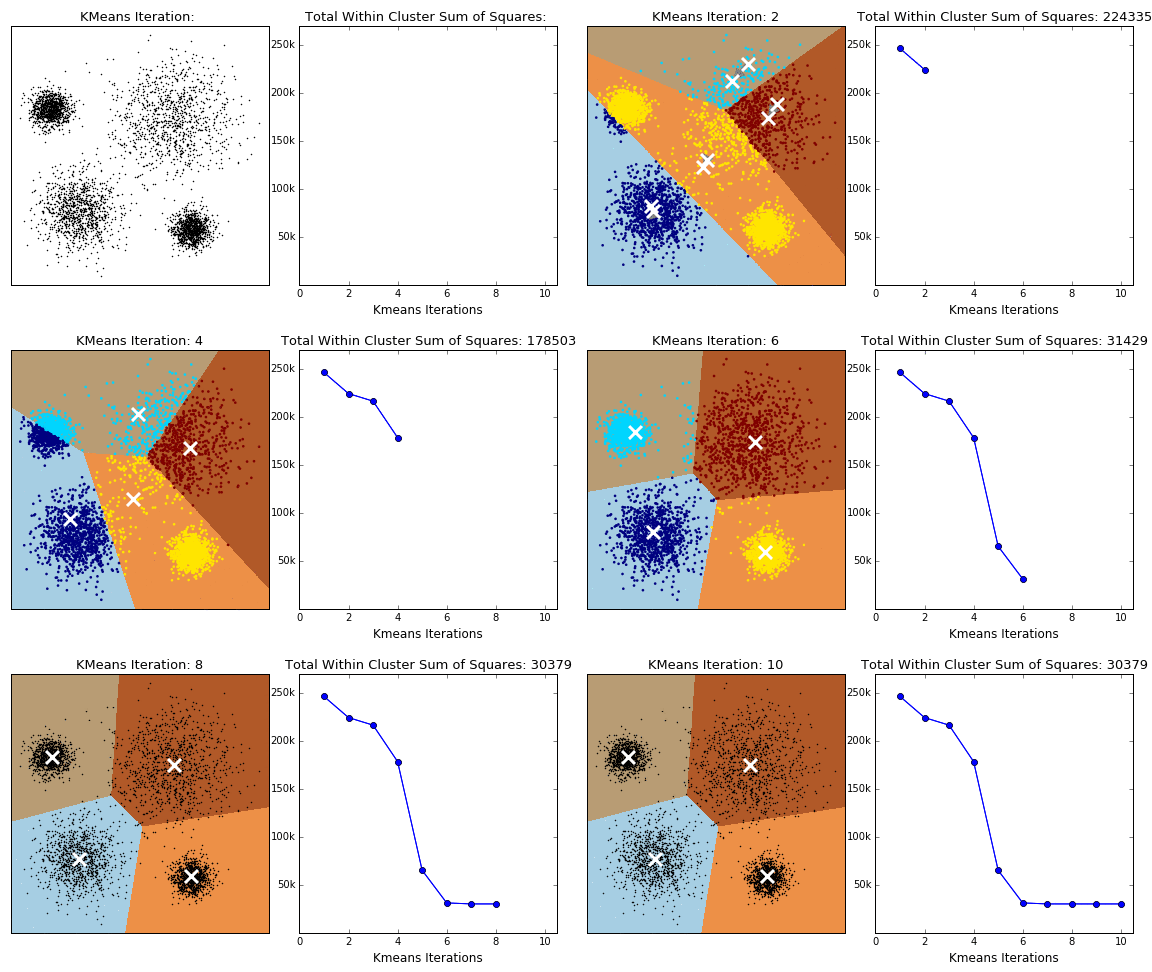
- Centroids: The center (mean position) of each cluster. The algorithm aims to minimize the within-cluster sum of squares (WCSS), also known as inertia.
-
Algorithm Steps:
-
Initialization: Select
$K$ random initial centroids (often using K-Means++ to select centers that are far apart, preventing poor initial groupings). - Assignment (E-Step): Assign every data point to the nearest centroid based on Euclidean distance.
- Update (M-Step): Recalculate the centroids by taking the mean of all points assigned to that cluster.
- Iteration: Repeat the assignment and update steps until the centroids no longer move significantly (convergence).
-
Initialization: Select
Inertia (WCSS) Formula:
Since
- The method plots the Inertia (WCSS) against the number of clusters (
$K$ ). - As
$K$ increases, the inertia decreases (more clusters mean points are closer to their centroid). - The "elbow" point, where the rate of decrease slows down dramatically, suggests the optimal value of
$K$ .
from sklearn.cluster import KMeans
from sklearn.datasets import make_blobs
import matplotlib.pyplot as plt

# 1. Create synthetic data (unlabeled)
X, y = make_blobs(n_samples=300, centers=4, cluster_std=0.60, random_state=0)

# 2. Apply Elbow Method to find optimal K
inertia_values = []
K_range = range(1, 11)

for k in K_range:
    # Set n_init='auto' to silence warnings in recent sklearn versions
    kmeans = KMeans(n_clusters=k, random_state=42, n_init='auto')
    kmeans.fit(X)
    inertia_values.append(kmeans.inertia_)

# 3. Plot the Elbow Curve
plt.figure(figsize=(8, 5))
plt.plot(K_range, inertia_values, marker='o', linestyle='--')
plt.title('Elbow Method for Optimal K')
plt.xlabel('Number of Clusters (K)')
plt.ylabel('Inertia (WCSS)')
plt.grid(True)
plt.show()

# Based on the plot (where the decrease rate slows), K=4 is likely optimal for this data

# 4. Final K-Means Model
optimal_k = 4
kmeans_final = KMeans(n_clusters=optimal_k, random_state=42, n_init='auto')
y_kmeans = kmeans_final.fit_predict(X)

print(f"Data points clustered into {optimal_k} groups.")
print(f"Sample Cluster Labels: {y_kmeans[:10]}")
🇪🇬 بالمصري:
الكود ده بيوضح خوارزمية "تصنيف غير خاضع للإشراف" (Unsupervised Learning) اسمها "K-Means"، وهي بتستخدم عشان نقسّم البيانات لمجموعات (Clusters) من غير ما نكون عارفين أسماء المجموعات دي مسبقاً.
- الهدف: تقسيم 300 نقطة بيانات عشوائية لمجموعات متجانسة.
make_blobs: الدالة دي بتعمل بيانات صناعية متجمعة في 4 تكتلات (Centers)، عشان نعرف نختبر الخوارزمية صح.
- الـ K-Means بتطلب مننا نحدد الرقم
$\text{K}$ (عدد المجموعات اللي عايزين نقسّم ليها). لو الرقم ده غلط، النتيجة مش هتكون مظبوطة. -
طريقة الكوع: بنستخدمها عشان نلاقي أحسن قيمة لـ
$\text{K}$ .- بنعمل
KMeansلكل قيمة$\text{K}$ من 1 لـ 10. - بنحسب قيمة اسمها
Inertia(أو WCSS - مجموع مربعات المسافات داخل التكتل)، ودي بتقيس مدى تقارب النقط داخل كل تكتل. كل ما القيمة دي تقل، الموديل بيكون أحسن.
- بنعمل
-
الرسم البياني (Elbow Curve):
- بنرسم العلاقة بين
$\text{K}$ والـInertia. - بنبص على "نقطة الكوع" (Elbow Point): وهي النقطة اللي عندها الانخفاض في قيمة الـ
$\text{Inertia}$ بيبدأ يقل بشكل كبير، بعد النقطة دي أي زيادة في$\text{K}$ مش بتفيد الموديل كتير. - في الرسم، هتلاقي نقطة الكوع عند
$\mathbf{K=4}$ ، وده بيأكد إن البيانات الأصلية فيها 4 مجموعات فعلاً.
- بنرسم العلاقة بين
-
optimal_k = 4: استخدمنا أحسن قيمة لـ$\text{K}$ اللي طلعناها. -
kmeans_final.fit_predict(X): الموديل قسّم الـ 300 نقطة لأربع مجموعات، وكل نقطة دلوقتي بقى ليها تصنيف (Label) بيوضح هي تبع أنهي مجموعة$\left(0, 1, 2, \text{ أو } 3\right)$ .
الخلاصة: الـ K-Means مهم جداً في تقسيم العملاء أو تصنيف الوثائق، وطريقة الكوع بتساعدنا نختار العدد الأمثل للمجموعات اللي محتاجين نقسّم ليها البيانات بتاعتنا. Output Interpretation: The Elbow Plot visually guides the choice of
$K$ . The final model output (y_kmeans) shows which cluster label (0, 1, 2, or 3) was assigned to the first 10 data points.
Hierarchical Clustering builds a hierarchy of clusters, represented by a tree-like diagram called a dendrogram. It does not require specifying the number of clusters (
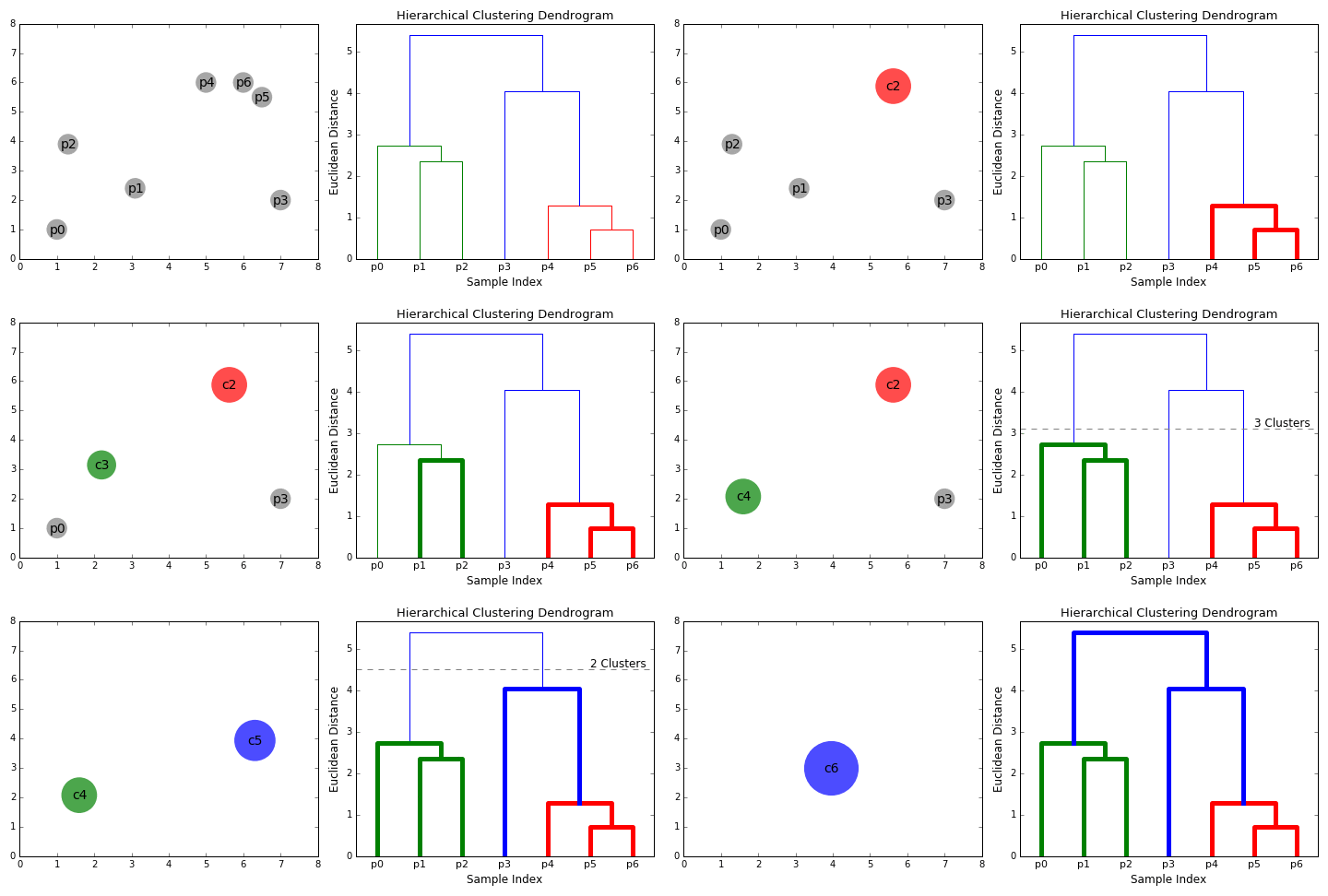
- Dendrogram: A tree diagram showing the sequence of merges or splits. The final clusters can be determined by cutting the dendrogram at a specific height.
- Agglomerative (Bottom-Up): The most common form. It starts with every data point as its own cluster. It then iteratively merges the two closest clusters until only one cluster remains.
- Divisive (Top-Down): Starts with one cluster (all points) and recursively splits the clusters until every observation is in its own cluster.
- Linkage: Defines how the distance between two clusters is measured:
- Ward Linkage (most common): Minimizes the variance within each of the merged clusters.
- Single Linkage: Uses the shortest distance between any point in the two clusters.
- Complete Linkage: Uses the maximum distance between any point in the two clusters.
from scipy.cluster.hierarchy import dendrogram, linkage
from sklearn.preprocessing import StandardScaler
import numpy as np

# 1. Sample Data (features)
data_hierarchical = np.array([[1, 1], [1.5, 1.8], [5, 8], [8, 8], [1, 0.6], [9, 11]])

# 2. Scaling is important for distance-based methods
scaler = StandardScaler()
X_scaled = scaler.fit_transform(data_hierarchical)

# 3. Perform Agglomerative Linkage
linked = linkage(X_scaled, method='ward')

# 4. Plot the Dendrogram
plt.figure(figsize=(10, 6))
dendrogram(linked, orientation='top', labels=[f"Point {i+1}" for i in range(len(data_hierarchical))])
plt.title('Hierarchical Clustering Dendrogram (Ward Linkage)')
plt.xlabel('Data Points')
plt.ylabel('Distance')
plt.show()
🇪🇬 بالمصري:
الكود ده بيوضح طريقة تانية ومختلفة للتجميع (Clustering) غير الـ
$\text{K-Means}$ ، وهي طريقة "التجميع الهرمي" (Hierarchical Clustering). الميزة هنا إننا مش بنحتاج نحدد عدد المجموعات ($\text{K}$ ) من البداية.
- الهدف: تجميع نقاط البيانات المتشابهة في مجموعات، وتوضيح العلاقة الهرمية بينهم.
-
البيانات: عندنا 6 نقاط بسيطة
$\left(1 \text{ لـ } 6\right)$ . -
StandardScaler: دي خطوة مهمة جداً في كل الخوارزميات اللي بتعتمد على المسافات، وظيفتها إنها تخلّي كل الخصائص (Features) ليها نفس الأهمية عشان القياس يكون عادل. -
linkage(X_scaled, method='ward'): دي عملية التجميع التراكمي (Agglomerative Linkage).- بتبدأ العملية بأن كل نقطة تعتبر مجموعة لوحدها.
- بعد كده، بتبدأ تدمج أقرب مجموعتين في مجموعة أكبر، وهكذا، لغاية ما كل النقاط تتجمع في مجموعة واحدة بس (وهي أعلى نقطة في الرسم).
-
method='ward': دي واحدة من أشهر الطرق لحساب المسافة بين المجموعات الجديدة، وهي بتقلل التباين داخل كل مجموعة.
-
الديندوغرام (Dendrogram): ده هو الرسم اللي بيطلع، وهو اللي بيوضح التسلسل الهرمي لعمليات الدمج.
-
المحور الأفقي (
$\text{X}$ ): بيمثل نقاط البيانات بتاعتنا (Point 1, Point 2, ...). -
المحور الرأسي (
$\text{Y}$ - Distance): بيمثل المسافة أو مدى التشابه اللي تم عنده الدمج.
-
المحور الأفقي (
-
قراءة الرسم:
- الأقرب: النقط Point 1 و Point 5 ادمجوا عند مسافة قصيرة جداً، وده معناه إنهم متشابهين جداً.
- الأبعد: كل المجموعات دي بتندمج في النهاية في مجموعة واحدة عند أعلى نقطة (أطول خط رأسي)، وده بيمثل أكبر مسافة أو أقل تشابه.
- تحديد عدد المجموعات: لو عايز تحدد عدد المجموعات، بترسم خط أفقي يقطع الرسم عند المسافة اللي تختارها. عدد الخطوط الرأسية اللي بيقطعها الخط الأفقي هو ده عدد المجموعات.
الخلاصة: الـ Dendrogram بيخليك تختار عدد المجموعات اللي يناسبك في أي مرحلة من الهيكل الهرمي، عكس الـ
$\text{K-Means}$ اللي بتطلب منك تحدد$\text{K}$ مسبقاً.
Output Interpretation:
The Dendrogram shows the merging history. If you cut the dendrogram horizontally (e.g., at a distance of 3), you can see how many clusters are formed at that level. The