Bionic Blue is an action platformer game featuring a bionic boy tasked with protecting humanity against dangerous robots.
Note
This game is a work in progress with playable content already available. To follow its progress, you can check the CHANGELOG.md file and the activity view of this repository.
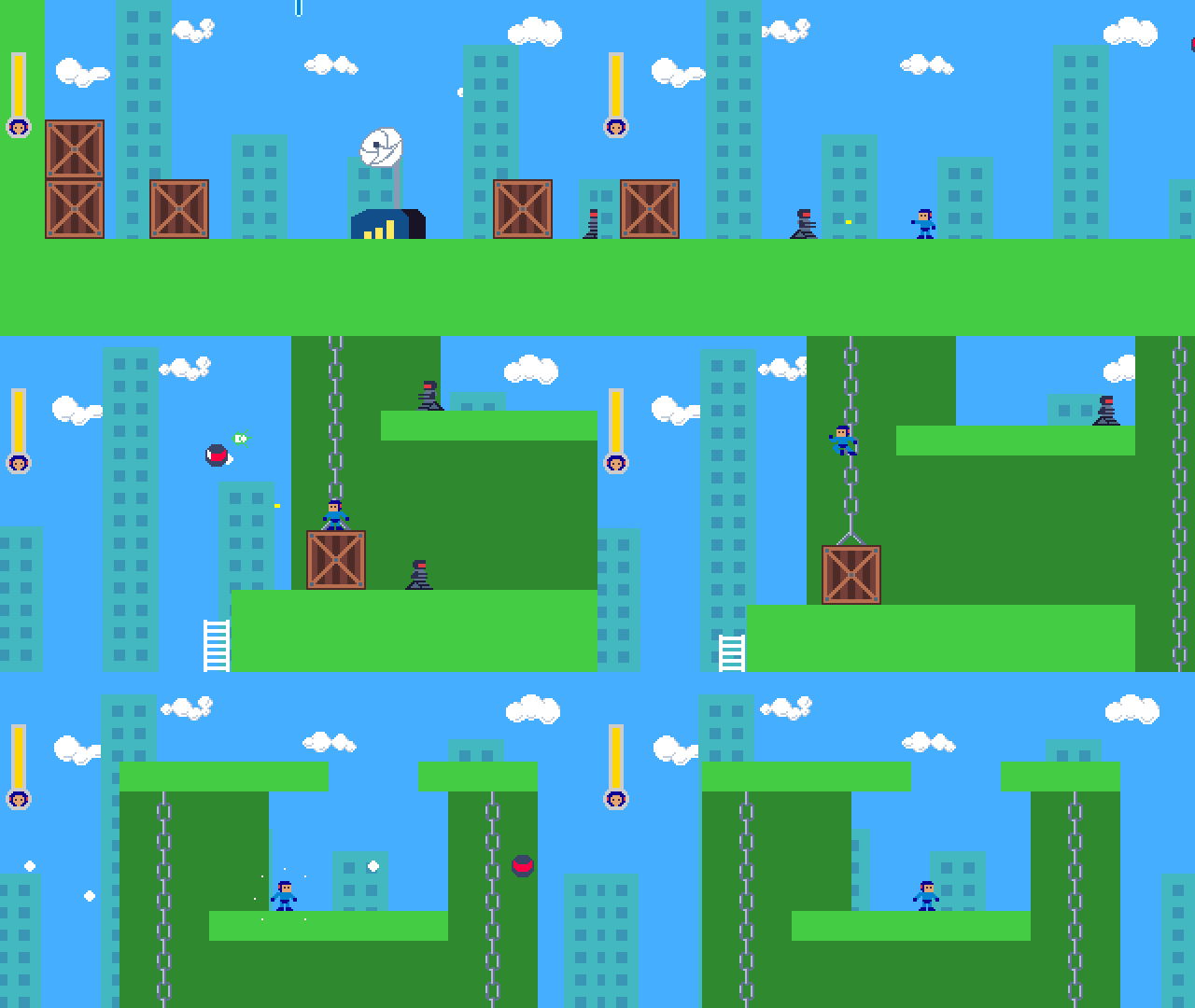

It is a desktop game completely free of charge and whose code is dedicated to the public domain (the vast majority of the art is proprietary, but you can download and play the game for free, forever, and use its code on your own projects; the proprietary art is just a measure to prevent fraudsters from redistributing the game for a fee and/or with malicious harmful software or deceiving people by falsely claiming authorship of the game).
Important
Given the complexity of this project, it has multiple elements/assets that are subject to different licenses. All of its code was made by me (Kennedy R. S. Guerra) and is open-source software with the goal of allowing people to play it for free, forever, and learn from its code. However, people cannot copy, relicense and redistribute/sell this game, because all the writing and the vast majority of its art/visual assets are mine, these are not in the public domain. Check the "Licenses" section at the end of this README file for more info and details. Again, as stated previously, the proprietary art is a measure to help prevent malicious and harmful use of the project. It does not limit your freedom to play and keep a copy of the game as an end-user.
This project is part of the Indie Smiths project (formerly know as Indie Python project) and has a dedicated website where you can find more info about it.
It is made with Python/pygame-ce targeting desktop platforms where Python is available like Windows, Mac and Linux.
This game was created by Kennedy R. S. Guerra(me), who also develops/maintains it. I wrote all the code/systems, did all the writing and created the vast majority of the art (check the "Licenses" section for more info on that).
Please, support the Bionic Blue game and other useful software of the Indie Smiths project by becoming our patron on patreon. You can also make recurrent donations using github sponsors, apoia.se (Brazil), liberapay or Ko-fi.
Both github sponsors and Ko-fi also accept one-time donations.
Any amount is welcome and helps. Check the project's donation page for all donation methods available.
To run the game, installation is actually optional.
You can install bionic blue from the Python Package Index with the pip command:
pip install bionicblue
Depending on your system, you might need to use the pip3 command instead of the pip command above. That's all you should need.
Important
By default, the pip command above doesn't install pre-releases (alpha, beta, release candidate and other versions like these). So, if the version you want to play is a pre-release version, you'll have to provide the specific version like this: pip install bionicblue==0.13.0rc1, or use the following command: pip install --pre bionicblue (the --pre option will make sure the latest version is installed even if it is a pre-release.
This will install the pygame-ce library (pygame community edition fork) as well, if not already present.
Then, in order to launch the installed game, all you need now is to run the bionicblue command. Alternatively, you can also run it with python -m bionicblue (perhaps you might need to use the word python3 instead, depending on your system).
Download the repository's source. Then, if you have the pygame-ce library (pygame community edition fork) installed in the Python instance you'll use to run the game, you have to do one of the following things:
You can either execute the run_bionic_blue.py script at the top of the directory like this...
python run_bionic_blue.pyIf you are on Windows, clicking the file will likely already execute it (and launch the game without problems if your Python instance has pygame-ce installed in it).
Alternatively, you can also run the game like this: execute the command below in the directory where you put the bionicblue folder (you must be in a location where, when you list the directory contents, you are able to see the bionicblue folder and the README.md file):
python -m bionicblueDepending on your system, you might need to use python3 instead of python in the commands above.
However, if the pygame installed in the Python instance used to run the game isn't pygame-ce the game won't launch. Instead, a dialog will appear explaining the problem and providing instructions to replace your pygame installation by the community edition fork.
Both regular pygame and the community edition fork (pygame-ce) are great, but the game can only run with pygame-ce because it uses services that are available solely in that library.
The controls are configurable both for keyboard and gamepad.
Default controls for keyboard are...
| Action | Key |
|---|---|
| Movement | w, a, s, d keys |
| Shoot | j |
| Jump | k |
Enter (return) and escape keys are reserved for confirming and exitting/going back, respectively. Arrow keys are used to navigate menus, but can also be configured to be used for moving the character.
Regarding the gamepad, the user doesn't need to configure directional buttons/triggers. Those are detected and managed automatically. The user only needs to configure the gamepad for actions like shooting, jumping, etc.
There are also actions for switching between available powers, but at the time of writing, we didn't add content/functionality to enable the character to use different powers yet.
This project adheres to the numbering scheme of Semantic Versioning, that is, the X.Y.Z scheme.
However, we use different meanings for the numbers: every time meaningful/playable content is added, we increase the minor number. If such addition completes the game, we set the major number to 1.
All other changes are indicated in what would normally be the numbering for indicating patches/fixes, including additions/improvements/removals in code or game design. This is so because in a game project, we assume people are more eager for changes in play.
In other words, it is a content-centric/play-centric approach which I think is more suited to game projects.
This way is also simpler for players to follow the project: they can focus their attention on the leading numbering (major and minor). The major one to know when the game is completed or not and the minor one to know when to look forward to new playable content on the game.
On top of that, the CHANGELOG.md has a dedicated "Play" subsection at the top of each new version listed, except the "patch" versions (since, as explained, they don't contain changes in play). This way players and followers can immediately see the relevant changes in play.
If we add content after completing the game, like DLCs or extra stuff, we also increase the minor number, but never touch the major number again. After all, it is still the same game. If we were to make a sequel or prequel, etc., rather than increasing the major number, we would create a new repository altogether, since we'd consider it different project.
Another slight difference is that for pre-releases we don't use separators between the patch number and the pre-release letters (for instance, we use 0.13.0rc1 rather than 0.13.0-rc1, which seems to be the recommended format for Python projects uploaded to the Python Package Index.
In semantic versioning, incrementing X indicates breaking changes, but since a game is just an executable, not a library with a public API, there's no reason to think of it like that here, so as we explained, we are only concerned with whether the game is finished or not.
Another slight difference is that for pre-releases we don't use separators between the patch number and the pre-release letters (for instance, we use 0.13.0rc1 rather than 0.13.0-rc1, which seems to be the recommended format for Python projects uploaded to the Python Package Index).
For contributing code or translations, check the CONTRIBUTING.md or TRANSLATIONS.md file, respectively.
Issues are reserved for things that crash the game or otherwise prevent the user from progressing in the game. Please, if your problem doesn't crash the game or prevent it from being played, or if you're not certain, start a discussion instead. It can always be converted into an issue later if needed.
Contact me any time via Bluesky, Twitter/X, mastodon or email.
You are also welcome on the Indie Smiths's discord server.
In summary, you can download, install and play this game for free, forever. You can also reuse the code or part of it in your own projects, commercial or not, but not the art and writing/story. In other words, you cannot make and distribute your own version using its art and story.
Here's how the elements comprising the game are licensed:
I (Kennedy R. S. Guerra) made all the code/systems, all the writing, and the vast majority of the visual assets/art by myself.
I released the code/systems to the public domain with The Unlicense. This means you can reuse the systems/code totally or partially, and only them, but you cannot copy, relicense and redistribute/sell the game as your own.
Why is that? Because only the code/systems are in the public domain. All the writing/story and the vast majority of the art/visual assets, elements that I made on my own are not in the public domain. I have all the rights to them and you don't have permission nor the right to use them in your projects nor redistribute/sell them.
As I stated before in a previous section, the proprietary art is a measure to prevent fraudsters from redistributing the game for a fee and/or with malicious harmful software or help prevent them from deceiving people by falsely claiming authorship of the game
Put another way, you can not copy the game, but you are free to use the underlying code as you see fit, because the underlying code is public domain. You can use the code with no fear or restrictions.
Above all else, you are always free to download and play this game, and keep a copy of it backed up at all times.
All the remaining assets, that is, a very small portion of the visual assets and all sound effects and music were made by other people and used within the terms of their respective licenses, mostly the CC0 license. All those creators were also properly credited in the game.
No genAI/LLMs were use to make this game. Also, when possible, I checked to make sure the external assets were not made with such tools as well. For instance, the vast majority of the external assets used are from before 2019/2022, when these tools became mainstream.
Making games is arduous, laborious and honest work. Musicians, illustrators and many other professionals always sign their works. People who make games should not be afraid of doing so as well. Check Bennett Foddy and Zach Gage's video to learn more about this.