Skip to content

Add search this user/agent to ProfilePage - #98091

Open
hungvu193 wants to merge 3 commits into
Expensify:mainfrom
hungvu193:feat-98076-add-search-user
Open

Add search this user/agent to ProfilePage#98091
hungvu193 wants to merge 3 commits into
Expensify:mainfrom
hungvu193:feat-98076-add-search-user

Conversation

@hungvu193

@hungvu193 hungvu193 commented Aug 9, 2026

Copy link
Copy Markdown
Contributor

Explanation of Change

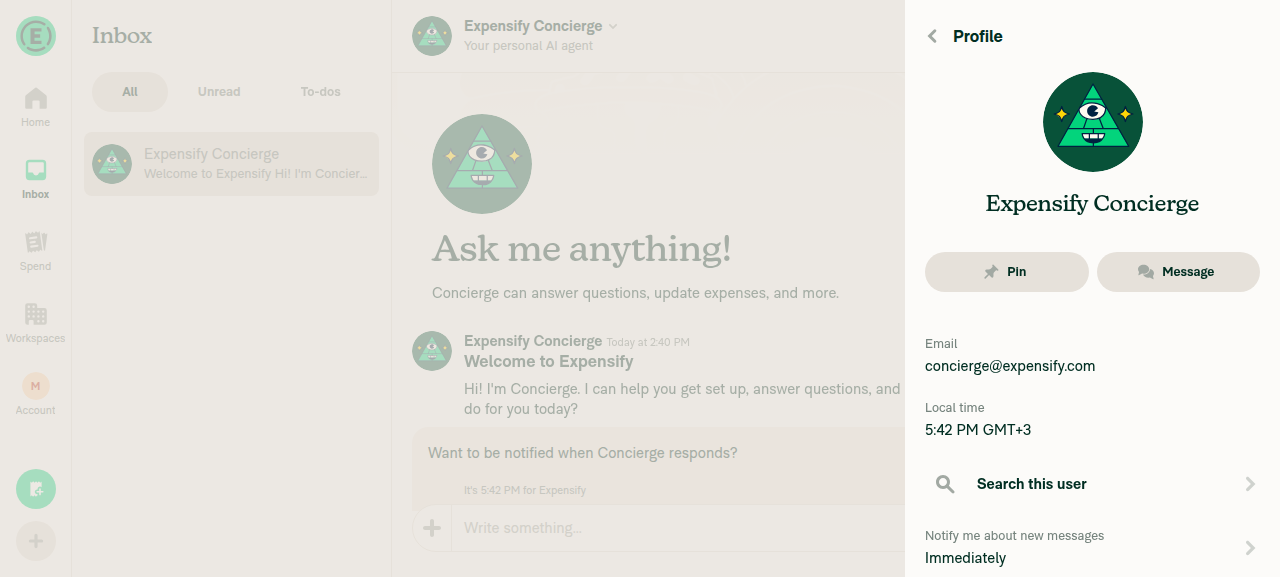
Add "🔍 Search this user" (or "Search this agent") to all profiles to view all report actions of that user/agent.

Fixed Issues

$ #98076
PROPOSAL: N/A

Tests

Same as QA steps.

  • Verify that no errors appear in the JS console

Offline tests

N/A

QA Steps

// TODO: These must be filled out, or the issue title must include "[No QA]."

  1. Go to a room or a chat.
  2. Click on a agent profile > Verify there's Search this agent button > Click on it
  3. Verify it navigates to Search and filters that agent's messages.
  4. Go back to any other chat and click on a user profile > Search this user
  5. Verify it navigates to Search and filter that user's messages.
  • Verify that no errors appear in the JS console

PR Author Checklist

  • I linked the correct issue in the ### Fixed Issues section above
  • I wrote clear testing steps that cover the changes made in this PR
    • I added steps for local testing in the Tests section
    • I added steps for the expected offline behavior in the Offline steps section
    • I added steps for Staging and/or Production testing in the QA steps section
    • I added steps to cover failure scenarios (i.e. verify an input displays the correct error message if the entered data is not correct)
    • I turned off my network connection and tested it while offline to ensure it matches the expected behavior (i.e. verify the default avatar icon is displayed if app is offline)
    • I tested this PR with a High Traffic account against the staging or production API to ensure there are no regressions (e.g. long loading states that impact usability).
  • I included screenshots or videos for tests on all platforms
  • I ran the tests on all platforms & verified they passed on:
    • Android: Native
    • Android: mWeb Chrome
    • iOS: Native
    • iOS: mWeb Safari
    • MacOS: Chrome / Safari
  • I verified there are no console errors (if there's a console error not related to the PR, report it or open an issue for it to be fixed)
  • I followed proper code patterns (see Reviewing the code)
    • I verified that comments were added to code that is not self explanatory
    • I verified that any new or modified comments were clear, correct English, and explained "why" the code was doing something instead of only explaining "what" the code was doing.
    • I verified any copy / text that was added to the app is grammatically correct in English. It adheres to proper capitalization guidelines (note: only the first word of header/labels should be capitalized), and is either coming verbatim from figma or has been approved by marketing (in order to get marketing approval, ask the Bug Zero team member to add the Waiting for copy label to the issue)
  • If a new code pattern is added I verified it was agreed to be used by multiple Expensify engineers
  • I followed the guidelines as stated in the Review Guidelines
  • I tested other components that can be impacted by my changes (i.e. if the PR modifies a shared library or component like Avatar, I verified the components using Avatar are working as expected)
  • If a new CSS style is added I verified that:
    • A similar style doesn't already exist
    • The style can't be created with an existing StyleUtils function (i.e. StyleUtils.getBackgroundAndBorderStyle(theme.componentBG))
  • If new assets were added or existing ones were modified, I verified that:
    • The assets are optimized and compressed (for SVG files, run npm run compress-svg)
    • The assets load correctly across all supported platforms.
  • If the PR modifies code that runs when editing or sending messages, I tested and verified there is no unexpected behavior for all supported markdown - URLs, single line code, code blocks, quotes, headings, bold, strikethrough, and italic.
  • If the PR modifies a generic component, I tested and verified that those changes do not break usages of that component in the rest of the App (i.e. if a shared library or component like Avatar is modified, I verified that Avatar is working as expected in all cases)
  • If the PR modifies a component related to any of the existing Storybook stories, I tested and verified all stories for that component are still working as expected.
  • If the PR modifies a component or page that can be accessed by a direct deeplink, I verified that the code functions as expected when the deeplink is used - from a logged in and logged out account.
  • If the PR modifies the UI (e.g. new buttons, new UI components, changing the padding/spacing/sizing, moving components, etc) or modifies the form input styles:
    • I verified that all the inputs inside a form are aligned with each other.
    • I added Design label and/or tagged @Expensify/design so the design team can review the changes.
  • I added unit tests for any new feature or bug fix in this PR to help automatically prevent regressions in this user flow.
  • If the main branch was merged into this PR after a review, I tested again and verified the outcome was still expected according to the Test steps.

Screenshots/Videos

Android: Native
Screen.Recording.2026-08-09.at.14.37.48.mov
Android: mWeb Chrome
Screen.Recording.2026-08-09.at.14.37.48.mov
iOS: Native
Screen.Recording.2026-08-09.at.14.33.53.mov
iOS: mWeb Safari
Screen.Recording.2026-08-09.at.13.33.44.mov
MacOS: Chrome / Safari
Screen.Recording.2026-08-09.at.13.16.51.mov

@melvin-bot

melvin-bot Bot commented Aug 9, 2026

Copy link
Copy Markdown

Hey, I noticed you changed src/languages/en.ts in a PR from a fork. For security reasons, translations are not generated automatically for PRs from forks.

If you want to automatically generate translations for other locales, an Expensify employee will have to:

  1. Look at the code and make sure there are no malicious changes.
  2. Run the Generate static translations GitHub workflow. If you have write access and the K2 extension, you can simply click: [this button]

Alternatively, if you are an external contributor, you can run the translation script locally with your own OpenAI API key. To learn more, try running:

npx ts-node ./scripts/generateTranslations.ts --help

Typically, you'd want to translate only what you changed by running npx ts-node ./scripts/generateTranslations.ts --compare-ref main

@hungvu193
hungvu193 marked this pull request as ready for review August 9, 2026 06:26
@hungvu193
hungvu193 requested review from a team as code owners August 9, 2026 06:26
@melvin-bot
melvin-bot Bot requested review from garrettmknight and marufsharifi and removed request for a team August 9, 2026 06:26
@melvin-bot

melvin-bot Bot commented Aug 9, 2026

Copy link
Copy Markdown

@marufsharifi Please copy/paste the Reviewer Checklist from here into a new comment on this PR and complete it. If you have the K2 extension, you can simply click: [this button]

@chatgpt-codex-connector chatgpt-codex-connector Bot left a comment

Copy link
Copy Markdown

Choose a reason for hiding this comment

The reason will be displayed to describe this comment to others. Learn more.

💡 Codex Review

Here are some automated review suggestions for this pull request.

Reviewed commit: 2acb4278da

ℹ️ About Codex in GitHub

Codex has been enabled to automatically review pull requests in this repo. Reviews are triggered when you

  • Open a pull request for review
  • Mark a draft as ready
  • Comment "@codex review".

If Codex has suggestions, it will comment; otherwise it will react with 👍.

When you sign up for Codex through ChatGPT, Codex can also answer questions or update the PR, like "@codex address that feedback".

Comment thread src/languages/en.ts
@marufsharifi

Copy link
Copy Markdown
Contributor

Reviewer Checklist

  • I have verified the author checklist is complete (all boxes are checked off).
  • I verified the correct issue is linked in the ### Fixed Issues section above
  • I verified testing steps are clear and they cover the changes made in this PR
    • I verified the steps for local testing are in the Tests section
    • I verified the steps for Staging and/or Production testing are in the QA steps section
    • I verified the steps cover any possible failure scenarios (i.e. verify an input displays the correct error message if the entered data is not correct)
    • I turned off my network connection and tested it while offline to ensure it matches the expected behavior (i.e. verify the default avatar icon is displayed if app is offline)
  • I checked that screenshots or videos are included for tests on all platforms
  • I included screenshots or videos for tests on all platforms
  • I verified that the composer does not automatically focus or open the keyboard on mobile unless explicitly intended. This includes checking that returning the app from the background does not unexpectedly open the keyboard.
  • I verified tests pass on all platforms & I tested again on:
    • Android: HybridApp
    • Android: mWeb Chrome
    • iOS: HybridApp
    • iOS: mWeb Safari
    • MacOS: Chrome / Safari
  • If there are any errors in the console that are unrelated to this PR, I either fixed them (preferred) or linked to where I reported them in Slack
  • I verified proper code patterns were followed (see Reviewing the code)
    • I verified that comments were added to code that is not self explanatory
    • I verified that any new or modified comments were clear, correct English, and explained "why" the code was doing something instead of only explaining "what" the code was doing.
    • I verified any copy / text that was added to the app is grammatically correct in English. It adheres to proper capitalization guidelines (note: only the first word of header/labels should be capitalized), and is either coming verbatim from figma or has been approved by marketing (in order to get marketing approval, ask the Bug Zero team member to add the Waiting for copy label to the issue)
  • If a new code pattern is added I verified it was agreed to be used by multiple Expensify engineers
  • I verified that this PR follows the guidelines as stated in the Review Guidelines
  • I verified other components that can be impacted by these changes have been tested, and I retested again (i.e. if the PR modifies a shared library or component like Avatar, I verified the components using Avatar have been tested & I retested again)
  • If a new component is created I verified that:
    • A similar component doesn't exist in the codebase
    • All props are defined accurately
    • The component has a clear name that is non-ambiguous and the purpose of the component can be inferred from the name alone
    • The only data being stored in the state is data necessary for rendering and nothing else
    • The component has the minimum amount of code necessary for its purpose, and it is broken down into smaller components in order to separate concerns and functions
  • If a new CSS style is added I verified that:
    • A similar style doesn't already exist
    • The style can't be created with an existing StyleUtils function (i.e. StyleUtils.getBackgroundAndBorderStyle(theme.componentBG)
  • If the PR modifies code that runs when editing or sending messages, I tested and verified there is no unexpected behavior for all supported markdown - URLs, single line code, code blocks, quotes, headings, bold, strikethrough, and italic.
  • If the PR modifies a generic component, I tested and verified that those changes do not break usages of that component in the rest of the App (i.e. if a shared library or component like Avatar is modified, I verified that Avatar is working as expected in all cases)
  • If the PR modifies a component related to any of the existing Storybook stories, I tested and verified all stories for that component are still working as expected.
  • If the PR modifies a component or page that can be accessed by a direct deeplink, I verified that the code functions as expected when the deeplink is used - from a logged in and logged out account.
  • If the PR modifies the UI (e.g. new buttons, new UI components, changing the padding/spacing/sizing, moving components, etc) or modifies the form input styles:
    • I verified that all the inputs inside a form are aligned with each other.
    • I added Design label and/or tagged @Expensify/design so the design team can review the changes.
  • For any bug fix or new feature in this PR, I verified that sufficient unit tests are included to prevent regressions in this flow.
  • If the main branch was merged into this PR after a review, I tested again and verified the outcome was still expected according to the Test steps.
  • I have checked off every checkbox in the PR reviewer checklist, including those that don't apply to this PR.

Screenshots/Videos

Android: HybridApp
Android: mWeb Chrome
iOS: HybridApp
iOS: mWeb Safari
MacOS: Chrome / Safari

@marufsharifi

Copy link
Copy Markdown
Contributor

@hungvu193, could you please check the failure actions, when you get a chance. thanks.

@hungvu193

Copy link
Copy Markdown
Contributor Author

Fixed 😄. Btw, I'm asking for confirmation in Slack, so can you please hold the review for a while?

@codecov

codecov Bot commented Aug 9, 2026

Copy link
Copy Markdown

Codecov Report

✅ Changes either increased or maintained existing code coverage, great job!

Files with missing lines Coverage Δ
src/pages/ProfilePage.tsx 0.00% <0.00%> (ø)
... and 13 files with indirect coverage changes

@hungvu193

Copy link
Copy Markdown
Contributor Author

@marufsharifi it's now ready

@marufsharifi

Copy link
Copy Markdown
Contributor

I am testing it. thanks.

Comment thread src/pages/ProfilePage.tsx
Comment on lines +316 to +329
{!!accountID && !isAnonymousUserSession() && (
<MenuItem
shouldShowRightIcon
title={translate(isAgentEmail(login) ? 'profilePage.searchThisAgent' : 'profilePage.searchThisUser')}
icon={expensifyIcons.MagnifyingGlass}
onPress={() => {
const query = buildQueryStringFromFilterFormValues({
type: CONST.SEARCH.DATA_TYPES.CHAT,
from: [String(accountID)],
});
Navigation.navigate(ROUTES.SEARCH_ROOT.getRoute({query}));
}}
/>
)}

Copy link
Copy Markdown
Contributor

Choose a reason for hiding this comment

The reason will be displayed to describe this comment to others. Learn more.

No automated coverage for this new feature.

This block has real branching worth locking down: the isAgentEmail(login) label choice, the !!accountID && !isAnonymousUserSession() visibility guard, and the exact query that gets built. A future refactor of buildQueryStringFromFilterFormValues, the CHAT filter allow-list, or the anonymous guard could silently break this with no signal.

Suggested minimal test in ProfilePageTest.tsx:

it('navigates to Search with type:chat from:<accountID> when tapped', () => {
    fireEvent.press(screen.getByText('Search this user'));
    expect(Navigation.navigate).toHaveBeenCalledWith(
        ROUTES.SEARCH_ROOT.getRoute({query: expect.stringContaining('type:chat')}),
    );
});
it('shows "Search this agent" for an agent email', () => { /* isAgentEmail login */ });

Comment thread src/pages/ProfilePage.tsx
{!!accountID && !isAnonymousUserSession() && (
<MenuItem
shouldShowRightIcon
title={translate(isAgentEmail(login) ? 'profilePage.searchThisAgent' : 'profilePage.searchThisUser')}

Copy link
Copy Markdown
Contributor

Choose a reason for hiding this comment

The reason will be displayed to describe this comment to others. Learn more.

Label depends on login, which is empty until details load.

login = details?.login ?? '', so during the isLoading window (route accountID is known but details aren't yet) isAgentEmail('') is false. For an agent profile opened before details resolve, this renders "Search this user" and then flips to "Search this agent" once details load. Not blocking — just flagging the visible flicker to verify on a slow/high-traffic account.

Comment thread src/pages/ProfilePage.tsx
onPress={callFunctionIfActionIsAllowed(() => switchToDelegator(login))}
/>
)}
{!!accountID && !isAnonymousUserSession() && (

Copy link
Copy Markdown
Contributor

Choose a reason for hiding this comment

The reason will be displayed to describe this comment to others. Learn more.

Note: Anonymous handling differs from the other menu items here.

Other actions on this page gate via callFunctionIfActionIsAllowed(...) / isAnonymousAction, whereas this item hides entirely with !isAnonymousUserSession(). Hiding it is cleaner and fine — just noting the divergence so the pattern choice is intentional.

@marufsharifi

Copy link
Copy Markdown
Contributor

@MelvinBot Review

@MelvinBot

Copy link
Copy Markdown
Contributor

Review — LGTM ✅

The change is clean, minimal, and matches the "Chat with agent" pattern requested in the issue. I verified the feature end-to-end on web and it works as intended.

What I checked

  • The new MenuItem in ProfilePage.tsx:316-329 builds the query with type: chat + from: [accountID] and navigates to SEARCH_ROOT.
  • from is a supported filter for the chat data type (SearchAdvancedFiltersForm.ts:627-631), so buildQueryStringFromFilterFormValues won't strip it.
  • Visibility guard !!accountID && !isAnonymousUserSession() correctly hides the item for accountID === 0 (DEFAULT_NUMBER_ID) and anonymous sessions.
  • Label switches via isAgentEmail(login); login defaulting to '' is handled safely.
  • MagnifyingGlass is a valid Expensicon and correctly added to useMemoizedLazyExpensifyIcons.
  • Translations added for all 11 locales.
  • Only failing checks are checklist / Check independent approval (reviewer-checklist gates), not code checks. Tests, typecheck, lint, React Compiler all pass.

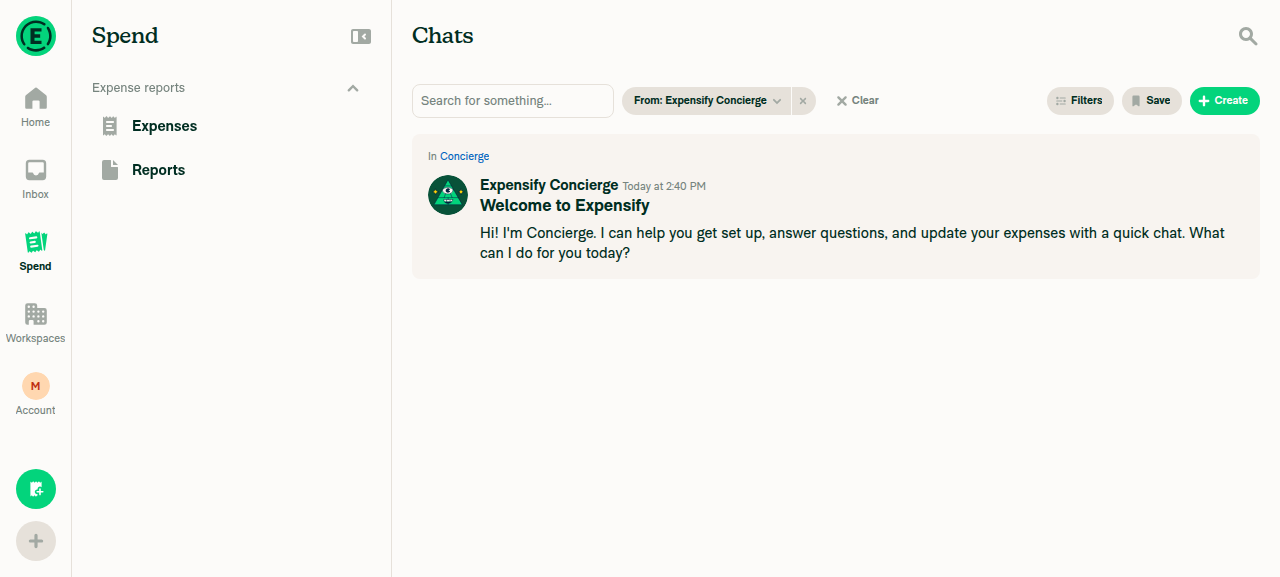
Live test (web): opened a profile → "Search this user" appears with the magnifying-glass icon → clicking it navigated to search?q=type:chat from:8392101, correctly pre-filtering to that user's chats.

Profile page showing Search this user menu item Search screen filtered by that user

Two things worth confirming before approving:

  1. Shown on your own profile too. The guard doesn't exclude isCurrentUser, so "Search this user" also appears on your own profile (searching your own chats). The issue says "add it to every profile … valuable for any user," so this is likely intended — just confirm it's desired rather than accidental.
  2. No unit test in the diff, although the author checklist has "I added unit tests" checked. For a trivial menu item this is often acceptable, but the checkbox/diff mismatch is worth reconciling.

I couldn't exercise the "Search this agent" label live (no *@expensify.ai agent chat in the test account), but the branch logic at ProfilePage.tsx:319 is correct — worth a manual check against a real agent profile (e.g. RuleBot) during QA.

@garrettmknight garrettmknight left a comment

Copy link
Copy Markdown
Contributor

Choose a reason for hiding this comment

The reason will be displayed to describe this comment to others. Learn more.

Looks good from a product perspective

Sign up for free to join this conversation on GitHub. Already have an account? Sign in to comment

Labels

None yet

Projects

None yet

Development

Successfully merging this pull request may close these issues.

4 participants