Welcome to the Digital Alchemy Starter Repo!
This repository is designed to work with Supervised and HAOS based installs, where Addons are supported. See installation documentation for a comparison of different installation types. These instructions assume that Studio Code Server Addon has been installed, serving as both editor and workspace management tool.
- 🗣️ Discord
- 📖 Extended documentation
- 🤖 Next steps for using workspace
Within the Code Server Addon:
- Open a terminal
Press Ctrl-Shift-` (default keybind) to open a terminal, or go through
Menu>Terminal>New Terminal.
- Execute the command
curl -fsSL https://setup.digital-alchemy.app -o setup.sh; bash setup.shThis command will:
- Download setup script & run it
- Install NodeJS on your system
- Clone this repository
- Set up type definitions
- Provide next steps
In order to help Code Server to keep node installed, you need to add a the following script as an init_command in the Configuration tab.
/config/home_automation/scripts/init.sh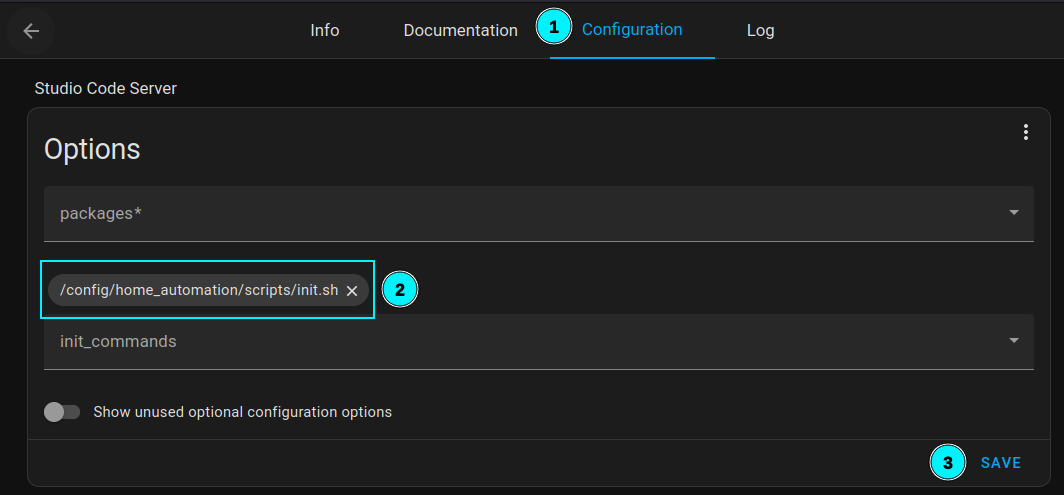
Use the type writer script to build custom definitions for your Home Assistant instance.
These are written to a src/hass folder by default.
yarn type-writerOnce your environment is set up, you can use provided commands from within the package.json to manage your workspace.
| NPM Command | Description |
|---|---|
upgrade |
⏺️ Upgrade all @digital-alchemy dependenciesAutomatically runs type-writer afterwards |
dev |
⏩ Run the development server Not intended for long term deployments! |
watch |
👀 Run the development server Automatically restart server on code changes |
build |
🏗️ Create a build of your code in the /share/digital_alchemy/ folderAddon has been set up to run from here |
type-writer |
🖨️ Rebuild custom type definitions for Home Assistant Run any time you modify your setup for more accurate definitions |
- Code Runner Addon - Create builds and run in the background
- Synapse Extension - Generate helper entities within Home Assistant


![@dependabot[bot]](https://avatars.githubusercontent.com/in/29110?s=64&v=4)

