


Self-hosted, open-source Qubic wallet tracker for tax documentation.
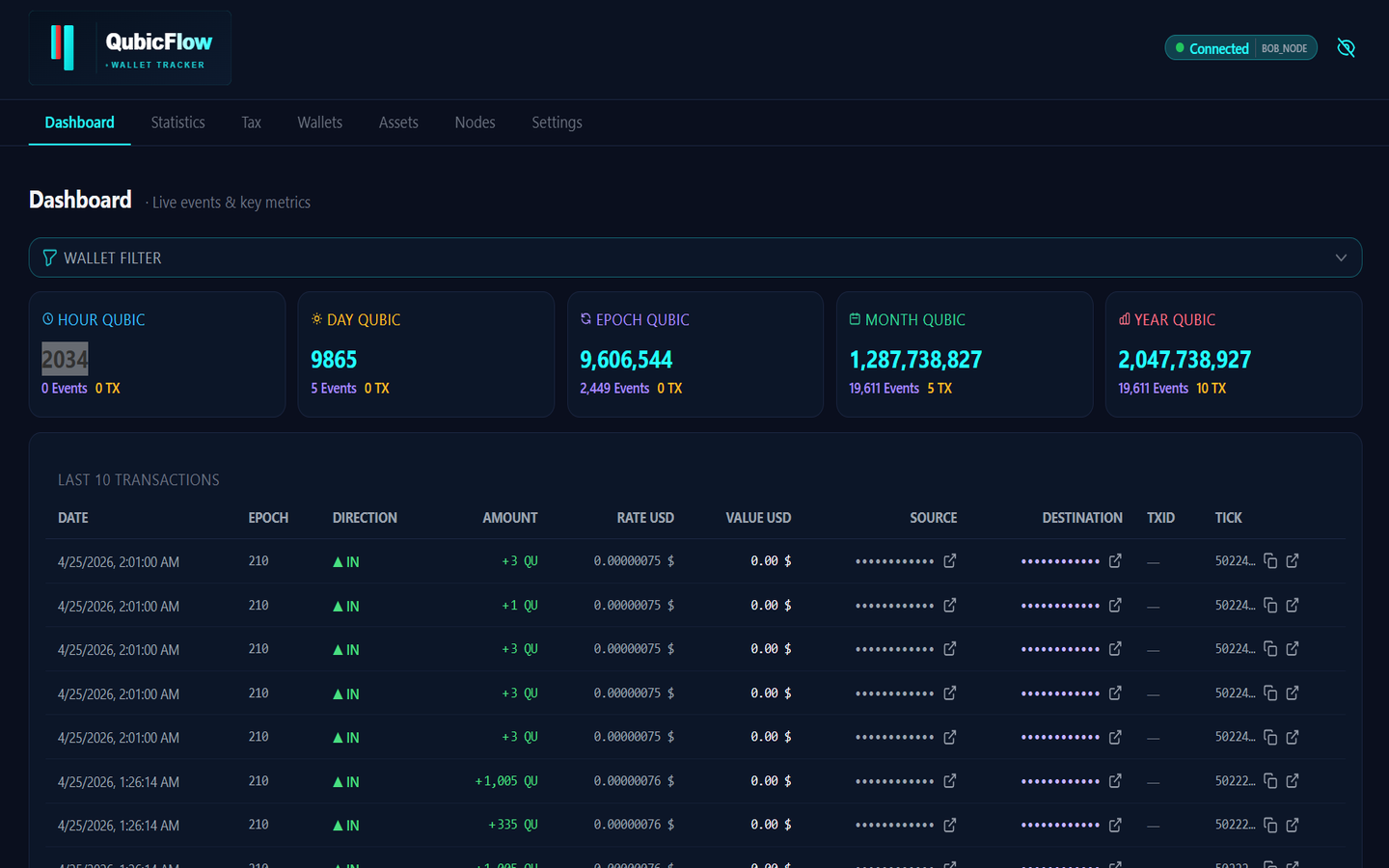
Supports unlimited wallets (PRIVATE / BUSINESS), automatic EUR/USD rates, live events via WebSocket, tax reporting (FIFO/LIFO/HIFO/AVCO, country-specific rules incl. 🇩🇰 Denmark) and CSV export for CoinTracking, Koinly, Blockpit and tax advisors.
GitHub: https://github.com/AndyQus/qubic-flow
German README: README.de.md
- Features
- Requirements
- Start with UmbrelOS
- Start with Docker
- Start in VSCode (Development)
- Configuration (.env)
- Node Configuration
- Project Structure
- API Overview
- Export / Tax CSVs
- Tax Reporting
- Background Jobs
- Running Tests
- Technology Stack
- Deployment & Publishing
- Unlimited wallets — PRIVATE and BUSINESS, manageable via the UI
- Multi-node support — Standard RPC (
rpc.qubic.org), BOB Node (bobnet.qubic.li) and your own Qubic Home Node on the LAN (HOME_NODE, private IPs allowed, preferred for sync whenever healthy); the best available node is chosen automatically - Event sync — automatically every 60 seconds; RPC nodes via
getEventLogs(usestransactionHashdirectly as primary key — the same 60-character ID shown in the Qubic Explorer), BOB nodes viaPOST /getQuTransferForIdentity. SC-internal events withouttransactionHashfall back to the numericlogId(the 16-characterlogDigestis then the Explorer ID for those events) - TX sync — transfer transactions via Qubic Archiver API, deduplicated against events; tries multiple field names (
transactionId,txId,id,digest,hash) and prefers the real 60-character Qubic TxID. Stub matching: existing event rows are found by(tick, source, destination, amount)and updated with the real TxID (user fields like notes/labels are preserved). Chunk-based progress with checkpoint per chunk — failed chunks become a sync gap and do not resetlast_tx_tick. Initial sync starts atcurrent_tick − 500,000(archiver retention period), not at tick 1 - Smart contract classification —
logType=0transfers are classified asTX(normal transfer) orEVENT(smart contract / token issuer, e.g. QX, Qearn, QMine) via address labels - Token dividend tracking — Qubics received via token distributions (e.g. QMine dividends) are automatically detected: token issuer addresses are synced daily from the Qubic assets registry (
static.qubic.org); incoming transfers from these addresses are classified as EVENTs and recorded per epoch with date, amount and EUR/USD rate - Manual resync — "Refresh data" button in settings (
POST /wallets/resync-all) resets sync counters and imports only missing records (existing data is preserved) - Tick-range window technique — overcomes the 10,000-record RPC API limit via recursive halving
- Address name resolution — automatic resolution of Qubic addresses to tokens/labels (assets page + CSV)
- Assets page — overview of all smart contracts and tokens with ticker, category, decimal places, website
- Wallet balances — current balance per wallet is updated automatically
- EUR/USD rates — fetched daily from CoinGecko, cached in the database
- Statistics panels — Hour / Day / Epoch / Month / Year, each with current and previous period
- Epoch view — all epochs navigable as a wallet panel grid (label, owner, incoming Qubics incl. TX/event split, outgoing Qubics incl. EUR value); dividends from smart contract payouts and token distributions (e.g. QX shares, Qearn, QMine) are automatically detected per epoch as EVENTs; filter "All" / "With income only" plus "Show all" toggle (
?ext=1) to show/hide empty sub-rows - Events table — separate columns for TxId and Tick, each with copy button and Explorer link (
/network/tx/{id}and/network/tick/{tick}); short display (5 chars) with tooltip, full value on copy/open. Only real 60-character Qubic TxIDs are shown — SC-internal events without user TX show a dash in the TxID column - Weekly snapshots — every Wednesday at 12:00 UTC
- Balance History (Bestandsverlauf) — automatic balance capture of all active wallets in three toggleable series: hourly, daily (12:00 UTC) and weekly at the epoch transition (Wednesday from 12:00 UTC, waits until the RPC reports the new epoch). Every record stores balance, delta versus the previous capture, interval in/out amounts, tick, epoch and EUR/USD rates. New Statistics tab with all sheets (ledger overview, absolute balances per wallet with consistency check against the captured in-/outflows, per-owner ledgers, internal transfers, transactions), a "Capture now" test button, inline editing (edited values are marked, the original measurement is kept as audit trail) and manual records. Generates three Excel files in a personal ledger layout — wallet columns and owner sheets built dynamically from the local database — regenerated after every capture/edit and downloadable any time. Configured on a dedicated settings tab "Balance History" with per-series reset (confirmation-guarded) and a built-in guide explaining how the feature works. All views cover only the recorded period (from the first capture of a series); the app shows times in the browser's local timezone, Excel dates use the server timezone (
TZenvironment variable, default UTC) - 3 animation variants for new events: slide down, fly in, bar fade (configurable)
- Live updates via WebSocket (events + node status)
- Tax reporting:
- FIFO, LIFO, HIFO and AVCO cost-basis methods
- Country-specific rules (DE, AT, CH, DK, and more) — including the 1-year holding-period tax exemption (DE) and the Danish model (mandatory FIFO, gains and deductible losses reported separately without netting)
- Income events (dividends, rewards) are taxed at receipt and enter the lot queue at market value — no double taxation on later disposal
- Honest report currency: countries without tracked local rates (CHF, GBP, DKK, …) are calculated and labelled in EUR
- Opening positions for pre-tracked balances
- Price lookup per date directly in the UI
- CSV and PDF export of the tax report
- CSV export:
- CoinTracking format (PRIVATE wallets, comma-separated, UTF-8 BOM)
- Koinly universal format (PRIVATE wallets)
- Blockpit generic import format (PRIVATE wallets)
- Tax advisor format (BUSINESS wallets, semicolon-separated, UTF-8 BOM)
- Resolved address names in the comment field
- Portfolio value chart — daily QU balance × daily rate as a line chart on the statistics page (with balance on a second axis)
- Webhook notifications — new incoming transfers can trigger a webhook (generic JSON, Discord or ntfy format) with a minimum-amount filter, a TX/SC-event type filter (checkboxes decide which kind triggers a push) and a test button (Settings → Data); every message carries the full record with the event type on the first line
- Token & asset holdings — live token balances (e.g. QX shares) per wallet on the wallet detail page, resolved via the Qubic assets registry; each asset shows its current price (last QX trade in QU, from the official QX API) and the resulting value in QU and EUR/USD
- Token/Shares portfolio view — "QUBIC | Tokens/Shares" switch on the Wallets → Portfolio tab: token values grouped by owner, per-wallet token drilldown and the total wallet value including QUBIC (batch endpoint with server-side cache)
- Internal transfers — wallet-to-wallet transfers are treated as tax-neutral in exports
- Privacy mode — eye icon in the header masks all sensitive values app-wide: wallet addresses, balances, portfolio values, P&L, tax amounts, EUR/USD totals, and personal data fields in the tax form
- Dashboard search & pagination — full-text search with debounce across all events; configurable page size (10–1000) persisted in localStorage
- Ledger import — import wallet history from myledger.qubic.tools JSON export directly in Settings → Data
- German / English UI, dark / light mode
- Tabbed settings —
Appearance(currency, font, theme, language, animations),Tax(country/method, personal/business data),Data(export, backup/restore, resync, ledger import); active tab is reflected in the URL query parameter (?tab=…) - Fully containerized — a single
docker compose up --buildis all you need - Footer — disclaimer banner and fixed footer with copyright, links (Qubic.org, terms, privacy) and version number
- Docker (Windows / Mac / Linux)
- Docker Compose plugin — included with Docker Desktop and with the
docker-compose-pluginpackage on Linux
Note: The modern command is
docker compose(with a space). The legacydocker-compose(with a hyphen) is outdated and may not be available on your system.
- Python 3.12+
- Node.js 22+
- VSCode with the Python (ms-python.python) and Debugpy extensions
QubicFlow is available for UmbrelOS — the self-hosted home server OS that runs on a Raspberry Pi or any Linux machine.
Umbrel Store Repository: https://github.com/AndyQus/qubicflow-umbrel-store
- Open the Umbrel App Store
- Click ⋮ (top-right menu) → Community App Stores
- Enter the store URL:
https://github.com/AndyQus/qubicflow-umbrel-store - Click Install next to QubicFlow
QubicFlow will be available at http://<your-umbrel-ip>:8080 after installation.
Official App Store — A submission to the official Umbrel App Store is pending (PR #5461). Once approved, QubicFlow will be installable directly from the built-in store without adding a community source.
cd qubic-flow
docker compose up --build   # first start or after code changes
docker compose up -d        # subsequent starts, runs in background
docker compose down         # stop (data is preserved)
docker compose down -v      # stop + delete all data
Note: Use
docker compose(with a space) — the legacydocker-compose(with a hyphen) is outdated.
→ Main page: http://localhost:8080
| Service | URL |
|---|---|
| Frontend | http://localhost:8080 |
| Backend | http://localhost:8000/api/v1/health |
| API docs | http://localhost:8000/docs |
Ports are bound to
127.0.0.1— not reachable from outside.
The backend automatically runs alembic upgrade head on startup — database migrations run without manual intervention.
Data is stored in the Docker volume qubicflow-data and persists across restarts.
For a full step-by-step guide including Docker installation, permission fixes (important for Raspberry Pi) and troubleshooting, see:
📄 INSTALL_Linux.md (English)
📄 INSTALL_Linux.de.md (Deutsch)
# Backend
cd qubic-flow/backend
pip install -r requirements.txt

# Frontend
cd qubic-flow/frontend
npm installcd qubic-flow/backend
alembic upgrade headRun after first checkout and after every new migration.
Creates all tables includingevents(composite primary key),sync_state,address_labels,wallet_balances,opening_positionsand more.
- Open the
qubic-flowfolder in VSCode - Open Run and Debug (
Ctrl+Shift+D) - Select "QubicFlow (Full Stack)" at the top
- Press F5
VSCode starts the backend (port 8000) and frontend (port 5173) simultaneously.
→ Main page: http://localhost:5173
The Vite dev server automatically proxies /api/... requests to the backend (proxy in vite.config.js).
Python breakpoints work directly in .py files.
# Backend only
cd backend
uvicorn app.main:app --reload --host 127.0.0.1 --port 8000

# Frontend only
cd frontend
npm run devNodes are managed via the UI under Settings → Nodes.
For live sync QubicFlow prefers your own Home Node whenever one is healthy; otherwise it automatically selects the BOB node with the highest tick (furthest advanced), falling back to RPC if every BOB node is stalled. The node actually feeding live sync is shown in the connection pill (top right) and marked with a pulsing dot in the node list.
| Type | Description | Default URL |
|---|---|---|
RPC |
Qubic Public RPC (REST) | https://rpc.qubic.org |
BOB_NODE |
Qubic BOB Node (core team, REST + WS) | http://your-bob-node:40420 |
HOME_NODE |
Your own Qubic Home Node on the LAN (RPC interface) | http://umbrel.local:8080 |
URL:       https://rpc.qubic.org
Type:      RPC
Label:     Qubic RPC
Priority:  1
URL:       https://bobnet.qubic.li:40420
Type:      BOB_NODE
Label:     BOB Public Node
Priority:  1
The BOB node uses its own REST API on port 40420 — the standard RPC endpoints (/v1/tick-info etc.) are not available there.
QubicFlow detects the type automatically via node_type = BOB_NODE and uses the correct endpoints.
URL:       http://umbrel.local:8080   (or http://192.168.x.x:8080)
Type:      HOME_NODE
Label:     My Home Node
Priority:  1
A Home Node is your own Qubic archive node on the local network (e.g. on a Raspberry Pi or Umbrel). It speaks the standard RPC interface (incl. getEventLogs) and serves from its own permanent archive, so it keeps working even when public infrastructure is down. Private LAN addresses (10.*, 192.168.*, 172.*) are allowed for this node type only — for RPC/BOB_NODE the SSRF protection still blocks them; link-local addresses (169.254.*) and localhost are always blocked. A healthy Home Node is preferred over all public nodes for both live sync and historical queries; TLS certificate verification is skipped for LAN nodes (http / self-signed certificates).
| Endpoint | Method | Purpose |
|---|---|---|
/status |
GET | Status check, current tick |
/getQuTransferForIdentity |
POST | QU transfers per wallet + tick range |
- Timestamps are missing in raw BOB transfer entries — QubicFlow resolves them automatically via
qubic_getTickByNumber/GET /tick/{tickNumber}during sync; events imported before this existed are repaired by the 6-hourly timestamp backfill job. - The public BOB node (
bobnet.qubic.li:40420) is a community service with no guaranteed availability. For production use, running your own BOB node is recommended.
Full BOB API documentation:
docs/bob_node.md
The sync job (sync_all_wallets, every 60 s) selects the live-sync node using the following logic:
- Only
is_active = 1nodes with status ONLINE or DEGRADED are considered - A healthy HOME_NODE always wins (ONLINE preferred over DEGRADED, then priority) — your own archive node beats public infrastructure
- Otherwise, among the BOB nodes, the one with the highest tick wins (furthest advanced); priority is only a tiebreaker when ticks are (nearly) equal
- If even the best BOB node lags more than
MAX_BOB_LAG(1000) ticks behind the RPC network tip, it is treated as stalled and RPC is used for live sync (logged as a warning) - If no node is available, the system falls back to
QUBIC_RPC_URLfrom.env
Data is never lost when the active node changes: incremental sync always resumes from the persisted
last_tick, and any range a node could not serve is backfilled via RPC or recorded as a gap and retried.
Create backend/.env (template: backend/.env.example):
# Environment: production (default) or development.
# In development the balance history capture series are pre-enabled for testing;
# in production they start disabled and are enabled per user in the settings.
APP_ENV=production

# Database (local: relative path, Docker: absolute path in container)
DATABASE_URL=sqlite:///./data/qubicflow.db

# Qubic RPC
QUBIC_RPC_URL=https://rpc.qubic.org

# CoinGecko (optional: API key for higher rate limits)
COINGECKO_API_URL=https://api.coingecko.com/api/v3
COINGECKO_API_KEY=

# CORS (comma-separated origins)
CORS_ORIGINS=http://localhost:8080,http://localhost:5173

# Logging
LOG_LEVEL=INFO
TZ=UTC
The
.envfile is in.gitignore— never commit it.
Without.env, the backend and Docker container start with built-in defaults.
qubic-flow/
├── backend/
│   ├── app/
│   │   ├── api/v1/          # REST endpoints
│   │   │   ├── wallets.py   # Wallet CRUD, resync, asset holdings
│   │   │   ├── events.py    # Event list, filters, notes, donation endpoints
│   │   │   ├── nodes.py     # Node CRUD, logs, diagnose, sync-now
│   │   │   ├── stats.py     # Statistics panels, epochs, portfolio history
│   │   │   ├── export.py    # CSV downloads (CoinTracking, Koinly, Blockpit, tax advisor)
│   │   │   ├── backup.py    # Full JSON backup export/restore
│   │   │   ├── notifications.py # Webhook notification settings + test
│   │   │   ├── labels.py    # Address name resolution
│   │   │   ├── health.py    # System status + metrics
│   │   │   ├── tax.py       # Tax reporting (settings, report, opening positions)
│   │   │   └── ws.py        # WebSocket endpoint
│   │   ├── models/          # SQLAlchemy ORM models
│   │   │   ├── wallet.py
│   │   │   ├── event.py
│   │   │   ├── node.py
│   │   │   ├── sync_state.py
│   │   │   ├── sync_gap.py
│   │   │   ├── price_cache.py
│   │   │   ├── address_label.py
│   │   │   ├── snapshot.py
│   │   │   ├── settings.py
│   │   │   ├── donor_cache.py       # Donation/supporter cache
│   │   │   └── opening_position.py  # Opening positions for tax
│   │   ├── services/        # Business logic
│   │   │   ├── sync_engine.py      # Tick sync with window technique (event + TX); dynamic node selection; timestamp/epoch/rate backfill
│   │   │   ├── qubic_client.py     # RPCClient + BOBClient (3× retry, BOB response mapping, asset lookup)
│   │   │   ├── coingecko.py        # Rate fetching with rate limiting
│   │   │   ├── label_service.py    # Address name sync
│   │   │   ├── export_service.py   # CSV generation (4 formats)
│   │   │   ├── notification_service.py # Webhook notifications (JSON/Discord/ntfy)
│   │   │   ├── health_monitor.py   # Node status checking
│   │   │   ├── snapshot_service.py # Weekly snapshots
│   │   │   ├── balance_service.py  # Wallet balance updates
│   │   │   ├── donation_cache_service.py # Supporter/donation detection
│   │   │   ├── tax_engine.py       # Tax calculation (FIFO/LIFO/HIFO/AVCO, country-specific incl. DK)
│   │   │   └── scheduler.py        # APScheduler jobs
│   │   ├── websocket/
│   │   │   └── manager.py   # WebSocket connection management
│   │   ├── utils/
│   │   │   ├── time.py      # UTC helper functions
│   │   │   └── log_buffer.py # In-memory log ring buffer (Logs tab)
│   │   ├── config.py        # Pydantic settings
│   │   ├── database.py      # SQLAlchemy engine + session
│   │   └── main.py          # FastAPI app + lifespan
│   ├── tests/               # pytest suite (13 files, 212 tests)
│   ├── alembic/
│   │   └── versions/        # Database migrations (001 … 013)
│   ├── requirements.txt
│   ├── Dockerfile
│   └── .env.example
├── frontend/
│   ├── src/
│   │   ├── views/           # Pages (Dashboard, Wallets, Assets, Statistics, Tax, etc.)
│   │   ├── components/      # AppHeader, AppNav, AppFooter, StatsPanel, EventsTable, WalletFilter
│   │   ├── composables/     # useWebSocket (auto-reconnect)
│   │   ├── stores/          # Pinia state stores
│   │   ├── i18n/            # DE / EN translations
│   │   ├── router/          # vue-router routes
│   │   └── api.js           # Backend HTTP client
│   ├── src/tests/unit/      # Vitest unit tests
│   ├── tests/e2e/           # Playwright end-to-end tests
│   ├── vitest.config.js     # Vitest config
│   ├── playwright.config.js # Playwright config
│   ├── Dockerfile           # Multi-stage: Node build → nginx
│   ├── nginx.conf           # SPA routing + /api proxy
│   ├── vite.config.js       # Dev proxy to backend
│   └── package.json
├── docs/
│   └── bob_node.md          # BOB Node API reference
├── VERSION                  # Current version number (read by CI)
├── docker-compose.yml
└── .vscode/
    ├── launch.json          # F5: start full stack
    └── tasks.json           # Build tasks
All endpoints under /api/v1/. Interactive docs: http://localhost:8000/docs
| Method | Path | Description |
|---|---|---|
| GET | /health |
Backend status |
| GET | /metrics |
Basic runtime metrics |
| GET | /wallets |
All active wallets |
| POST | /wallets |
Create wallet |
| PUT | /wallets/{id} |
Update wallet |
| DELETE | /wallets/{id} |
Soft-delete wallet |
| GET | /wallets/{id}/assets |
Live token/asset holdings incl. QX prices (RPC proxy) |
| GET | /wallets/assets-summary |
Token holdings + values for all wallets (batch, cached) |
| POST | /wallets/{id}/resync-tx |
Restart TX sync for a wallet |
| POST | /wallets/resync-all |
Resync all wallets (missing records only) |
| GET | /events |
Events (filters: wallet, epoch, month, year, source_type; paginated) |
| GET | /events/count |
Event count for the current filter |
| GET | /events/filter-options |
Available years/months/epochs for filters |
| PATCH | /events/{id}/note |
Save a note on an event |
| GET | /labels |
Address labels (optional ?address=) |
| GET | /nodes |
List nodes |
| POST | /nodes |
Create node |
| PUT | /nodes/{id} |
Update node |
| DELETE | /nodes/{id} |
Delete node |
| PATCH | /nodes/{id}/toggle |
Enable/disable node |
| POST | /nodes/{id}/check-now |
Immediate health check |
| POST | /nodes/sync-now |
Trigger an immediate full sync |
| POST | /nodes/diagnose |
Connectivity + sync diagnostics |
| GET | /nodes/logs |
In-memory log buffer (Logs tab) |
| GET | /stats/current |
Statistics panels (current + previous period) |
| GET | /stats/history |
Weekly/monthly time series |
| GET | /stats/snapshots |
Stored weekly snapshots |
| GET | /stats/epochs |
All epoch breakdowns per wallet (in/out, TX/event split, dividends as EVENTs) |
| GET | /stats/portfolio-history |
Daily portfolio value (balance × rate) |
| GET | /export/cointracking |
CoinTracking CSV (?year=2026) |
| GET | /export/koinly |
Koinly universal CSV (?year=2026) |
| GET | /export/blockpit |
Blockpit import CSV (?year=2026) |
| GET | /export/steuerberater |
Tax advisor CSV (?year=2026) |
| GET | /backup |
Full JSON backup (wallets, nodes, events, tax settings) |
| POST | /backup/restore |
Restore from a backup file (deduplicated) |
| GET | /notifications/settings |
Read webhook notification settings |
| PUT | /notifications/settings |
Save webhook notification settings |
| POST | /notifications/test |
Send a test notification |
| GET | /tax/settings |
Read tax settings |
| PUT | /tax/settings |
Save tax settings |
| GET | /tax/countries |
Available countries + tax rules |
| GET | /tax/opening-positions |
List opening positions |
| POST | /tax/opening-positions |
Create opening position |
| DELETE | /tax/opening-positions/{id} |
Delete opening position |
| GET | /tax/report |
Calculate tax report |
| GET | /tax/price |
EUR/USD rate for a date (?date=) |
| GET | /balance-history/settings |
Balance history settings (series toggles, retention, auto export) |
| PUT | /balance-history/settings |
Save balance history settings |
| GET | /balance-history/overview |
Capture rows of a series (?kind=hourly|daily|weekly) |
| POST | /balance-history/capture |
Capture now (manual trigger, same function as the scheduler) |
| PATCH | /balance-history/snapshots/{id} |
Edit a captured value (original kept as audit trail) |
| PATCH | /balance-history/annotations |
Save why/information/notes of a capture row |
| POST | /balance-history/rows |
Add a manual record |
| DELETE | /balance-history/rows |
Delete a manual record (?kind=&bucket=) |
| GET | /balance-history/owner-ledger |
Per-owner event ledger (?owner=) |
| GET | /balance-history/transfers |
Internal transfers between own wallets since the series baseline (?kind=) |
| GET | /balance-history/transactions |
Flat transaction list (paginated) |
| GET | /balance-history/export/{kind} |
Download the Excel file of a series (?lang=de|en) |
| POST | /balance-history/export/rebuild |
Regenerate all enabled Excel files in the data folder |
| DELETE | /balance-history/series/{kind} |
Reset one series completely (deletes all its captures, regenerates its Excel file empty) |
| WS | /ws |
WebSocket (event.new, node.health, sync.node) |
Qubic wallet addresses consist of exactly 60 uppercase letters (A–Z).
Example: AAAAABBBBBCCCCCDDDDDEEEEEFFFFFGGGGGHHHHHIIIIIIJJJJJKKKKKLLLLL
- Format: comma-separated, UTF-8 BOM
- Contains: deposits and withdrawals
- Internal transfers (wallet → wallet) are automatically excluded
is_internalis calculated dynamically at export time — retroactively correct when new wallets are added- Comment field contains resolved address names:
"Source name → Destination name" - Download:
GET /api/v1/export/cointracking?year=2026
- Koinly universal CSV format (Date, Sent/Received Amount + Currency, Net Worth, Label, TxHash)
- Reward income is labelled
reward; internal transfers excluded - Download:
GET /api/v1/export/koinly?year=2026
- Blockpit generic import format (Date (UTC), Integration Name, Label, Outgoing/Incoming Asset + Amount, Trx. ID)
- Incoming rewards are labelled
Staking, transfersDeposit/Withdrawal; internal transfers excluded - Download:
GET /api/v1/export/blockpit?year=2026
- Format: semicolon-separated, UTF-8 BOM
- Contains: all transfers including internal (with type flag)
- Comment field contains resolved address names:
"Source name → Destination name" - Download:
GET /api/v1/export/steuerberater?year=2026
Both exports include EUR values rounded to 2 decimal places.
The Tax page calculates gains and income according to country-specific rules directly in the app.
Under Settings → Tax:
| Setting | Description | Default |
|---|---|---|
| Country | Tax jurisdiction (DE, AT, CH, …) | DE |
| Method | Calculation order (FIFO / LIFO / HIFO / AVCO) | FIFO |
Available countries and their rules are provided by GET /api/v1/tax/countries.
- Germany (DE): gains from disposals held for more than 12 months are tax-free; €1,000 Freigrenze
- Denmark (DK): FIFO is mandatory (the method selector is locked); gains and losses are not netted — taxable gains and deductible losses are reported separately (Spekulationsbeskatning)
- Report currency: rates are tracked in EUR and USD only. The US is calculated in USD, everything else in EUR — countries with another local currency (CHF, GBP, DKK, …) are labelled honestly as EUR. Income events enter the lot queue at market value at receipt, so they are not taxed twice.
If you held QU before the first recorded event, you can enter the balance as an opening position:
- Wallet, date, amount (QU), optional EUR/USD rate, note
- Managed via
GET/POST/DELETE /api/v1/tax/opening-positions - The rate for the entered date can be looked up via
GET /api/v1/tax/price?date=YYYY-MM-DD
GET /api/v1/tax/report?year=2024&mode=private&wallet_ids=… returns:
{
  "summary": {
    "taxable_gains_eur": 1234.56,
    "tax_free_gains_eur": 500.00,
    "income_eur": 200.00,
    "total_disposed_qu": 50000,
    "total_acquired_qu": 100000
  },
  "disposals": [...],
  "income_events": [...],
  "meta": { "year": 2024, "mode": "private", "country": "DE", "method": "FIFO" }
}
The report can be downloaded directly in the UI as CSV or PDF.
| Job | Interval | Description |
|---|---|---|
sync_all_wallets |
every 60 seconds | Event sync + TX sync + balance update; dynamically selects the best available node |
health_monitor |
every 30 seconds | Check node status (/v1/tick-info for RPC, /status for BOB), WebSocket broadcast |
retry_sync_gaps |
every 15 minutes | Retry unresolved sync gaps (EVENT + TX) via RPC |
check_balances |
every hour | Compare live RPC balance vs. computed balance; trigger targeted resync on drift |
backfill_tx_epochs |
every hour | Fill missing epoch numbers on TX records |
refresh_donation_cache |
every hour | Update supporter/donation cache |
backfill_rates |
every 6 hours | Fetch EUR/USD rates for events without a rate |
backfill_timestamps |
every 6 hours | Resolve events without a usable timestamp (old BOB imports) via tick data |
sync_labels |
every 24 hours | Address name sync (address_labels, tokens, issuances) |
weekly_snapshot |
Wed 12:00 UTC (cron) | Save weekly aggregation snapshot |
Jobs run with max_instances=1 and coalesce=True — no parallel duplicate runs.
If the RPC delivers fewer records than expected for a tick range (validForTick < to_tick), a sync gap is created and the missing range is retried on the next run.
cd backend
pip install -r requirements.txt
python -m pytest tests/ -v| File | Tests | Description |
|---|---|---|
tests/test_tax_engine.py |
27 | Lot matching (FIFO/LIFO/HIFO/AVCO), holding period, tax rules, date parser |
tests/test_tax_report_fixes.py |
8 | Income cost basis, year-end holdings, report currency, Danish model |
tests/test_export_service.py |
25 | CSV exports (classification, formats, internal transfers) |
tests/test_review_fixes.py |
46 | API regressions (nodes, sync guard, diagnose) |
tests/test_bob_client.py |
25 | BOB JSON-RPC client, response mapping, timestamp resolution |
tests/test_wallets_api.py |
23 | Wallet CRUD + resync endpoints |
tests/test_time_utils.py |
15 | UTC helpers |
tests/test_donation_utils.py |
13 | Supporter rank / donation logic |
tests/test_balance_snapshots.py |
10 | Balance history: buckets, edit audit trail, Excel workbook, transfer period, UTC timestamps |
tests/test_bob_selection.py |
8 | Tick-based BOB node election + lag fallback |
tests/test_home_node_selection.py |
7 | HOME_NODE preference in the sync source selection chain (HOME → BOB → RPC) |
tests/test_sync_engine_logic.py |
8 | Sync window / persistence logic |
tests/test_sync_gap_type.py |
7 | Gap recording (EVENT vs. TX) |
tests/test_coingecko.py |
6 | Rate cache hit/miss, network errors, side-effect-free |
cd frontend
npm test              # run once
npm run test:watch # watch mode| File | Tests | Description |
|---|---|---|
src/tests/unit/useQubicUtils.test.js |
12 | explorerUrl, txUrl, tickUrl, shortAddr, maskLabel |
src/tests/unit/store.test.js |
17 | Pinia store: locale, filteredWallets, activeNode, prependEvent, localStorage |
cd frontend
npx playwright install   # once: download browsers
npm run test:e2e         # run all E2E tests
Requires a running backend server. The Vite dev server is started automatically by Playwright.
| File | Tests | Description |
|---|---|---|
tests/e2e/dashboard.spec.js |
4 | Title, navigation, events table, header |
tests/e2e/navigation.spec.js |
8 | Page switching, settings tabs, URL persistence |
tests/e2e/wallets.spec.js |
6 | Wallet list, add dialog, filter buttons |
| Package | Version | Purpose |
|---|---|---|
| FastAPI | 0.115 | REST + WebSocket |
| SQLAlchemy | 2.0 | ORM + SQLite (WAL) |
| Alembic | 1.14 | Database migrations |
| Pydantic | 2.10 | Validation |
| APScheduler | 3.10 | Background jobs |
| httpx | 0.28 | Async HTTP (RPC, CoinGecko) |
| uvicorn | 0.32 | ASGI server |
| pytest | 8.3 | Test framework |
| Package | Version | Purpose |
|---|---|---|
| Vue 3 | 3.5 | UI framework |
| Vite | 6.0 | Build tool + dev server |
| Pinia | 2.3 | State management |
| vue-router | 4.5 | SPA routing |
| Tailwind CSS | 3.4 | Styling |
| Chart.js | 4.4 | Line chart for snapshots |
| i18next | 24.1 | DE/EN translations |
| jsPDF | 2.x | PDF export (tax report) |
| Vitest | 2.1 | Unit tests (happy-dom) |
| Playwright | 1.49 | End-to-end tests |
| Component | Details |
|---|---|
| Container | Docker + docker-compose |
| Web server | nginx (alpine) for frontend + proxy |
| Database | SQLite with WAL mode |
| Data path | Docker volume qubicflow-data |
QubicFlow is published as a multi-arch Docker image (linux/amd64 + linux/arm64) to Docker Hub and can be installed via the Umbrel Community App Store.
develop  →  development, tests, bugfixes  (no automatic build)
   ↓  merge
main     →  GitHub Actions starts automatically  →  Docker Hub + Umbrel Store
- Development happens on
develop— unlimited commits, no build triggered - Every merge to
maintriggers the full release process - The
VERSIONfile holds the last released version — the pipeline bumps the patch number itself before tagging. Never bumpVERSIONmanually, or a release number gets skipped (double bump).
The workflow consists of 4 sequential jobs:
| Job | Description |
|---|---|
tag |
Bumps the patch version in VERSION, commits it, creates git tag v{VERSION} (skipped if it already exists) |
build-backend |
Multi-arch Docker image for backend → Docker Hub |
build-frontend |
Vue build + nginx Docker image → Docker Hub |
update-umbrel-store |
Automatically updates version numbers in the store repo |
sync-develop |
Pushes the version bump commit back to develop |
The workflow_dispatch trigger allows manual re-runs from the GitHub Actions UI if a build fails.
In the qubic-flow repository under Settings → Secrets and variables → Actions:
| Secret | Value |
|---|---|
DOCKERHUB_USERNAME |
Docker Hub username |
DOCKERHUB_TOKEN |
Docker Hub Personal Access Token |
STORE_REPO_TOKEN |
GitHub fine-grained PAT for qubicflow-umbrel-store (Contents: Read+Write) |
# 1. Add an entry to CHANGELOG.md (do NOT touch VERSION — the pipeline bumps it)
git add CHANGELOG.md
git commit -m "docs: changelog for next release"
git push origin develop

# 2. Merge to main → triggers the pipeline automatically
git checkout main
git merge develop
git push origin main

# 3. Afterwards: pull develop — CI pushes the version bump commit back
git checkout develop && git pull- Open Umbrel → App Store
- Click ⋮ in the top right → Community App Stores
- Enter the following link and confirm:
https://github.com/AndyQus/qubicflow-umbrel-store - QubicFlow appears in the App Store → Install
QubicFlow has been submitted to the official Umbrel App Store and is currently under review by the Umbrel team.
Once accepted, QubicFlow will be available directly in the built-in Umbrel App Store without adding a community store URL. Until then, use the community store link above.
MIT License — see LICENSE
QubicFlow is free, open-source software. The source code is publicly available on GitHub:
https://github.com/AndyQus/qubic-flow