
So far in this book we have focussed on functional aspects of Java 8 and looked at how to design better API's using Optional and default and static methods in Interfaces. In this chapter, we will learn about another new API that will change the way we work with dates -- Date Time API. Almost all Java developers will agree that date and time support prior to Java 8 is far from ideal and most of the time we had to use third party libraries like Joda-Time in our applications. The new Date Time API is heavily influenced by Joda-Time API and if you have used it then you will feel home.
Before we learn about new Date Time API let's understand why existing Date API sucks. Look at the code shown below and try to answer what it will print.
import java.util.Date;

public class DateSucks {

    public static void main(String[] args) {
        Date date = new Date(12, 12, 12);
        System.out.println(date);
    }
}
Can you answer what above code prints? Most Java developers will expect the
program to print 0012-12-12 but the above code prints Sun Jan 12 00:00:00 IST 1913. My first reaction when I learnt that program prints Sun Jan 12 00:00:00 IST 1913 was WTF???
The code shown above has following issues:
-
What each 12 means? Is it month, year, date or date, month, year or any other combination.
-
Date API month index starts at 0. So, December is actually 11.
-
Date API rolls over i.e. 12 will become January.
-
Year starts with 1900. And because month also roll over so year becomes `1900
- 12 + 1 == 1913`. Go figure!!
-
Who asked for time? I just asked for date but program prints time as well.
-
Why is there time zone? Who asked for it? The time zone is JVM's default time zone, IST, Indian Standard Time in this example.
Date API is close to 20 years old introduced with JDK 1.0. One of the original authors of Date API is none other than James Gosling himself -- Father of Java Programming Language.
There are many other design issues with Date API like mutability, separate class
hierarchy for SQL, etc. In JDK1.1 effort was made to provide a better API i.e.
Calendar but it was also plagued with similar issues of mutability and index
starting at 0.
Java 8 Date Time API was developed as part of JSR-310 and reside insides
java.time package. The API applies domain-driven design principles with
domain classes like LocalDate, LocalTime applicable to solve problems related to
their specific domains of date and time. This makes API intent clear and easy to
understand. The other design principle applied is the immutability. All the
core classes in the java.time are immutable hence avoiding thread-safety
issues.
The three classes that you will encounter most in the new API are LocalDate,
LocalTime, and LocalDateTime. Their description is like their name suggests:
-
LocalDate: It represents a date with no time or timezone.
-
LocalTime: It represents time with no date or timezone
-
LocalDateTime: It is the combination of LocalDate and LocalTime i.e. date with time without time zone.
We will use JUnit to drive our examples. We will first write a JUnit case that will explain what we are trying to do and then we will write code to make the test pass. Examples will be based on great Indian president -- A.P.J Abdul Kalam.
import org.junit.Test;
import java.time.LocalDate;
import static org.hamcrest.CoreMatchers.equalTo;
import static org.junit.Assert.assertThat;

public class DateTimeExamplesTest {
    private AbdulKalam kalam = new AbdulKalam();
    @Test
    public void kalamWasBornOn15October1931() throws Exception {
        LocalDate dateOfBirth = kalam.dateOfBirth();
        assertThat(dateOfBirth.toString(), equalTo("1931-10-15"));
    }
}
LocalDate has a static factory method of that takes year, month, and date
and gives you a LocalDate. To make this test pass, we will write dateOfBirth
method in AbdulKalam class using of method as shown below.
import java.time.LocalDate;
import java.time.Month;

public class AbdulKalam {
    public LocalDate dateOfBirth() {
        return LocalDate.of(1931, Month.OCTOBER, 15);
    }
}
There is an overloaded of method that takes month as integer instead of
Month enum. I recommend using Month enum as it is more readable and clear.
There are two other static factory methods to create LocalDate instances --
ofYearDay and ofEpochDay.
The ofYearDay creates LocalDate instance from the year and day of year for
example March 31st 2015 is the 90th day in 2015 so we can create LocalDate using
LocalDate.ofYearDay(2015, 90).
LocalDate january_21st = LocalDate.ofYearDay(2015, 21);
System.out.println(january_21st); // 2015-01-21
LocalDate march_31st = LocalDate.ofYearDay(2015, 90);
System.out.println(march_31st); // 2015-03-31
The ofEpochDay creates LocalDate instance using the epoch day count. The
starting value of epoch is 1970-01-01. So, LocalDate.ofEpochDay(1) will give
1970-01-02.
LocalDate instance provide many accessor methods to access different fields like year, month, dayOfWeek, etc.
@Test
public void kalamWasBornOn15October1931() throws Exception {
    LocalDate dateOfBirth = kalam.dateOfBirth();
    assertThat(dateOfBirth.getMonth(), is(equalTo(Month.OCTOBER)));
    assertThat(dateOfBirth.getYear(), is(equalTo(1931)));
    assertThat(dateOfBirth.getDayOfMonth(), is(equalTo(15)));
    assertThat(dateOfBirth.getDayOfYear(), is(equalTo(288)));
}
You can create current date from the system clock using now static factory
method.
LocalDate.now()@Test
public void kalamWasBornAt0115() throws Exception {
LocalTime timeOfBirth = kalam.timeOfBirth();
assertThat(timeOfBirth.toString(), is(equalTo("01:15")));
}LocalTime class is used to work with time. Just like LocalDate, it also
provides static factory methods for creating its instances. We will use the of
static factory method giving it hour and minute and it will return LocalTime as
shown below.
public LocalTime timeOfBirth() {
    return LocalTime.of(1, 15);
}
There are other overloaded variants of of method that can take second and
nanosecond.
LocalTime is represented to nanosecond precision.
You can print the current time of the system clock using now method as shown
below.
LocalTime.now()You can also create instances of LocalTime from seconds of day or nanosecond
of day using ofSecondOfDay and ofNanoOfDay static factory methods.
Similar to LocalDate LocalTime also provide accessor for its field as shown
below.
@Test
public void kalamWasBornAt0115() throws Exception {
    LocalTime timeOfBirth = kalam.timeOfBirth();
    assertThat(timeOfBirth.getHour(), is(equalTo(1)));
    assertThat(timeOfBirth.getMinute(), is(equalTo(15)));
    assertThat(timeOfBirth.getSecond(), is(equalTo(0)));
}When you want to represent both date and time together then you can use
LocalDateTime. LocalDateTime also provides many static factory methods to
create its instances. We can use of factory method that takes a LocalDate
and LocalTime and gives LocalDateTime instance as shown below.
public LocalDateTime dateOfBirthAndTime() {
    return LocalDateTime.of(dateOfBirth(), timeOfBirth());
}
There are many overloaded variants of of method which as arguments take year,
month, day, hour, min, secondOfDay, nanosecondOfDay.
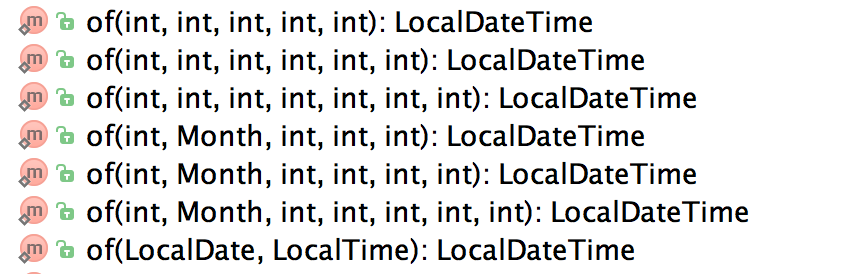
To create current date and time using system clock you can use now factory
method.
LocalDateTime.now()Now that we know how to create instances of LocalDate, LocalTime, and
LocalDateTime let's learn how we can manipulate them.
LocalDate, LocalTime, and LocalDateTime are immutable so each time you perform a manipulation operation you get a new instance.
@Test
public void kalam50thBirthDayWasOnThursday() throws Exception {
    DayOfWeek dayOfWeek = kalam.dayOfBirthAtAge(50);
    assertThat(dayOfWeek, is(equalTo(DayOfWeek.THURSDAY)));
}
We can use dateOfBirth method that we wrote earlier with plusYears on
LocalDate instance to achieve this as shown below.
public DayOfWeek dayOfBirthAtAge(final int age) {
    return dateOfBirth().plusYears(age).getDayOfWeek();
}
There are similar plus* variants for adding days, months, weeks to the value.
Similar to plus methods there are minus methods that allow you minus year,
days, months from a LocalDate instance.
LocalDate today = LocalDate.now();
LocalDate yesterday = today.minusDays(1);
Just like LocalDate LocalTime and LocalDateTime also provide similar
plus*andminus*methods.
For this use-case, we will create an infinite stream of LocalDate starting
from the Kalam's date of birth using the Stream.iterate method.
Stream.iterate method takes a starting value and a function that allows you to
work on the initial seed value and return another value. We just incremented the
year by 1 and return next year birthdate. Then we transformed LocalDate to
DayOfWeek to get the desired output value. Finally, we limited our result set
to the provided limit and collected Stream result into a List.
public List<DayOfWeek> allBirthDateDayOfWeeks(int limit) {
    return Stream.iterate(dateOfBirth(), db -> db.plusYears(1))
            .map(LocalDate::getDayOfWeek)
            .limit(limit)
            .collect(toList());
}
Duration and Period classes represents quantity or amount of time.
Duration represents quantity or amount of time in seconds, nano-seconds, or days like 10 seconds.
Period represents amount or quantity of time in years, months, and days.
@Test
public void kalamLived30601Days() throws Exception {
    long daysLived = kalam.numberOfDaysLived();
    assertThat(daysLived, is(equalTo(30601L)));
}
To calculate number of days kalam lived we can use Duration class. Duration
has a factory method that takes two LocalTime, or LocalDateTime or
Instant and gives a duration. The duration can then be converted to days,
hours, seconds, etc.
public Duration kalamLifeDuration() {
    LocalDateTime deathDateAndTime = LocalDateTime.of(LocalDate.of(2015, Month.JULY, 27), LocalTime.of(19, 0));
    return Duration.between(dateOfBirthAndTime(), deathDateAndTime);
}

public long numberOfDaysLived() {
    return kalamLifeDuration().toDays();
}@Test
public void kalamLifePeriod() throws Exception {
Period kalamLifePeriod = kalam.kalamLifePeriod();
assertThat(kalamLifePeriod.getYears(), is(equalTo(83)));
assertThat(kalamLifePeriod.getMonths(), is(equalTo(9)));
assertThat(kalamLifePeriod.getDays(), is(equalTo(12)));
}We can use Period class to calculate number of years, months, and days kalam
lived as shown below. Period's between method works with LocalDate only.
public Period kalamLifePeriod() {
    LocalDate deathDate = LocalDate.of(2015, Month.JULY, 27);
    return Period.between(dateOfBirth(), deathDate);
}In our day-to-day applications a lot of times we have to parse a text format to
a date or time or we have to print a date or time in a specific format. Printing
and parsing are very common use cases when working with date or time. Java 8
provides a class DateTimeFormatter which is the main class for formatting and
printing. All the classes and interfaces relevant to them resides inside the
java.time.format package.
In India, dd-MM-YYYY is the predominant date format that is used in all the
government documents like passport application form. You can read more about
Date and time notation in India on the
wikipedia.
@Test
public void kalamDateOfBirthFormattedInIndianDateFormat() throws Exception {
    final String indianDateFormat = "dd-MM-YYYY";
    String dateOfBirth = kalam.formatDateOfBirth(indianDateFormat);
    assertThat(dateOfBirth, is(equalTo("15-10-1931")));
}
The formatDateofBirth method uses DateTimeFormatter ofPattern method to
create a new formatter using the specified pattern. All the main main date-time
classes provide two methods - one for formatting, format(DateTimeFormatter formatter), and one for parsing, parse(CharSequence text, DateTimeFormatter formatter).
public String formatDateOfBirth(final String pattern) {
    DateTimeFormatter formatter = DateTimeFormatter.ofPattern(pattern);
    return dateOfBirth().format(formatter);
}
For the common use cases, DateTimeFormatter class provides formatters as
static constants. There are predefined constants for BASIC_ISO_DATE i.e
20111203 or ISO_DATE i.e. 2011-12-03, etc that developers can easily
use in their code. In the code shown below, you can see how to use these
predefined formats.
@Test
public void kalamDateOfBirthInDifferentDateFormats() throws Exception {
    LocalDate kalamDateOfBirth = LocalDate.of(1931, Month.OCTOBER, 15);
    assertThat(kalamDateOfBirth.format(DateTimeFormatter.BASIC_ISO_DATE), is(equalTo("19311015")));
    assertThat(kalamDateOfBirth.format(DateTimeFormatter.ISO_LOCAL_DATE), is(equalTo("1931-10-15")));
    assertThat(kalamDateOfBirth.format(DateTimeFormatter.ISO_ORDINAL_DATE), is(equalTo("1931-288")));
}Let's suppose we have to parse 15 Oct 1931 01:15 AM to a LocalDateTime
instance as shown in code below.
@Test
public void shouldParseKalamDateOfBirthAndTimeToLocalDateTime() throws Exception {
    final String input = "15 Oct 1931 01:15 AM";
    LocalDateTime dateOfBirthAndTime = kalam.parseDateOfBirthAndTime(input);
    assertThat(dateOfBirthAndTime.toString(), is(equalTo("1931-10-15T01:15")));
}
We will again use DateTimeFormatter ofPattern method to create a new
DateTimeFormatter and then use the parse method of LocalDateTime to create
a new instance of LocalDateTime as shown below.
public LocalDateTime parseDateOfBirthAndTime(String input) {
    return LocalDateTime.parse(input, DateTimeFormatter.ofPattern("dd MMM yyyy hh:mm a"));
}In Manipulating dates section, we learnt how we can use plus* and minus*
methods to manipulate dates. Those methods are suitable for simple manipulation
operations like adding or subtracting days, months, or years. Sometimes, we need
to perform advance date time manipulation such as adjusting date to first day of
next month or adjusting date to next working day or adjusting date to next
public holiday then we can use TemporalAdjusters to meet our needs. Java 8
comes bundled with many predefined temporal adjusters for common scenarios.
These temporal adjusters are available as static factory methods inside the
TemporalAdjusters class.
LocalDate date = LocalDate.of(2015, Month.OCTOBER, 25);
System.out.println(date);// This will print 2015-10-25

LocalDate firstDayOfMonth = date.with(TemporalAdjusters.firstDayOfMonth());
System.out.println(firstDayOfMonth); // This will print 2015-10-01

LocalDate firstDayOfNextMonth = date.with(TemporalAdjusters.firstDayOfNextMonth());
System.out.println(firstDayOfNextMonth);// This will print 2015-11-01

LocalDate lastFridayOfMonth = date.with(TemporalAdjusters.lastInMonth(DayOfWeek.FRIDAY));
System.out.println(lastFridayOfMonth); // This will print 2015-10-30- firstDayOfMonth creates a new date set to first day of the current month.
- firstDayOfNextMonth creates a new date set to first day of next month.
- lastInMonth creates a new date in the same month with the last matching day-of-week. For example, last Friday in October.
I have not covered all the temporal-adjusters please refer to the documentation for the same.

You can write your own adjuster by implementing TemporalAdjuster functional
interface. Let's suppose we have to write a TemporalAdjuster that adjusts
today's date to next working date then we can use the TemporalAdjusters
ofDateAdjuster method to adjust the current date to next working date as show
below.
LocalDate today = LocalDate.now();
TemporalAdjuster nextWorkingDayAdjuster = TemporalAdjusters.ofDateAdjuster(localDate -> {
    DayOfWeek dayOfWeek = localDate.getDayOfWeek();
    if (dayOfWeek == DayOfWeek.FRIDAY) {
        return localDate.plusDays(3);
    } else if (dayOfWeek == DayOfWeek.SATURDAY) {
        return localDate.plusDays(2);
    }
    return localDate.plusDays(1);
});
System.out.println(today.with(nextWorkingDayAdjuster));