When submitting a report, if I select the form "secondary project" (which is not the default form on the 'submit a report page'), and then fill out the report but forget to fill out one of the mandatory fields (*), the page reloads with an error message indicating my mistake:
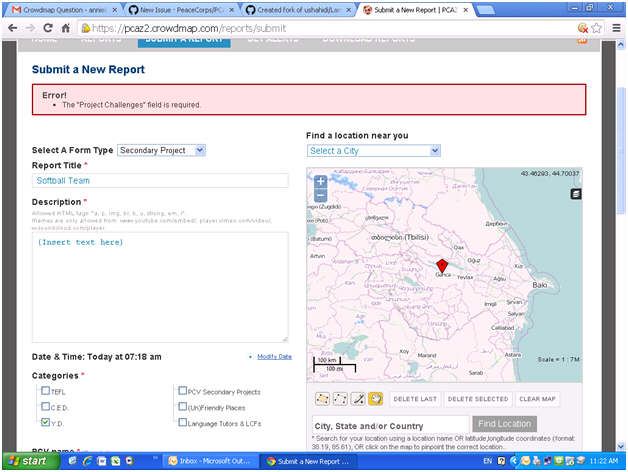
The problem is that in the process of reloading, this form reverts to the default "primary assignment" form (even though "secondary project" is still shown in the drop-down menu), and all the previously inserted information on the "secondary project" form is lost.

Can we change this so that if a mandatory field form is blank when someone submits the report, the page doesn't reload and default to a different form, but just displays an error message notifying the user to fill in the mandatory field. I don't want anyone to lose information they wrote on the forms.
When submitting a report, if I select the form "secondary project" (which is not the default form on the 'submit a report page'), and then fill out the report but forget to fill out one of the mandatory fields (*), the page reloads with an error message indicating my mistake:

The problem is that in the process of reloading, this form reverts to the default "primary assignment" form (even though "secondary project" is still shown in the drop-down menu), and all the previously inserted information on the "secondary project" form is lost.

Can we change this so that if a mandatory field form is blank when someone submits the report, the page doesn't reload and default to a different form, but just displays an error message notifying the user to fill in the mandatory field. I don't want anyone to lose information they wrote on the forms.