 Firefly III
CSV Import Tool Fails On Reverse Proxy SSL (Potential fix) #4322

Replies: 4 comments 7 replies

-
|
You need something like this in your reverse proxy config. |
Beta Was this translation helpful? Give feedback.

-
|
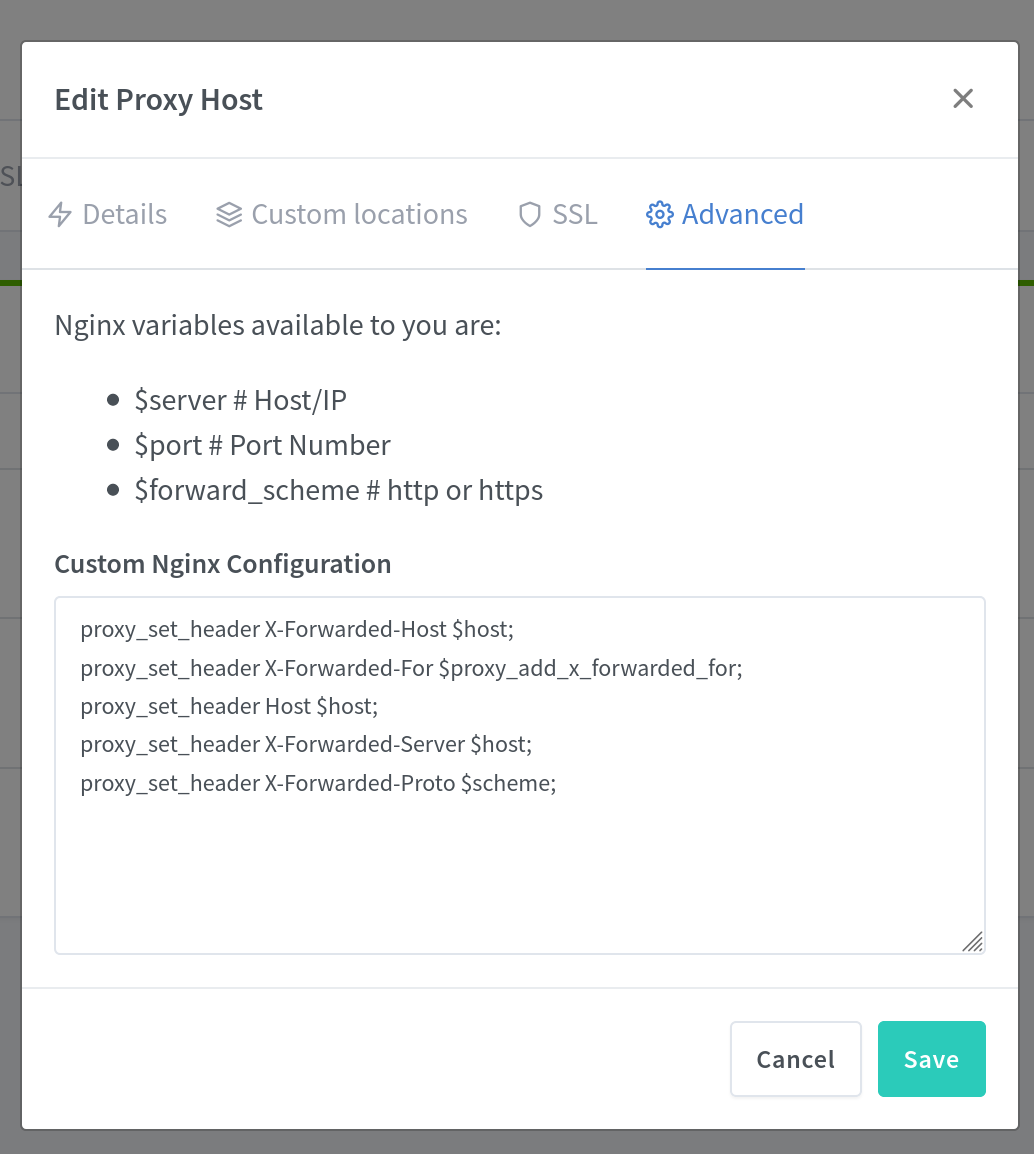
Hi @JC5 thanks so much for replying so quickly. Thanks a ton! I tried to implement that fix but it hasn't seemed to have changed anything. It might need some time for cache to clear or something? I'm off to bed now but just thought I'd show you my config in case I did anything wrong. I'll update again in the morning if it hasn't fixed itself by then Thanks again for the help so far :D |
Beta Was this translation helpful? Give feedback.
-
|
Change $scheme to $forward_scheme and it should work, but I know very little about the software you use. |
Beta Was this translation helpful? Give feedback.

-
|
Thank you very much JC5, i tried that but unfortunately still no luck. I will continue researching and I'll update here if I find a solution :) |
Beta Was this translation helpful? Give feedback.
-
|
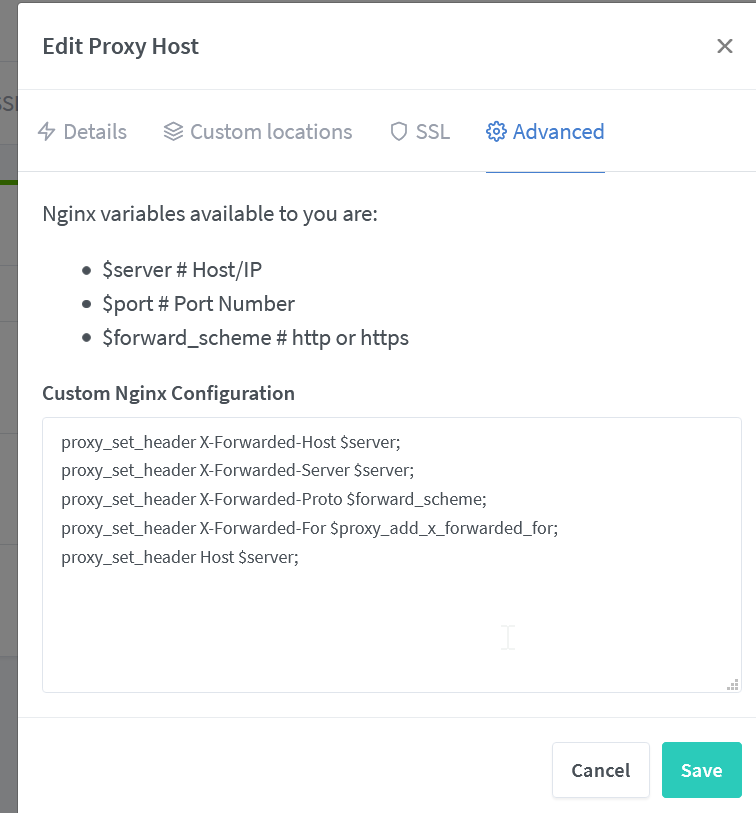
Hey @JC5 thanks so much for all the help so far! I've just found the part of the docs that addresses this issue... hahaha. I am very sorry for bugging you with this when there was an entry in the docs. Just been so tired after work lately stuff like this becomes real hard to do after a full work day hahhaah. Thanks for being kind and helping me even though I suck at searching docs :P Once I read the docs I kinda figured out what I needed to do - I think. SSL seems to be setup now and the site loads (yay!) but it still does not load fully (some stuff is still http) I had to edit the code in the docs a little bit to fit in with my Nginx Proxy Manager software, not sure why it limits the variables you can access via the GUI, but maybe I need to figure out how to change them via CLI if I can't figure it out via the GUI This is the code I've ended up with: (Code for copy/pasting here if needed: https://pastebin.com/wwJ9UrJY) I had to change out $host with $server because it seems like it limits what variables can pass through? Don't know if that's true or not but that's my intuition based on the docs i've read so far etc. Reverse proxies aren't really something I know a lot about in general though D: |
Beta Was this translation helpful? Give feedback.
-
|
I tried replacing the host ones with the actual host (i.e example.domain.com) but no luck :( |
Beta Was this translation helpful? Give feedback.
-
|
Maybe I need to replace the $proxy_add_x_forwarded_for as well, but not sure what that needs to be |
Beta Was this translation helpful? Give feedback.
-
|
Found in the docs it's supposed to go to an IP, so I replaced it with the host IP instead of a variable. But no luck again :( |
Beta Was this translation helpful? Give feedback.
-
|
oh wait is the IP supposed to be the users IP? I'm confused. Sorry for the slurry of messages just updating as I go through my debugging hahaha. I think I need to take some time to read the docs of Nginx more but it's late and I need sleep hahaha. Thanks for all the help so far again, if you think of anything I should try, it is much appreciated :) |
Beta Was this translation helpful? Give feedback.

-
|
Hi, @LukeStaszewski have you found what the problem was? |
Beta Was this translation helpful? Give feedback.


Uh oh!
There was an error while loading. Please reload this page.
-
Bug description
I am running the latest version of the CSV Importer script but I'm having some issues getting it to work. I think I know the solution to the bug but I am struggling to implement it because I lack the Laravel knowledge.
Steps to reproduce
Install Firefly CSV Importer using Yacht (or Portainer, or just Docker) and then setup a Nginx Reverse Proxy to a subdomain (like fireflyimporter.yourdomain.com) and then get an SSL for the subdomain via Lets Encrypt.
The page will load in non-https (but the import doesn't work then, i think it needs SSL to work if I remember reading the docs correctly, apologies if not) and the SSL subdomain (setup via NGinx) will load but it does not load the non-https content in the bootstrap script.
The problem files are:
/css/bootstrap.min.css?version=2.3.4
/fa/css/all.min.css
/js/jquery-3.4.1.min.js?version=2.3.4
/js/popper.min.js?version=2.3.4
These all load as non-https even when the domain is https (Maybe just when setup via reverse proxy? not sure if that makes a difference)
But I located these files in the Github and I was going to attempt to change them to https:// links and see if that fixes everything and if so, submit a pull request.
But I found the correct code in the files (I believe so... not very good at laravel) but I am not sure what to do to change it. It loads them like this:
<script src="{{ asset('js/jquery-3.4.1.min.js') }}?version={{ version }}"></script> <script src="{{ asset('js/popper.min.js') }}?version={{ version }}"></script> <script src="{{ asset('js/bootstrap.min.js') }}?version={{ version }}"></script>{% block scripts %}{% endblock %}
But I'm not sure where to edit the actual variables and change the links from http to https.
I have searched for an answer for this in Github and on Google but have not had any luck in finding an answer. I apologize if I've missed something obvious, but I tried my best to fix this bug myself and contribute to the project. Hopefully my efforts are helpful and one of you smart folk can help me finish the job. I really appreciate any help.
Please let me know if I've missed any important information. I tried my best to explain things as best I could, apologies if I have not done so correctly.
Kind regards,
Luke
Beta Was this translation helpful? Give feedback.
All reactions