This document provides a general outline the steps and calls made by each of the general media types that Meedan's "Alegre" similairty knows how to compute similarity for: Images, Video, Text and Audio.
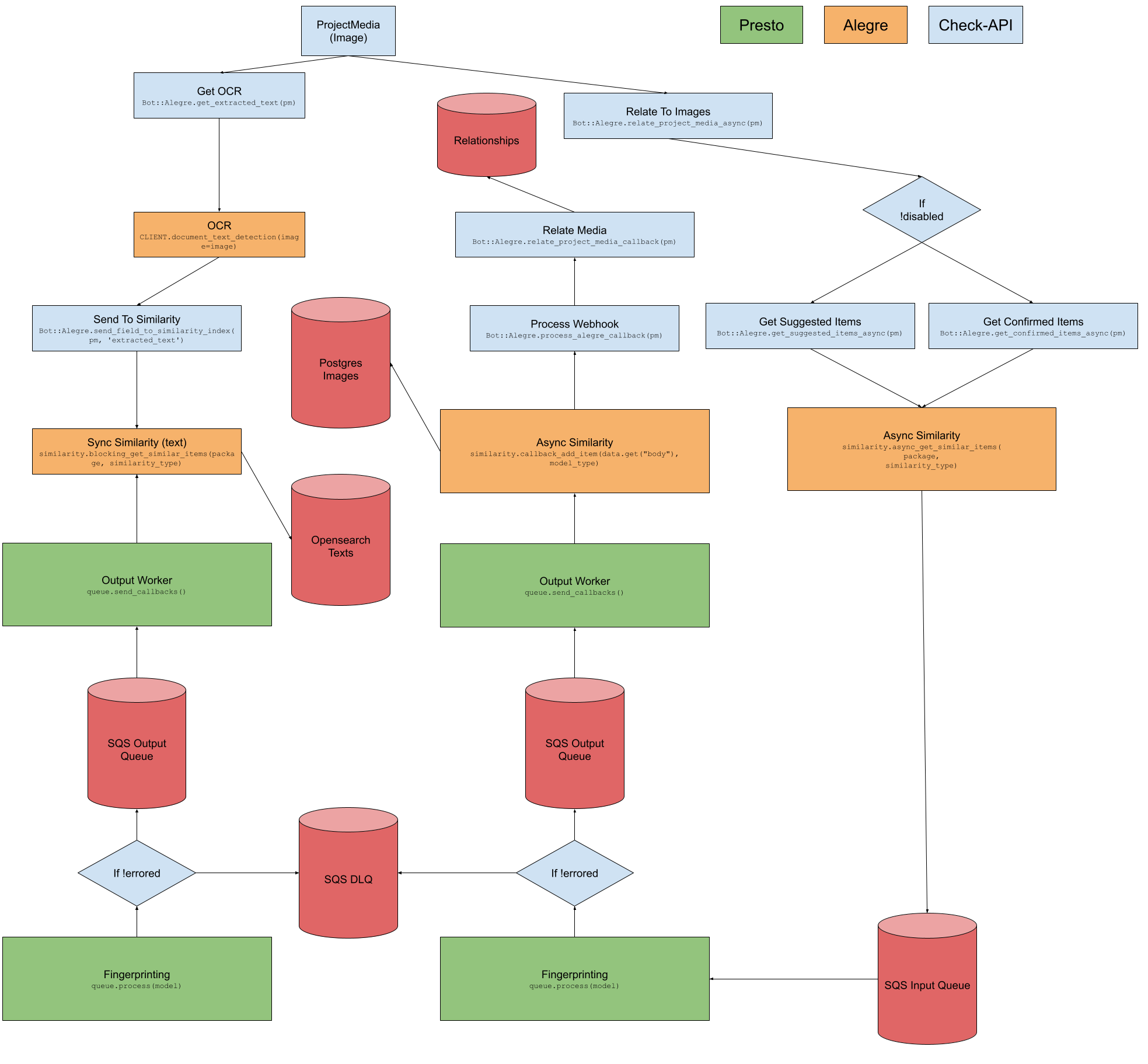
At a high level, Check-API receives new ProjectMedia items and, as they are created, we perform the following procedures:
- Store the
ProjectMedia, - Send the
ProjectMediathroughBot::Alegre.run, Bot::Alegre.runsearches for items via image hashing,- Matches are simultaneously checked asynchronously for suggested and confirmed items,
- Once both queries are completed, we process the item in a callback, and store results in
Bot::Alegre.relate_project_media_callback, - We also store OCR text annotations in the text index for the item, which will match subsequent items (but does not match against existing items for the OCR attempt),
- OCR data is exhausted into OpenSearch for text lookups, and Image Hashes are exhausted into Postgres for image lookups on Alegre,
- Relationships at the Check API level are persisted after (5).
When Searching images, the following events occur:
- Eventually, during the chain of a sync or async lookup on an existing item, we hit
app.main.lib.image_similarity.search_image, - We pass into
search_imagethe hash value of the current item (either as yielded from existing DB record or as received from presto), - We then set the value on the image object identified by URL or Doc ID,
- We then search via PDQ or PHASH, whichever is set,
- When searching for PDQ we use a custom
bit_count_pdqfunction for similarity score in postgres queries, - When searching for PHASH we use a custom
bit_count_imagefunction for similarity score in postgres queries, - A set of image records are returned - we then render them in the response to Check API or other requestor.

For video, Check-API receives new ProjectMedia items and, as they are created, performs the following procedures:
- Store the
ProjectMedia, - Send the
ProjectMediathroughBot::Alegre.run, Bot::Alegre.runsearches for items via video fingerprinting,- Matches are simultaneously checked asynchronously for suggested and confirmed items,
- Once both queries are completed, we process the item in a callback, and store results in
Bot::Alegre.relate_project_media_callback, - We also store transcription text annotations in the text index for the item, which will match subsequent items (but does not match against existing items for the transcription attempt),
- Transcription data is exhausted into OpenSearch for text lookups, and Video Hashes are exhausted into Postgres for video lookups on Alegre, as well as on a disk lookup for .tmk file lookups,
- Relationships at the Check API level are persisted after (5).
When Searching videos, the following events occur:
- Eventually, during the chain of a sync or async lookup on an existing item, we hit
app.main.lib.shared_models.video_model.VideoModel.search, - We pass into
searcheither the references sufficient to find an existing hash from an existing video, or the data yielded from Presto in order to set that hash value / tmk filepath value, - We then identify all videos that have similar context and pull up that full list,
- We then calculate
l1scores based off the simplistic hash stored on the objects to determine candidates for deeper analysis, - We then conduct a more thorough TMK-based analysis for videos passing the candidate test,
- We return the list of matching TMK-based results.

For text, Check-API receives new ProjectMedia items and, as they are created, performs the following procedures:
- Store the
ProjectMedia, - Send the
ProjectMediathroughBot::Alegre.run, Bot::Alegre.runsearches for items via video fingerprinting,- Matches are simultaneously checked asynchronously for suggested and confirmed items for
original_titleandoriginal_description, for all vector models applied, - Once both queries are completed for both fields, for all vector models applied, we process the item in a callback, and store results in
Bot::Alegre.relate_project_media_callback- that method tracks remaining messages and only processes a match when all messages are no longer in flight, - Relationships at the Check API level are persisted after (5).
When Searching text, the following events occur:
- Eventually, during the chain of a sync or async lookup on an existing item, we hit
app.main.lib.text_similarity.search_text(after waiting to pass on to this step until all vectors are completed, subject toelastic_crud.requires_encoding), - We pass into
search_textthe OpenSearch document which contains all completed relevant vectors along with the list of models from which we will process search results, - For each model, including elasticsearch, we search for results from OpenSearch - using language analyzers where applicable with opensearch, else, cosine similarity searches with vectors.
- We append results into a large list of results, each item of which contains sufficient data to indicate the model that yielded the result.

For audio, Check-API receives new ProjectMedia items and, as they are created, performs the following procedures:
- Store the
ProjectMedia, - Send the
ProjectMediathroughBot::Alegre.run, Bot::Alegre.runsearches for items via video fingerprinting,- Matches are simultaneously checked asynchronously for suggested and confirmed items,
- Once both queries are completed, we process the item in a callback, and store results in
Bot::Alegre.relate_project_media_callback, - We also store transcription text annotations in the text index for the item, which will match subsequent items (but does not match against existing items for the transcription attempt),
- Transcription data is exhausted into OpenSearch for text lookups, and Audio Hashes are exhausted into Postgres for audio lookups on Alegre
- Relationships at the Check API level are persisted after (5).
When Searching text, the following events occur:
- Eventually, during the chain of a sync or async lookup on an existing item, we hit
app.main.lib.shared_models.audio_model.AudioModel.search, - We pass into
searcheither the references sufficient to find an existing hash from an existing audio, or the data yielded from Presto in order to set that chromaprint hash value, - We then run that hash through the custom postgres/perl script
get_audio_chromaprint_scorein order to calculate similarity, - We then return all matches yielded.