This example contains Terraform code used to deploy an Azure Databricks workspace with Azure Private Link, using the standard deployment approach.
It is using the adb-with-private-link-standard module.
This example can be used to deploy the following:
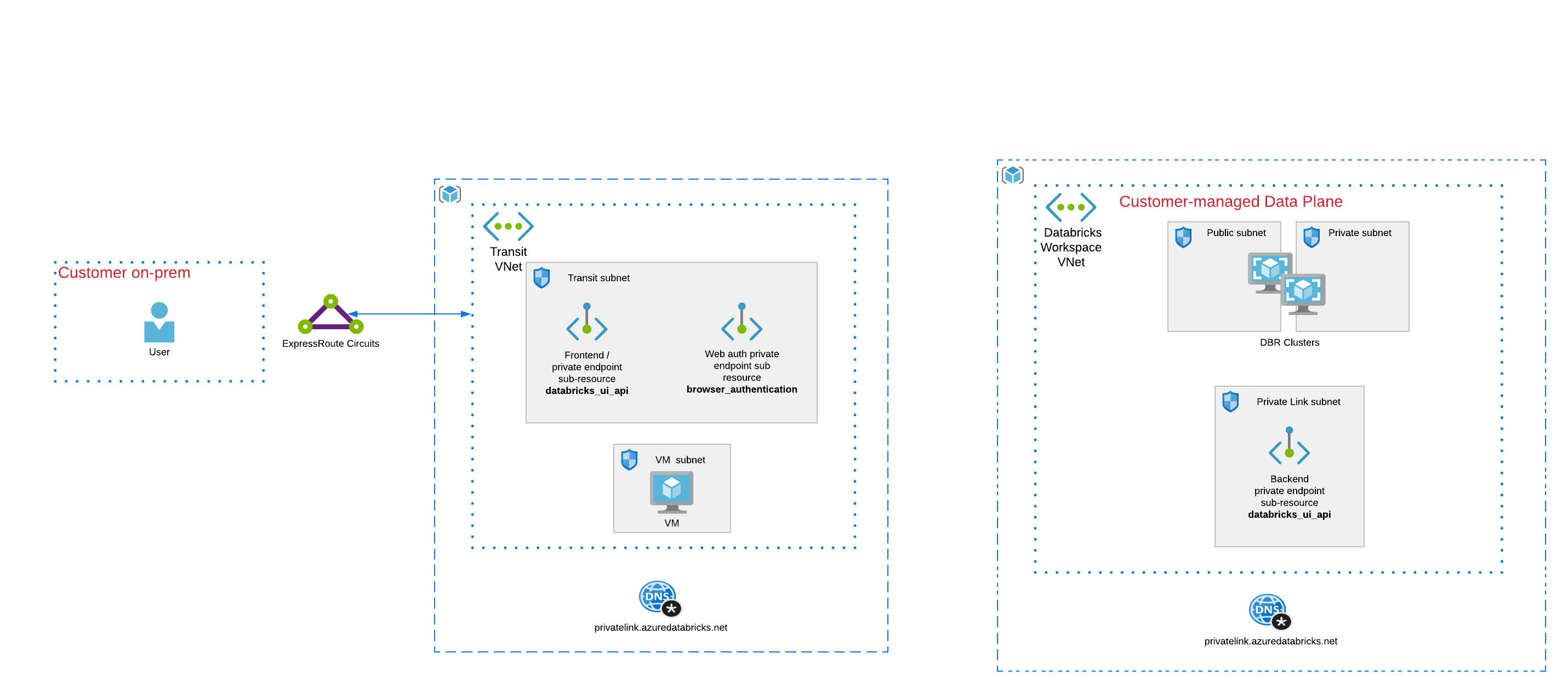
- Two seperate VNets are used:
- A transit VNet
- A customer Data Plane VNet
- A private endpoint is used for back-end connectivity and deployed in the customer Data Plane VNet.
- A private endpoint is used for front-end connectivity and deployed in the transit VNet.
- A private endpoint is used for web authentication and deployed in the transit VNet.
- A dedicated Databricks workspace, called Web Auth workspace, is used for web authentication traffic. This workspace is configured with the sub resource browser_authentication and deployed using subnets in the transit VNet.
- Update
terraform.tfvarsfile and provide values to each defined variable - (Optional) Configure your remote backend
- Run
terraform initto initialize terraform and get provider ready. - Run
terraform applyto create the resources.
Public access to the workspace deployed here is not allowed by default. If you can establish a direct network connection to the VNet into which the workspace is deployed then you should be able to browse the workspace directly. Alternatively, a virtual machine is created as part of this deployment allowing you to connect to the workspace in case you don't have direct network path to the VNet in which the workspace is deployed. You can use the test_vm_public_ip and test_vm_password to log into this VM (password value is marked as sensitive but can be found in the teraform.tfstate file). By default, access to this machine is only allowed from the deployer's public IP address. To allow access from other sources, extra rules can be added to the Network Security Group created for the VM as part of this deployment.
| Name | Version |
|---|---|
| terraform | >= 1.9.0 |
| azurerm | >=4.0.0 |
No providers.
| Name | Source | Version |
|---|---|---|
| adb-with-private-link-standard | ../../modules/adb-with-private-link-standard | n/a |
No resources.
| Name | Description | Type | Default | Required |
|---|---|---|---|---|
| cidr_dp | (Required) The CIDR for the Azure Data Plane VNet | string |
n/a | yes |
| cidr_transit | (Required) The CIDR for the Azure transit VNet | string |
n/a | yes |
| location | (Required) The location for the resources in this module | string |
n/a | yes |
| subscription_id | Azure Subscription ID to deploy the workspace into | string |
n/a | yes |
| create_data_plane_resource_group | Set to true to create a new Azure Resource Group for data plane resources. Set to false to use an existing Resource Group specified in existing_data_plane_resource_group_name | bool |
true |
no |
| create_transit_resource_group | Set to true to create a new Azure Resource Group for transit VNet resources. Set to false to use an existing Resource Group specified in existing_transit_resource_group_name | bool |
true |
no |
| existing_data_plane_resource_group_name | Specify the name of an existing Resource Group for Data plane resources only if you do not want Terraform to create a new one | string |
"" |
no |
| existing_transit_resource_group_name | Specify the name of an existing Resource Group for transit VNet resources only if you do not want Terraform to create a new one | string |
"" |
no |
| Name | Description |
|---|---|
| test_vm_password | Password to access the Test VM, use terraform output -json test_vm_password to get the password value |
| test_vm_public_ip | Public IP of the Azure VM created for testing |
| workspace_id | The Databricks workspace ID |
| workspace_url | The Databricks workspace URL |