Failed to boot ubuntu 18.04 VM with Vagrant #5

Description

Environment
- macOS 10.12.5
- Vagrant 2.2.5
- VirtualBox v6.0.12
Expected
Boot 3 VMs defined in Vagrantfile successfully.
Actual
The VMs based on these boxes boot successfully.
- bento/ubuntu-14.04
- bento/ubuntu-16.04
However, the VM based on bento/ubuntu-18.04 cannot boot since out of memory (I confirmed it by adding v.gui = true option).
$ vagrant up ubuntu-1804
Bringing machine 'ubuntu-1804' up with 'virtualbox' provider...
==> ubuntu-1804: Importing base box 'bento/ubuntu-18.04'...
==> ubuntu-1804: Matching MAC address for NAT networking...
==> ubuntu-1804: Checking if box 'bento/ubuntu-18.04' version '201906.18.0' is up to date...
==> ubuntu-1804: Setting the name of the VM: ansible-singularity_ubuntu-1804_1569306320604_8220
==> ubuntu-1804: Clearing any previously set network interfaces...
==> ubuntu-1804: Preparing network interfaces based on configuration...
    ubuntu-1804: Adapter 1: nat
    ubuntu-1804: Adapter 2: hostonly
==> ubuntu-1804: Forwarding ports...
    ubuntu-1804: 22 (guest) => 2222 (host) (adapter 1)
==> ubuntu-1804: Running 'pre-boot' VM customizations...
==> ubuntu-1804: Booting VM...
==> ubuntu-1804: Waiting for machine to boot. This may take a few minutes...
    ubuntu-1804: SSH address: 127.0.0.1:2222
    ubuntu-1804: SSH username: vagrant
    ubuntu-1804: SSH auth method: private key
Timed out while waiting for the machine to boot. This means that
Vagrant was unable to communicate with the guest machine within
the configured ("config.vm.boot_timeout" value) time period.

If you look above, you should be able to see the error(s) that
Vagrant had when attempting to connect to the machine. These errors
are usually good hints as to what may be wrong.

If you're using a custom box, make sure that networking is properly
working and you're able to connect to the machine. It is a common
problem that networking isn't setup properly in these boxes.
Verify that authentication configurations are also setup properly,
as well.

If the box appears to be booting properly, you may want to increase
the timeout ("config.vm.boot_timeout") value.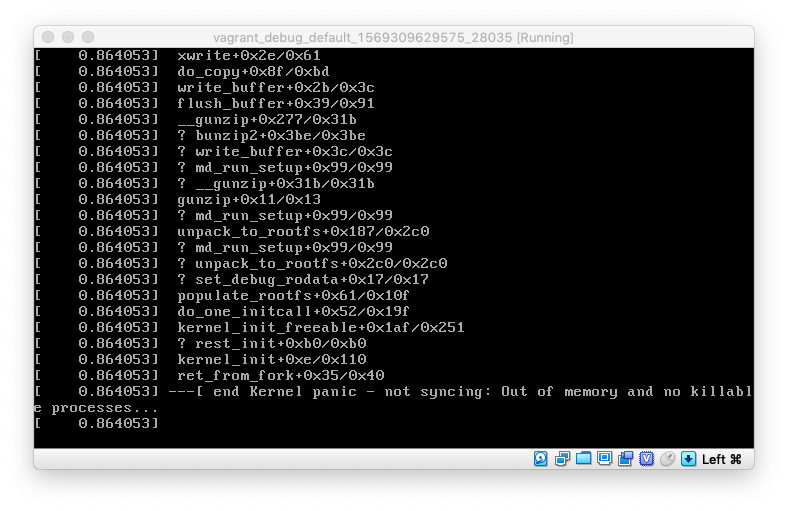
How to reproduce
Place this minimum Vagrantfile.
# -*- mode: ruby -*-
# vi: set ft=ruby :

Vagrant.configure("2") do |config|
  config.vm.box = "bento/ubuntu-18.04"
  config.vm.hostname = "bionic"

  config.vm.provider "virtualbox" do |vb|
    vb.customize ["modifyvm", :id, "--memory", "256"]
    vb.gui = true
  end
end
And just try to boot.
vagrant up
How to fix
Increase memory assignment.