The free, Open-Source app for creating and editing meaningful maps in the browser.
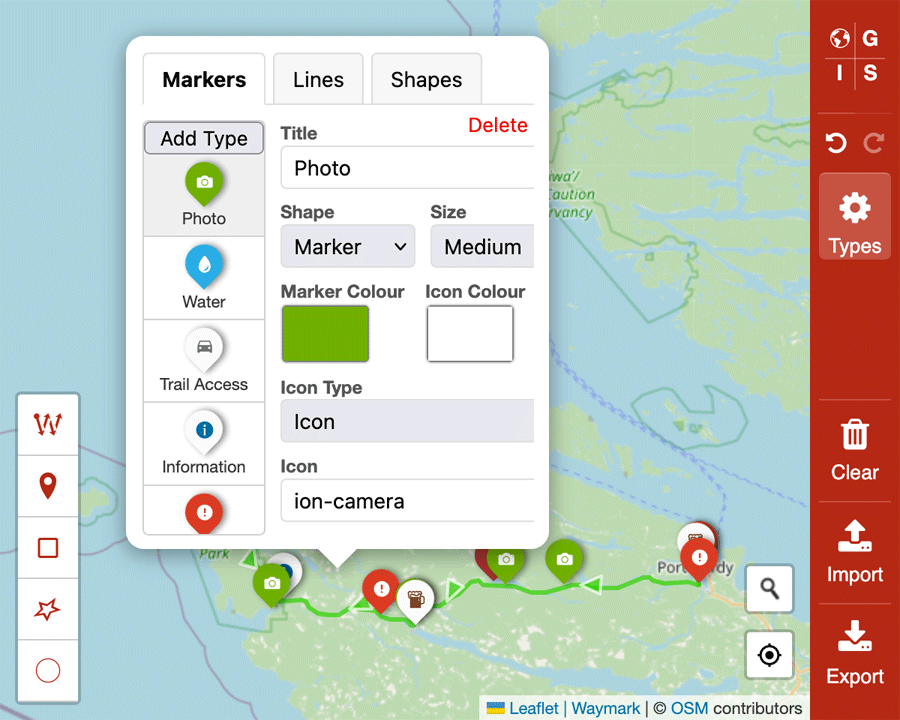
Create stunning, interactive maps with custom Markers, Lines, and Shapes.
- Markers: Add custom point Markers with configurable icons, colours, and sizes
- Lines: Draw routes, paths, and boundaries with customizable styles
- Shapes: Create areas, regions, and polygons with fill colours
Define and customize Marker, Line, and Shape Types with:
- Custom titles and descriptions
- Icon custimisation using text, Emojis and Ionic Icons & Font Awesome libraries
- Colour customization for Markers, Lines, and fills
- Size and style options
- Real-time preview of changes
- Import: Load existing GeoJSON files to continue working on maps
- Export: Download your complete map data including:
- All map features (Markers, Lines, Shapes)
- Custom Type configurations
- Map settings and styling
- Timestamped filenames (e.g.,
ogis-map-2025-06-26-11-17.geojson)
Full history tracking allows you to:
- Undo and redo any changes
- Experiment with confidence
- Revert to previous states
- Route Planning: Create detailed travel routes with waypoints
- Property Mapping: Mark boundaries, features, and points of interest
- Event Planning: Map venues, parking, and logistics
- Educational Maps: Create interactive learning materials
- Business Mapping: Show locations, territories, and service areas
- Personal Projects: Document travels, hiking trails, or local discoveries
The export feature is designed for maximum compatibility and future-proofing:
- Complete Data Export: Your exported file contains everything needed to recreate your map exactly as you designed it
- Standard Format: Uses GeoJSON format, compatible with most mapping applications
- Configuration Included: All custom Types, colours, and settings are preserved
Note
To develop locally you will need to have both Node.js and NPM installed.
# Clone the repository (and the Waymark JS submodule)
git clone --recurse-submodules https://github.com/OpenGIS/ogis-app

# Navigate to the Waymark directory
cd ogis-app

# Install the dependencies (or pnpm/yarn install)
npm install

# Run the development server (using Vite)
npm run dev
Open the provided localhost URL in your browser to view the app. Changes will automatically reload.
Pull requests are welcome!