| title | Editor support |
|---|
The editor of choice is still Emacs, but it is not the only one.
SLIME is the Superior Lisp Interaction Mode for Emacs. It has support for interacting with a running Common Lisp process for compilation, debugging, documentation lookup, cross-references, and so on. It works with many implementations.
IDEmacs is an attempt at
making Emacs beginner friendly. It ships Sly for Common Lisp. With
Emacs v29 or higher, you can try IDEmacs temporarily without messing
with your .emacs configuration, thanks to the new --init-directory
option. Other Emacs distributions such as Doom or
Spacemacs
ship CL support (Sly and Slime, respectively).
plain-common-lisp is a crafted, easy-to-install Common Lisp environment for Windows. It ships Emacs, SBCL, Slime, Quicklisp. It also shows how to display GUI windows with Win32, Tk, IUP, ftw and Opengl.

Slimv is a full-blown environment for Common Lisp inside of Vim.
Vlime is a Common Lisp dev environment for Vim (and Neovim), similar to SLIME for Emacs and SLIMV for Vim.

cl-neovim makes it possible to write Neovim plugins in Common Lisp.
quicklisp.nvim is a Neovim frontend for Quicklisp.
Slimv_box brings Vim, SBCL, ABCL, and tmux in a Docker container for a quick installation.
See also:
- Lisp in Vim demonstrates usage and compares both Slimv and Vlime
See SLIMA. This package allows you to interactively develop Common Lisp code, turning Atom, or now Pulsar, into a pretty good Lisp IDE. It features:
- REPL
- integrated debugger
- (not a stepping debugger yet)
- jump to definition
- autocomplete suggestions based on your code
- compile this function, compile this file
- function arguments order
- integrated profiler
- interactive object inspection.
It is based on the Swank backend, like Slime for Emacs.
Important notice: at the time of writing, SLIMA doesn't work with the latest Slime sources. We tested it successfully with Slime 2.27. It worked with SBCL 2.5.8 and SBCL 2.1.11.debian. Just follow SLIMA's documentation to set this 1 setting.

Alive makes VSCode a powerful Common Lisp development. It hooks directly into the Swank server that Emacs Slime uses and is fully compatible with VSCode's ability to develop remotely in containers, WSL, Remote machines, etc. It has no dependencies beyond a version of Common Lisp on which to run the Swank server. It can be configured to run with Quicklisp, CLPM, and Roswell. It currently supports:
- Syntax highlighting
- Code completion
- Code formatter
- Jump to definition
- Snippets
- REPL integration
- Interactive Debugger
- REPL history
- Inline evaluation
- Macro expand
- Disassemble
- Inspector
- Hover Text
- Rename function args and let bindings
- Code folding

commonlisp-vscode extension works via the cl-lsp language server and it's possible to write LSP client that works in other editors. It depends heavily on Roswell. It currently supports:
- running a REPL
- evaluate code
- auto indent,
- code completion
- go to definition
- documentation on hover

SLT is a new (published on January, 2023) plugin for the suite of JetBrains' IDEs. It uses a modified SLIME/Swank protocol to commmunicate with SBCL, providing IDE capabilities for Common Lisp.
It has a very good user guide.
At the time of writing, for its version 0.4, it supports:
- REPL
- symbol completion
- send expressions to the REPL
- interactive debugging, breakpoints
- documentation display
- cross-references
- find symbol by name, global class/symbol search
- inspector (read-only)
- graphical threads list
- SDK support, automatic download for Windows users
- multiple implementations support: SBCL, CCL, ABCL and AllegroCL.
warn: this plugin might not work on every Intellij releases. See also this updated fork: https://github.com/ivanbulanov/SLT/releases

Dandelion is a plugin for the Eclipse IDE.
Available for Windows, Mac and Linux, built-in SBCL and CLISP support and possibility to connect other environments, interactive debugger with restarts, macro-expansion, parenthesis matching,…

Lem is a general-purpose editor. It is built in Common Lisp, it is extensible interactively from the ground up in Common Lisp, and it is tailored for Common Lisp development. Once you install it, you can start working. It supports many programming languages out of the box thanks to its built-in LSP client: Python, Go, Rust, JS, Clojure, Kotlin, Scheme, HTML, CSS… It has a directory mode, a good vim layer, an interactive Git mode, and more.
Its interface resembles Emacs and SLIME (same shortcuts). It comes with an ncurses frontend, a web view and a (deprecated) SDL2 frontend. You can download pre-built binaries for the three platforms.

It can be started as a REPL right away in the terminal. Run it with:
lem --eval "(lem-lisp-mode:start-lisp-repl t)"
So you probably want a shell alias:
alias ilem='lem --eval "(lem-lisp-mode:start-lisp-repl t)"'
There is more:
- 🚀 Lem on the cloud (video presentation) Rooms is a product that runs Lem, a text editor created in Common Lisp, in the Cloud and can be used by multiple users.
- Lem on the cloud is NEW as of April, 2024. In private beta at the time of writing.

Sublime Text has now good support for Common Lisp.
First install the "SublimeREPL" package and then see the options in Tools/SublimeREPL to choose your CL implementation.
Then Slyblime ships IDE-like features to interact with the running Lisp image. It is an implementation of SLY and it uses the same backend (SLYNK). It provides advanced features including a debugger with stack frame inspection.

LispWorks is a Common Lisp implementation that comes with its own Integrated Development Environment (IDE) and its share of unique features, such as the CAPI GUI toolkit. It is proprietary and provides a free limited version.
You can read our LispWorks review here.

zed-cl is an extension for the Zed editor.
It provides:
- smart type-aware code completion
- smart parameter completion (includes type information when available)
- LSP, tree-sitter
- Jupyter REPL integration
- rainbow brackets support
As of writing, you need to build the editor plugin (the LSP, tree-sitter and Jupyter Rust crates), so you need a Rust toolchain.
It is likely that this extension was assembled with the help of LLMs.
Geany-lisp is an experimental lisp mode for the Geany editor. It features completion of symbols, smart indenting, jump to definition, compilation of the current file and highlighting of errors and warnings, a REPL, and a project skeleton creator.

common-lisp-jupyter is a Common Lisp kernel for Jupyter notebooks.
You can see a live Jupyter notebook written in Lisp here. It is easy to install (Roswell, repo2docker and Docker recipes).

There is also Darkmatter, a notebook-style Common Lisp environment, built in Common Lisp.
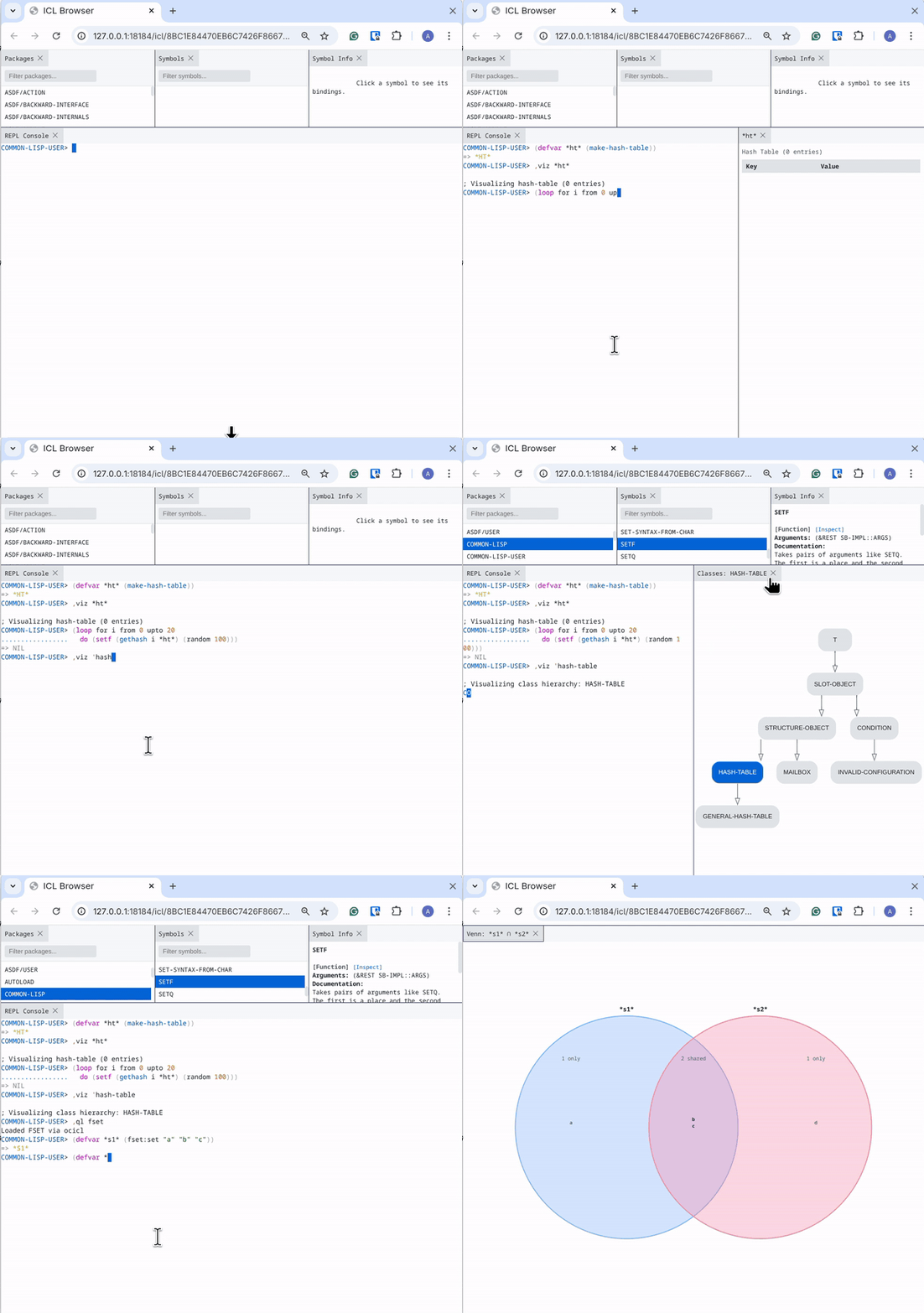
ICL, Interactive Common Lisp, is an enhanced REPL for the terminal. It works with any implementation you have on your system. It brings a lot of nice features, such as:
- easy to use terminal-based REPL (code completion, etc)
- browser REPL
- with a packages and systems browser,
- documentation browser
- inspector
- variable "watcher"
- data visualization
- flame graph profiling
- integration with Emacs and Slime or SLY, so you can control the browser-based tools from your favorite editor.
It comes with pre-built binaries. Try it out!

cl-repl is an ipython-like REPL. It supports symbol completion, magic and shell commands, multi-line editing, editing command in a file and a simple debugger.
It is available as a binary.

There are some more editors out there, more or less discontinued, and free versions of other Lisp vendors, such as Allegro CL.
See also CLOG, the Common Lisp Omnificent GUI, a web-based GUI builder that comes with a Lisp editor.