We need the ability to display interactions in the NGL component in the pose viewer.
This is an example of functionality that would ideally be composable (see #47), but for now we probably want to just get it implemented as it's needed ASAP.
In the data there are potentially 6 fields named HydrogenBondInteraction, HydrophobicInteraction, SaltBridgeInteraction, PiCationInteraction, PiStackingInteraction and HalogenBondInteraction. They contain data like this:
PHE140BO, [2.819999933242798, 2.002000093460083, 16.007999420166016], [4.74370002746582, 0.9549999833106995, 18.35420036315918], [3.210, 16], [0.7013114003761906, Mpro-x1093_0A]
GLU166SC, [5.080999851226807, 5.110000133514404, 19.26799964904785], [4.461699962615967, 2.1008999347686768, 20.45549964904785], [3.294, 14], [0.44212811416007225, Mpro-x0995_0A]
GLU166BN, [9.652000427246094, 2.691999912261963, 18.52199935913086], [9.823800086975098, 0.9459999799728394, 21.380300521850586], [3.354, 10], [0.8540329315193407, Mpro-x0967_0A]
Each line is an interaction that needs to be displayed as a coloured cylinder. The tokens on each line are:
- name of the interaction
- x,y,z coordinates for the end of the cylinder at the protein
- x,y,z coordinates for the end of the cylinder at the ligand
- length of the cylinder and atom number of the atom in the ligand
- most similar real interaction that is seen.
Only the first 3 tokens are needed to display the cylinder.
These interactions can be display in NGL using code like this:
var interaction_colours = {
    'HydrogenBond': [ 0.7, 0.7, 0.0 ], // yellow
    'PiStacking':   [ 1.0, 0.6, 0.0 ], // orange
    'PiCation':     [ 0.6, 0.4, 0.2 ], // brown
    'SaltBridge':   [ 1.0, 0.0, 0.0 ], // red
    'Hydrophobic':  [ 0.0, 1.0, 1.0 ], // cyan
    'HalogenBond':  [ 0.0, 0.0, 1.0 ]  // blue
};

function add_interactions(name, inter_data) {
    size = 0.5;
    var shape = new NGL.Shape(name, { disableImpostor: true, radialSegments: 10 })
    for (var i=0; i< inter_data.length; i++) {
    	f = inter_data[i];
        type = f[0];
        canon = f[1]
        pos1 = f[2]
        pos2 = f[3]
    	shape.addCylinder(pos1, pos2, interaction_colours[type], size, canon)
    }
    var shapeComp = stage.addComponentFromObject(shape);
    shapeComp.addRepresentation('buffer', { opacity: 0.5, wireframe: false });
}
Then to add a cylinder something like this:
add_interactions("Some_Name", [
  ['HydrogenBond', [4.54, -2.284, 15.577], [5.623, 0.769, 16.907]],
  ['HydrogenBond', [9.895, 4.562, 20.372], [7.891, 2.595, 22.421]],
  ['Hydrophobic', [12.066, 0.877, 19.34], [11.263, -1.582, 22.374]],
  ['Hydrophobic', [7.635, 3.892, 18.472], [5.980833333333332, 0.6749999999999999, 19.62083333333333]],
]);
The data will need to be pulled out of the fields accordingly.
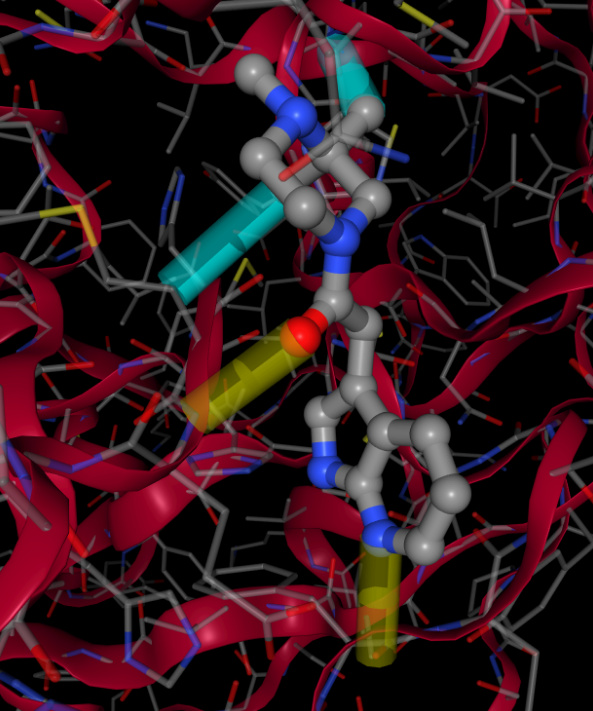
The result would look like this:


We need the ability to display interactions in the NGL component in the pose viewer.
This is an example of functionality that would ideally be composable (see #47), but for now we probably want to just get it implemented as it's needed ASAP.
In the data there are potentially 6 fields named HydrogenBondInteraction, HydrophobicInteraction, SaltBridgeInteraction, PiCationInteraction, PiStackingInteraction and HalogenBondInteraction. They contain data like this:
Each line is an interaction that needs to be displayed as a coloured cylinder. The tokens on each line are:
Only the first 3 tokens are needed to display the cylinder.
These interactions can be display in NGL using code like this:
Then to add a cylinder something like this:
The data will need to be pulled out of the fields accordingly.
The result would look like this:
