
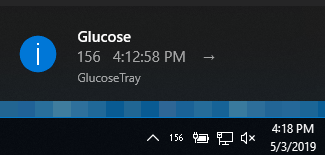
Tray icon for displaying your current blood glucose (BG) information in the Windows taskbar.
Always verify the time of the last reading by hovering over the tray icon or double-clicking it. If the app crashes, the icon may stay in the taskbar but stop updating.
Always check with your Dexcom reader before making any treatment decisions.
- Getting Started
- Choosing Your Data Source
- Settings Reference
- Color Coding
- Features
- Your Privacy
- Troubleshooting & FAQ
- Setup Guide
- Download and run one of the following:
- GlucoseTray.exe — the easiest option. Nothing else to install.
- GlucoseTray-Slim.exe — a smaller download, but it requires the appropriate .NET runtime to already be installed on your PC.
- On first run, the program creates a settings file named
appsettings.jsonright next to the program. - Right-click the new taskbar icon and click Settings, or open
appsettings.jsonin any text editor (like Notepad). - Enter your settings and save. GlucoseTray updates immediately — no need to restart.
Tip: Can't see the icon? It may be hidden. Click the small upward arrow (^) near your clock to show hidden taskbar icons, then drag GlucoseTray onto the taskbar so it's always visible.
GlucoseTray can read your glucose from one of two places. Pick whichever you already use:
- Dexcom — Sign in with the same username and password you use for the Dexcom Share/Follow app. Make sure Share is turned on in your Dexcom app.
- Nightscout — If you run your own Nightscout site, enter its web address and access token.
You can change these in the Settings window or by editing appsettings.json. The most useful ones are near the top.
| Setting | What it does |
|---|---|
DataSource |
Where readings come from: Dexcom or Nightscout. |
DexcomServer |
Your Dexcom region: DexcomShare1 (US), DexcomShare2, or DexcomInternational (outside the US). |
DexcomUsername / DexcomPassword |
Your Dexcom Share login. |
NightscoutUrl / NightscoutToken |
Your Nightscout site address and access token. |
RefreshIntervalInMinutes |
How often GlucoseTray checks for a new reading (default 5). |
MinutesUntilStale |
How old a reading can be before it's shown as out-of-date (default 15). |
IsDarkMode |
Set to true if your taskbar is dark, so numbers stay readable. |
DisplayUnitType |
Units shown to you: Mg (mg/dL) or Mmol (mmol/L). |
EnableAlerts |
Set to true to get alerts for high/low readings. |
| Threshold settings | The numbers that decide when a reading counts as low, high, critically low, or critically high (separate values for mg/dL and mmol/L). |
| Reading | Display |
|---|---|
| Critically high glucose | Red |
| High glucose | Yellow |
| Low glucose | Yellow |
| Critically low glucose | DAN (for DANGER), red |
| Normal glucose | Black (white in dark mode) |
| Out-of-date reading | Strikethrough effect |
- Color-coded glucose numbers set to your own ranges.
- See the latest glucose reading right in the taskbar, plus the reading time and trend on hover or double-click.
- Optional high/low alerts.
- Option to start the application automatically when you sign in to Windows.
Your Dexcom password and Nightscout token are automatically scrambled (encrypted) inside appsettings.json so they aren't stored in plain text. Encryption uses Windows' built-in protection tied to your Windows user account, which means the saved file only works on your PC under your login. If you change a password or token while the app is running, it's re-encrypted the moment you save.
The number stopped updating. Hover over the icon to check the reading time. If it's old, the app may have lost its connection or crashed — close it from the taskbar and start it again.
It says my login is wrong.
Double-check your Dexcom username, password, and that DexcomServer matches your region. Confirm that Share is enabled in your Dexcom app.
I don't see any icon after opening it. Look under the hidden-icons arrow (^) by the clock and drag it onto the taskbar.
Is my data safe? Your credentials are encrypted on your own PC (see Your Privacy). GlucoseTray only talks to the Dexcom or Nightscout service you choose.