A key denotes the actions caused by the press of a key on the keyboard. A key has the following attributes:
- Position (
pos). - Shortcut position (
shortcutPos). - Letters (
letters). - Shiftlevels (
shiftlevels). - Caps Lock (
capslock). - Filter (
filter).
If multiple files contain keys with the same positions, the separate keys will be merged. The letters will be combined and the last explicit definitions are used. For example, if file 1 contains the key
{
  "pos": "S",
  "letters": [ "s", "S", "ß" ],
  "shiftlevels": [ "None", "Shift", "AltGr" ]
}
and file 2 the key
{
  "pos": "S",
  "letters": [ "σ", "Σ" ],
  "shiftlevels": [ "AltGr", "Shift+AltGr" ]
}
the resulting key is
{
  "pos": "S",
  "letters": [ "s", "S", "σ", "Σ" ],
  "shiftlevels": [ "None", "Shift", "AltGr", "Shift+AltGr" ]
}
The same applies if the keys are defined in the same file, which can be useful when the filter attribute is used on at least one of the keys.
The pos attribute corresponds to the position of the key on a QWERTY keyboard.
For a full list of available positions, see lists/positions.md.
It is also possible to use the XKB keycode names, without the brackets, as shown here.
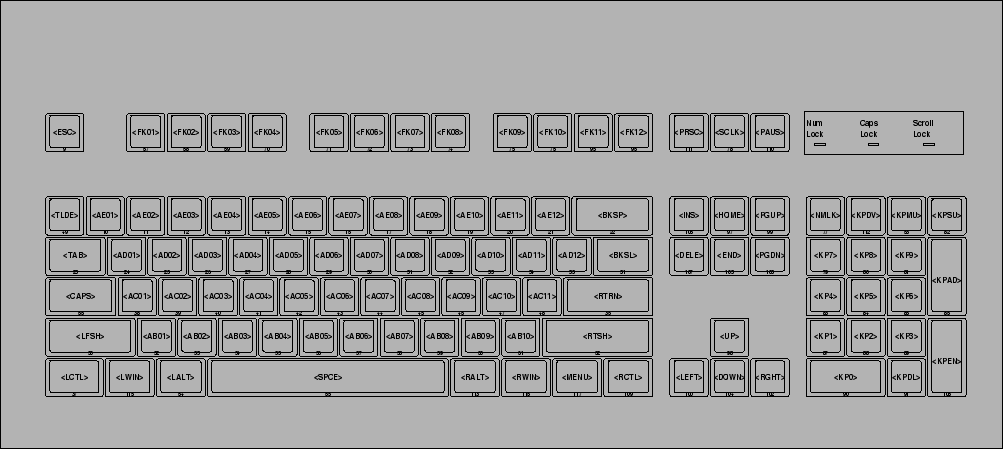
The shortcutPos attribute corresponds to the position used in shortcuts.
If qwertyShortcuts is true, it will be set to the QWERTY location.
By default, the shortcut position will be the (QWERTY) position of the default letter. That is, the letter that is typed when no modifier is pressed. If the default letter has no corresponding position, the shortcut position will be the same as the normal position.
The letters attribute corresponds to a list of letters.
The letter in the nth position is activated when the nth shiftlevel in the corresponding shiftlevels attribute is active.
A letter can be one of the following:
- A single Unicode character, e.g.
aor\u0061. - A single Unicode character denoted by its code point, e.g.
U+0061. Useful when the character does not appear well in text. It also forces the generated files to contain explicit code points, which can be useful when the normal character works incorrectly. - Multiple Unicode characters (a 'ligature'), e.g.
ij:ij(that is, the single Unicode characterij,U+0133LATIN SMALL LIGATURE IJ, followed by a:,iandj). In XKB, a single base character is needed and can be provided before a colon. If no base character is applicable, the prefixligature:orlig:can be used and a Unicode character from the private use area is used. - An action, e.g.
Backspace. For a full list of available actions, see lists/actions.md. - A modifier, e.g.
Shift. For a full list of available modifiers, see layout.md#shiftlevels. - One or more modifiers which act either shifted, latched or locked. This is a list of modifiers separated with commas or spaces, prefixed with
shift:,latch:orlock:. Shifted modifiers are active when the corresponding key is held down. This is the default for most modifiers. Latched modifiers are sticky. They should be pressed and released before the affected key is pressed. This is what the 'sticky key' accessibility functionality does. Locked modifiers activate when the corresponding key is pressed and deactivate when the key is pressed again. This is the default for the Caps Lock and Num Lock modifiers. - A predefined dead key, e.g.
acute. The prefixesdeadKey:,dead:anddk:can be used, but aren't necessary. For a full list of available predefined dead keys, see lists/deadkeys.md. - A custom dead key, e.g.
customDeadKey:math. The definition of the custom dead key has to be included in the same file. The prefixcustomDeadKey:,customDead:orcdk:is necessary. - A redirected key, e.g.
Control+Shift+T. This is a list of modifiers with at the end the position to redirect to, all separated by a+, optionally prefixed withredirect:orred:. If a redirected key has no modifiers, it can have the same name as an action. In that case, it is necessary to prepend the letter withredirect:orred:. Depending on the output format, the position will be adjusted to the keyboard layout. So,Control+Cshould always copy text andred:Cshould always output 'c', independent from the position of the letter 'c' on the keyboard layout. - The empty action, denoted by the empty string. Useful for filling up unused modifiers, but often it is better to use multiple files to separate different layout layers.
The same as the global shiftlevels attribute, but the local one will overwrite the global one.
Useful when the shiftlevels of only a single key differ from the other.
The capslock attribute corresponds to the influence of the Caps Lock state.
If capslock is true and Caps Lock is active, the pressed letter will be capitalized.
If capslock is false, the Caps Lock state will be ignored.
By default, Caps Lock will be set iff the default letter is an alphabetic character. The default letter is the letter that is typed when no modifiers are pressed.
The same as the global filter attribute, but the local one only filters the key it corresponds to.